Skip to Content

10 Tips and Tricks for the iPad Pro Magic Keyboard

If you've just picked up Apple's new Magic Keyboard for your 2018 or 2020 iPad Pro, here's a list of our favorite tips and tricks that you need to know.


1. Use Your Free USB-C Port

Apple made a neat design decision to integrate a USB-C port into the side of the Magic Keyboard. This lets you power your connected ‌iPad Pro‌ via pass-through charging, leaving your tablet's onboard USB-C port free to plug in other accessories like an SD card reader or a digital camera. You could even charge an Apple Watch from the free USB-C port, or connect your ‌iPad Pro‌ to an external display.

2. Reclaim the Escape Key

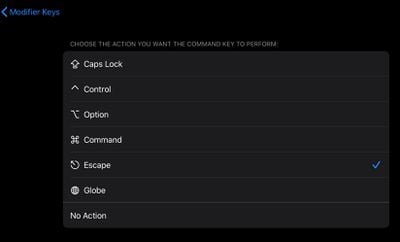
The Magic Keyboard for ‌‌iPad Pro‌‌ lacks an Escape key, but there are a couple of ways you can get around this. Try hitting the Command key and the period key in combination. If that doesn't work in the context that you need an Escape function, you can use an option in iPadOS 13.4 that lets you remap modifier keys for various actions.
settings
To do so, first make sure your Magic Keyboard is connected to your ‌iPad Pro‌, then launch the Settings app and select General -> Keyboard -> Hardware Keyboard. Select the Modifier Keys option, then choose the modifier key that you'd like to use as an Escape key. Choose the Escape action on the next screen, and you'll be good to go.

3. Gain Quick Access to the Virtual Keyboard
virtual keyboard magic keyboard
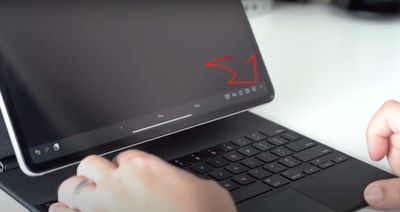
If you need to use the onscreen virtual keyboard to do things like type accented characters or use dictation, tap the down arrow key on your Magic Keyboard, then touch and hold the downward-facing chevron in the bottom-right corner of the iPad's screen. To hide the keyboard again, tap the key in the bottom-right corner of the screen.

4. Control Touchscreen Actions With Keys
ipadpromagickeyboardtrackpad
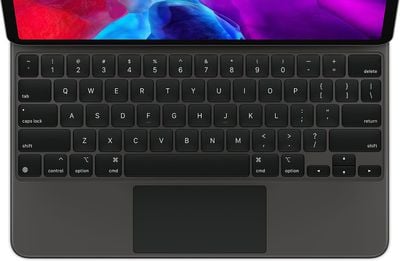
If you have difficulty using your ‌iPad Pro‌'s touchscreen, you can replicate many of the functions and actions using the keys on a Magic Keyboard. With the Magic Keyboard connected, launch the Settings app and select Accessibility -> Keyboards -> Full Keyboard Access.

Toggle on the switch next to Full Keyboard Access, and you'll be able to control and customize several keyboard shortcuts to replicate a range of functions, movements, interactions, gestures, and more.

5. Adjust Backlight Brightness

Perhaps the only drawback of the Magic Keyboard is that its layout lacks a row of function keys. That leaves users with no dedicated keys for adjusting some system settings, including keyboard backlight brightness.

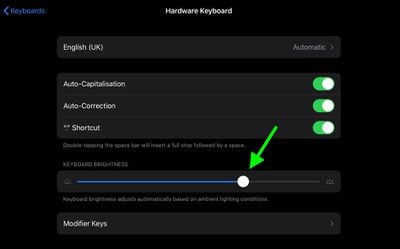
The Magic Keyboard actually uses the ‌iPad Pro‌'s sensors to detect the lighting in your environment and will adjust the backlit keys accordingly. But if for some reason you find it too bright or too dim, you can adjust this manually. Granted, it's not as convenient as tapping a key when you want to watch a video with the lights out, but at least it's there.
settings
Launch the Settings app and select General -> Keyboard -> Hardware Keyboard, then simply drag the Keyboard Brightness slider to the right or left to make the keys brighter or dimmer.

MacStories' iOS Shortcut magician Federico Viticci has also created a handy shortcut that launches the Hardware Keyboard section of Settings directly. As Viticci suggests, the most convenient way of using it is as a widget on the ‌iPad‌ Home screen.

6. Customize Cursor Behavior
ipad cursor accessibility options 2
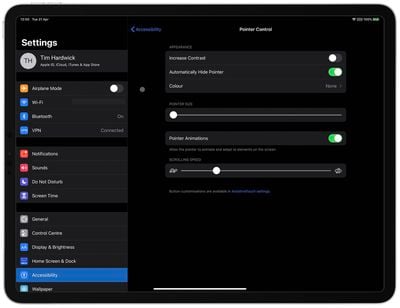
iPadOS includes options that let you customize the appearance and behavior of the trackpad's round cursor. These include increasing the cursor's contrast, changing its color, making it bigger or smaller, changing scrolling speed, and disabling the auto-hide after inactivity. These settings can be found in the Settings app under Accessibility -> Pointer Control.

7. Tap-to-Click and Two-Finger Secondary Click

If you own a Mac, you're likely already familiar with Tap to Click. It lets your trackpad register a tap with a single finger as a virtual click, allowing you to do things like launch apps and open menus without physically clicking the pad.
magic keyboard trackpad secondary click
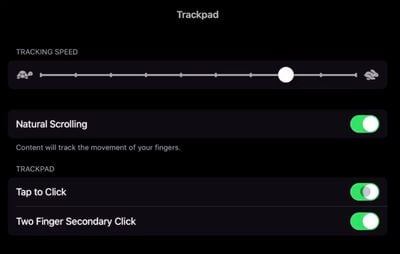
Apple has included the same feature in iPadOS 13.4, so you can use it with your Magic Trackpad. Launch Settings and choose General -> Trackpad, then switch on the toggle next to Tap to Click. Now you can tap the trackpad's surface with one finger to register a click, instead of having the physically depress the trackpad.

You can also make a two-finger tap or click behave as a secondary click (or right-click, if you're used to a two-button mouse). Simply enable the Two Finger Secondary Click toggle in the same Trackpad settings screen above.

8. Trackpad Gestures

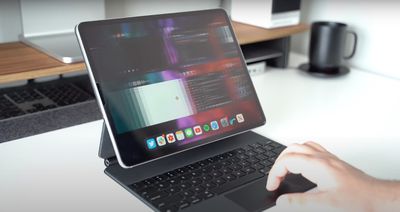
As you'd expect, the Magic Keyboard supports the new trackpad gestures in iPadOS 13.4. For example, you can enter the Slide Over multitasking interface by moving the cursor over to the right side of the screen or dragging an app over from the Dock.

You can also use two- and three-finger gestures. On the Home screen, for example, a two-finger swipe downwards on your trackpad will bring up Spotlight search. When you're using Photos, you can pinch in and out to control picture zoom. You can also use two fingers to scroll up or down when navigating a web page in Safari.
ipad pro magic keyboard gesture multi tasking
Try swiping downwards with three fingers to be taken back to the Home screen no matter what you're doing on the ‌iPad‌. Likewise, a three-finger swipe up on the trackpad will open up the iPadOS multitasking interface. And swiping to the left or the right with three fingers will also switch between your open apps.

9. Access Emoji Keyboard

It's easy to access emoji while using the Magic Keyboard. Whenever you're in typing mode, press the globe key in the bottom-corner of the keyboard layout.

ipad emoji keyboard
As long as you're using only English, the emoji keyboard will appear on the screen. To make it disappear again, simply tap the globe key on the keyboard once again.

10. "Easel Mode" and Other Orientations

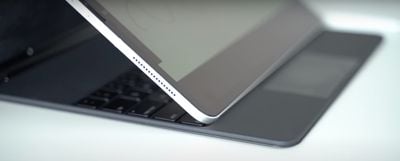
Hold your ‌iPad Pro‌ in landscape orientation, prop the bottom side against the ridge below the keys, and rest its top side against the Magic Keyboard cover. Now you have a stable elevated drafting stand or "easel," perfect for drawing.
magic keyboard ipad pro easel
You can also try this stand trick in portrait orientation for some FaceTime, or whenever you want to have the screen closer to you. It's not quite as stable, but it works. (Hat tip to MacRumors forum member GrindedDown for this one.)

Alternatively, with the ‌iPad Pro‌ attached in the normal way, try flipping the Magic Keyboard over backwards, then take your iPhone and slip it in between the keyboard and the top of your ‌iPad‌, and you'll have another decent angle for drawing.
Related Roundup: iPad Pro
Buyer's Guide: iPad Pro (Caution)

Popular Stories

iPad Pro 2024 vs Air 2024 Feature

Three New iPads Rumored to Launch in First Half of 2027

Sunday November 1, 2026 7:27 am PST by
After announcing a new iPad mini with an OLED display earlier this month, Apple plans to release new iPad Air, iPad Pro, and entry-level iPad models in the first half of 2027, according to the latest word from Bloomberg's Mark Gurman. In his Power On newsletter today, Gurman said the next iPad Air will also feature an OLED display, while he expects the next iPad Pro to be equipped with a...
OLED mini Hands On Thumb

Hands-On: The OLED iPad Mini is Almost an iPad Pro Mini

Tuesday November 3, 2026 6:01 am PST by
The OLED iPad mini is launching this Friday, and we were able to test one out ahead of release. MacRumors videographer Dan Barbera has been using the new iPad for about a week at this point, and he shared his initial thoughts over on YouTube. Subscribe to the MacRumors YouTube channel for more videos. The iPad mini 8 is the biggest update the iPad mini line has gotten since the smaller tablet ...
MacBook Pro PROLED Touch 1

Will Apple Ever Merge iPadOS and macOS? John Ternus Responds

Tuesday November 3, 2026 6:21 am PST by
Over the years, Apple has repeatedly dismissed the idea of merging iPadOS and macOS into a single operating system. Will that change under John Ternus? On an earnings call yesterday, Apple's new CEO responded to a question about the topic. In short, the answer remains no. "We don't have any fundamentally different changes that we're planning right now, nor would we talk about it anyway,"...

Top Rated Comments

4jasontv Avatar
86 months ago

Use Your Free USB-C Port
That USB port is far from free. /s
Score: 16 Votes (Like | Disagree)
86 months ago
Absultly lov myy magc keybord - usin it now
Score: 13 Votes (Like | Disagree)
Aluminum213 Avatar
86 months ago

So basically a whole lot of problems could have been solved with a row of function keys?
That function row magic keyboard is exclusive to the next iPad Pro model :)
Score: 12 Votes (Like | Disagree)
The Game 161 Avatar
86 months ago

Just buy a Macbook. It'll work and save you money.
Not everybody wants a MacBook
Score: 10 Votes (Like | Disagree)
86 months ago

More functionality at the same price but thinner and less weight? Yeah, who in their right mind wants that?
Just this morning i had to explain to my 2.5yo that you can’t draw on a macbook‘s screen, cant touch the screen, cant pull the screen out to use as a tablet..
Score: 9 Votes (Like | Disagree)
notabadname Avatar
86 months ago
The quality of this thing is excellent. The backlighting is fantastic and I like the feel of typing. Really beats the smart-cover experience in every way. I am very happy I bought this.

Score: 9 Votes (Like | Disagree)
Latest Stories
The 50+ Best Apple Black Friday Deals on AirPods, iPads, MacBooks, and More
2 hours ago
Apple's M6 and PROLED MacBook Pro Reach New Low Prices for Black Friday
2 hours ago
The MacRumors Show: iPhone Air 2 and iPhone 18 Are Coming
3 hours ago
Apple Store in Brisbane Reopening Next Month With New Design
3 hours ago
The 60+ Best Black Friday Accessory Deals on iPhone Chargers, TVs, Headphones, and More
4 hours ago
GTA VI Now (Barely) Running on Apple Silicon Macs
4 hours ago
The Best Black Friday Streaming Deals on Apple TV, Disney+, and More
5 hours ago
Apple TV's 'Carême' Wins International Emmy for Best Drama
5 hours ago
iPhone 18 Production Delay Leaves Apple Little Time Before Launch
6 hours ago
The Best Black Friday AirPods Deals
7 hours ago
The Best Black Friday Deals on Apple Home Products
7 hours ago
The Best Black Friday iPhone Deals
7 hours ago
The Best Black Friday iPad Deals
7 hours ago
The Best Black Friday Apple Watch Deals
7 hours ago
The Best Black Friday AirTag Deals
7 hours ago
The Best Black Friday Mac Deals
7 hours ago
iPhone Share of US Smartphone Market Hits 57% as Rivals Slip
8 hours ago
iPhone 20 Pro Rumored to Feature 3D-Printed Titanium Frame
10 hours ago
Apple's Official 2026 Black Friday Offer Starts Rolling Out
1 day ago
Halide Adds Fill Light Feature for iPhone Duo
1 day ago
MacBook Air Black Friday Deals Now Live With Massive $399 Savings
1 day ago
Amazon Discounts All MacBook Neo Models by $99 for Black Friday
1 day ago
Kodak Launches Unique AirTag Rival With E-Ink Display
1 day ago
Here's Why the Apple Store is Going Down
1 day ago
Apple Still Working on Giant Foldable iPad That Could Cost $5,000
1 day ago
iPhones Dominate China's Weak Singles' Day Smartphone Sales
1 day ago
iPhone 20 Pro Could Feature Ceramic in Limited-Edition Model
1 day ago
Apple Faces Korean Regulator Review Over iPhone 16 AI Advertising
1 day ago
Apple Watch Ultra 4 Hits New Best-Ever Price of $649.99 for Black Friday
1 day ago
New Apple Store Opening in India, Download the Special Wallpaper Now
2 days ago
Related Apple News: Entertainment | Travel | World News | Politics | Reviews