Skip to Content

iOS 27 Makes the Shortcuts App Much Less Intimidating

The Shortcuts app can be intimidating to casual iPhone users, but with iOS 27, it's a lot easier to use. With Apple Intelligence integration, shortcuts can be created using natural language, and they're much more accessible to the average person.

Shortcuts Feature

Describe a Shortcut

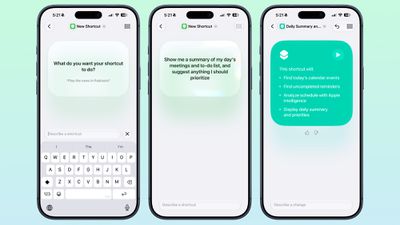
When you tap on the New Shortcut button in the ‌iOS 27‌ Shortcuts app, it opens to the Describe a Shortcut interface.
ios 27 describe shortcut
There's a text box that asks you what you want your shortcut to do, and you can describe what you need in natural language. You can start with a single step, or add in multiple parameters. ‌Apple Intelligence‌ selects the correct actions, creates the automations, and folds it all into a completed shortcut. A few examples of what you can do:

  • Each evening, set tomorrow's alarm based on my first Calendar event, turn on Sleep Focus, and dim the bedroom lights.
  • Every morning, show me my first meeting, today's weather, and my Reminders due today.
  • Turn on the porch lights at night when you get a notification that food delivery is arriving.
  • Text my partner an ETA when I leave work, then start playing my podcast.
  • Show me a summary of my day's meetings and to-do list, and suggest anything I should prioritize.
  • When I open YouTube, turn off orientation lock. Turn it back on when I close the app.
  • Give me a three-line summary of today's tech news.

Shortcuts and automations can run based on time of day, location, an app action, a system feature like a screenshot, an incoming notification, and more. Shortcuts can do all kinds of things, from accessing system features to opening and running apps.

Add Refinements

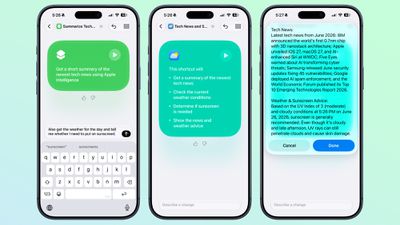
After dictating a shortcut, the app will outline each of the actions the shortcut will perform. If it's what you want, you can tap on the play button to test it. It will be added automatically to your personal shortcuts.
ios 27 shortcut refine
If it's not quite what you want or you want to add more features, you can use the "Describe a change" interface. You can type in what you want to tweak, and go through multiple rounds of refinement until you get exactly what you want.

Shortcuts can be used from Siri, the app, Control Center, the Action Button, and more.

Edit Manually

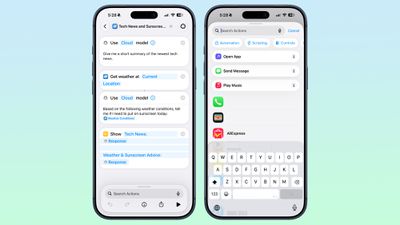
Once created, you can tap into a manual editing interface if you want to add more complicated actions or tweak without using ‌Apple Intelligence‌. AI Shortcuts is in beta and it's not always perfect, so sometimes manual edits are required to get the end result you want.
ios 27 shortcut edit manual
You can also open any shortcut and use the ‌Apple Intelligence‌ mode to make edits.

New Automation Triggers

  • When a notification is received
  • When a screenshot is captured
  • When a keyboard is connected
  • When an Apple Watch workout starts

New Actions

There are several new actions in the Shortcuts app.

  • Automate a recording in Notes
  • Send messages to a group conversation
  • Updated Get What's On Screen option that gets context information from the display (e.g. text, title, or links)
  • Choose an item from a list
  • Delete conversations or messages in Messages
  • Mark as read in Messages
  • Search in Messages
  • Open Messages inbox
  • Send Tapback
  • Auto Enhance Photo
  • Delete albums and photos
  • Favorite photos
  • Hide photos
  • Open photo
  • Create Group in Reminders
  • Create Section in Reminders
  • Delete groups, lists, and sections in Reminders
  • Edit list in Reminders
  • Toggle Hearing Aid Mute
  • Toggle Vehicle Motion Cues

Improved Apple Intelligence Models

Shortcuts can use improved ‌Apple Intelligence‌ models that have access to broad world knowledge, which means the model can search the web to get information.
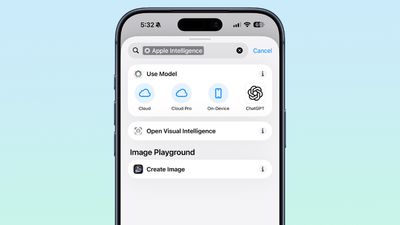
ios 27 shortcuts apple intelligence
There are now Cloud, Cloud Pro, and on-device models that can be used in shortcuts. Cloud Pro is able to search the web, and is used for queries that need information from the internet.

Data Storage

Shortcuts can store and update data, so you can do things like add items to a list or keep a tally.
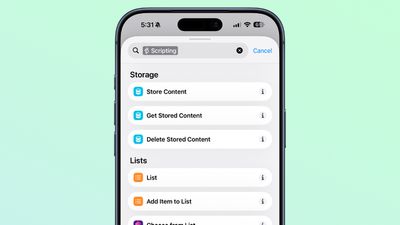
ios 27 shortcuts data storage

Automation Updates

Automation is no longer a separate section in the Shortcuts app, and automation triggers are under the general Shortcuts actions.
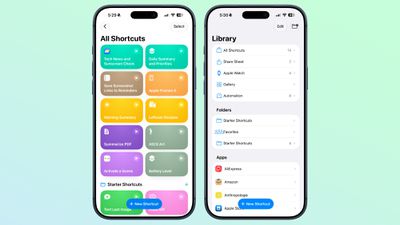
ios 27 shortcut interface

Cross-Platform Support

The Describe a Shortcut feature is available in the Shortcuts app in ‌iOS 27‌, iPadOS 27, and macOS Golden Gate.

Requirements

The ‌Apple Intelligence‌ Shortcut app features require a device that supports ‌Apple Intelligence‌, which includes the iPhone 15 Pro and later, iPads with an M-series chip or the iPad mini with A17 Pro, or a Mac with an Apple silicon chip.

Supported languages include English, Danish, Dutch, French, German, Italian, Norwegian, Portuguese, Spanish, Swedish, Turkish, Vietnamese, Chinese (simplified and traditional), Japanese, and Korean.

Availability

‌iOS 27‌ is available to developers and public beta testers right now, and a public launch is planned for September 2026.

Related Roundups: iOS 27, iPadOS 27
Related Forum: iOS 27

Popular Stories

iphone duo yellow hand

Apple Adds Facial Unlock Option on iPhone Duo in iOS 27.3

Monday November 16, 2026 10:17 am PST by
Apple today added a new option for unlocking the iPhone Duo using the front-facing camera, giving device users multiple ways to access their content. The feature is available in the second iOS 27.3 beta. The option to unlock with facial recognition is only available on the Lock Screen, and authentication via Touch ID is still needed for Apple Pay purchases, adding passwords and logins, and...

bug security vulnerability issue fix larry

Here's What Apple Fixed in iOS 27.2.1 and macOS 27.2.1

Monday November 9, 2026 3:07 pm PST by
The iOS 27.2.1, iPadOS 27.2.1, and macOS 27.2.1 updates Apple released today fix a handful of security vulnerabilities. With the security fixes implemented, it's a good idea to update as soon as you can. A bug with iMessage could let a remote attacker join a group chat to receive its messages, and another could let users see messages sent before they joined a group chat. Most of the...
iOS 27

Apple Releases iOS 27.2.1 With Bug Fixes

Monday November 9, 2026 10:09 am PST by
Apple today released iOS 27.2.1, a minor update to the iOS 27 operating system. iOS 27.2.1 comes two weeks after the launch of iOS 27.2. iOS 27.2.1 includes addresses bugs and patches security vulnerabilities according to Apple's release notes for the update. You can download iOS 27.2.1 over the air by going to Settings > General > Software Update. Apple has also released iOS 26.7.3...

Top Rated Comments

Radeon85 Avatar
22 weeks ago

I never had problems with shortcuts, I asked for more automatisations not Ai slop
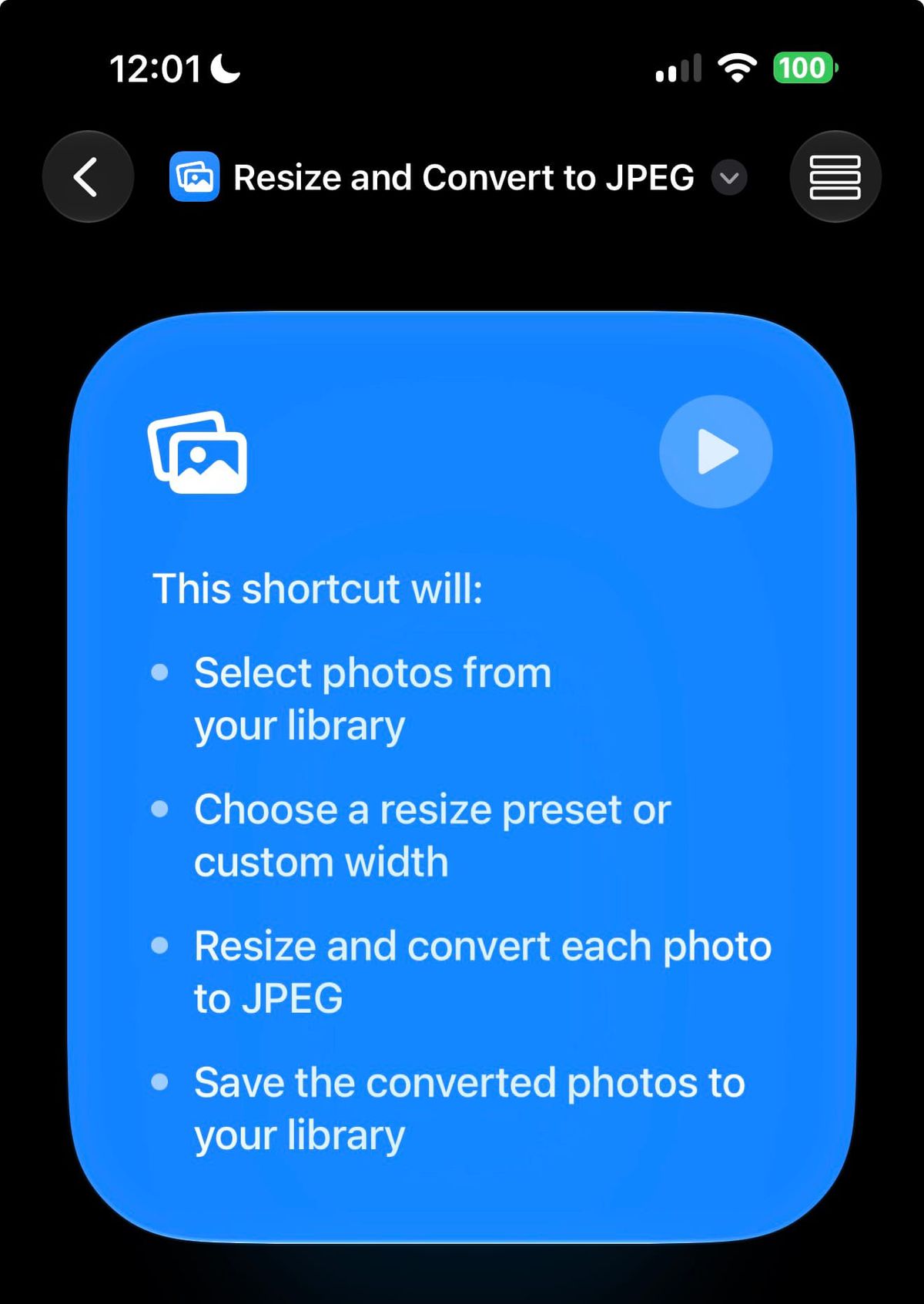
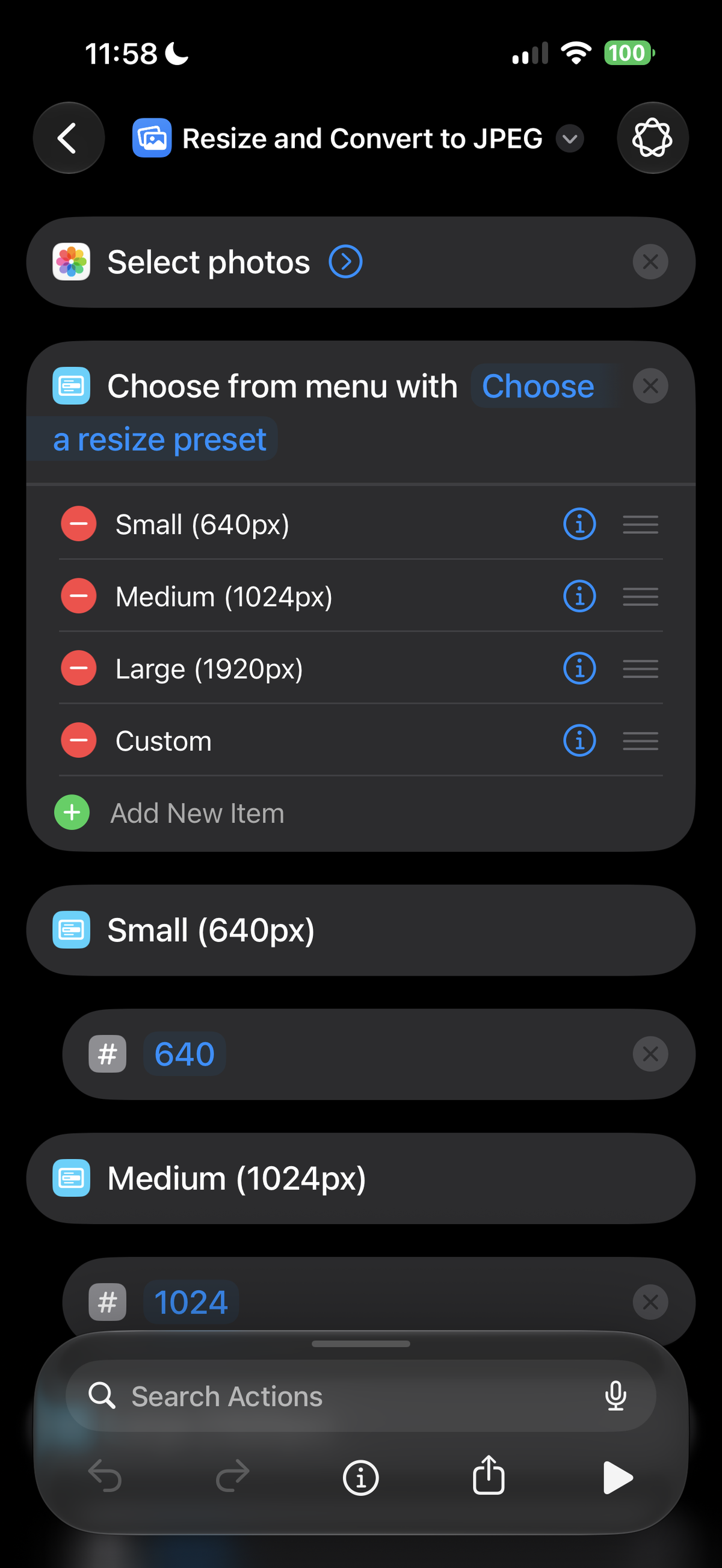
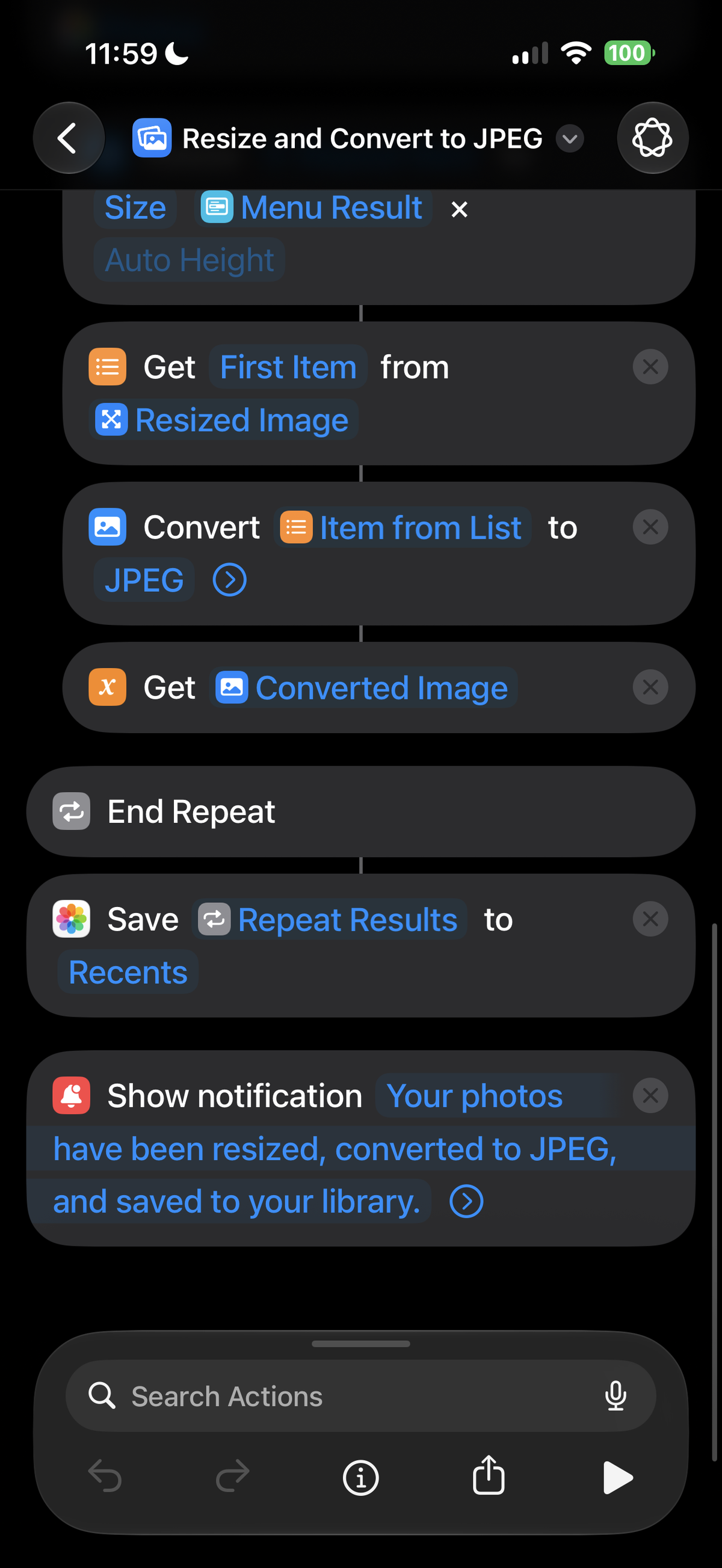
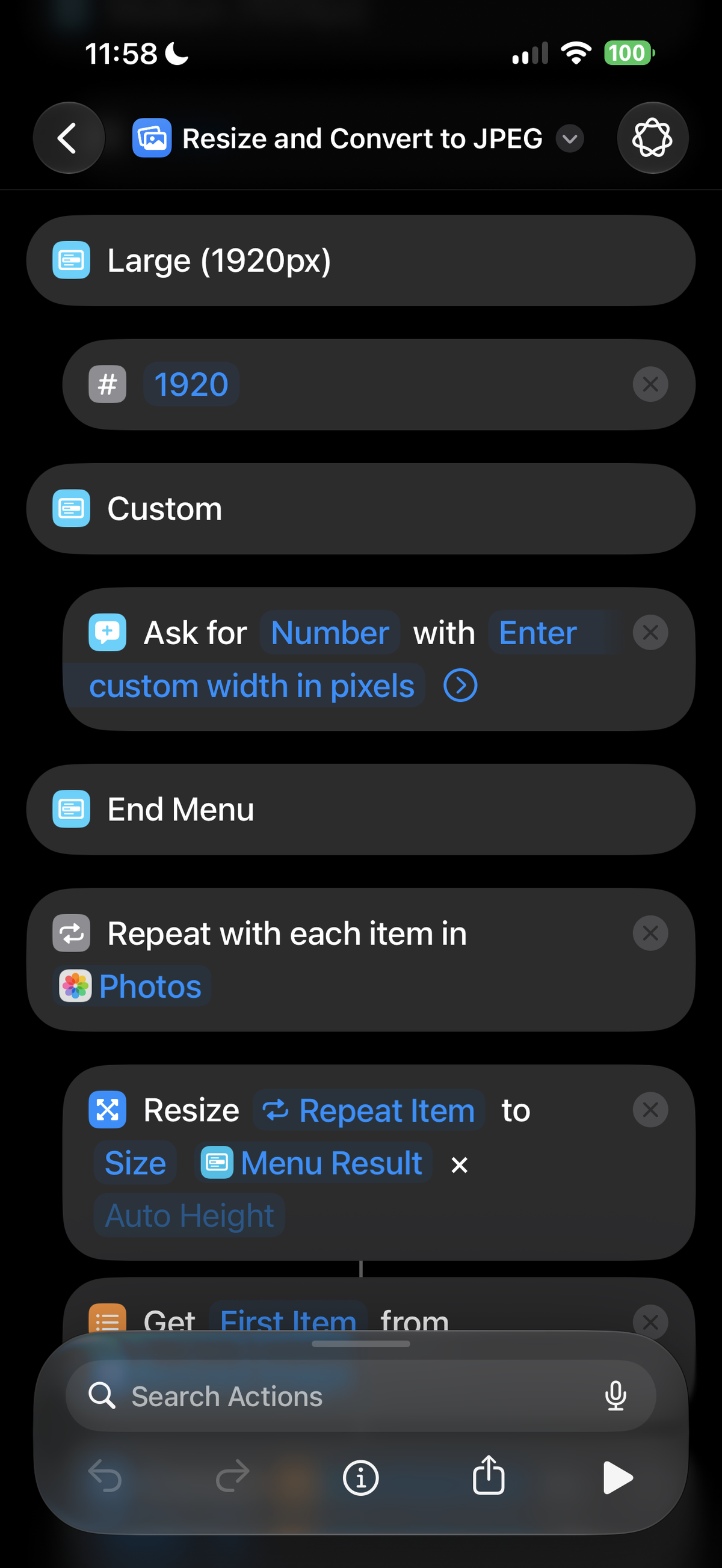
This is certainly not AI slop. If you wanted a shortcut to perform multiple tasks, or even a complicated one, it was impossible for the average user to make unless you knew what you were doing. I wanted a simple shortcut to resize photos, but I wouldn’t have had a clue where to start making this.

Now it’s stupidly easy to use, and anyone can use it. Good luck asking your average tech-illiterate person to make this shortcut in a few seconds.


Attachment Image

Attachment Image

Attachment Image

Attachment Image
Score: 29 Votes (Like | Disagree)
cjsuk Avatar
22 weeks ago
It’s not intimidating now. It’s just crappy and unreliable.
Score: 26 Votes (Like | Disagree)
Radeon85 Avatar
22 weeks ago
After playing about with it for a week, it’s one of my favourite features in 27, being able to ask Siri what I want in plain English is a massive improvement.

Made a shortcut to batch import photos from the Folders app and import them into the Photos app into collections, while preserving the same folder names, and then import them into those folders. Works beautifully and saved me hours of manual work.

Made another one to allow me to resize photos to either a simple small, medium, large, or enter my own custom resolution while converting it to jpeg: simple tool, and I no longer need those crappy third-party apps to do that, which are full of ads or demand a subscription.
Score: 20 Votes (Like | Disagree)
chrono1081 Avatar
22 weeks ago
I could never ever get the shortcuts app to do what I wanted to do, and I’m a software developer. Glad to see they’re making improvements.
Score: 15 Votes (Like | Disagree)
22 weeks ago
I have never used the shortcuts app and probably never will.
Score: 12 Votes (Like | Disagree)
phenste Avatar
22 weeks ago
genuinely one of the most exciting/underrated features of the update + a prime example of how to use AI in a non-slop way
Score: 12 Votes (Like | Disagree)
Latest Stories
The 50+ Best Apple Black Friday Deals on AirPods, iPads, MacBooks, and More
5 hours ago
Apple Store in Brisbane Reopening Next Month With New Design
8 minutes ago
The 60+ Best Black Friday Accessory Deals on iPhone Chargers, TVs, Headphones, and More
56 minutes ago
GTA VI Now (Barely) Running on Apple Silicon Macs
1 hour ago
The Best Black Friday Streaming Deals on Apple TV, Disney+, and More
2 hours ago
Apple TV's 'Carême' Wins International Emmy for Best Drama
3 hours ago
iPhone 18 Production Delay Leaves Apple Little Time Before Launch
3 hours ago
The Best Black Friday AirPods Deals
4 hours ago
The Best Black Friday Deals on Apple Home Products
4 hours ago
The Best Black Friday iPhone Deals
4 hours ago
The Best Black Friday iPad Deals
4 hours ago
The Best Black Friday Apple Watch Deals
4 hours ago
The Best Black Friday AirTag Deals
4 hours ago
The Best Black Friday Mac Deals
4 hours ago
iPhone Share of US Smartphone Market Hits 57% as Rivals Slip
5 hours ago
iPhone 20 Pro Rumored to Feature 3D-Printed Titanium Frame
7 hours ago
Apple's Official 2026 Black Friday Offer Starts Rolling Out
1 day ago
Halide Adds Fill Light Feature for iPhone Duo
1 day ago
MacBook Air Black Friday Deals Now Live With Massive $399 Savings
1 day ago
Amazon Discounts All MacBook Neo Models by $99 for Black Friday
1 day ago
Kodak Launches Unique AirTag Rival With E-Ink Display
1 day ago
Here's Why the Apple Store is Going Down
1 day ago
Apple Still Working on Giant Foldable iPad That Could Cost $5,000
1 day ago
iPhones Dominate China's Weak Singles' Day Smartphone Sales
1 day ago
iPhone 20 Pro Could Feature Ceramic in Limited-Edition Model
1 day ago
Apple Faces Korean Regulator Review Over iPhone 16 AI Advertising
1 day ago
Apple Watch Ultra 4 Hits New Best-Ever Price of $649.99 for Black Friday
1 day ago
New Apple Store Opening in India, Download the Special Wallpaper Now
2 days ago
Redesigned OLED MacBook Air Could Launch in 2027 or 2028
2 days ago
AirPods Pro 3 for $149 is One of The Best Black Friday Deals This Year
2 days ago
Related Apple News: Reviews | Buyers Guide | Ipad | Entertainment | News