Skip to Content

What's New in the iOS 27 Photos App

The Photos app is one of a handful of apps that Apple paid extra attention to in iOS 27. It has multiple improvements to performance, and several quality-of-life upgrades. There are also new AI photo editing tools that use Apple Intelligence.

Whats New in the iOS 27 Photos App Feature

AI Tools

There is a set of AI photo editing tools in the ‌Photos‌ app, accessible by tapping on the icon featuring three sliders, and then selecting the ‌Apple Intelligence‌ icon labeled "Tools."

Clean Up

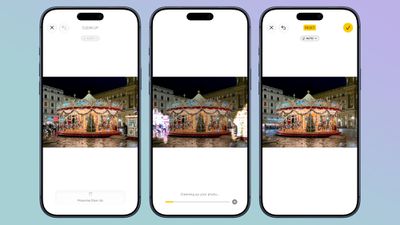
Clean Up uses new AI models, and it's better at removing objects. The original version of Clean Up was best for small items with little complexity in the surrounding area, but now it is able to do more work reconstructing backgrounds with generative AI.
ios 27 photos cleanup
There are now three options for object removal. Fast works more quickly and can still be used for simple edits, while High Quality works better for more detailed scenes. Auto lets the ‌Photos‌ app decide which option is best.

Extend

Extend lets you change the crop of an image, expanding the borders around content to zoom out a bit or change the photo's composition. It uses generative AI to fill in missing areas, and you can adjust the borders with pinch gestures.

ios 27 photos extend
Apple also uses the Extend feature for expanding iPhone Lock Screen wallpapers that don't quite fit the display.

Reframe

Reframe can change the perspective of the photo, making adjustments to the angle of a person or object. It draws on the spatial information the iPhone gathers when a photo is taken, and combines it with AI to change the angle of the camera in post-processing. The spatial data is used for adjusting the subject of the image, and then AI fills in any pixels that are missing.
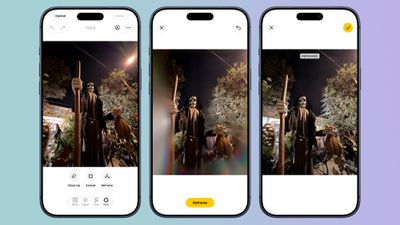
ios 27 photos reframe
Reframe uses touch and drag gestures to adjust perspective, and two fingers for panning, zooming, or rotating an image to get the right angle.

Image Playground

While not part of the ‌Photos‌ app, the Image Playground app can be used to make photorealistic edits to your image. If you have a photo of a friend and want to add a hat or an accessory that looks real, you can do so with ‌Image Playground‌. You can select specific areas in an image to modify and make AI edits using natural language, plus there's an option to combine images.
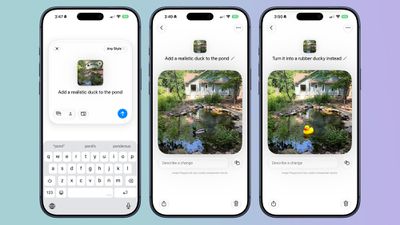
ios 27 image playground

Videos to Photos

You can now save a frame of a video as an individual photo.
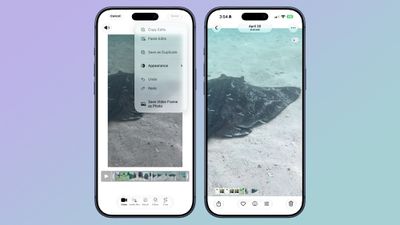
ios 27 photos save video frame

Metadata

Apple now lets you add keywords and star ratings to photos and videos in the ‌Photos‌ app. You can rate images with one to five stars and then filter images by rating.
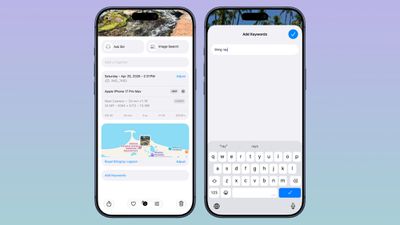
ios 27 photos metadata

Album Changes

Apple improved album organization in ‌iOS 27‌ and added new features for Shared Albums, including an option for Android and Windows users to contribute to iCloud albums.

  • Shared Albums can be filtered by photos or videos.
  • It's easier to save images from Shared Albums.
  • You can set Shared Albums to expire after 30 days, which is useful for sharing photos without having a permanent album.
  • It's easier to invite people to Shared Albums with a dedicated "Create Shared Album" option in any album menu.
  • You can create a link for people to upload images to a Shared Album, and there are new permissions so you can require explicit access to be granted.
  • Shared Albums have a recent activity log.
  • You can react to images in Shared Albums with any emoji.

Slideshows

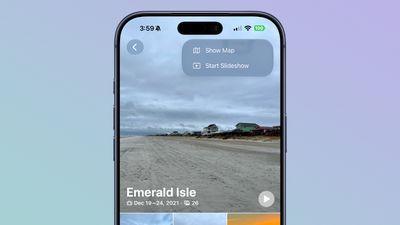
You can create a slideshow from any album or collection of images in the ‌Photos‌ app instead of being limited to what's in the Memories section. Just tap into an album, tap the icon in the upper right of the display, and choose "Start Slideshow." Alternatively, select several photos and then follow the same steps from the main Library interface.
ios 27 photos slideshow
Slideshows can be customized with transition styles, slide duration, and background music. The resulting file can be shared on social media, and saved as a video.

Utilities

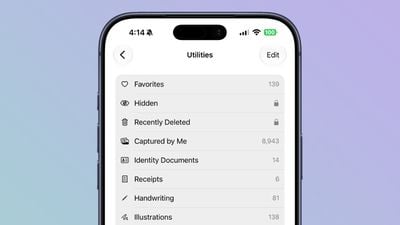
There are two new Utilities folders in the ‌Photos‌ app. Captured by Me includes all of the images that you've taken from the Camera app on your current or past iPhone, while Identity Documents aggregates pictures of passports, licenses, and similar documents.
ios 27 photos new utilities

iCloud

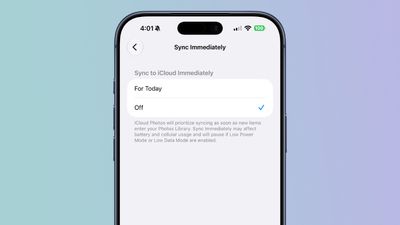
In the ‌Photos‌ section of the Settings app, there's a "Sync Immediately" option that lets you prioritize immediate ‌iCloud‌ uploads for the day.

ios 27 photos sync
With the setting enabled, iCloud Photos will sync as soon as new images enter the ‌Photos‌ Library instead of holding uploads to save battery.

Full-resolution photos and videos can be added to ‌iCloud‌ Shared Albums, with support for all common photo and video formats.

Other Changes
ios 27 photos show selected

  • You can select a specific pet to use with the Photo Shuffle wallpaper.
  • Search returns more pleasing photos of people and pets in Top Results.
  • The Collections tab is faster to render.
  • New captures from the Camera app load quicker in ‌Photos‌.
  • You can include images of yourself in Photo Shuffle.
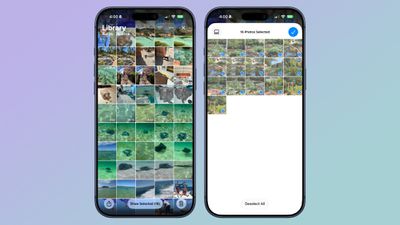
  • A "Show Selected" option in the Library shows you all of the photos you have checked so you can modify metadata.

Compatibility

The AI photo editing tools are available on devices that support ‌Apple Intelligence‌, which includes the iPhone 15 Pro and later. Performance and organizational tools are available on devices that run ‌iOS 27‌, which includes the iPhone 11 and later.
Related Roundups: iOS 27, iPadOS 27
Related Forum: iOS 27

Popular Stories

iphone duo yellow hand

Apple Adds Facial Unlock Option on iPhone Duo in iOS 27.3

Monday November 16, 2026 10:17 am PST by
Apple today added a new option for unlocking the iPhone Duo using the front-facing camera, giving device users multiple ways to access their content. The feature is available in the second iOS 27.3 beta. The option to unlock with facial recognition is only available on the Lock Screen, and authentication via Touch ID is still needed for Apple Pay purchases, adding passwords and logins, and...
bug security vulnerability issue fix larry

Here's What Apple Fixed in iOS 27.2.1 and macOS 27.2.1

Monday November 9, 2026 3:07 pm PST by
The iOS 27.2.1, iPadOS 27.2.1, and macOS 27.2.1 updates Apple released today fix a handful of security vulnerabilities. With the security fixes implemented, it's a good idea to update as soon as you can. A bug with iMessage could let a remote attacker join a group chat to receive its messages, and another could let users see messages sent before they joined a group chat. Most of the...
iOS 27

Apple Releases iOS 27.2.1 With Bug Fixes

Monday November 9, 2026 10:09 am PST by
Apple today released iOS 27.2.1, a minor update to the iOS 27 operating system. iOS 27.2.1 comes two weeks after the launch of iOS 27.2. iOS 27.2.1 includes addresses bugs and patches security vulnerabilities according to Apple's release notes for the update. You can download iOS 27.2.1 over the air by going to Settings > General > Software Update. Apple has also released iOS 26.7.3...

Top Rated Comments

Unity451 Avatar
24 weeks ago
I'm all for using AI for quick edits and design shortcuts and whatnot, but we all agree that an AI generated/edited photo is not real in the same way an actual photo is real, right?
Score: 13 Votes (Like | Disagree)
24 weeks ago
I can’t tell wether it’s amazing or scary. Probably both. Nothing is real anymore
Score: 10 Votes (Like | Disagree)
24 weeks ago
Man that generative AI stuff is gross. Here’s hoping Apple implements a master “I don’t want this garbage” switch in settings.

Otherwise I might be on my iPhone 13 way, way longer than I thought.
Score: 9 Votes (Like | Disagree)
iFanaddic Avatar
24 weeks ago
What app icons should have looked like in iOS 27 (and 26) 🥲🪦

Attachment Image
Score: 8 Votes (Like | Disagree)
24 weeks ago
The “AI” features here are truly just about creating lies. None of these AI generated/edited photos will be remotely real things. Even the previous color filters available were at least re-shading real things that actually existed. I no longer believe photos my friends or family send me are real unless they state otherwise, and even then, I assume most of the image is still AI slop.

Even the “Clean up” tool is removing things that were REALLY there, creating some fake reality. I suppose photoshop has been doing similar things, but it was done generally by a human doing often professional work, and not by 99% of the people you talk to every day. I do not see this as an improvement overall and it’s one of those “just because you can…” scenarios imo.
Score: 6 Votes (Like | Disagree)
24 weeks ago
Why can’t “sync immediately” be a always on thing and not the timed 3 hours
Score: 4 Votes (Like | Disagree)
Latest Stories
The 50+ Best Apple Black Friday Deals Still Available on AirPods, iPads, and More
1 hour ago
Apple's M6 and PROLED MacBook Pro Reach New Low Prices for Black Friday
5 hours ago
The MacRumors Show: iPhone Air 2 and iPhone 18 Are Coming
5 hours ago
Apple Store in Brisbane Reopening Next Month With New Design
6 hours ago
The 60+ Best Black Friday Accessory Deals on iPhone Chargers, TVs, Headphones, and More
7 hours ago
GTA VI Now (Barely) Running on Apple Silicon Macs
7 hours ago
The Best Black Friday Streaming Deals on Apple TV, Disney+, and More
8 hours ago
Apple TV's 'Carême' Wins International Emmy for Best Drama
8 hours ago
iPhone 18 Production Delay Leaves Apple Little Time Before Launch
9 hours ago
The Best Black Friday AirPods Deals Still Available
1 hour ago
The Best Black Friday Deals on Apple Home Products
10 hours ago
The Best Black Friday iPhone Deals Still Available
1 hour ago
The Best Black Friday iPad Deals Still Available
1 hour ago
The Best Black Friday Apple Watch Deals Still Available
1 hour ago
The Best Black Friday AirTag Deals Still Available
1 hour ago
The Best Black Friday Mac Deals Still Available
1 hour ago
iPhone Share of US Smartphone Market Hits 57% as Rivals Slip
11 hours ago
iPhone 20 Pro Rumored to Feature 3D-Printed Titanium Frame
12 hours ago
Apple's Official 2026 Black Friday Offer Starts Rolling Out
1 day ago
Halide Adds Fill Light Feature for iPhone Duo
1 day ago
MacBook Air Black Friday Deals Now Live With Massive $399 Savings
1 day ago
Amazon Discounts All MacBook Neo Models by $99 for Black Friday
1 day ago
Kodak Launches Unique AirTag Rival With E-Ink Display
1 day ago
Here's Why the Apple Store is Going Down
1 day ago
Apple Still Working on Giant Foldable iPad That Could Cost $5,000
1 day ago
iPhones Dominate China's Weak Singles' Day Smartphone Sales
1 day ago
iPhone 20 Pro Could Feature Ceramic in Limited-Edition Model
1 day ago
Apple Faces Korean Regulator Review Over iPhone 16 AI Advertising
1 day ago
Apple Watch Ultra 4 Hits New Best-Ever Price of $649.99 for Black Friday
2 days ago
New Apple Store Opening in India, Download the Special Wallpaper Now
2 days ago
Related Apple News: News | Technology | Iphone | Travel | Buyers Guide