Skip to Content

iOS 27: 13 Ways the Messages App is Smarter and Less Annoying

The Messages app is arguably the most important app on the iPhone, and in iOS 27, Apple is adding some useful improvements. There are some quality-of-life fixes for longtime issues, and new AI features.


Contextual Suggestions

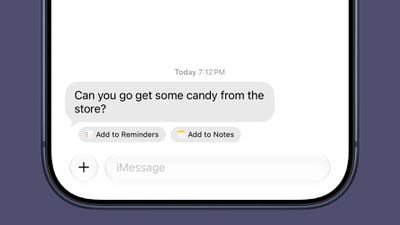
Messages uses Apple Intelligence to surface one-tap suggestions based on what's being discussed in a conversation. If someone you're talking to asks you to send a photo, Messages recognizes the request and suggests adding the relevant photos.
ios 27 messages actions
If someone invites you to an event, Messages offers to add it to your Calendar. If someone asks you to pick something up at the store, Messages will suggest adding it to your Reminders list or to the Notes app.

Messages will also suggest Genmoji you might want to generate based on the conversation.

Write With Siri

There's a systemwide Write with Siri feature that's available in the Messages app. ‌Siri‌ AI can compose entire messages for you, proofread your messages, or give you feedback.
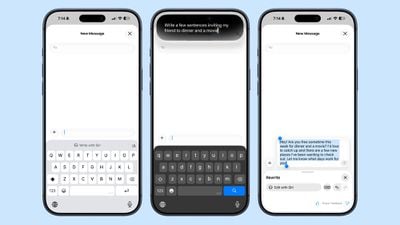
ios 27 messages write with siri
There is a dedicated Write with ‌Siri‌ button above the keyboard where you can get to the new ‌Siri‌ tools.

Smart Reply suggestions also use your writing style so they sound more natural.

Siri AI

‌Siri‌ AI integrates with the Messages app. You can ask ‌Siri‌ to find images, videos, links, addresses, phone numbers, and more in the Messages app, plus ‌Siri‌ can draft message replies and act on info in the Messages app, like adding an event date to the Calendar app.

Drawing

You can use a new Drawing interface in the Messages app to send little sketches and notes. It's available when tapping on the "+" button next to the text bar in a conversation.
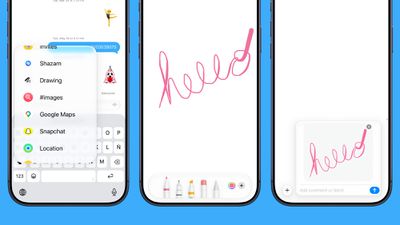
ios 27 messages drawing
The drawing interface is the same as the Markup tool available in apps like Photos and Notes. There's a marker, a pen, a highlighter, and an eraser, plus options to use the tools in any color.

Accidental Recordings

The ‌iOS 27‌ Messages app includes an option to remove the audio button from the text bar. In the Messages section of the Settings app, you can navigate to Show in Text Field to set the right-side button to Record Audio, Start Dictation, or None.
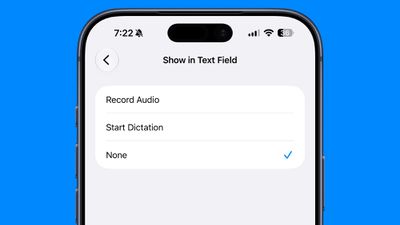
ios 27 text field messages
Setting the option to none will prevent you from accidentally recording a voice message with an errant tap.

Tapbacks

Messages now consolidates notifications for Tapback responses, which is useful when you're in a group thread and tons of people are sending emojis.

Sending

When a message fails to send in ‌iOS 27‌, your iPhone will automatically retry sending it. In iOS 26, you get an alert if a message fails, but you have to manually tap to try to send it again.

The Messages app also supports continuous sending of photos, videos, and texts. If you're sending someone a photo and your connection is poor or you go offline, it automatically resumes sending when the connection is restored.

Syncing

Cross-device syncing is improved in ‌iOS 27‌, so conversations will sync more reliably across the iPhone, iPad, Mac, Apple Watch, and Vision Pro. Fewer messages will fail to sync and display properly when you switch between devices.

Messages, read states, reactions, and attachments sync faster.

When you take a photo and then go to the Messages app to send it, you're more likely to see it right away. Apple says the iPhone is faster to add recent camera captures to Messages.

Apple improved its search index across apps like Mail and Messages, so you're more likely to find what you're looking for.

You can also search for conversations in Messages using a phone number or a contact's nickname.

Offloaded Media

If you have photos or videos that have been offloaded to save storage space, you can still find them in the ‌iOS 27‌ Messages app when you search.

Thumbnails are also displayed for offloaded media instead of a placeholder image, so you know what's there.

RCS

In RCS message conversations with Android users, you can now long press on a message to send an inline reply. ‌iOS 27‌ also shows reaction emoji directly on images and videos, a feature that was not functioning in ‌iOS 26‌.

Genmoji

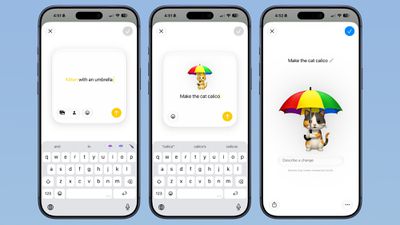
Apple revamped ‌Genmoji‌ creation in ‌iOS 27‌. There's an updated interface for describing an emoji that you want, with options to start from an existing emoji, choose an image from ‌Photos‌, or select a person.

ios 27 genmoji
After uploading an image or using a text phrase to create a ‌‌Genmoji‌‌, there's a new "Describe a change" interface for making updates to what you've already created. You can iterate on designs and change individual elements of a ‌‌Genmoji‌‌, tweaking colors and objects. Each change uses the old base instead of regenerating a new ‌‌Genmoji‌‌.

With a series of requests, it is possible to make a complicated, multi-element ‌‌Genmoji‌‌. Along with describing changes, you can add in additional emoji, and the interface makes suggestions on what to do next.

‌‌Genmoji‌‌ output is more consistent, and ‌‌Genmoji‌‌ look more like real emoji with a 3D, cartoonish style by default. There is now an option to change style, so if you don't want the cartoonish look, you can ask for something else like a drawing or a sketch.

Large Conversations

Large conversations load and scroll faster in ‌iOS 27‌, according to Apple.

Read More

More on all of the features in ‌iOS 27‌ can be found in our iOS 27 guide.

Related Roundups: iOS 27, iPadOS 27
Related Forum: iOS 27

Popular Stories

iphone duo yellow hand

Apple Adds Facial Unlock Option on iPhone Duo in iOS 27.3

Monday November 16, 2026 10:17 am PST by
Apple today added a new option for unlocking the iPhone Duo using the front-facing camera, giving device users multiple ways to access their content. The feature is available in the second iOS 27.3 beta. The option to unlock with facial recognition is only available on the Lock Screen, and authentication via Touch ID is still needed for Apple Pay purchases, adding passwords and logins, and...
bug security vulnerability issue fix larry

Here's What Apple Fixed in iOS 27.2.1 and macOS 27.2.1

Monday November 9, 2026 3:07 pm PST by
The iOS 27.2.1, iPadOS 27.2.1, and macOS 27.2.1 updates Apple released today fix a handful of security vulnerabilities. With the security fixes implemented, it's a good idea to update as soon as you can. A bug with iMessage could let a remote attacker join a group chat to receive its messages, and another could let users see messages sent before they joined a group chat. Most of the...
iOS 27

Apple Releases iOS 27.2.1 With Bug Fixes

Monday November 9, 2026 10:09 am PST by
Apple today released iOS 27.2.1, a minor update to the iOS 27 operating system. iOS 27.2.1 comes two weeks after the launch of iOS 27.2. iOS 27.2.1 includes addresses bugs and patches security vulnerabilities according to Apple's release notes for the update. You can download iOS 27.2.1 over the air by going to Settings > General > Software Update. Apple has also released iOS 26.7.3...

Top Rated Comments

13 weeks ago
Unpopular opinion: shoving AI slop down a user’s throat makes Messages more annoying, not less. Don’t need to add a simple task to reminders or notes JFC!

*knocks over water bottle
Score: 13 Votes (Like | Disagree)
13 weeks ago
lol.

Texting is awful compared to day one iPhone. You need to proofread almost every message.
Score: 10 Votes (Like | Disagree)
13 weeks ago
‘The Messages app is arguably the most important app on the iPhone’ - maybe in the US? In the UK everyone is on WhatsApp.
Score: 6 Votes (Like | Disagree)
Eureka20 Avatar
13 weeks ago
I don't want or need Ai. I just want the dang thing to do better when it fails to send a message
Score: 6 Votes (Like | Disagree)
13 weeks ago
I'd trade all of this for simply having better dictation.
Score: 6 Votes (Like | Disagree)
13 weeks ago
Can we PLEASE STOP giving ANY attention to STUPID emoji / Memoji & similar utter garbage?!?

Are there THAT many people with so little going on in their lives that they dedicate so much time & effort to this?
Holy cow… 😑🙄
Score: 5 Votes (Like | Disagree)
Latest Stories
The 50+ Best Apple Black Friday Deals Still Available on AirPods, iPads, and More
47 minutes ago
Apple's M6 and PROLED MacBook Pro Reach New Low Prices for Black Friday
8 hours ago
The MacRumors Show: iPhone Air 2 and iPhone 18 Are Coming
8 hours ago
Apple Store in Brisbane Reopening Next Month With New Design
9 hours ago
The 60+ Best Black Friday Accessory Deals on iPhone Chargers, TVs, Headphones, and More
10 hours ago
GTA VI Now (Barely) Running on Apple Silicon Macs
10 hours ago
The Best Black Friday Streaming Deals on Apple TV, Disney+, and More
11 hours ago
Apple TV's 'Carême' Wins International Emmy for Best Drama
11 hours ago
iPhone 18 Production Delay Leaves Apple Little Time Before Launch
12 hours ago
The Best Black Friday AirPods Deals Still Available
4 hours ago
The Best Black Friday Deals on Apple Home Products
13 hours ago
The Best Black Friday iPhone Deals Still Available
4 hours ago
The Best Black Friday iPad Deals Still Available
4 hours ago
The Best Black Friday Apple Watch Deals Still Available
4 hours ago
The Best Black Friday AirTag Deals Still Available
4 hours ago
The Best Black Friday Mac Deals Still Available
4 hours ago
iPhone Share of US Smartphone Market Hits 57% as Rivals Slip
14 hours ago
iPhone 20 Pro Rumored to Feature 3D-Printed Titanium Frame
15 hours ago
Apple's Official 2026 Black Friday Offer Starts Rolling Out
1 day ago
Halide Adds Fill Light Feature for iPhone Duo
1 day ago
MacBook Air Black Friday Deals Now Live With Massive $399 Savings
1 day ago
Amazon Discounts All MacBook Neo Models by $99 for Black Friday
1 day ago
Kodak Launches Unique AirTag Rival With E-Ink Display
2 days ago
Here's Why the Apple Store is Going Down
2 days ago
Apple Still Working on Giant Foldable iPad That Could Cost $5,000
2 days ago
iPhones Dominate China's Weak Singles' Day Smartphone Sales
2 days ago
iPhone 20 Pro Could Feature Ceramic in Limited-Edition Model
2 days ago
Apple Faces Korean Regulator Review Over iPhone 16 AI Advertising
2 days ago
Apple Watch Ultra 4 Hits New Best-Ever Price of $649.99 for Black Friday
2 days ago
New Apple Store Opening in India, Download the Special Wallpaper Now
2 days ago
Related Apple News: South Africa | Buyers Guide | Reviews | Iphone | Sport