Skip to Content

iOS 26: Every Change to the Messages App

The Messages app has the Liquid Glass redesign that's been introduced throughout iOS 26, but Apple also added several long-desired features that make for a better experience in both one-to-one and group chats, such as custom backgrounds and group typing indicators.

iOS 26 Messages Feature 2 1

Message Backgrounds

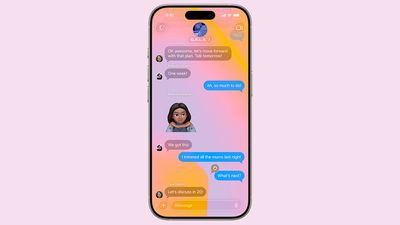
In any conversation in the Messages app, you can set a custom background, a feature that's available in many third-party messaging apps.
ios 26 messages backgrounds
To set a custom background, tap on the name of the person or group at the top, and choose the "Backgrounds" option. There are pre-set options like sky, water, and aurora, or you can choose a solid color.

You can also opt to select a photo from your Photo Library, or generate an image with Image Playground. Backgrounds are changed for every participant in the conversation, but you need to have ‌iOS 26‌, iPadOS 26, or macOS Tahoe. Custom backgrounds can only be set for iMessage conversations at the current time, and there won't be an option to set a custom background in a chat with someone who has an Android device.

If you don't want to see custom backgrounds that people set, you can turn off the option in the Messages section of the Settings app. Just go to Settings > Apps > Messages and toggle off Conversation Backgrounds.

Regardless of the background that you choose, message bubbles will still be blue, and bubble color can't be changed.

Polls

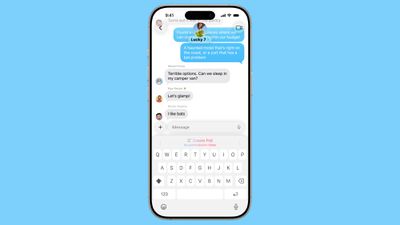
For conversations where you're asking people to choose one of multiple options, you can now create a poll. If you tap on the "+" button next to the Messages text, there's a poll option.
ios 26 messages poll suggestions
You can add up to 12 choices in a poll, and then send it to people in a conversation to vote on. If you send a poll and someone thinks an option is missing, they can edit it and add in another choice.

On devices that support Apple Intelligence, the Messages app will suggest a poll in relevant conversations. If you're asking the group whether to get pizza, burgers, or pasta, for example, you might see a suggestion to create a poll.

Live Translation

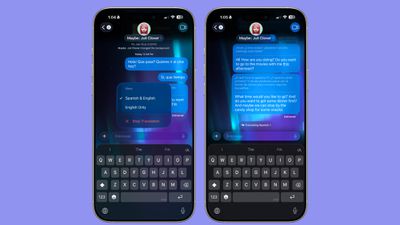
‌iOS 26‌ supports a live translate feature in Messages on devices with ‌Apple Intelligence‌. If you're conversing with someone that speaks another language, you can turn on translate. What they type will be translated to your language, and what you type will be translated to their language. Translations are near instantaneous and don't slow down text conversations.
messages live translation
Languages that are supported include Chinese (Mandarin, Simplified), French, German, Italian, English, Japanese, Korean, Portuguese (Brazil), and Spanish (Spain).

To opt in to automatic translate, tap on the person's name, scroll down, and toggle on the Automatically Translate option. You will need to select a language to translate from, and download that language pack if you don't already have it installed (they're around 900MB).
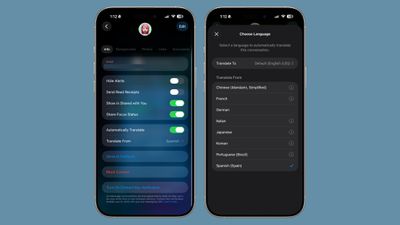
ios 26 select language messages
Messages that you send will show up in both your language and the translated language on your own phone, but the person on the other end will only see the message in their language. Messages they respond with will show their language and the translated language.
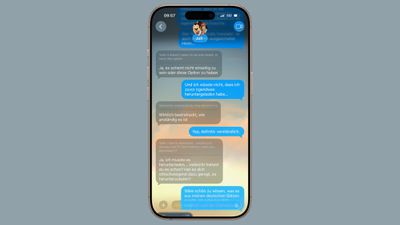
messages ios 26 live translation 2
Live Translation is an ‌Apple Intelligence‌ feature, and it works best when both participants have ‌iOS 26‌, ‌iPadOS 26‌, or ‌macOS Tahoe‌. You can use Live Translation with someone who has an older device or an Android device, and it will translate their text on your end, but your responses are not translated to their language.

Group Chat Improvements

When you're in a group chat, you'll see typing indicators for people who are typing a response.

Apple Cash is also now supported in group chats, so members of the group can send money to one another without having to split out into separate conversations.

If you're in a group chat and there's a person that you don't know, there's now an option to add that person to your Contacts app with a tap.

Copy/Paste

If you want to copy just a part of a message, such as an address or a package tracking number, there's an option in ‌iOS 26‌ to do so. Long press on the message that you want to copy and then tap on the "Select" option.
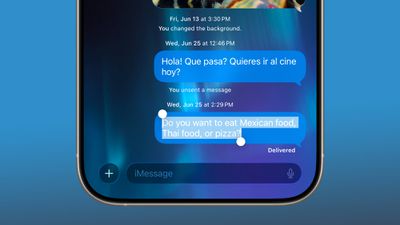
ios 26 messages select copy paste

Message Filtering

Apple separated spam messages and messages from unknown senders into two categories in ‌iOS 26‌, and both can be filtered out if you prefer.
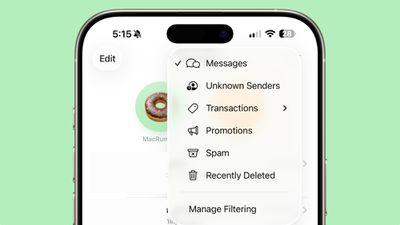
ios 26 messages filtering
There's a Filter section that you can access by tapping the icon at the top right of the Messages app interface that will let you see messages with specific content. Options include Unknown Senders, Transactions, Promotions, Spam, and Recently Deleted.

You can have messages from unknown senders (aka not saved in your Contacts) sent directly to the Unknown Senders list, and you won't get notifications. You'll see a badge in the filter section of the Messages app so you know the message is there, but you won't be bothered by it.

There's an exception you can turn on for Time Sensitive notifications, so you won't miss something like a food delivery person sending you a message. Messages classified as spam will be sent to the spam box, and you won't see a notification or a badge.

You can also turn on filtering notifications for messages that are classified as Personal (not from businesses), Transactions (order receipts and confirmations), and Promotions.

Messages supports natural language search, so you can use conversational words when looking for a text thread or something specific in a conversation.

Low Data Photo Sharing

Apple added a "Send Low Quality Photo Previews" setting that can be enabled in the Messages section of the Settings app. When it's turned on, Messages will send a lower quality preview of an image if your iPhone is in Low Data Mode. The full version of the photo is sent at a later time when you have a Wi-Fi connection.
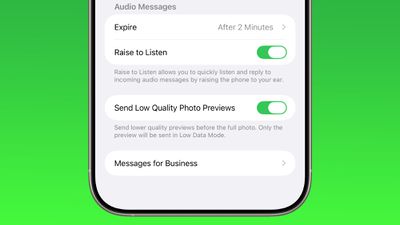
ios 26 messages low quality previews

Genmoji

In Messages, the Genmoji feature has been updated to support mixing two or more existing emoji characters together to create a new emoji.
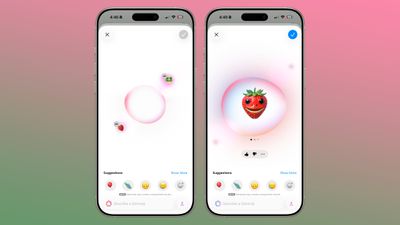
ios 26 genmoji
In a conversation, tap on ‌Genmoji‌ to make a custom emoji character. Once in the ‌Genmoji‌ interface, tap on the smile icon with a "+" next to it, and you can select the emoji characters that you want to add from the emoji menu. You can add two emoji, or even more if you want.

Combined emoji can be further edited with text-based descriptions, and if someone sends you a combo emoji, you can long press on it and choose "New Emoji" to tweak it further.

CarPlay

When you're driving, you can now respond to an incoming message with a quick Tapback response. Plus you can pin conversations to the Messages app in CarPlay so you can access your favorite contacts quickly.

CarPlay Messages Tapbacks

EU Changes

In the European Union, there's a new EU-only API for developers that will allow third-party messages apps to send and receive RCS/MMS/SMS messages by default instead of the built-in Messages app.

End-to-End RCS Encryption

Apple is planning to bring end-to-end encryption to ‌RCS‌ conversations between iPhone and Android users in a future software update, but the functionality is not implemented yet.

Read More

We have a complete iOS 26 roundup that covers all of the new features that are available in the update.


Related Roundups: iOS 26, iPadOS 26
Related Forum: iOS 26

Popular Stories

apple design award 2025

Apple Announces 2025 Design Award Winners Ahead of WWDC 2025

Tuesday June 3, 2025 10:14 am PDT by
As we wait for WWDC to kick off next Monday, Apple today announced the winners of its annual Apple Design Awards, recognizing apps and games for their innovation, ingenuity, and technical achievement. The 2025 Apple Design Award winners are listed below, with one app and one game selected per category: Delight and Fun - CapWords (App) and Balatro (Game) Innovation - Play (App) and PBJ -...
1password deal blue

1Password Security Breach: What Was Accessed and What Wasn't

Wednesday November 25, 2026 1:09 pm PST by
Popular password management app 1Password today said it experienced a security breach earlier this month. 1Password says some customer names and email addresses were accessed, but no customer vault contents were compromised. On November 19, 1Password saw indications that an employee's GitHub account had been breached and began investigating. The company says the breached GitHub account was...
apple store down feature

Here's Why the Apple Store is Going Down

Thursday November 26, 2026 5:49 am PST by
Apple's online store is going down for a few hours on a rolling country-by-country basis right now, but do not get your hopes up for new products. Apple takes its online store down for a few hours ahead of Black Friday every year to tease its annual gift card offer with the purchase of select products. The store is down in Australia, New Zealand, and Thailand, right now, and it will...

Top Rated Comments

18 months ago
I can't believe it took us 18 years to be able to copy part of a text message.
Score: 11 Votes (Like | Disagree)
Flamingdeathbolts Avatar
18 months ago
It drove me insane for years not being able to copy/paste a portion of a text. Glad that is finally doable
Score: 10 Votes (Like | Disagree)
jclo Avatar
18 months ago

On the iOS 26 Beta right now I can only assign backgrounds to iMessage conversations. This article mentions it works with green bubbles. Does anyone know if that is planned or a mistake?
I shouldn't have said green bubbles. I'll update. This only works in iMessage conversations and I can't set a background for an Android convo.


As soon as I saw the feature in the keynote about setting backgrounds I wondered “Who gets to set the background?”

Will there be background battles? Maybe just the person who first started the chat can control this. What if it is an offensive background? Can you block it? Now I get so many junk messages, I wonder if they will start including backgrounds?
You sure can have background battles where you just swap back and forth. I would not be surprised to see spam messages start to include them, and while I haven't tried an NSFW picture, it seems to be possible to just choose whatever you want. Hopefully we get per-conversation options for this setting, because right now it's all or nothing.


Great to see!
Thank You @jclo for providing these summaries for us, it is very helpful for me as I would not install beta SW on my iPhone but like to see the summaries of the changes. Excellent job!
I'm really glad to hear they're helpful! More to come. I'm trying to get through every feature and app before September so there's a nice knowledge base for the people who will be installing it then.


Question: In iOS 26, does anyone know if group chats show when someone has their notifications silenced? As in, does the message “... has notifications silenced...” appear at the bottom of the chat like it does in one-on-one conversations? It’s kind of a bummer that group chats don’t show that right now.
I don't think this shows up.
Score: 5 Votes (Like | Disagree)
ritmomundo Avatar
18 months ago
Cool. It only took like 17 years for Apple to add a proper copy/paste function in Messages.
Score: 3 Votes (Like | Disagree)
ApAx Avatar
18 months ago
I would like to see delivery and read receipts in group messages. Right now, it behaves like an individual message that didn't send so I never know it was seen until the first reply. Maybe just a counter?

"Read by 4 people"
Score: 3 Votes (Like | Disagree)
18 months ago
“Graphic design is my passion”


Attachment Image
Score: 3 Votes (Like | Disagree)
Latest Stories
The 50+ Best Apple Black Friday Deals Still Available on AirPods, iPads, and More
4 hours ago
HomePod Mini 2 in (RED) Seemingly Spotted Ahead of Announcement
2 hours ago
Apple's M6 and PROLED MacBook Pro Reach New Low Prices for Black Friday
12 hours ago
The MacRumors Show: iPhone Air 2 and iPhone 18 Are Coming
12 hours ago
Apple Store in Brisbane Reopening Next Month With New Design
12 hours ago
The 60+ Best Black Friday Accessory Deals on iPhone Chargers, TVs, Headphones, and More
13 hours ago
GTA VI Now (Barely) Running on Apple Silicon Macs
14 hours ago
The Best Black Friday Streaming Deals on Apple TV, Disney+, and More
14 hours ago
Apple TV's 'Carême' Wins International Emmy for Best Drama
15 hours ago
iPhone 18 Production Delay Leaves Apple Little Time Before Launch
16 hours ago
The Best Black Friday AirPods Deals Still Available
8 hours ago
The Best Black Friday Deals on Apple Home Products
16 hours ago
The Best Black Friday iPhone Deals Still Available
8 hours ago
The Best Black Friday iPad Deals Still Available
8 hours ago
The Best Black Friday Apple Watch Deals Still Available
8 hours ago
The Best Black Friday AirTag Deals Still Available
8 hours ago
The Best Black Friday Mac Deals Still Available
8 hours ago
iPhone Share of US Smartphone Market Hits 57% as Rivals Slip
17 hours ago
iPhone 20 Pro Rumored to Feature 3D-Printed Titanium Frame
19 hours ago
Apple's Official 2026 Black Friday Offer Starts Rolling Out
2 days ago
Halide Adds Fill Light Feature for iPhone Duo
2 days ago
MacBook Air Black Friday Deals Now Live With Massive $399 Savings
2 days ago
Amazon Discounts All MacBook Neo Models by $99 for Black Friday
2 days ago
Kodak Launches Unique AirTag Rival With E-Ink Display
2 days ago
Here's Why the Apple Store is Going Down
2 days ago
Apple Still Working on Giant Foldable iPad That Could Cost $5,000
2 days ago
iPhones Dominate China's Weak Singles' Day Smartphone Sales
2 days ago
iPhone 20 Pro Could Feature Ceramic in Limited-Edition Model
2 days ago
Apple Faces Korean Regulator Review Over iPhone 16 AI Advertising
2 days ago
Apple Watch Ultra 4 Hits New Best-Ever Price of $649.99 for Black Friday
2 days ago
Related Apple News: Health | Motoring | Lifestyle | Entertainment | News