Skip to Content

iOS 26.1 Coming Next Week: All the New Features

Apple is currently beta testing iOS 26.1, which will be the first major update to the iOS 26 operating system. It's not going to bring the new version of Siri that we've been waiting for, but it does include useful new features and interface changes. We're nearing the end of the beta testing process, and iOS 26.1 could be released early next week.
iOS 26
We've rounded up all of the new features that are included in iOS 26.1.

Liquid Glass Transparency Toggle

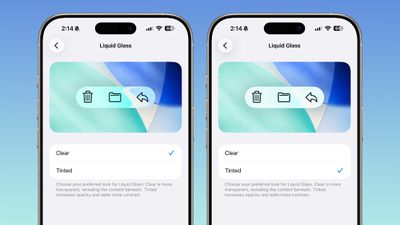
Apple added a toggle for customizing the look of Liquid Glass. In Settings > Display and Brightness, there's a new option to switch between Clear or Tinted settings.
ios 26 1 liquid glass opaque
Clear is more transparent and is the standard version of Liquid Glass that displays the background underneath buttons, menu bars, and other interface elements, while Tinted increases the opacity of Liquid Glass and adds contrast.

Lock Screen Camera Swipe

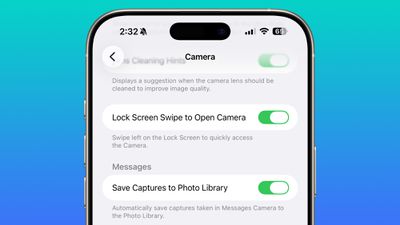
In the Camera section of the Settings app, there's a Lock Screen Swipe to Open Camera setting, and turning it off disables the feature where you can swipe left to open the camera from the Lock Screen.
lock screen swipe disable camera
The iPhone has long allowed users to open the Camera app directly from the Lock Screen with a swipe, but it can be a setting that's easy to activate, and it provides a way for someone that gets ahold of an iPhone to use it to take unwanted photos.

There was previously no way to turn off Lock Screen camera activation without disabling the camera app entirely.

Phone Haptics

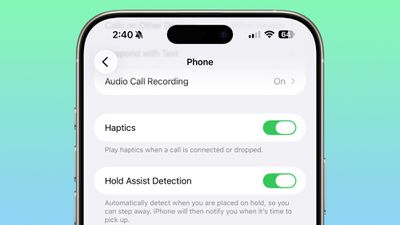
In the Phone app, there's a toggle to turn off haptic feedback when a call is connected or dropped.
ios 26 1 phone haptics

Alarms and Timers

Alarms and timers that you set up in the Clock app now have a slide to stop button rather than a tap to stop button on the Lock Screen. You can snooze an alarm with a tap, but to turn it off entirely, you need to use a slide gesture.

ios 26 1 slide to stop
The change makes it much harder to accidentally dismiss an alarm when you're trying to tap on the snooze button.

New Apple Intelligence Languages

Apple Intelligence is now available in Danish, Dutch, Norwegian, Portuguese (Portugal), Swedish, Turkish, Chinese (Traditional), and Vietnamese.

AirPods Live Translation Languages

AirPods Live Translation works with additional languages in iOS 26.1, including Japanese, Korean, Italian, and Chinese (both Mandarin Traditional and Simplified).

Apple Music

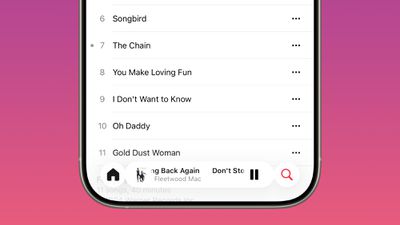
You can swipe on the music player in Apple Music to switch songs. Just slide a finger over where the song title is listed, and it'll go to the next song or back to the previous song.
ios 26 1 apple music swipe

Apple TV App

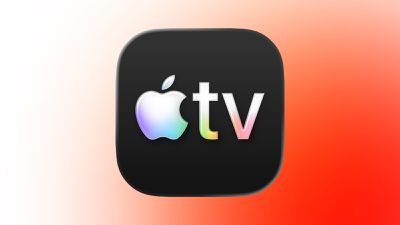
The Apple TV app has a new, more colorful icon that adopts the Liquid Glass aesthetic that Apple added alongside the ‌Apple TV‌+ name change. Apple is no longer referring to its streaming service as ‌Apple TV‌+, and is instead just calling it ‌Apple TV‌, like the app.

apple tv rebrand icon

Fitness App

You can create custom workouts in the Fitness app on iPhone. There are options for selecting workout type, estimated Active Calories, effort, duration, and start time.
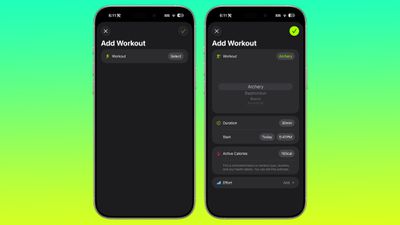
ios 26 1 custom workout

There were workout creation options before, but they were more structured than the open, custom creation options that are in iOS 26.1.

Settings App

Apple changed the alignment of icons and text in the Settings app. All settings with headers that feature text now have that text aligned to the left instead of center aligned. It's a small change that makes a big visual difference.
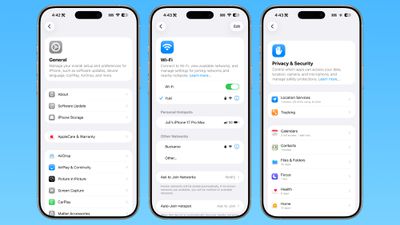
ios 26 1 left aligned settings
This includes General, Bluetooth, Wi-Fi, Cellular, Personal Hotspot, Accessibility, and more.

Home Screen Folders

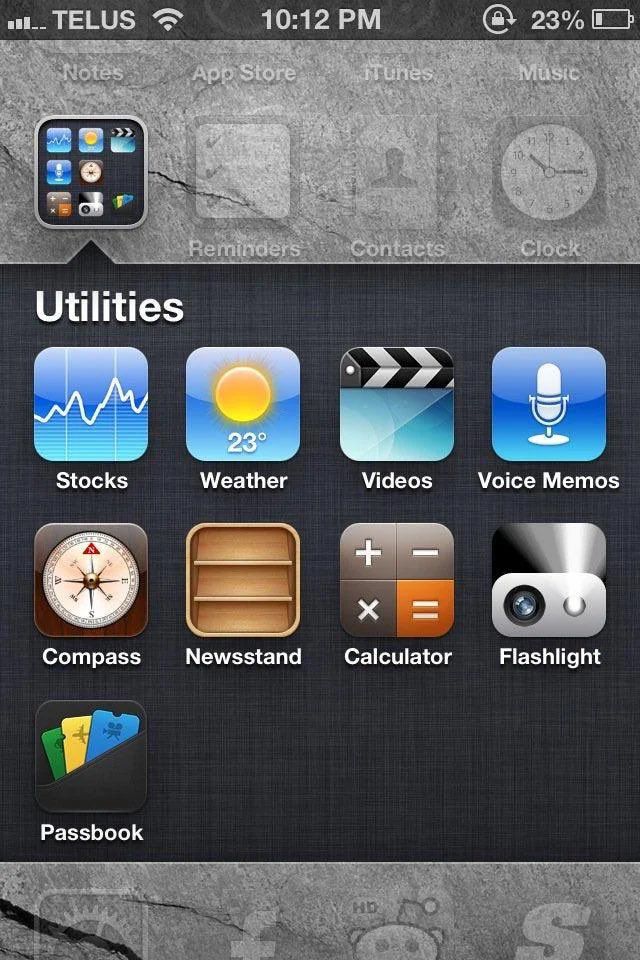
When you tap into a folder on the Home Screen, the name of the folder at the top is left aligned instead of center aligned, matching the changes made in the Settings app.
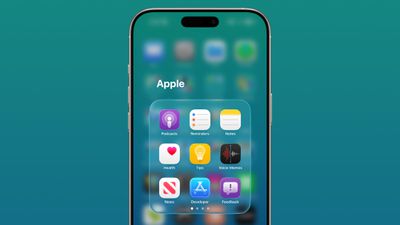
ios 26 1 folder alignment

Phone

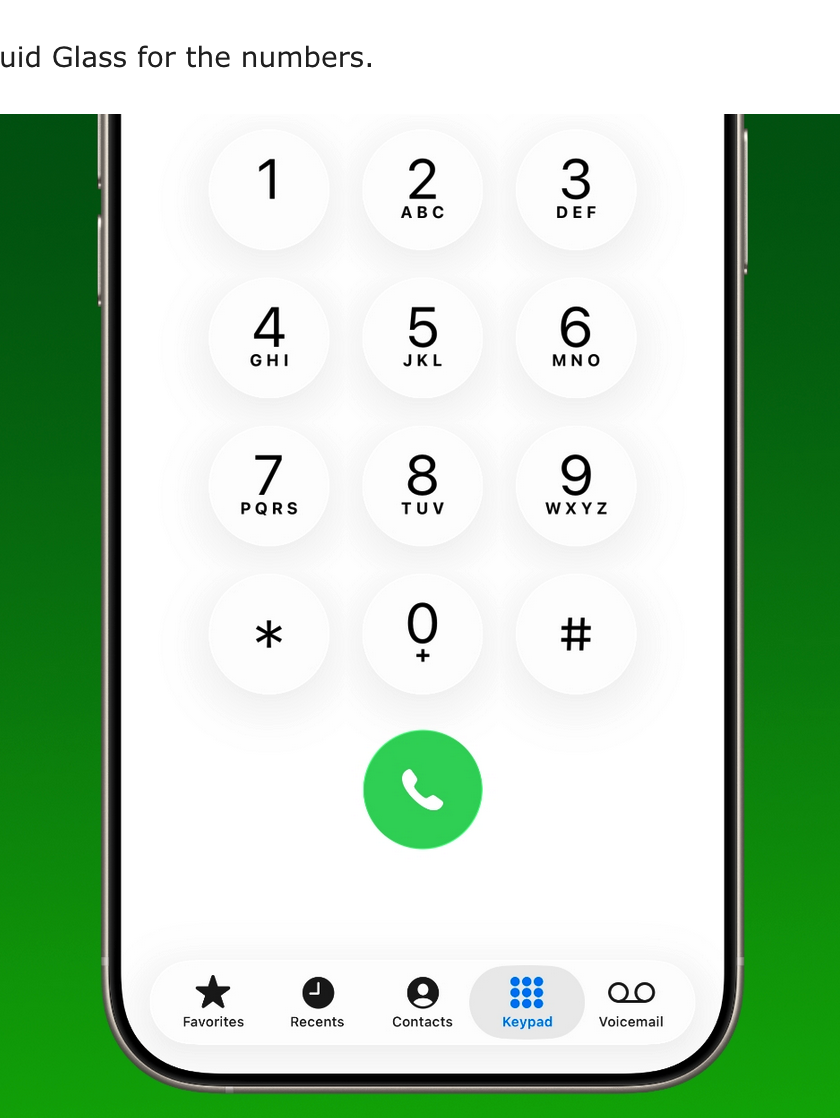
The Phone keypad now uses Liquid Glass for the numbers.
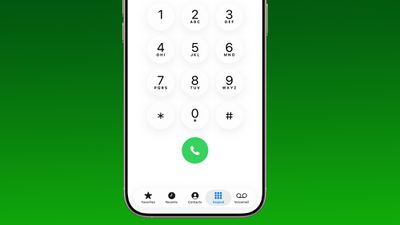
ios 26 1 phone app keypad

Photos

The slider for scrubbing through videos in the Photos app has been updated.
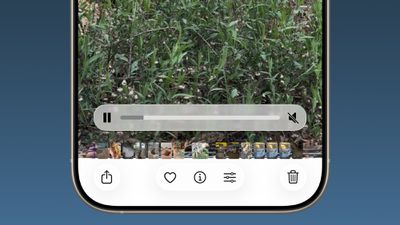
ios 26 1 photos app video
The navigation bar also has a slightly more frosted look that makes it easier to see on light backgrounds.
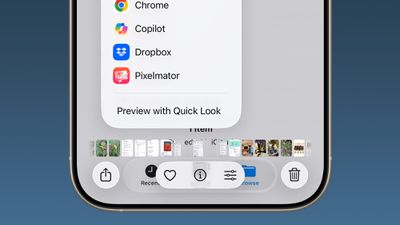
ios 26
The interface for managing multiple photos that you've selected has been tweaked slightly. Play as Slideshow, Favorite, and Hide are now at the top of the menu.
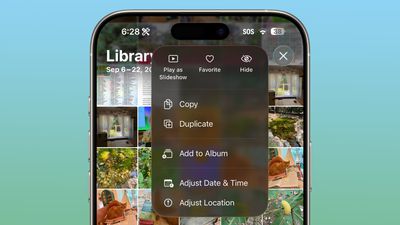
ios 26 1 photos app

Safari

The Tab Bar (Bottom) in Safari is wider with less padding around the edges. In Reduce Transparency mode, there's more padding, so it no longer looks odd.
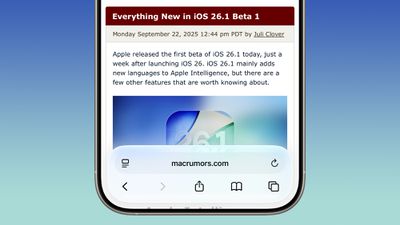
ios 26 1 safari bar

Background Security Improvements

The Privacy and Security section of the Settings app now has a toggle to automatically download and install security improvements. It's a revamp of the prior Rapid Security Responses feature.
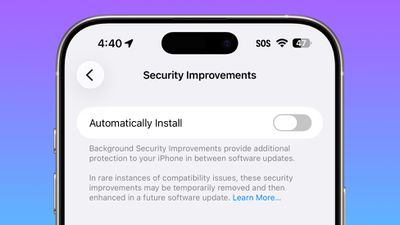
ios 26 1 security improvements

Display Settings

The Display section of the Settings app now has iOS 26-themed wallpaper instead of iOS 18 wallpaper.
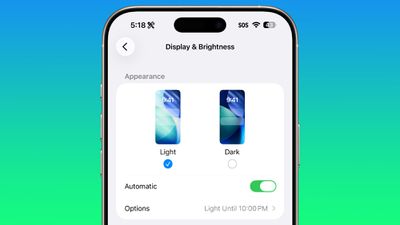
display brightness setting ios 26 1

Liquid Glass

The light refraction effect around apps is now more subtle with darker icon colors and background colors.

Wallpaper

When setting a wallpaper on the Lock Screen, instructions like Pinch to Crop show up momentarily and then disappear, rather than being shown all the time.
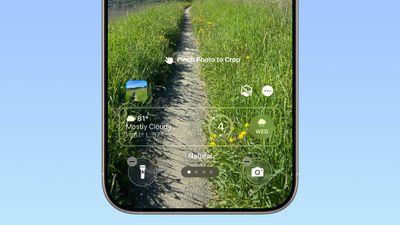
ios 26 1 wallpaper crop

Display Accessibility

Under the Display and Text Size section in the Accessibility settings, there is a new "Display Borders" toggle. It adds a border to all buttons, and replaces the prior "Button Shapes" setting.

Local Capture Settings

There's now an option to set a location in the Files app for audio and video recordings from calls. It's available by going to Settings > General > Local Capture.

Bonus: iPadOS 26.1

Many of the changes above are in iPadOS 26.1 too, and iPadOS 26.1 also makes some changes to multitasking.

Slide Over

With iPadOS 26.1, Apple is reintroducing Slide Over. Slide Over works alongside the window-based iPadOS 26 multitasking functionality, so you can have multiple windows open and still swipe over to quickly access a Slide Over app.
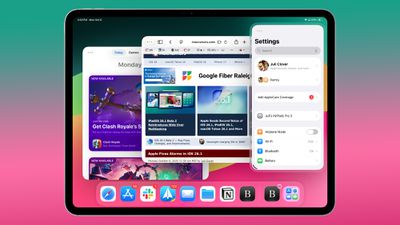
ipados 26 1 slide over
You can only have one Slide Over app at a time in iPadOS 26.1, and you can use the feature by tapping on the green window resizing button and toggling on Enter Slide Over.

External Microphones on iPad

There's now an option to adjust input gain on the iPad when using an external microphone.

Download iOS 26.1

iOS 26.1 is available for both developers and public beta testers, so if you want to get your hands on the new features now, you can. It's easiest to sign up for public beta testing by visiting Apple's beta website. You don't have long to wait for a public release, though.

Compatibility

iOS 26.1 is available on all iPhones that support ‌iOS 26‌.

Release Date

Apple could release iOS 26.1 on Monday, November 3 or Tuesday, November 4.

Related Roundups: iOS 26, iPadOS 26
Related Forum: iOS 26

Popular Stories

1password deal blue

1Password Security Breach: What Was Accessed and What Wasn't

Wednesday November 25, 2026 1:09 pm PST by
Popular password management app 1Password today said it experienced a security breach earlier this month. 1Password says some customer names and email addresses were accessed, but no customer vault contents were compromised. On November 19, 1Password saw indications that an employee's GitHub account had been breached and began investigating. The company says the breached GitHub account was...
apple design award 2025

Apple Announces 2025 Design Award Winners Ahead of WWDC 2025

Tuesday June 3, 2025 10:14 am PDT by
As we wait for WWDC to kick off next Monday, Apple today announced the winners of its annual Apple Design Awards, recognizing apps and games for their innovation, ingenuity, and technical achievement. The 2025 Apple Design Award winners are listed below, with one app and one game selected per category: Delight and Fun - CapWords (App) and Balatro (Game) Innovation - Play (App) and PBJ -...
ipad pro prime

Apple Has iPads Running macOS Internally, Says Gurman

Wednesday November 25, 2026 4:55 am PST by
Apple has iPads running macOS internally and has had them "for some time," according to Bloomberg's Mark Gurman, although he says no work is currently being done to bring the Mac operating system to iPads. Speaking on his latest Power On podcast, Gurman said there is "no work being done to consumerize macOS on the iPad." Rather, Apple will continue to bring Mac features and apps like Final Cut ...

Top Rated Comments

15 months ago
Adding a slide button and aligning text to the left are features now?
Score: 35 Votes (Like | Disagree)
bigandtasty Avatar
15 months ago
staying on iOS 18 for a good long while
Score: 31 Votes (Like | Disagree)
15 months ago
Nice addition for alarm stop, but still no independent alarm volume option. Come on Apple! How hard is it to have a constant alarm volume set, without worrying about changes to ringtone or system volume. And no, getting an app I need to subscribe to monthly to control my alarm volume is a joke for something that should be default.
Score: 29 Votes (Like | Disagree)
turbineseaplane Avatar
15 months ago

Before anybody complains about the left-aligned folder names…


Specific icons and styling aside, what I love here is how much contrast there is.

I also just love how much personality this has.
Score: 26 Votes (Like | Disagree)
TMRJIJ Avatar
15 months ago
Before anybody complains about the left-aligned folder names…


Attachment Image
Score: 26 Votes (Like | Disagree)
turbineseaplane Avatar
15 months ago
WTH is this?

Don't we want to easily and clearly see where the number buttons are?


Attachment Image
Score: 16 Votes (Like | Disagree)
Latest Stories
The 50+ Best Apple Black Friday Deals on AirPods, iPads, MacBooks, and More
2 hours ago
Apple's M6 and PROLED MacBook Pro Reach New Low Prices for Black Friday
2 hours ago
The MacRumors Show: iPhone Air 2 and iPhone 18 Are Coming
2 hours ago
Apple Store in Brisbane Reopening Next Month With New Design
3 hours ago
The 60+ Best Black Friday Accessory Deals on iPhone Chargers, TVs, Headphones, and More
3 hours ago
GTA VI Now (Barely) Running on Apple Silicon Macs
4 hours ago
The Best Black Friday Streaming Deals on Apple TV, Disney+, and More
4 hours ago
Apple TV's 'Carême' Wins International Emmy for Best Drama
5 hours ago
iPhone 18 Production Delay Leaves Apple Little Time Before Launch
6 hours ago
The Best Black Friday AirPods Deals
6 hours ago
The Best Black Friday Deals on Apple Home Products
6 hours ago
The Best Black Friday iPhone Deals
6 hours ago
The Best Black Friday iPad Deals
7 hours ago
The Best Black Friday Apple Watch Deals
7 hours ago
The Best Black Friday AirTag Deals
7 hours ago
The Best Black Friday Mac Deals
7 hours ago
iPhone Share of US Smartphone Market Hits 57% as Rivals Slip
8 hours ago
iPhone 20 Pro Rumored to Feature 3D-Printed Titanium Frame
9 hours ago
Apple's Official 2026 Black Friday Offer Starts Rolling Out
1 day ago
Halide Adds Fill Light Feature for iPhone Duo
1 day ago
MacBook Air Black Friday Deals Now Live With Massive $399 Savings
1 day ago
Amazon Discounts All MacBook Neo Models by $99 for Black Friday
1 day ago
Kodak Launches Unique AirTag Rival With E-Ink Display
1 day ago
Here's Why the Apple Store is Going Down
1 day ago
Apple Still Working on Giant Foldable iPad That Could Cost $5,000
1 day ago
iPhones Dominate China's Weak Singles' Day Smartphone Sales
1 day ago
iPhone 20 Pro Could Feature Ceramic in Limited-Edition Model
1 day ago
Apple Faces Korean Regulator Review Over iPhone 16 AI Advertising
1 day ago
Apple Watch Ultra 4 Hits New Best-Ever Price of $649.99 for Black Friday
1 day ago
New Apple Store Opening in India, Download the Special Wallpaper Now
2 days ago
Related Apple News: Travel | Health | Culture | Reviews | Business