Skip to Content

iOS 18: What's New With Safari

iOS 18 includes updates for many of Apple's built-in apps, and Safari is no exception. Apple's browser has some useful new features for more quickly getting to the information that you want most from websites.
iOS 18 Safari Feature
This guide highlights everything that's new in Safari.

Highlights

Highlights detects relevant information on a webpage that you're visiting and surfaces it for you so you can find pertinent details without having to scour a page.

ipados 18 safari highlights
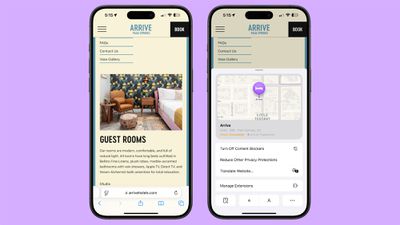
When a Highlight is available on a webpage, you'll see a small purple sparkle over the tool icon in the browser bar, along with a quick flash to the Highlight data that's available. If you tap on the icon with the sparkle, Safari will show you key website information like location, hours, and directions.

Information that's shown in Highlights depends on the website you're visiting. For stores, hotels, and other places you might want to go to, Safari provides directions. For other websites, you might see links to learn more about people, music, movies, and TV shows.
ios 18 safari highlights
Highlights is available in U.S. English at the current time, and you won't see it on all websites. Highlights can be disabled by opening up the Safari section of the Settings app and toggling it off.

Reader Mode

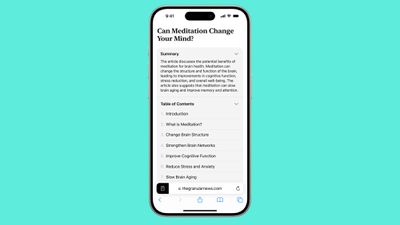
Safari updated Reader Mode to provide a table of contents for long articles and also a quick summary of what's on the page.
ios 18 safari reader mode
The new Reader Mode features give users a way to get to a specific part of an article as well as an overview of what's in an article in order to decide whether it's worth continuing to read.

New Reader Mode options are available in English (Australia), English (Canada), English (Ireland), English (New Zealand), English (South Africa), English (UK), and English (U.S.)

Design Changes

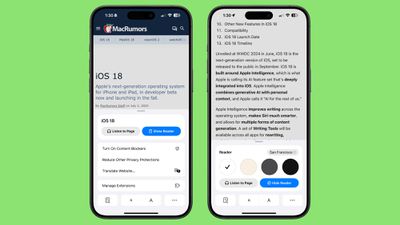
Apple updated the design of the Safari tools that can be accessed through the URL bar. The tool icon is now a box with two lines, and tapping it brings you into full overlay window that's at the bottom of the display.
ios 18 safari design changes
Not all tools are displayed at once anymore, with Apple prioritizing those people might want most like translate, Reader Mode, Privacy Protections, and font size. Tapping on the ellipsis at the bottom of the interface shows the rest of the Safari settings like Show IP Address, Request Desktop Website, and Hide Toolbar.

Apple has also changed the design of the tab management page, with a unified toolbar for separate sections and tab groups.

New Quick Access Options

Some of the features that used to be tucked away in the Share Sheet are now more readily available through the Safari toolbar.
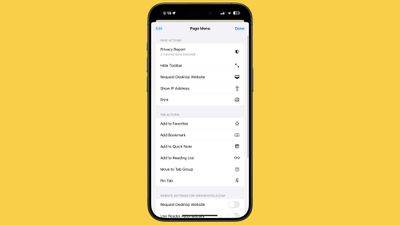
ios 18 safari menu options
New options include the following:

  • Print
  • Add to Favorites
  • Add Bookmark
  • Add to Quick Note
  • Add to Reading List
  • Move to Tab Group
  • Pin Tab
  • Camera Access
  • Microphone Access
  • Location Access
  • Open Links in Profile

The Page Menu can be edited so that you can customize which tools go in your list of favorites for quicker access.

All of these options are still available through the Share Sheet as well.

Distraction Control

Safari includes Distraction Control, a feature that cuts down on distracting elements on webpages like sign-in windows, cookie preference popups, GDPR notices, newsletter signup banners, autoplay videos, and more.
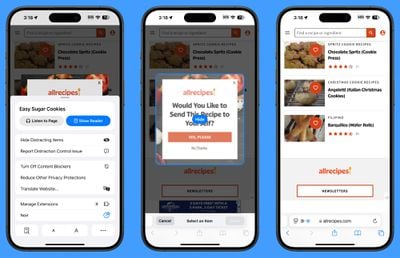
ios 18 distraction control
Distraction Control can be used to hide static content on a page, but it is not an ad blocker and cannot be used to permanently hide ads. An ad can be temporarily hidden, but the feature was not designed for ads, and an ad will reappear when it refreshes. It was not created for elements on a webpage that regularly change.

To use Distraction Control, go to the Page Menu and select Hide Distracting Items. You can select an area on the page that you want to hide, and static content that you select will remain hidden. It is a good way to eliminate the pesky popovers that show up when browsing online stores, reading articles, and more. iPhone, iPad, and Mac users need to opt in to hiding elements on the page, and Apple says that nothing is hidden that is not proactively selected.

When hiding a cookie banner or GDPR popup with Distraction Control, the function is the same as closing a banner without submitting website preferences at all.

Your Distraction Control settings are on-device and will not sync from device to device, so you will need to hide website elements on each one of your devices. You can use the "Show Hidden Items" option by going to the Safari search field to instantly see all hidden elements on a webpage.

Passwords

With a new dedicated Passwords app, Safari logins, passwords, and passkeys are filled in automatically if you have your information saved to the app.
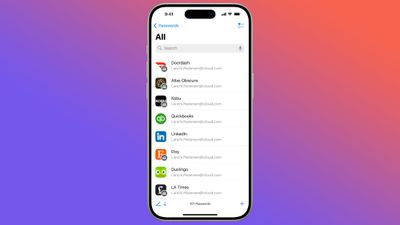
ios 18 passwords app
The Passwords app has the same functionality as the Passwords section in the Settings app, it's simply been split out into a standalone app for easier access. Safari can automatically save login and password information to the Passwords app, and everything syncs cross-device. Passwords can even be accessed on Windows PCs.

Locked Apps

Apps like Safari can be locked and hidden, requiring Face ID or Touch ID authentication to access them. Locking an app goes a step further than the protected private browsing feature that Apple introduced in an earlier version of iOS, as the entire Safari browser can be locked.
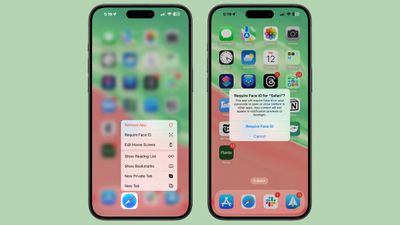
ios 18 locked apps
To open a locked app, you need to authenticate, so someone who has your unlocked phone still won't be able to see your browser if you lock Safari. Hiding an app locks it and removes it from the Home Screen, tucking it away in a secret Hidden apps folder in the App Library.

Read More

For more on the new features that Apple is adding in iOS 18, we have a dedicated iOS 18 roundup.

Related Forums: iOS 18, iPadOS 18

Popular Stories

apple design award 2025

Apple Announces 2025 Design Award Winners Ahead of WWDC 2025

Tuesday June 3, 2025 10:14 am PDT by
As we wait for WWDC to kick off next Monday, Apple today announced the winners of its annual Apple Design Awards, recognizing apps and games for their innovation, ingenuity, and technical achievement. The 2025 Apple Design Award winners are listed below, with one app and one game selected per category: Delight and Fun - CapWords (App) and Balatro (Game) Innovation - Play (App) and PBJ -...
1password deal blue

1Password Security Breach: What Was Accessed and What Wasn't

Wednesday November 25, 2026 1:09 pm PST by
Popular password management app 1Password today said it experienced a security breach earlier this month. 1Password says some customer names and email addresses were accessed, but no customer vault contents were compromised. On November 19, 1Password saw indications that an employee's GitHub account had been breached and began investigating. The company says the breached GitHub account was...
Apple 2026 Black Friday Event Hero

Apple's Official 2026 Black Friday Offer Starts Rolling Out

Thursday November 26, 2026 8:37 am PST by
Apple's annual four-day Black Friday through Cyber Monday shopping event is now live in Australia, New Zealand, and Thailand, and it will continue to roll out across Europe, the U.S., and Canada as the calendar turns to Friday, November 27 around the world. In the U.S., Apple's terms and conditions say the promotion begins on November 27 at 12 a.m. Pacific Time and ends on November 30 at...

Top Rated Comments

DocMultimedia Avatar
31 months ago
I'm really looking forward to the Passwords app.
Score: 5 Votes (Like | Disagree)
31 months ago

If they’d just fix all the endless problems with the world’s worst browser and not make any feature changes, the entire human race would celebrate.
I find Safari perfect for my needs with no problems at all.
Score: 4 Votes (Like | Disagree)
sniffies Avatar
31 months ago
Still no favicons in bookmarks though.

macOS Safari has had them since 2003.
Score: 4 Votes (Like | Disagree)
31 months ago
There should be a porn mode

With custom quick action options… such as blank window, mute sound and clear all history 😂

I think we all know the motivation for Retina displays. Porn pushes technology and retina displays were made in response to the demand for super high resolution images and their display. QuickTime was also a response to porn. Anyone wanna QuickTime was a thing in the 90s

Seriously, adult content has pushed tech and also software. Whether you like it or not.
Score: 3 Votes (Like | Disagree)
QuarterSwede Avatar
31 months ago

If they’d just fix all the endless problems with the world’s worst browser and not make any feature changes, the entire human race would celebrate.
Ahhh, so you’ve used Chrome too.
Score: 3 Votes (Like | Disagree)
needsomecoffee Avatar
31 months ago
Why does Apple not support Progressive Web Apps the same between iOS and MacOS. I just tested the new PWA "Add to Dock" feature in MacOS and was severly disappointed to find that the "app" is really just an optimized link to the web page. No HTML/CSS/JS files are downloaded. If you are off-line, the PWA will not work. Both iPhone and iPad Safari apps properly download the web page files as described in the manifest, and work just fine off-line. Why is MacOS different ??
Score: 2 Votes (Like | Disagree)
Latest Stories
The 50+ Best Apple Black Friday Deals Still Available on AirPods, iPads, and More
10 hours ago
HomePod Mini 2 in (RED) Seemingly Spotted Ahead of Announcement
8 hours ago
Apple's M6 and PROLED MacBook Pro Reach New Low Prices for Black Friday
18 hours ago
The MacRumors Show: iPhone Air 2 and iPhone 18 Are Coming
18 hours ago
Apple Store in Brisbane Reopening Next Month With New Design
19 hours ago
The 60+ Best Black Friday Accessory Deals on iPhone Chargers, TVs, Headphones, and More
19 hours ago
GTA VI Now (Barely) Running on Apple Silicon Macs
20 hours ago
The Best Black Friday Streaming Deals on Apple TV, Disney+, and More
20 hours ago
Apple TV's 'Carême' Wins International Emmy for Best Drama
21 hours ago
iPhone 18 Production Delay Leaves Apple Little Time Before Launch
22 hours ago
The Best Black Friday AirPods Deals Still Available
14 hours ago
The Best Black Friday Deals on Apple Home Products
22 hours ago
The Best Black Friday iPhone Deals Still Available
14 hours ago
The Best Black Friday iPad Deals Still Available
14 hours ago
The Best Black Friday Apple Watch Deals Still Available
14 hours ago
The Best Black Friday AirTag Deals Still Available
14 hours ago
The Best Black Friday Mac Deals Still Available
14 hours ago
iPhone Share of US Smartphone Market Hits 57% as Rivals Slip
1 day ago
iPhone 20 Pro Rumored to Feature 3D-Printed Titanium Frame
1 day ago
Apple's Official 2026 Black Friday Offer Starts Rolling Out
2 days ago
Halide Adds Fill Light Feature for iPhone Duo
2 days ago
MacBook Air Black Friday Deals Now Live With Massive $399 Savings
2 days ago
Amazon Discounts All MacBook Neo Models by $99 for Black Friday
2 days ago
Kodak Launches Unique AirTag Rival With E-Ink Display
2 days ago
Here's Why the Apple Store is Going Down
2 days ago
Apple Still Working on Giant Foldable iPad That Could Cost $5,000
2 days ago
iPhones Dominate China's Weak Singles' Day Smartphone Sales
2 days ago
iPhone 20 Pro Could Feature Ceramic in Limited-Edition Model
2 days ago
Apple Faces Korean Regulator Review Over iPhone 16 AI Advertising
2 days ago
Apple Watch Ultra 4 Hits New Best-Ever Price of $649.99 for Black Friday
2 days ago
Related Apple News: Iphone | Business | Reviews | Motoring | Politics































