

With iOS 18.2, Apple introduced ChatGPT integration with Apple Intelligence to expand your iPhone's AI capabilities in several ways. When enabled, Siri can leverage ChatGPT for complex queries about photos and documents, and the integration also extends to Writing Tools for text and image generation, while Visual Intelligence helps identify objects and places using your iPhone's camera.
No ChatGPT account is required to get started, but connecting a free or paid ChatGPT account unlocks additional features and more frequent access to advanced capabilities. This guide explains how to set up and make the most of these new features. Note that you must have an iPhone 15 Pro or iPhone 16 model to use Apple Intelligence features in iOS 18.2.
Setting Up ChatGPT in iOS 18.2
If you have Apple Intelligence enabled, setting up optional ChatGPT integration requires just a few steps, and you can begin without even having a ChatGPT account. You can always start with the basic setup and upgrade to a connected account later if needed (although you may never need to – more on that below).
- Open Settings.
- Tap Apple Intelligence & Siri.
- Under "Extensions," tap ChatGPT.
- Toggle on the switch next to Use ChatGPT.
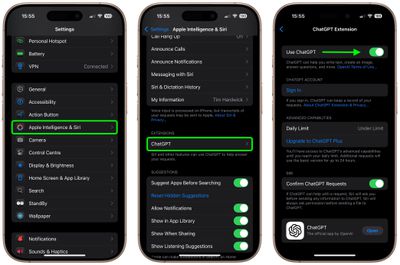
If you have a ChatGPT account (free or paid), you can optionally Sign In from this last screen using your account credentials. One benefit of doing this is that it allows you to retain a history of your chats and return to them later in the ChatGPT app or website.
Remember that you do not need an account to use ChatGPT with Siri – it's completely free, but you may eventually hit OpenAI's daily limits for advanced capabilities, which use the latest GPT-4o model. After reaching these limits, the system switches to basic mode until 24 hours have passed. While it has not been confirmed, basic mode likely uses OpenAI's GPT-4o mini model, which handles most common requests more quickly, but the responses you get may be less detailed. However, in our tests there isn't too much difference between them when used within the context of daily iPhone usage.
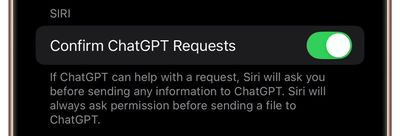
After you've enabled the ChatGPT extension, Siri automatically determines when to use ChatGPT for better responses to your queries. However, you can control whether Siri asks you before sending any information to ChatGPT by toggling the switch next to Confirm ChatGPT Requests in the Chat GPT Extension settings menu. Note that Siri always asks permission before sending a file to ChatGPT.
Apple, ChatGPT, and Your Privacy
Apple says that when you use the ChatGPT extension without logging in, only your request and any attachments — like documents or photos — are sent to ChatGPT to process your query. OpenAI doesn't receive any information linked to your Apple Account, and your IP address remains hidden. Only your general location is shared.

OpenAI does not store your queries or their responses, and your data won't be used to enhance or train their models. Only if you choose to sign in will your ChatGPT account settings and OpenAI's data privacy policies apply.
Siri Integration
The combination of Siri and ChatGPT easily enhances the voice assistant's capabilities compared to what you will be used to. The integration works well for complex queries involving problem solving, writing assistance, detailed explanations, and step-by-step instructions. You'll find that responses are more detailed and context-aware compared to standard Siri capabilities.
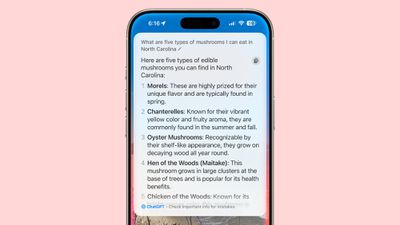
Siri will analyze each request to see if it's something that needs to be answered by ChatGPT, but you can specify that you want to use ChatGPT simply by starting a Siri query with "ChatGPT." This actually opens up a lot more of the integration's utility. For example, you can ask ChatGPT to generate an image based on a prompt, and it will use Dall-E to do the heavy lifting. Even better, the results are generally superior to Apple's Image Playground. You can save the resulting image using the Save button in the top-right corner of the output card.
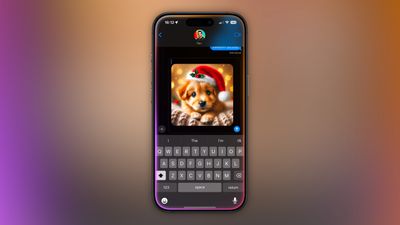
Pro Tip: If you query ChatGPT in Messages and ask it to generate an image, it will even drop the image into the text field, ready for it to be shared in the conversation.
You can also ask ChatGPT a question about something on your screen, and Siri will offer to send a screenshot of it to ChatGPT or the full content as a file if it's a long document.
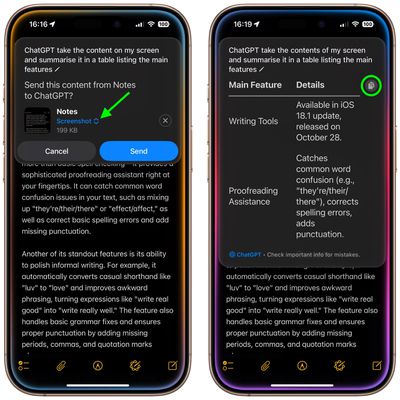
You can use the Copy button at the top-right of the scrollable response window to copy the output to your clipboard.
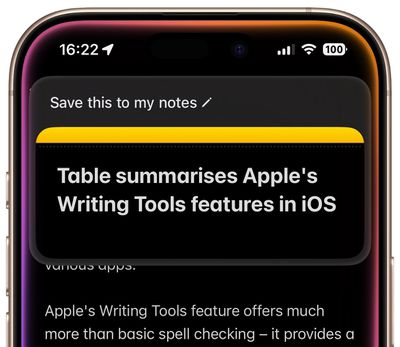
Alternatively, you can save useful responses by invoking Siri and saying "Save this to my notes," which gives you a searchable archive of your conversations in Notes that persists after they end. This is especially useful if you aren't logged into ChatGPT and can't refer back to your account to see your chat history.
ChatGPT can be used with Siri, but it is also integrated into Writing Tools and Visual Intelligence. With Writing Tools, ChatGPT can generate text, and with Visual Intelligence, ChatGPT can answer questions about what the Camera sees. We'll look at these specific integrations in what follows.
ChatGPT and Writing Tools
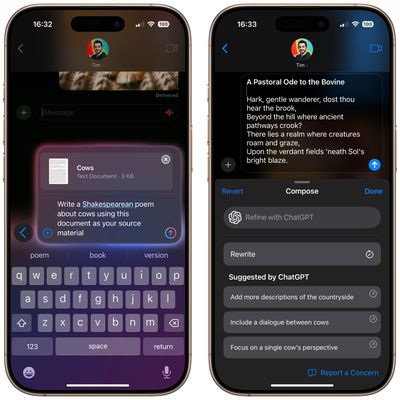
With the advent of ChatGPT integration in iOS 18.2, Writing Tools has gained a new Compose option. This lets you describe what you'd like to write, and ChatGPT will create it for you.
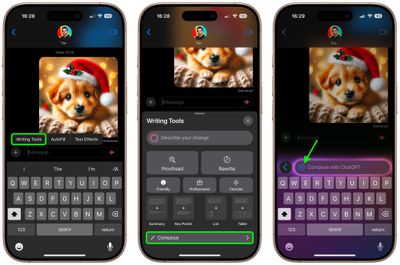
But the Compose option doesn't just limit you to text prompts. If you look in the text input field, there is a + button. Tapping this brings up options to upload a file or image on your iPhone to ChatGPT for the chat bot to reference as part of your query. When a response has been generated, you will also see further suggested queries from ChatGPT in the Compose panel.
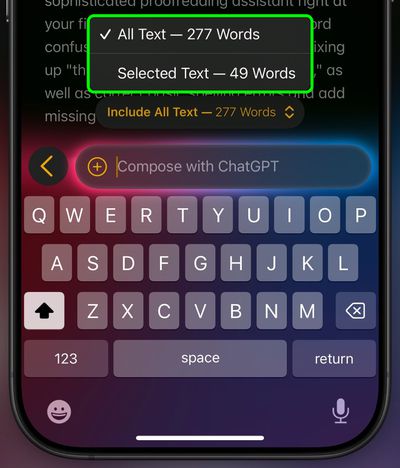
The Compose feature isn't limited to generating text from files or images stored on your iPhone. If you are in Notes, for example, you can select text that you want ChatGPT to work with, or you can ask it to reference all the text in a note. You'll also see these options in a tappable menu above the Compose input field.
ChatGPT's Compose option can be used pretty much anywhere on your iPhone where you can access Writing Tools, such as Notes, Messages, and Safari, as well as third-party apps that support the Apple Intelligence feature set.
ChatGPT and Visual Intelligence
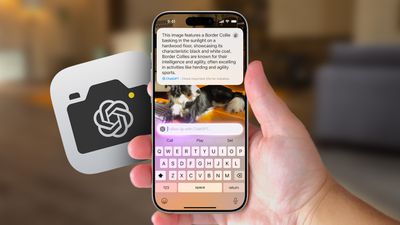
Visual Intelligence is an iPhone 16 feature that uses the Camera Control button located on the lower right side of the device. If you long press it, you can get into Visual Intelligence mode, where the Camera app can be used to identify what's around you.
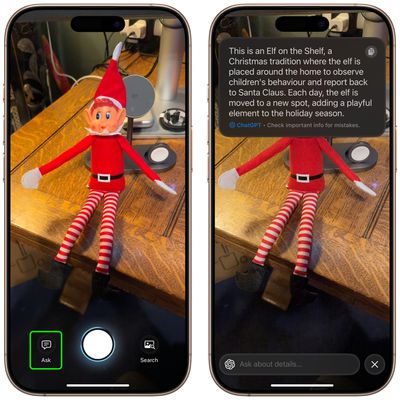
For example, if you point the camera at an object or take a picture of it, you can tap the Ask button, and ChatGPT will analyse what is in the viewfinder to identify the object. If the output doesn't answer your query, you can follow it up by typing into the ChatGPT input field. This can be useful for getting more information about pretty much anything around your home or when you're out and about.
Future Chat Bot Extensions for iOS
There have been reports about future Apple Intelligence integrations with AI chatbots like Google's Gemini and Anthropic's Claude, although no official announcements have been made yet. That said, Apple software chief Craig Federighi stated in June that he would like to see Gemini integration happen at some point.

According to Bloomberg's Mark Gurman, Apple may delay integrating Google Gemini until next year to give OpenAI an exclusivity window, particularly since Apple isn't paying for the technology. However, it's unclear whether Gemini's arrival will coincide with an iOS 18 update in the spring or if it will feature as part of the iOS 19 release cycle later next year.

































