Skip to Content

iOS 17 Safari Features: Profiles, Locked Private Browser, Shared Passwords, Updated Tracking Prevention and More

With every update to the iOS operating system, Apple adds new features to the built-in apps like Safari. In iOS 17, Safari gains new privacy functionality, improvements to search, updated Siri integration, and more.
iOS 17 General Safari Feature
This guide highlights all of the iOS 17 Safari feature additions.

Profiles

In iOS 17, Apple expanded on Tab Groups with a Profile feature that is designed to let you separate your browsing for different use cases. You can create a "Work" profile and a "Personal" profile, for example, so all of your work-related browsing is kept separate from your personal browsing.
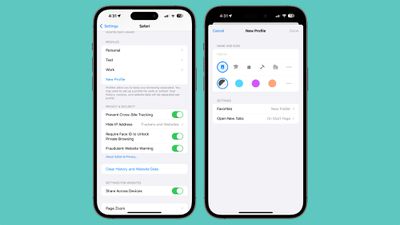
ios 17 safari profiles
Each profile has separate cookies, browsing history, extensions, and website data. You can turn off cookies and pop-ups on one profile, for instance, leaving them on for another profile. Profiles also have separate Favorites and Tab Groups.
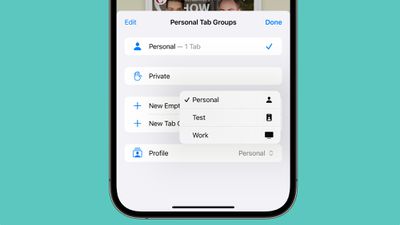
safari profiles set up ios 17
Profiles can be set up by following these instructions:

  1. Open up the Settings app.
  2. Scroll down to Safari.
  3. Tap on New Profile.
  4. Select an icon, name, and background color for the profile.
  5. Choose your settings for Favorites and Tabs.
  6. Tap Done.

From there, you can edit profiles by tapping into them in the Settings app. In Safari, tap on the Tabs icon with two overlapping squares, then tap on the middle icon and choose the "Profile" option to change which profile is active.

Locked Private Browsing Window

Private browsing windows are now locked and require secondary authentication to unlock and access. If you hand your unlocked phone over to someone and they attempt to open your Safari private browsing tab, access will be denied without a second Face ID/Touch ID scan or a passcode.
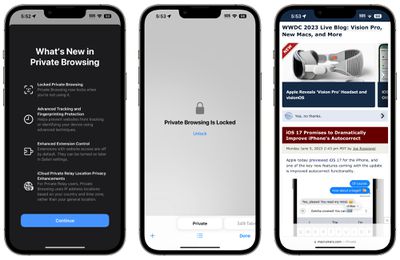
safari private browsing ios 17
The ‌Face ID‌/‌Touch ID‌ requirement keeps the private browsing tab private even if someone else has access to your iPhone or iPad. The private browsing tab is locked by default in iOS 17, but the ‌Face ID‌/‌Touch ID‌ requirement can be turned off by following these steps:

  1. Open the Settings app.
  2. Tap on Safari.
  3. Scroll down to Require ‌Face ID‌ (or ‌Touch ID‌) to Unlock Private Browsing.
  4. Tap the toggle to turn it off and confirm with a ‌Face ID‌/‌Touch ID‌ scan. When disabled, the toggle will be gray.

Private Search Engine

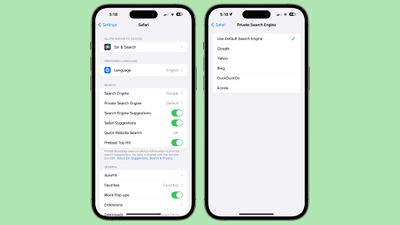
In iOS 16 you can choose a default search engine to use with Safari, but in iOS 17, you can choose separate search engines for standard browsing and private browsing.
ios 17 private search engine
Options include Google, Yahoo, Bing, DuckDuckGo, and Ecosia. Leaving it on Default will use the same search engine that's set for standard browsing.

  1. Open up the Settings app.
  2. Scroll down to Safari.
  3. Tap on Private Search Engine.
  4. Tap on one of the Search Engine options to select it.
  5. Exit out of the Settings.

Tracking URLs

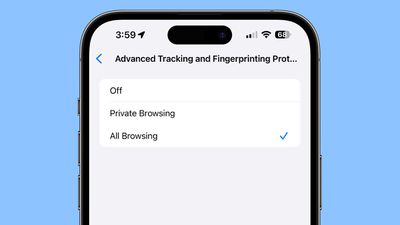
URLs in iOS 17 can be stripped of all tracking information appended to the end of the URL so that websites cannot track your browsing using URL identifiers. This function is enabled automatically for private browsing in iOS 17, but it can be turned on for all browsing.
safari tracking all browsing ios 17
Here's how to remove URL-based tracking for all browser windows:

  1. Open up the Settings app.
  2. Scroll down to Safari.
  3. Tap on Advanced.
  4. Tap on Advanced Tracking and Fingerprinting Protection.
  5. Toggle on "All Browsing."

Turning this on will ensure that all URLs opened in Safari will strip the additional tracking information that's sometimes pasted on to the end of a URL.

Hide IP Address From Websites

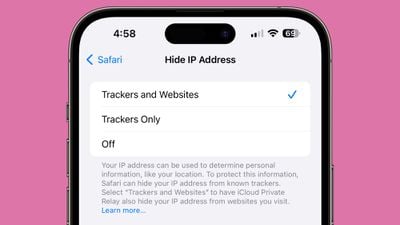
In iOS 17, there is an option to hide IP address from both trackers and websites or only trackers when using the iCloud Private Relay feature. With Trackers and Websites selected, IP address will be kept cloaked and websites will not be able to determine your location using that information.
ios 17 safari hide ip address
In iOS 16, ‌iCloud‌ Private Relay was designed to hide IP address primarily from known trackers, so this is an expansion of the feature.

Search Improvements

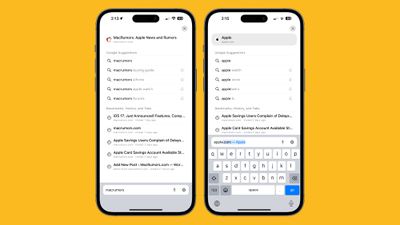
Search is more responsive in iOS 17, so it brings up search results more quickly. It also brings up a wider range of search suggestions for you to choose from.
ios 17 safari search
Apple has added favicons to top website search suggestions, and search results that come from your bookmarks, tabs, and search history are clearly marked.

Listen to Page

‌Siri‌ in iOS 17 can read a website to you, which is useful if you come across a long-form article or other content that you want to listen to while you do something else. The feature works as long as Reader View is available on a website.
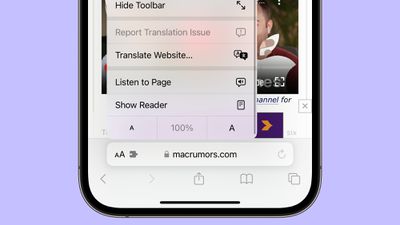
ios 17 safari listen to page

  1. Open up Safari.
  2. Navigate to the content that you want ‌Siri‌ to read.
  3. Tap on the Aa icon in the address bar.
  4. Select the Listen to Page option.

From there, ‌Siri‌ will begin to read the content on the page. You can pause by tapping on the Pause Listening option, and resume with the Resume Listening option. If you lock your display, you will get dedicated playback controls.

‌Siri‌ will also read a page if you open up a website to a selected article and ask ‌Siri‌ to "Read this to me."

Shared Passwords and Passkeys

In iOS 17 (and iPadOS 17/macOS Sonoma) there is an option to securely share passwords and passkeys with friends and family members. With the sharing feature, passwords for shared media accounts, utilities, bills, and more can be provided to multiple people.
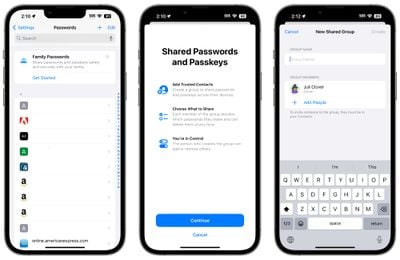
ios 17 shared passwords
Each person can access, add to, and change passwords that are shared, with setup available by going to the Passwords section of the Settings app and choosing "Get Started" under the "Family Passwords" heading.

This is not strictly a Safari feature, but it does make logging into sites where you use shared login information simpler.

Privacy Settings

Note that privacy-focused settings that include Block All Cookies, Privacy Preserving Ad Measurement, and Check for Apple Pay have been relocated from the "Privacy & Security" section of the Safari settings to the "Advanced" section, which is more hidden.
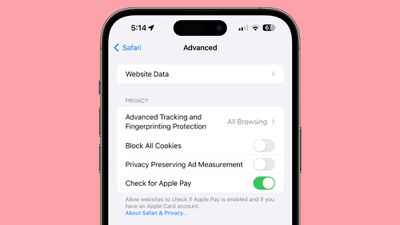
ios 17 privacy settings safari

Read More

A rundown on all of the new features in the iOS 17 update can be found in our comprehensive iOS 17 roundup.


Tag: Safari
Related Forums: iOS 17, iPadOS 17

Popular Stories

apple design award 2025

Apple Announces 2025 Design Award Winners Ahead of WWDC 2025

Tuesday June 3, 2025 10:14 am PDT by
As we wait for WWDC to kick off next Monday, Apple today announced the winners of its annual Apple Design Awards, recognizing apps and games for their innovation, ingenuity, and technical achievement. The 2025 Apple Design Award winners are listed below, with one app and one game selected per category: Delight and Fun - CapWords (App) and Balatro (Game) Innovation - Play (App) and PBJ -...
1password deal blue

1Password Security Breach: What Was Accessed and What Wasn't

Wednesday November 25, 2026 1:09 pm PST by
Popular password management app 1Password today said it experienced a security breach earlier this month. 1Password says some customer names and email addresses were accessed, but no customer vault contents were compromised. On November 19, 1Password saw indications that an employee's GitHub account had been breached and began investigating. The company says the breached GitHub account was...
Apple 2026 Black Friday Event Hero

Apple's Official 2026 Black Friday Offer Starts Rolling Out

Thursday November 26, 2026 8:37 am PST by
Apple's annual four-day Black Friday through Cyber Monday shopping event is now live in Australia, New Zealand, and Thailand, and it will continue to roll out across Europe, the U.S., and Canada as the calendar turns to Friday, November 27 around the world. In the U.S., Apple's terms and conditions say the promotion begins on November 27 at 12 a.m. Pacific Time and ends on November 30 at...

Top Rated Comments

TheYayAreaLiving 🎗️ Avatar
44 months ago
Nice features! Safari is my favorite browser in iOS.
Score: 17 Votes (Like | Disagree)
44 months ago
I love Safari because it protects my privacy and consumes less power. 😊
Score: 11 Votes (Like | Disagree)
ShivneelSingh Avatar
44 months ago
“Profiles” is a very welcome feature.
Score: 10 Votes (Like | Disagree)
Flamingdeathbolts Avatar
44 months ago
And that’s why I won’t mind paying extra $$ for Apple products! Love the privacy features coming
Score: 9 Votes (Like | Disagree)
Apple Fan 2008 Avatar
44 months ago
Getting rid of URL tracking is awesome!
Score: 8 Votes (Like | Disagree)
44 months ago

The line between privacy and revenue gets more and more blurred everyday.

If we are being honest, we can’t have growth in both categories.

It’s a give and take situation.
Apple gains more revenue because it pursues increased privacy for its customers who value what they get from Apple. that is growth in both categories.
Score: 6 Votes (Like | Disagree)
Latest Stories
The 50+ Best Apple Black Friday Deals Still Available on AirPods, iPads, and More
9 hours ago
HomePod Mini 2 in (RED) Seemingly Spotted Ahead of Announcement
7 hours ago
Apple's M6 and PROLED MacBook Pro Reach New Low Prices for Black Friday
17 hours ago
The MacRumors Show: iPhone Air 2 and iPhone 18 Are Coming
17 hours ago
Apple Store in Brisbane Reopening Next Month With New Design
17 hours ago
The 60+ Best Black Friday Accessory Deals on iPhone Chargers, TVs, Headphones, and More
18 hours ago
GTA VI Now (Barely) Running on Apple Silicon Macs
19 hours ago
The Best Black Friday Streaming Deals on Apple TV, Disney+, and More
19 hours ago
Apple TV's 'Carême' Wins International Emmy for Best Drama
20 hours ago
iPhone 18 Production Delay Leaves Apple Little Time Before Launch
21 hours ago
The Best Black Friday AirPods Deals Still Available
13 hours ago
The Best Black Friday Deals on Apple Home Products
21 hours ago
The Best Black Friday iPhone Deals Still Available
13 hours ago
The Best Black Friday iPad Deals Still Available
13 hours ago
The Best Black Friday Apple Watch Deals Still Available
13 hours ago
The Best Black Friday AirTag Deals Still Available
13 hours ago
The Best Black Friday Mac Deals Still Available
13 hours ago
iPhone Share of US Smartphone Market Hits 57% as Rivals Slip
22 hours ago
iPhone 20 Pro Rumored to Feature 3D-Printed Titanium Frame
1 day ago
Apple's Official 2026 Black Friday Offer Starts Rolling Out
2 days ago
Halide Adds Fill Light Feature for iPhone Duo
2 days ago
MacBook Air Black Friday Deals Now Live With Massive $399 Savings
2 days ago
Amazon Discounts All MacBook Neo Models by $99 for Black Friday
2 days ago
Kodak Launches Unique AirTag Rival With E-Ink Display
2 days ago
Here's Why the Apple Store is Going Down
2 days ago
Apple Still Working on Giant Foldable iPad That Could Cost $5,000
2 days ago
iPhones Dominate China's Weak Singles' Day Smartphone Sales
2 days ago
iPhone 20 Pro Could Feature Ceramic in Limited-Edition Model
2 days ago
Apple Faces Korean Regulator Review Over iPhone 16 AI Advertising
2 days ago
Apple Watch Ultra 4 Hits New Best-Ever Price of $649.99 for Black Friday
2 days ago
Related Apple News: Iphone | Iphone Duo Separate Lock Screen Rotation | Iphone 16 Pro Vs 18 Pro | Homepod | Level Lock Pro






























