Skip to Content

iOS 17 Messages App Features: Check In, Stickers, and More

Apple made a number of changes to the Messages app in iOS 17, introducing a new look, updated stickers functionality, and important new safety features that help people traveling alone feel safer.
iOS 17 Messages Feature
This guide highlights all of the features that Apple is adding to Messages in iOS 17.

Design Updates

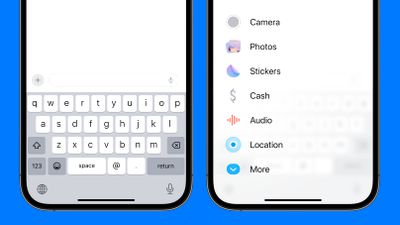
Apple updated the design of the Messages to cut down on clutter. The "+" button on the left side of the compose window houses all of the Messages apps and tools. Tapping on it brings up a dropdown list of options, that include Camera, Photos, Stickers, Cash, Audio, Location, Store, and Messages apps that have been installed.
ios 17 messages redesign
You can tap on one of the options to open its related function. So instead of tapping on the little photos icon to add a photo as you did in iOS 16, you will tap on the "+" button and then the ‌Photos‌ option to get to your Camera Roll in iOS 17.

In iOS 16, Apple had a camera icon and an App Store icon that could be tapped to expand the available options. Apps expanded across the top of the keyboard horizontally, so the cleaner vertical design is a notable change. It makes for a much more simplified design, and it's easier to tell what's what with the larger icons and text descriptions.

Check In

Check In is a safety feature that you can use when you're traveling to have someone else keep an eye on your progress. You can let a friend or family member know that you're going somewhere, and they'll be automatically notified when you reach your destination.
messages check in
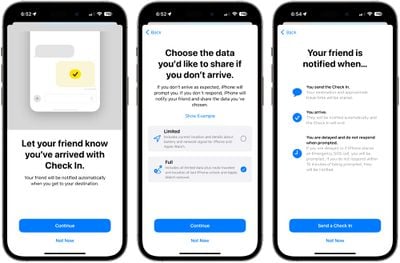
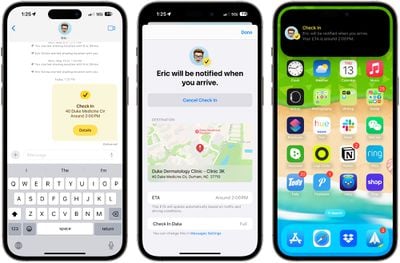
To use Check In, you'll need to select a conversation with a trusted person, tap on the "+" button, and choose the Check In option. From there, you can input the location that you're going to and the time you're set to arrive.
ios 17 messages check in messages
The person on the other end will be notified that you're heading somewhere and when you should get there. If you stop making progress while you're on your way, Messages will check in with you to see what's going on, and if there's no response, your battery level, full location, and cellular status will be shared with the person you selected.
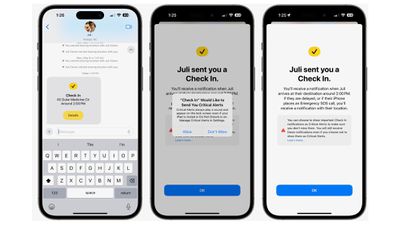
ios 17 messages check in receiving end
You can customize the amount of data that you share. Limited shares location, network signal, and battery level, while Full shares all of that plus route traveled, location of last iPhone unlock, and location of where the Apple Watch was last removed.
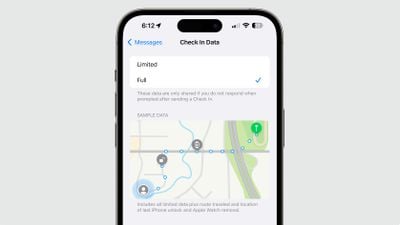
messages check in changes
When you arrive at your destination, your friend or family member is notified that you got there safely and the Check In ends successfully.
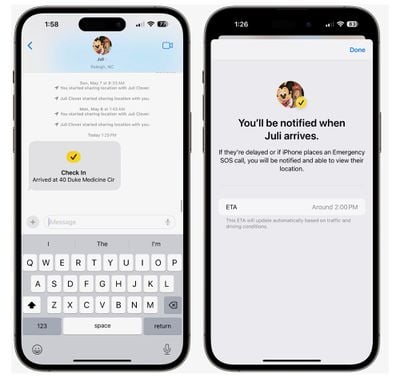
ios 17 messages check in confirmed

Stickers

Stickers have been in the Messages app for years now, but they haven't gotten a lot of attention. Apple is changing that in iOS 17, because all emoji are now considered stickers, in addition to actual stickers.
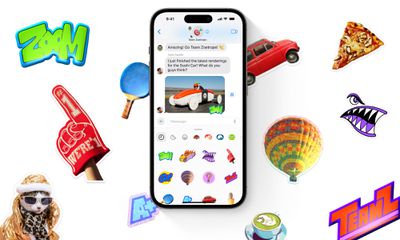
ios 17 messages stickers
Emoji now behave the same way as stickers, so in addition to simply inserting them into a conversation, you can also drag them anywhere on a message, and you can layer them on top of one another to create little emoji scenes. To put an emoji on a message, just open the emoji keyboard, select an emoji, and drag it up to the message you want to accent.

If you open up the Stickers section of the Messages app, you'll see stickers from apps you've downloaded, stickers you've created, emoji, and Memoji in one spot.

Creating Stickers

Apple in iOS 16 introduced a Remove Subject From Background option, and in iOS 17, you can use it to create and save your own stickers. Choose any of your photos and long press on the subject of the photo to get to the "Add Sticker" option.
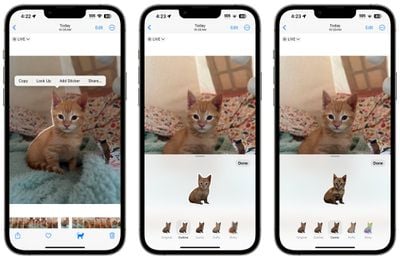
ios 17 stickers create
Choose that and it will be added right to your sticker collection, and if it's a Live Photo, it will animate.

There are a number of effects that can be added to make your digital stickers look more like real stickers, including a white outline, comic-like shading, a puffy 3D look, and a shiny, holographic finish. The sticker effects will animate and reflect the light appropriately, making your self-created stickers look professionally done.

Sticker Reactions

With emoji able to be placed anywhere on an iMessage, you can use them in place of tapback reactions. Just drag the emoji to the message that you want to respond to rather than long pressing for a tapback. Later in the year, Apple plans to allow stickers to be used right in the tapback interface.
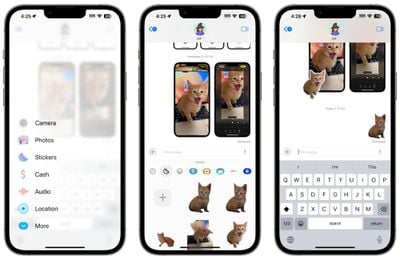
ios 17 stickers messages

Sticker Expansion

Stickers can now be used anywhere that emoji can be accessed, including third-party apps, pictures, emails, and more. So once you create your stickers from photos, you can do more with them than just send them to people using Messages.

Memoji

Apple added new halo, smirk, and peekaboo Memoji stickers to go along with the existing still Memoji sticker options.
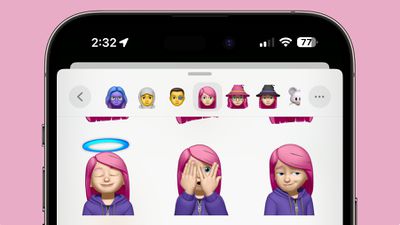
ios 17 memoji stickers

Catch-Up

If you get behind on a Messages chat with a friend or with a group of people, iOS 17 shows you a catch-up arrow. If you tap it, it will jump to the first message in a conversation that you have not seen. Catch-up is a feature that will be coming in an update to iOS 17 and it won't be in the launch version of the software.

Swipe to Reply

If you want to reply to a specific message in a conversation, just swipe from left to right to bring up the reply interface. This is a much quicker way to reply to something specific someone has said because you no longer need to long press and tap the reply button.
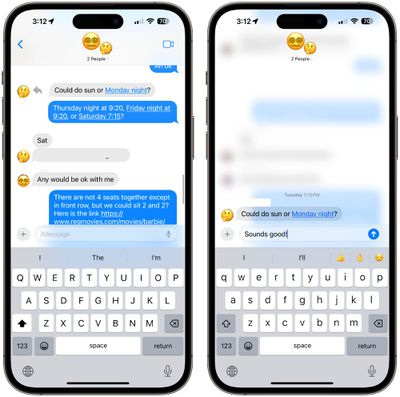
ios 17 messages swipe reply

Search Improvements

Apple improved Messages search in iOS 17 with an option to combine multiple filters. If you're looking for images from a certain person, for example, you can type in "photos" and then the person's name, tapping to select each search filter to narrow down your search results.
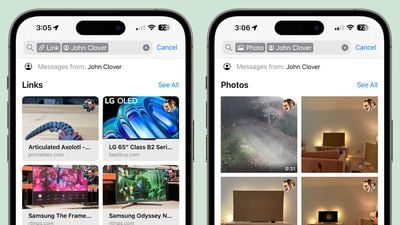
ios 17 messages search

Audio Message Transcriptions

If someone sends you an audio message and you're somewhere where you can't listen to it right away, iOS 17 will transcribe it for you so you can read it instead.
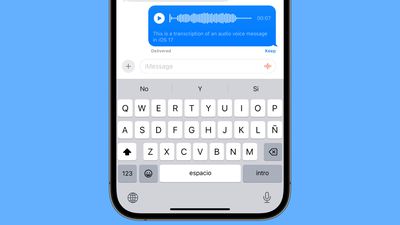
ios 17 audio transcription

Auto-Delete Verification Codes

Many websites and services use texted one-time passcodes for verification purposes, and those one-time codes can clog up the Messages app. In iOS 17, there's an option to have those messages auto delete after the code is autofilled and used for a login. Apple should ask you if you want to enable this when you use the autofill feature after upgrading to iOS 17, but it can be toggled on manually under Settings > Passwords > Password Options > Clean Up Automatically.
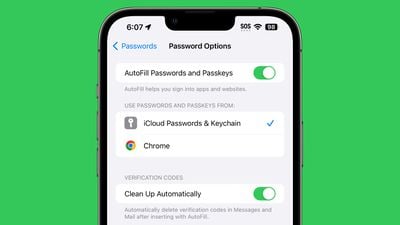
verification code clean up ios 17

Location Sharing

With the "Location" setting under the Messages options, you can share your location or request a friend's location directly from the Messages app. You can also set a pin at a specific location you're going to be going to without opening the Maps app.
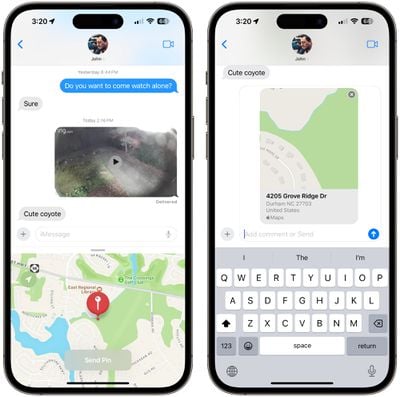
ios 17 messages location pin

Read More

More information on all of the new features in the iOS 17 update can be found in our iOS 17 roundup.


Related Forums: iOS 17, iPadOS 17

Popular Stories

apple design award 2025

Apple Announces 2025 Design Award Winners Ahead of WWDC 2025

Tuesday June 3, 2025 10:14 am PDT by
As we wait for WWDC to kick off next Monday, Apple today announced the winners of its annual Apple Design Awards, recognizing apps and games for their innovation, ingenuity, and technical achievement. The 2025 Apple Design Award winners are listed below, with one app and one game selected per category: Delight and Fun - CapWords (App) and Balatro (Game) Innovation - Play (App) and PBJ -...

1password deal blue

1Password Security Breach: What Was Accessed and What Wasn't

Wednesday November 25, 2026 1:09 pm PST by
Popular password management app 1Password today said it experienced a security breach earlier this month. 1Password says some customer names and email addresses were accessed, but no customer vault contents were compromised. On November 19, 1Password saw indications that an employee's GitHub account had been breached and began investigating. The company says the breached GitHub account was...
apple store down feature

Here's Why the Apple Store is Going Down

Thursday November 26, 2026 5:49 am PST by
Apple's online store is going down for a few hours on a rolling country-by-country basis right now, but do not get your hopes up for new products. Apple takes its online store down for a few hours ahead of Black Friday every year to tease its annual gift card offer with the purchase of select products. The store is down in Australia, New Zealand, and Thailand, right now, and it will...

Top Rated Comments

SilenceBroken Avatar
44 months ago
The new + design/layout is terrible and clicking to add a photo takes upwards of double digits at times to actually work.
Score: 25 Votes (Like | Disagree)
TheYayAreaLiving 🎗️ Avatar
44 months ago
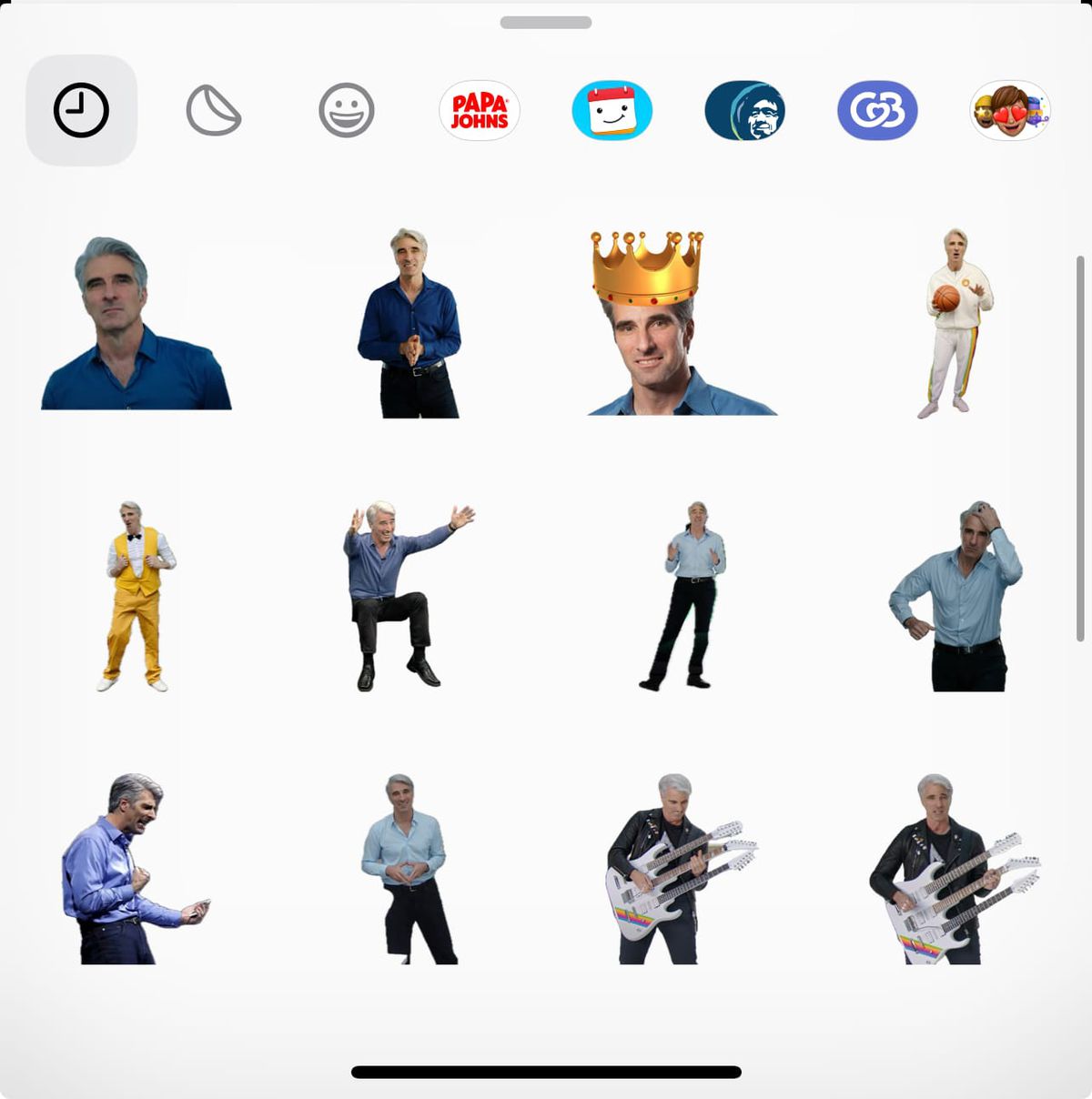
My all-time favorite.. Apple Stickers. I have stepped up my game. ✨


Attachment Image
Score: 24 Votes (Like | Disagree)
erikkfi Avatar
44 months ago
What I really want is the option to restrict a group chat to notifying me only once every 1, 5, or 20 minutes. No matter how many messages are sent. Having that repeated tap on my wrist when a big group chat is going crazy is one of the most annoying things my technology does.
Score: 20 Votes (Like | Disagree)
44 months ago

The new + design/layout is terrible and clicking to add a photo takes upwards of double digits at times to actually work.
Agreed, it takes much longer to add a photo from before, the other things aren't as bad imo, but the change to add photos is very annoying
Score: 12 Votes (Like | Disagree)
squirrellydw Avatar
44 months ago
Apple should really make the messages app icon Blue instead of Green, since Apple to Apple has a Blue bubble.
Score: 11 Votes (Like | Disagree)
teejaysplace24 Avatar
44 months ago
It appears I’m going to be in the minority here, but I am excited for the + button because I was in the habit of mistakenly tapping the camera icon to insert a photo, ever since it replaced the basic carrot that used to occupy that location several versions ago. Opening either the camera or the app icon necessitated a second tap to get to photos anyhow, so from that vantage, it’s no more time consuming and at least I’ll get what I expect.
Score: 10 Votes (Like | Disagree)
Latest Stories
The 50+ Best Apple Black Friday Deals Still Available on AirPods, iPads, and More
46 minutes ago
Apple's M6 and PROLED MacBook Pro Reach New Low Prices for Black Friday
8 hours ago
The MacRumors Show: iPhone Air 2 and iPhone 18 Are Coming
8 hours ago
Apple Store in Brisbane Reopening Next Month With New Design
9 hours ago
The 60+ Best Black Friday Accessory Deals on iPhone Chargers, TVs, Headphones, and More
10 hours ago
GTA VI Now (Barely) Running on Apple Silicon Macs
10 hours ago
The Best Black Friday Streaming Deals on Apple TV, Disney+, and More
11 hours ago
Apple TV's 'Carême' Wins International Emmy for Best Drama
11 hours ago
iPhone 18 Production Delay Leaves Apple Little Time Before Launch
12 hours ago
The Best Black Friday AirPods Deals Still Available
4 hours ago
The Best Black Friday Deals on Apple Home Products
13 hours ago
The Best Black Friday iPhone Deals Still Available
4 hours ago
The Best Black Friday iPad Deals Still Available
4 hours ago
The Best Black Friday Apple Watch Deals Still Available
4 hours ago
The Best Black Friday AirTag Deals Still Available
4 hours ago
The Best Black Friday Mac Deals Still Available
4 hours ago
iPhone Share of US Smartphone Market Hits 57% as Rivals Slip
14 hours ago
iPhone 20 Pro Rumored to Feature 3D-Printed Titanium Frame
15 hours ago
Apple's Official 2026 Black Friday Offer Starts Rolling Out
1 day ago
Halide Adds Fill Light Feature for iPhone Duo
1 day ago
MacBook Air Black Friday Deals Now Live With Massive $399 Savings
1 day ago
Amazon Discounts All MacBook Neo Models by $99 for Black Friday
1 day ago
Kodak Launches Unique AirTag Rival With E-Ink Display
2 days ago
Here's Why the Apple Store is Going Down
2 days ago
Apple Still Working on Giant Foldable iPad That Could Cost $5,000
2 days ago
iPhones Dominate China's Weak Singles' Day Smartphone Sales
2 days ago
iPhone 20 Pro Could Feature Ceramic in Limited-Edition Model
2 days ago
Apple Faces Korean Regulator Review Over iPhone 16 AI Advertising
2 days ago
Apple Watch Ultra 4 Hits New Best-Ever Price of $649.99 for Black Friday
2 days ago
New Apple Store Opening in India, Download the Special Wallpaper Now
2 days ago
Related Apple News: Iphone | Reviews | Entertainment | Buyers Guide | Ipad