Skip to Content

iOS 17 Lock Screen Features: StandBy and Interactive Widgets

With iOS 16, Apple introduced a whole new look for the Lock Screen complete with widgets and customizability, and in iOS 17, the Lock Screen was further refined. Widgets are more useful than ever before, and there's a new StandBy mode that turns your iPhone into an information hub when it's not in use.
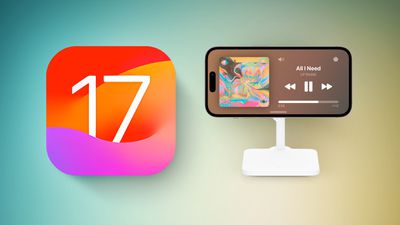
iOS 17 Lockscreen Feature
This guide highlights everything that's new with the Lock Screen in iOS 17.

StandBy

StandBy is a Lock Screen mode that activates when an iPhone is plugged into a charger and positioned in a horizontal (or landscape) orientation. It works with a MagSafe charger, which is arguably the most useful way to use it, but it also activates with a Qi-based wireless charger or a Lightning charger.


If you have an Apple Watch, it's similar to Nightstand mode, but it does more than Nightstand mode is capable of.

There are several different StandBy screens that you can choose from, some of which are customizable and some of which require unlocking the iPhone.

  • Dual Widget Stacks - With this StandBy screen, you can swipe through widgets of your choice. You can set up two separate widget stacks with multiple Home Screen widgets, displaying two sets of information side by side. You can customize the widgets in each stack, and swipe through each side individually to change them.
  • Photos - One of the StandBy screens shows content from your Photo Library, with the current time overlaid in the top right corner. You can see the date and location of the photo if you tap, and using this requires the iPhone to be unlocked so no one can see your images without your permission. You can swipe to change between themes like Favorites, Nature, Pets, Cities, and People. You can hide any themes that you don't like, and add additional albums.
  • Time - The time StandBy screen displays the time and information like the current weather, the date, or when your next alarm is set for. You can select digital or analog time, and there are four digital themes including standard Digital, World, Solar, and Float. Float shows the time in big bubble numbers in customizable colors, Solar has more of a standard font with a solar flare design in different colors, and World shows the time with a map of the world and your current location highlighted. The Analog theme has customizable accent colors, and Digital has bold numbers with different color options.

With all of these StandBy screens, you can swipe left or right to swap between one of the three display options, and then you can swipe up and down to choose what's displayed. So if you've set up different Time screens, for example, you can swipe to change between digital and analog.

Notifications

Incoming notifications will be shown full screen when you have your iPhone in StandBy mode. So if you get an iMessage, for example, it will pop up with the name of the person and the Messages icon to let you know you have a message.
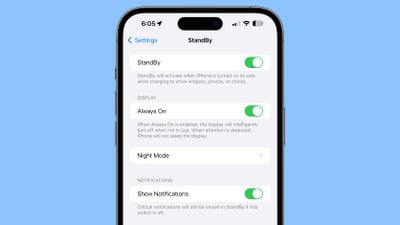
standby ios 17 show notifications
Content that would not normally be shown in a notification will not show up in StandBy mode unless you are nearby and have unlocked your device with Touch ID or Face ID.

Customizing StandBy

On any of the StandBy screens, you can long press to open options for customizing what you see. Long press on either of the widgets on the widget screen, for example, and you can choose the widgets that you want to see.

There are customization options for almost all of the StandBy display options, and it's worth swiping through and long pressing where applicable to change your setup to meet your needs.

Always-On StandBy

With the iPhone 14 Pro and iPhone 14 Pro Max (and future iPhones), StandBy is more useful because of the always-on display. StandBy content is always on and active on these devices, without the need to interact with the iPhone.

On iPhones without always-on display technology, you need to tap the screen to activate it because it turns off after a short period. You can use StandBy with all iPhones, but it is a better experience with the always-on display.

Interactive Widgets

Lock Screen widgets were introduced with iOS 16, but in iOS 17, they're interactive, making them much more useful. On iOS 16, tapping a Lock Screen widget launches the accompanying app, but that step is not necessary for certain widgets that have tasks you can complete without an app.
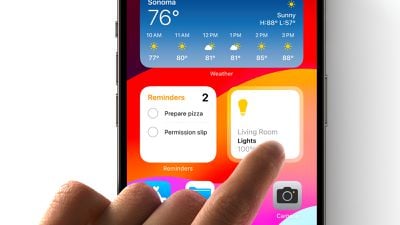
iOS 17 Interactive Widgets
You can check off a task right in the Reminders widget, for example, or use the Home widget to control a smart home device without opening the Home app. Apple apps have interactive features, and third-party developers have an API to adopt interactivity too.

Interactive widgets are available on the Lock Screen and the ‌Home Screen‌, so they can do more wherever you're using them.

Read More

More information about the new features in iOS 17 can be found in our iOS 17 roundup.

Related Forums: iOS 17, iPadOS 17

Popular Stories

1password deal blue

1Password Security Breach: What Was Accessed and What Wasn't

Wednesday November 25, 2026 1:09 pm PST by
Popular password management app 1Password today said it experienced a security breach earlier this month. 1Password says some customer names and email addresses were accessed, but no customer vault contents were compromised. On November 19, 1Password saw indications that an employee's GitHub account had been breached and began investigating. The company says the breached GitHub account was...
apple design award 2025

Apple Announces 2025 Design Award Winners Ahead of WWDC 2025

Tuesday June 3, 2025 10:14 am PDT by
As we wait for WWDC to kick off next Monday, Apple today announced the winners of its annual Apple Design Awards, recognizing apps and games for their innovation, ingenuity, and technical achievement. The 2025 Apple Design Award winners are listed below, with one app and one game selected per category: Delight and Fun - CapWords (App) and Balatro (Game) Innovation - Play (App) and PBJ -...
ipad pro prime

Apple Has iPads Running macOS Internally, Says Gurman

Wednesday November 25, 2026 4:55 am PST by
Apple has iPads running macOS internally and has had them "for some time," according to Bloomberg's Mark Gurman, although he says no work is currently being done to bring the Mac operating system to iPads. Speaking on his latest Power On podcast, Gurman said there is "no work being done to consumerize macOS on the iPad." Rather, Apple will continue to bring Mac features and apps like Final Cut ...

Top Rated Comments

TheYayAreaLiving 🎗️ Avatar
44 months ago
I love StandBy Mode. It is such an amazing feature! Hands down! 🤩
Score: 11 Votes (Like | Disagree)
44 months ago
What is the brand of charging stand in the pictures?
Score: 7 Votes (Like | Disagree)
44 months ago
Really hoping they add some flexibility for phones without always on display. There should at least be an option to extend the screen timeout to 15-30 minutes or more. It's on a charger, aside from burn-in there's no reason not to leave it on for a long time, and that still applies to always on displays so they've already taken that into consideration. Not really any reason for this not to work the same on all phones.
Score: 5 Votes (Like | Disagree)
azentropy Avatar
44 months ago
Standby would sure be a killer feature if it was available on older iPads.
Score: 4 Votes (Like | Disagree)
44 months ago
The iPhone features will be pretty useless unless they bring them to iPhoneOS 17.
Score: 4 Votes (Like | Disagree)
StealthRider Avatar
44 months ago

Can anyone recommend a good charging stand that will charge all 3 products (iPhone [MagSafe], Watch, and AirPods [either MagSafe or Lightning])?
+Mainly for stand by (able to rotate phone)
I love the Belkin BoostCharge Pro series - I have the 3-in-1 and it's great. Not cheap, but very nice.

https://www.belkin.com/3-in-1-wireless-charger-with-official-magsafe-charging-15w/WIZ017ttWH.html
Score: 4 Votes (Like | Disagree)
Latest Stories
The 50+ Best Apple Black Friday Deals on AirPods, iPads, MacBooks, and More
2 hours ago
Apple's M6 and PROLED MacBook Pro Reach New Low Prices for Black Friday
2 hours ago
The MacRumors Show: iPhone Air 2 and iPhone 18 Are Coming
2 hours ago
Apple Store in Brisbane Reopening Next Month With New Design
2 hours ago
The 60+ Best Black Friday Accessory Deals on iPhone Chargers, TVs, Headphones, and More
3 hours ago
GTA VI Now (Barely) Running on Apple Silicon Macs
4 hours ago
The Best Black Friday Streaming Deals on Apple TV, Disney+, and More
4 hours ago
Apple TV's 'Carême' Wins International Emmy for Best Drama
5 hours ago
iPhone 18 Production Delay Leaves Apple Little Time Before Launch
6 hours ago
The Best Black Friday AirPods Deals
6 hours ago
The Best Black Friday Deals on Apple Home Products
6 hours ago
The Best Black Friday iPhone Deals
6 hours ago
The Best Black Friday iPad Deals
6 hours ago
The Best Black Friday Apple Watch Deals
7 hours ago
The Best Black Friday AirTag Deals
7 hours ago
The Best Black Friday Mac Deals
7 hours ago
iPhone Share of US Smartphone Market Hits 57% as Rivals Slip
7 hours ago
iPhone 20 Pro Rumored to Feature 3D-Printed Titanium Frame
9 hours ago
Apple's Official 2026 Black Friday Offer Starts Rolling Out
1 day ago
Halide Adds Fill Light Feature for iPhone Duo
1 day ago
MacBook Air Black Friday Deals Now Live With Massive $399 Savings
1 day ago
Amazon Discounts All MacBook Neo Models by $99 for Black Friday
1 day ago
Kodak Launches Unique AirTag Rival With E-Ink Display
1 day ago
Here's Why the Apple Store is Going Down
1 day ago
Apple Still Working on Giant Foldable iPad That Could Cost $5,000
1 day ago
iPhones Dominate China's Weak Singles' Day Smartphone Sales
1 day ago
iPhone 20 Pro Could Feature Ceramic in Limited-Edition Model
1 day ago
Apple Faces Korean Regulator Review Over iPhone 16 AI Advertising
1 day ago
Apple Watch Ultra 4 Hits New Best-Ever Price of $649.99 for Black Friday
1 day ago
New Apple Store Opening in India, Download the Special Wallpaper Now
2 days ago
Related Apple News: Foldable Iphone | Iphone | Ipad | Iphone Duo Enable Reachability One Handed Use | Opinion































