Skip to Content

iOS 17 AirDrop Features: NameDrop, SharePlay, and Proximity Sharing

Apple in iOS 17 is improving the AirDrop sharing feature that is designed to allow two Apple devices to share content with one another quickly and easily. Proximity sharing has been improved, it's easier to exchange content, and more.
iOS 17 AirDrop Feature
This guide highlights all of the new AirDrop features you'll find in iOS 17.

NameDrop

NameDrop is an AirDrop feature that lets you exchange contact information with someone by touching two iPhones together. Bringing two devices together will automatically pop up a contact sharing interface.
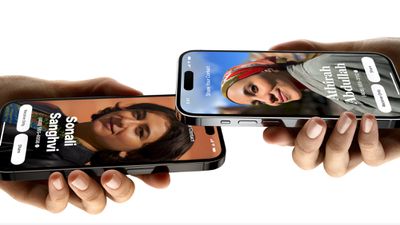
ios 17 namedrop
Tapping on the popup shows a person's contact information and their Contact Poster, with options to "Receive Only" or share your own contact information in response. You can choose the phone number and email address that you want to share with someone on the other end, and if someone is already in your Contacts app, it updates contact information.


Note that NameDrop works between two iPhones running iOS 17 and later this year, it will work between an iOS 17 iPhone and an Apple Watch running watchOS 10.

Proximity Sharing

If you need to share a file or a photo with someone who is right next to you, there's a new proximity sharing feature available for AirDrop.
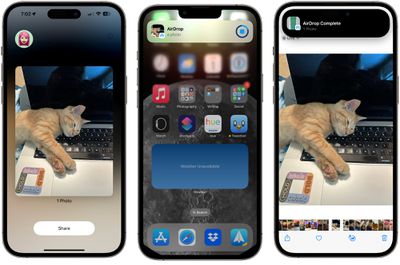
airdrop proximity sharing
To initiate a transfer, choose the photo or file that you want to share with someone. From there, bring your unlocked iPhone next to the person's unlocked iPhone, and it will pop up a share interface without you having to tap on the Share Sheet.

You can tap on the Share option that pops up to send the photo or file to the person next to you. It will be received on the other device automatically, with permission granted through proximity.
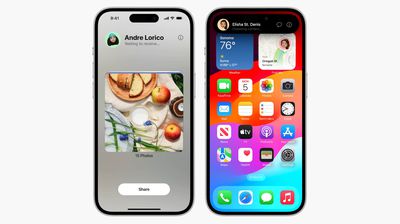
airdrop ios 17
Note that sharing files this way works even if AirDrop receiving is turned off or limited to contacts, so it is a way to share a file with someone without having to change your overall AirDrop settings. AirDrop normally works with someone in the same room, but the proximity sharing feature requires the two iPhones to be close to touching.
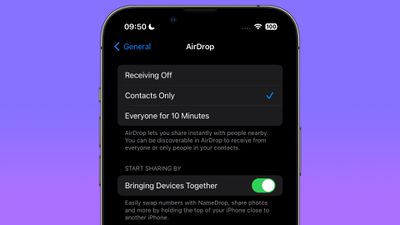
namedrop settings toggle
Sharing through proximity can be enabled or disabled by going to Settings > General > AirDrop and toggling "Bringing Devices Together" on or off.

Transfers Over the Internet

Apple plans to allow AirDrop transfers that have been initiated to finish over the internet in iOS 17. That means if you start sharing a bunch of files or photos with someone, you won't need to stay nearby for the transfer to complete.

AirDrop is a fairly fast file sharing method, but if you're sharing large videos, it can be frustrating to have to stay close by to someone for a transfer to finish. File transfers over the internet requires iOS 17 and for both participants to be signed into iCloud, and this is a feature that will be coming in an update to iOS 17.

SharePlay

If you want to listen to music or watch a movie with someone nearby, there's a new SharePlay feature that allows SharePlay to be initiated through proximity much like AirDrop.
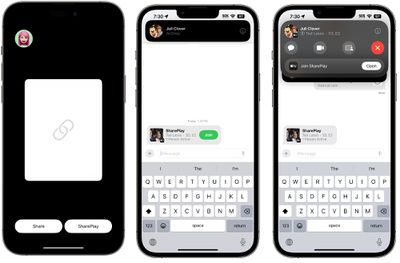
ios 17 shareplay session
Starting SharePlay content and then bringing your iPhone next to another iPhone will initiate a SharePlay session through the Messages app. It's the same SharePlay function that can be accessed through the Share Sheet, but the proximity method is a quicker way to begin a SharePlay session.

Proximity SharePlay is useful for situations like flights where each person may want to use their own device but share the same content.
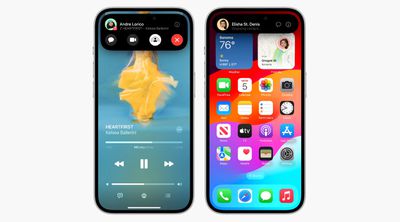
airdrop shareplay ios 17
Developers can build support for SharePlay over AirDrop into their apps, but as with standard SharePlay, both people will need to have the app installed and have access to the content.

Read More

Additional details on the new features in the iOS 17 update can be found in our iOS 17 roundup.

Tag: AirDrop
Related Forums: iOS 17, iPadOS 17

Popular Stories

apple design award 2025

Apple Announces 2025 Design Award Winners Ahead of WWDC 2025

Tuesday June 3, 2025 10:14 am PDT by
As we wait for WWDC to kick off next Monday, Apple today announced the winners of its annual Apple Design Awards, recognizing apps and games for their innovation, ingenuity, and technical achievement. The 2025 Apple Design Award winners are listed below, with one app and one game selected per category: Delight and Fun - CapWords (App) and Balatro (Game) Innovation - Play (App) and PBJ -...
1password deal blue

1Password Security Breach: What Was Accessed and What Wasn't

Wednesday November 25, 2026 1:09 pm PST by
Popular password management app 1Password today said it experienced a security breach earlier this month. 1Password says some customer names and email addresses were accessed, but no customer vault contents were compromised. On November 19, 1Password saw indications that an employee's GitHub account had been breached and began investigating. The company says the breached GitHub account was...
apple store down feature

Here's Why the Apple Store is Going Down

Thursday November 26, 2026 5:49 am PST by
Apple's online store is going down for a few hours on a rolling country-by-country basis right now, but do not get your hopes up for new products. Apple takes its online store down for a few hours ahead of Black Friday every year to tease its annual gift card offer with the purchase of select products. The store is down in Australia, New Zealand, and Thailand, right now, and it will...

Top Rated Comments

zapmymac Avatar
43 months ago
I’d like to see a business card option as well as personal/family/friends option.

One card with limited info, the other card with all my info pending use case.
Score: 14 Votes (Like | Disagree)
43 months ago
I once had someone tell me that name dropping is just a pathetic way to make yourself seem more important.

It was Bill Gates if anyone is curious.
Score: 9 Votes (Like | Disagree)
Radeon85 Avatar
43 months ago
Just re-enable the option to share to anyone forever again.
Score: 8 Votes (Like | Disagree)
43 months ago

This is Literally the Bump App ('https://en.wikipedia.org/wiki/Bump_(application)#:~:text=Bump%20sends%20contact%20information%2C%20photos,physically%20bump%20their%20phones%20together.') from 2009.

From Wikipedia:
"Bump sends contact information, photos and files to another device over the internet.[4] ('https://en.wikipedia.org/wiki/Bump_(application)#cite_note-PCworld-4') Before activating the transfer, each user confirms what he or she wants to send to the other user.[5] ('https://en.wikipedia.org/wiki/Bump_(application)#cite_note-PCmag-5') To initiate a transfer, two people physically bump their phones together."
Not really. Bump required both users to have downloaded, installed and set up the bump app, which practically no one used. This feature only requires users to have iOS 17. That’s a game changer.
Score: 6 Votes (Like | Disagree)
43 months ago

This is Literally the Bump App ('https://en.wikipedia.org/wiki/Bump_(application)#:~:text=Bump%20sends%20contact%20information%2C%20photos,physically%20bump%20their%20phones%20together.') from 2009.

From Wikipedia:
"Bump sends contact information, photos and files to another device over the internet.[4] ('https://en.wikipedia.org/wiki/Bump_(application)#cite_note-PCworld-4') Before activating the transfer, each user confirms what he or she wants to send to the other user.[5] ('https://en.wikipedia.org/wiki/Bump_(application)#cite_note-PCmag-5') To initiate a transfer, two people physically bump their phones together."
Thanks! I feel like I've been taking crazy pills so much of what is coming out already existed in another app or form. Are these 'tech' journalists just too young to know?

There was a Verge article a two years ago about the map functionality using your camera to overlay Augmented Reality to show you walking directions talking about it being new. I had an app that did that in like 2008, I remember standing on the corner in New York holding my phone up and there was an arrow telling me which block to turn on.
Score: 6 Votes (Like | Disagree)
klasma Avatar
43 months ago

NameDrop seems cool
MicDrop would be even cooler.
Score: 6 Votes (Like | Disagree)
Latest Stories
The 50+ Best Apple Black Friday Deals Still Available on AirPods, iPads, and More
4 hours ago
HomePod Mini 2 in (RED) Seemingly Spotted Ahead of Announcement
48 minutes ago
Apple's M6 and PROLED MacBook Pro Reach New Low Prices for Black Friday
11 hours ago
The MacRumors Show: iPhone Air 2 and iPhone 18 Are Coming
11 hours ago
Apple Store in Brisbane Reopening Next Month With New Design
12 hours ago
The 60+ Best Black Friday Accessory Deals on iPhone Chargers, TVs, Headphones, and More
13 hours ago
GTA VI Now (Barely) Running on Apple Silicon Macs
13 hours ago
The Best Black Friday Streaming Deals on Apple TV, Disney+, and More
14 hours ago
Apple TV's 'Carême' Wins International Emmy for Best Drama
14 hours ago
iPhone 18 Production Delay Leaves Apple Little Time Before Launch
15 hours ago
The Best Black Friday AirPods Deals Still Available
7 hours ago
The Best Black Friday Deals on Apple Home Products
15 hours ago
The Best Black Friday iPhone Deals Still Available
7 hours ago
The Best Black Friday iPad Deals Still Available
7 hours ago
The Best Black Friday Apple Watch Deals Still Available
7 hours ago
The Best Black Friday AirTag Deals Still Available
7 hours ago
The Best Black Friday Mac Deals Still Available
7 hours ago
iPhone Share of US Smartphone Market Hits 57% as Rivals Slip
17 hours ago
iPhone 20 Pro Rumored to Feature 3D-Printed Titanium Frame
18 hours ago
Apple's Official 2026 Black Friday Offer Starts Rolling Out
2 days ago
Halide Adds Fill Light Feature for iPhone Duo
2 days ago
MacBook Air Black Friday Deals Now Live With Massive $399 Savings
2 days ago
Amazon Discounts All MacBook Neo Models by $99 for Black Friday
2 days ago
Kodak Launches Unique AirTag Rival With E-Ink Display
2 days ago
Here's Why the Apple Store is Going Down
2 days ago
Apple Still Working on Giant Foldable iPad That Could Cost $5,000
2 days ago
iPhones Dominate China's Weak Singles' Day Smartphone Sales
2 days ago
iPhone 20 Pro Could Feature Ceramic in Limited-Edition Model
2 days ago
Apple Faces Korean Regulator Review Over iPhone 16 AI Advertising
2 days ago
Apple Watch Ultra 4 Hits New Best-Ever Price of $649.99 for Black Friday
2 days ago
Related Apple News: Mac | Health | Travel | South Africa | Education































