Skip to Content

iOS 17.1 Beta: All the New Features So Far

Apple is currently testing iOS 17.1, the first major update to the iOS 17 operating system that came out in September. Apple plans to release iOS 17.1 later in October, so we still have several betas to go before the software sees a public debut.
iOS 17
In this guide, we've rounded up all of the feature additions and changes in the iOS 17.1 beta, and we'll be updating it throughout the testing period.

Apple Music Favorites

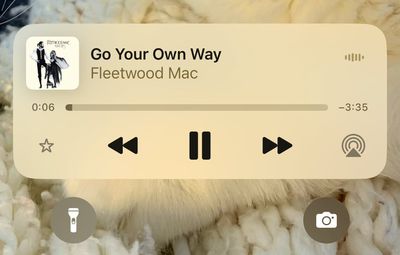
You can favorite songs, albums, playlists, and artists in the iOS 17.1 Music app. Favorited music is added to the Library and improves recommendations. Favoriting replaces the prior "Love" system and favoriting can be done from the Lock Screen's Now Playing widget.
apple music favorite
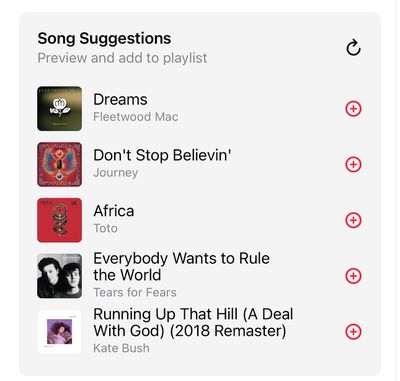
A star next to a track in an album means that it's a favorite, while a dot is next to the most played track. With the favorites system, the Music app is suggesting songs to add to playlists.
apple music song suggestions
Eventually, Apple plans to provide a Favorite Songs playlist and offer collaborative playlists, but these features do not appear to be implemented as of yet.

Apple Music Playlists

iOS 17.1 provides color-matched playlist artwork options that can be selected as a new customization option for your playlists. There are eight artwork styles that feature geometric shapes and gradients, with the colors featured pulled from the album artwork of the first song in the playlist.
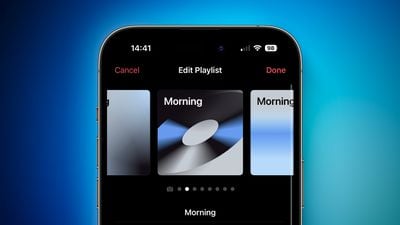
iOS 17 Playlist Artwork Feature 1

AirDrop Over Internet

AirDrop transfers can now be completed over a cellular connection or Wi-Fi if you walk out of the range of the person you're sharing with. That means you will not have to stay close to someone if you are transferring a large number of files.
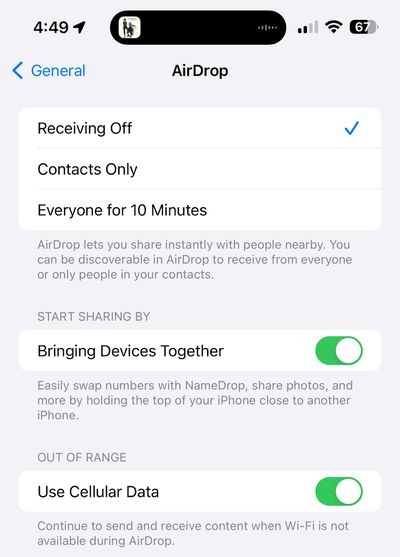
ios 17 1 airdrop
There is a new "Out of Range" toggle in the AirDrop section of the Settings menu that you can toggle to allow or disallow transfers over cellular.

Play Favorite Songs Quick Action

If you long press on the Apple Music icon on the Home Screen, you can now choose a "Play Favorite Songs" option.

Double Tap on Apple Watch

Double Tap is enabled in the watchOS 10.1 update that is also in beta testing, and the settings for it can be managed using the Apple Watch app.
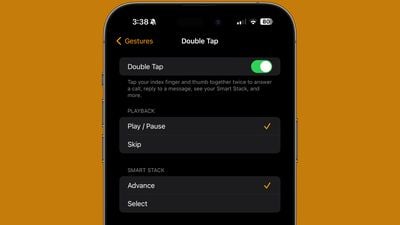
watchos 10 1 double tap

Double Tap allows Apple Watch Series 9 and Apple Watch Ultra 2 owners to tap their thumb and index fingers together to control the Apple Watch with one hand. The gesture can be used for opening up the Smart Stack, answering/ending calls, playing/pausing music, stopping alarms and timers, and more.

StandBy Display Options

Apple added a new "Display" section to the StandBy section of the Settings app, which houses some new customization options. The display can be set to turn off automatically, after 20 seconds, or never.
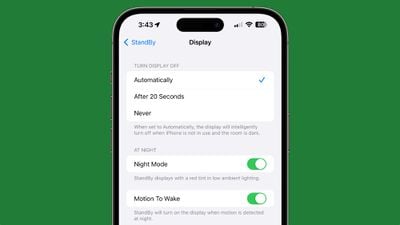
standby display settings ios 17 1
The existing Night Mode function that adds a red tint and dims the screen has been relocated to this section, as has the Motion to Wake toggle. The Display section also replaces the prior Always On toggle that limited the display to turning off intelligently.

UK Bank Balances in the Wallet App

UK users can add their UK bank accounts to the Wallet app in iOS 17.1, allowing them to see their account balances, payments, purchases, and deposits.
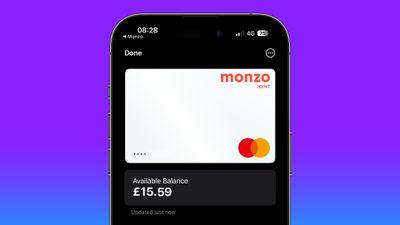
uk bank account apple wallet 2

Wallet App and Discover Cards

U.S. Discover users who add their credit cards to Apple Wallet can see their total card balance and transaction history right on the iPhone with iOS 17.1.

Books App

The "Reading Now" section in the Apple Books app has been renamed to "Read Now."

Dynamic Island Flashlight Indicator

When the flashlight is activated on an iPhone 14 Pro, iPhone 14 Pro Max, iPhone 15, or iPhone 15 Plus, there is now a flashlight icon in the Dynamic Island that lets you know that It is on. The flashlight icon for the ‌Dynamic Island‌ was previously limited to the iPhone 15 Pro and iPhone 15 Pro Max.
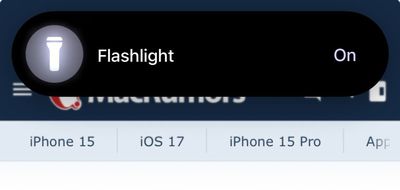
dynamic island flashlight

Controller Support

iOS 17.1 includes support for the Nintendo Switch N64 Controller.

Extend Wallpaper

When you are setting up a new wallpaper, Apple has added an "Extend" option that can be used if the image does not fit the display.

Photo Shuffle

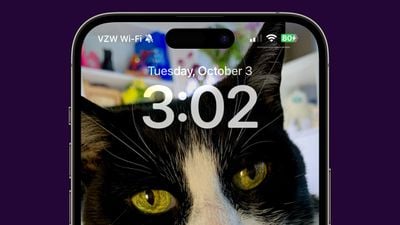
When you add a Photo Shuffle Lock Screen in iOS 17.1, you can select a specific album of photos that will be shown on the Lock Screen rather than having to rely on Apple's pre-selected options like People, Pets, or Nature.

When selecting any of the main Photo Shuffle images, you're brought into a customization screen where you can choose your Favorites album or opt for any other album you have created, giving you complete control over the images that show up on the Lock Screen. There was previously a tool for manually selecting photos, but being able to choose an entire album is quicker.
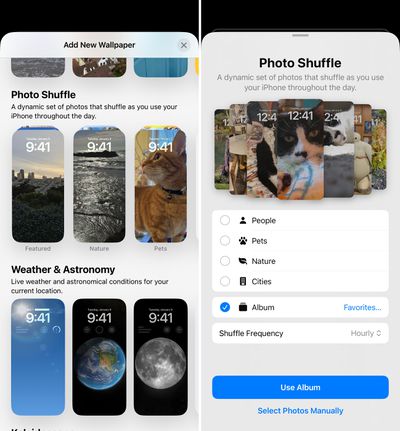
ios 17 1 photo shuffle
Photo Shuffle frequency remains the same at on tap, on lock, hourly, or daily.

Reachability

On iPhones with a ‌Dynamic Island‌, you'll now see a black background when you use the Reachability feature. In prior versions of iOS 17, a blurred version of the device's wallpaper was shown. The change to a black background prevents the ‌Dynamic Island‌ from being displayed twice when Reachability is used.
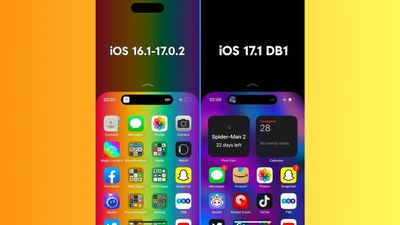
ios 17 1 reachability

Journal App

There is no sign of the promised Journal app in iOS 17.1, but there are mentions of Journaling Suggestions in the code, which indicates that it could be coming before too long.

80% Charging Limit Fix

With the iPhone 15 models, Apple added a toggle that prevents the devices from charging past 80 percent in order to keep the battery healthy for a longer period of time. In iOS 17, the iPhone could ignore this setting and charge past 80 percent, but that no longer happens following the second beta update.
ios 17 1 80 percent charge

Messages Bug Fix

iOS 17.1 addresses an issue with the search function in the Messages app in iOS 17. Some iPhone 15 users have been able to search for older messages after transferring their data over from an older iPhone. The Messages search feature only works for recent messages, but the update fixes the issue.

Action Button Update

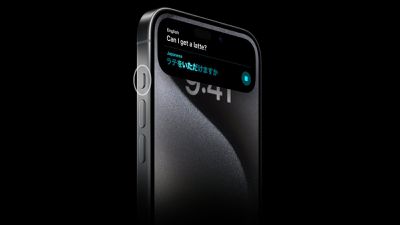
In iOS 17.1, Apple changed the functionality of the Action Button to prevent certain actions from being triggered while the iPhone is in a pocket or a bag. The Camera, Flashlight, Voice Memo, Focus, and Magnifier functions will no longer activate when the Action Button is pressed if the ‌iPhone‌ is tucked away in a pocket.

iPhone 15 Pro Action Button Translate
Actions that make sense to trigger in a pocket like the mute function and a shortcut can still be activated while the ‌iPhone‌ is inside of a pocket by long pressing on the Action Button, but other features are disabled.

More iOS 17.1 Beta Features

Know of a feature that we've missed on this list? Let us know in the comments below.

Related Forums: iOS 17, iPadOS 17

Popular Stories

apple design award 2025

Apple Announces 2025 Design Award Winners Ahead of WWDC 2025

Tuesday June 3, 2025 10:14 am PDT by
As we wait for WWDC to kick off next Monday, Apple today announced the winners of its annual Apple Design Awards, recognizing apps and games for their innovation, ingenuity, and technical achievement. The 2025 Apple Design Award winners are listed below, with one app and one game selected per category: Delight and Fun - CapWords (App) and Balatro (Game) Innovation - Play (App) and PBJ -...
Apple 2026 Black Friday Event Hero

Apple's Official 2026 Black Friday Offer Starts Rolling Out

Thursday November 26, 2026 8:37 am PST by
Apple's annual four-day Black Friday through Cyber Monday shopping event is now live in Australia, New Zealand, and Thailand, and it will continue to roll out across Europe, the U.S., and Canada as the calendar turns to Friday, November 27 around the world. In the U.S., Apple's terms and conditions say the promotion begins on November 27 at 12 a.m. Pacific Time and ends on November 30 at...
1password deal blue

1Password Security Breach: What Was Accessed and What Wasn't

Wednesday November 25, 2026 1:09 pm PST by
Popular password management app 1Password today said it experienced a security breach earlier this month. 1Password says some customer names and email addresses were accessed, but no customer vault contents were compromised. On November 19, 1Password saw indications that an employee's GitHub account had been breached and began investigating. The company says the breached GitHub account was...

Top Rated Comments

Joosst Avatar
41 months ago
There's ONE SUPER ANNOYING BUG since iOS 17 that wasn't there in iOS 16.
It takes some words to explain, but it's SO STUPID and I hope EVERYONE will report it using Feedback Assistant:

Here's how to replicate it:

Write a few lines of text (in the notes app or wherever) and try to move the cursor around using a long press on the space bar. That goes pretty well if you want to move the cursor upwards, but downwards is a lot harder in iOS 17 beta.

It is specifically noticeable when the cursor is somewhere on top / on the first line of your text.

In iOS 16 you could:
1. hold space bar
2. move your finger upwards on the keyboard (the cursor would stay on the first line because it can’t go any higher)
3. move your finger down (the cursor would follow immediately, so you could reach the second or third line of text)

In iOS 17 though, the cursor stays on top when moving your finger down. Only when you reach the initial position (the bottom of the screen, where the space bar is) the cursor follows your movement again. But obviously you can’t move further down now because you’re already at the edge of the screen…

This is an obvious mistake, and I can't believe it made it through the betas.

It’s really a UI rule that when indirectly controlling something (like a cursor with a mouse), whenever you hit the edge of a screen and you keep moving your input device in the same direction, AS SOON as you move it back the slightest bit, the cursor comes along.

Imagine using a mouse and having this mistake: A cursor is at the right edge of a screen, you move your mouse (physically, in the real world) an arm length to the right. Then when you’re moving your arm back to the left the cursor doesn’t move! It stays on the right, only to start moving when your arm is physically back in the starting position.

That would be crazy. And it would drive anyone crazy. Because it feels like you’re out of control. That's what this is.
Ok I might be exaggerating but I do find it really annoying and stupid.
Score: 15 Votes (Like | Disagree)
Joosst Avatar
41 months ago
OH and there's another bug I hope EVERYONE will report:

In iOS 16, a new great feature was introduced: anywhere on the native full screen video player interface (that pops up in safari), you could start swiping left or right to navigate the video. Now in iOS 17 when you try that, the whole video moves left and right. Why would anyone want that?

I understand swiping down on the video has a function: it throws the video back into the smaller size within the webpage. But swiping left and right does nothing now except annoyingly moving the entire video.

That used to be a skim / search gesture and that was GREAT.
It’s annoying having to first tap the screen and then exactly finding the playhead. Just swiping any random place on the screen felt so good and easy.

So, this update feels like a downgrade in many of those day to day uses and I'm surprised they got through the betas.
I thought Apple was about quality control.
Score: 13 Votes (Like | Disagree)
41 months ago
i wish apple music was better. I gave it my best try but spotify is a superior experience hands down for music discovery.
Score: 11 Votes (Like | Disagree)
JGIGS Avatar
41 months ago

i wish apple music was better. I gave it my best try but spotify is a superior experience hands down for music discovery.
AM apparently has 20 million more songs and I have found lots of good ways to discover new music with it. I usually add at least 25% of the songs they present to me on my weekly new music playlist to my library every week.
Score: 6 Votes (Like | Disagree)
41 months ago
The Photo Shuffle wallpaper feature is a great touch!
Score: 6 Votes (Like | Disagree)
dannys1 Avatar
41 months ago

i wish apple music was better. I gave it my best try but spotify is a superior experience hands down for music discovery.
I kept Spotify around for years because of this, but Apple Music got better and better to the point where I dropped Spotify altogether about 18 months ago.

The thing AM does that Spotify can't touch is library management across all my devices. Spotify feels like renting access to a few playlists, Apple Music feels like my acutal carefully curated music library - I uploaded stuff that isn't on any streaming services and it sits there side by side indistinguishable from Apple music tracks or bought stuff.

If you're a casual music listener and everything you're interested in can be just found on a streaming server Spotify is fine, but if you're a music nerd AM can't be touched. Probably 40% of my library which is uploaded and synced across multiple devices isn't on Apple Music streaming or Spotify.
Score: 5 Votes (Like | Disagree)
Latest Stories
The 50+ Best Apple Black Friday Deals Still Available on AirPods, iPads, and More
2 hours ago
Here Are the Best Apple Black Friday Leftover Deals You Can Get Today
12 minutes ago
HomePod Mini 2 in (RED) Seemingly Spotted Ahead of Announcement
11 hours ago
Apple's M6 and PROLED MacBook Pro Reach New Low Prices for Black Friday
22 hours ago
The MacRumors Show: iPhone Air 2 and iPhone 18 Are Coming
22 hours ago
Apple Store in Brisbane Reopening Next Month With New Design
22 hours ago
The 60+ Best Black Friday Accessory Deals on iPhone Chargers, TVs, Headphones, and More
5 minutes ago
GTA VI Now (Barely) Running on Apple Silicon Macs
1 day ago
The Best Black Friday Streaming Deals on Apple TV, Disney+, and More
1 day ago
Apple TV's 'Carême' Wins International Emmy for Best Drama
1 day ago
iPhone 18 Production Delay Leaves Apple Little Time Before Launch
1 day ago
The Best Black Friday AirPods Deals Still Available
18 hours ago
The Best Black Friday Deals on Apple Home Products
1 day ago
The Best Black Friday iPhone Deals Still Available
18 hours ago
The Best Black Friday iPad Deals Still Available
18 hours ago
The Best Black Friday Apple Watch Deals Still Available
18 hours ago
The Best Black Friday AirTag Deals Still Available
18 hours ago
The Best Black Friday Mac Deals Still Available
18 hours ago
iPhone Share of US Smartphone Market Hits 57% as Rivals Slip
1 day ago
iPhone 20 Pro Rumored to Feature 3D-Printed Titanium Frame
1 day ago
Apple's Official 2026 Black Friday Offer Starts Rolling Out
2 days ago
Halide Adds Fill Light Feature for iPhone Duo
2 days ago
MacBook Air Black Friday Deals Now Live With Massive $399 Savings
2 days ago
Amazon Discounts All MacBook Neo Models by $99 for Black Friday
2 days ago
Kodak Launches Unique AirTag Rival With E-Ink Display
2 days ago
Here's Why the Apple Store is Going Down
2 days ago
Apple Still Working on Giant Foldable iPad That Could Cost $5,000
2 days ago
iPhones Dominate China's Weak Singles' Day Smartphone Sales
2 days ago
iPhone 20 Pro Could Feature Ceramic in Limited-Edition Model
2 days ago
Apple Faces Korean Regulator Review Over iPhone 16 AI Advertising
2 days ago
Related Apple News: Iphone | Opinion | Buyers Guide | Travel | Mac