

Apple's Safari app has undergone a number of changes during the iOS 15 beta testing process. Apple started out with a radical new design that moved the address bar from the top of the app's interface and introduced a floating tab bar, but after a multitude of complaints, there were several redesigns that culminated in an option to undo the iOS 15 design entirely.


This guide walks through all of the features added in the iOS 15 Safari app, including those new design options.
Design Changes
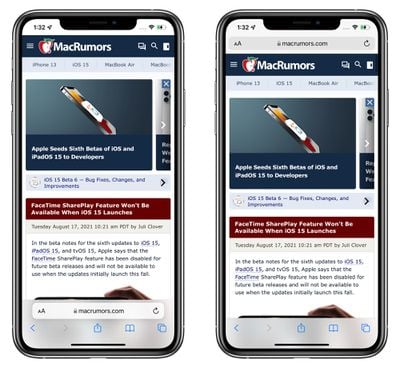
Safari started out with a new floating tab design that moved the address bar and tabs to the bottom of the iPhone interface, but now the design change is optional.
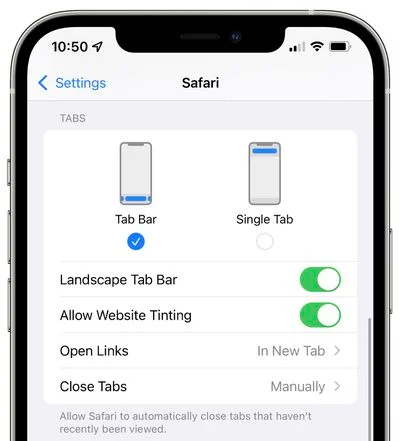
In the Safari section of the Settings app, you can choose your tab view. The "Tab Bar" option moves the address bar to the bottom of the Safari interface, which is the new design.
There is a dedicated control bar at the bottom of the Safari interface, and above that, an integrated tab bar and address bar. You can swipe left and right to swap tabs, or tap into the bar to search or type in a new URL. The dedicated control bar was added in a later iOS 15 beta and offers access to forward/back, share tools, bookmarking tools, and tabs.
You can get to webpage settings by tapping on the Aa, or reload a page by tapping on the reload button. With this Tab Bar interface, when you scroll through a webpage, the entire Tab Bar collapses down so you can see more of the website. You can bring it back up with a tap.
If you choose "Single Tab" instead of "Tab Bar," the address bar and tabs will remain at the top of the Safari window, which is how iOS 14 works. The design of the Single Tab option is unchanged from iOS 14, with the same control bar available at the bottom of the interface. You can't swipe through tabs using the Single Tab interface and will instead need to use the Tab Switcher.
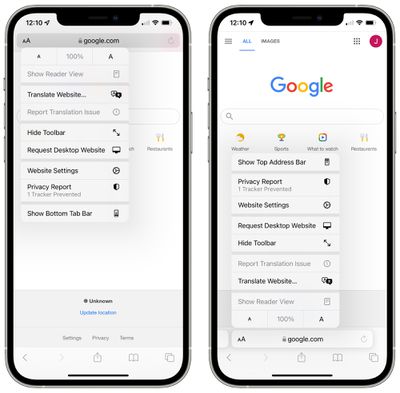
You can swap between the bottom Tab Bar and the Single Tab interface by tapping on the "Aa" button that's next to any URL.
Website Tinting
Available in the Settings app, Allow Website Tinting matches the collapsed Safari address bar interface to the website's colors to make it blend in better with the background.
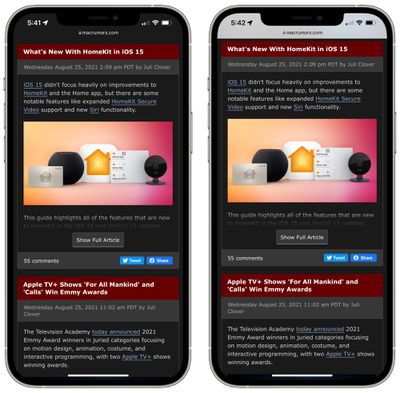
This only applies when you're scrolling through a webpage and have collapsed the address bar. In both Single Tab and Tab Bar modes, the interface adopts the colors of the website at the top and bottom, with the coloring extending all the way to the iPhone's status icons.
Landscape Tab Bar
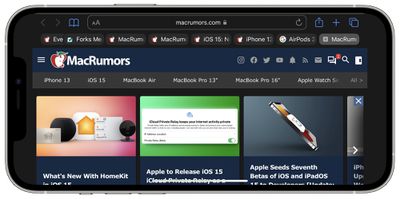
With the new Landscape Tab Bar setting, when you use your iPhone in landscape mode with Safari, you'll see a Mac-style tab bar that shows all of your open tabs, and you can swipe through them.
Pull to Refresh
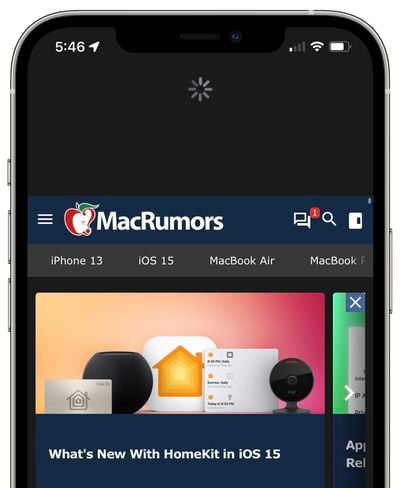
A downward swipe on any webpage in iOS 15 will refresh the page, and this is an alternative to having to tap on the reload icon.
Tab Groups
Tabs in iOS 15 can be saved into Tab Groups, which offers a way to preserve a set of tabs you have open without having to have those tabs active.
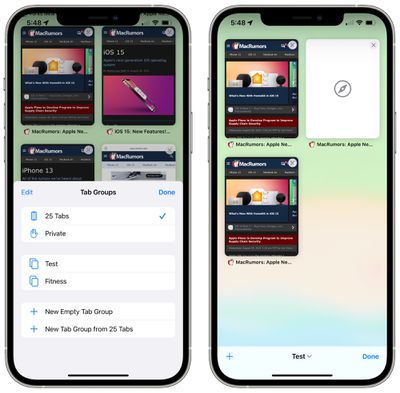
If you're planning a trip, for example, you can save all of your tabs into a "Vacation" group, accessing them when needed and leaving your device free for other content when you're not doing active planning. If you have a set of websites you always open up for work, you can save these in a dedicated Tab Group.
To make a Tab Group, just open up all of the websites that you want to include, tap on the Tabs button with the down arrow, and then tap New Tab Group from [#] Tabs. You can also use this option to create a New Empty Tab Group that tabs can be added to later. Long press on any open tab (or the main address bar if you have the single tab view enabled) to add it to a Tab Group.
To load up a Tab Group, tap on the Tabs button and then tap on the name of the group in the list. All of your Tab Groups sync across your devices so you can access them on iPhones and iPads running iOS and iPadOS 15 as well as on Macs running macOS Monterey.
Tab Overview Grid
In iOS 14, all of your open tabs are displayed in a card-like interface that you can swipe through, but in iOS 15, open tabs are displayed in a grid view.
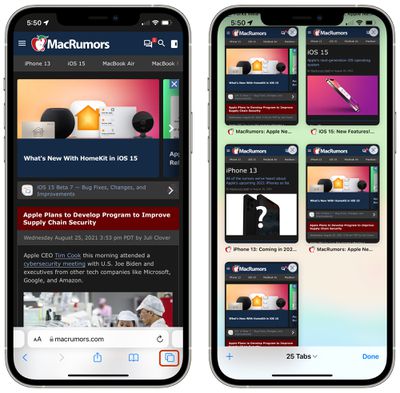
You can tap on the tab button (which is two overlapping squares) to bring up the grid interface that shows all of your open tabs. Tapping on the "X" in the corner of any tab closes it.
Customizable Start Page
Safari is more customizable in iOS 15, and you can edit what's available on your start page. This is a feature that has been available on macOS, but is now also available on iOS devices.
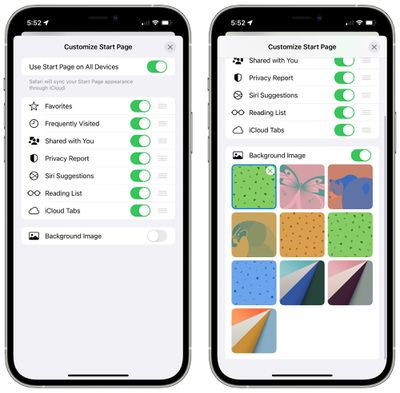
To customize the start page, open a new, blank tab, scroll all the way to the bottom of the window, and tap on the "Edit" button.
You can choose to have the start page show Favorites, Frequently Visited sites, Shared With You content, Privacy Report info, Siri Suggestions, Reading List, and iCloud Tabs.
There's an option to use the same Start Page appearance across all devices, and a toggle to upload the background image of your choice.
Intelligent Tracking Prevention Improvements
With updates to Intelligent Tracking Prevention, the feature that keeps websites from tracking your web activity, trackers are now blocked from accessing your IP address to build a profile on you.
HTTPS Upgrade
Safari in iOS 15 automatically upgrades sites that are known to support HTTPS from HTTP, which is insecure.
iCloud Private Relay
iCloud Private Relay is a privacy feature that makes sure all of your Safari traffic is encrypted.
As explained in our privacy guide, iCloud Private Relay protects your IP address and de-links it from the websites that you visit by utilizing two separate internet relays.
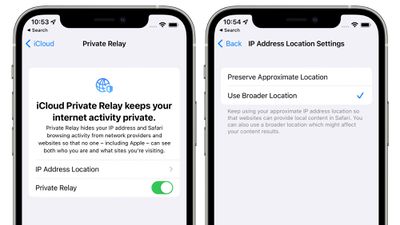
iCloud Private Relay sends all web traffic to a server that is maintained by Apple where information like IP address is stripped. Once the info is removed, the traffic (your DNS request) is sent to a secondary server that's maintained by a third-party company, where it is assigned a temporary IP address, and then the traffic is sent on to its destination.
By having a two-step process that involves both an Apple server and a third-party server, iCloud Private Relay prevents anyone, including Apple, from determining a user's identity and linking it to the website the user is visiting.
With this system, Apple knows your IP address and the third-party partner knows the site you're visiting, and because the information is de-linked, neither Apple nor the partner company has a complete picture of the site you're visiting and your location, and neither does the website you're browsing. Normally websites have access to this data and combined with cookies, can use it to build a profile of your preferences.
Web Extensions
Safari in iOS 15 supports web extensions, with web extensions able to be downloaded and installed through the App Store. Available extensions include content blockers, VPNs, and more.
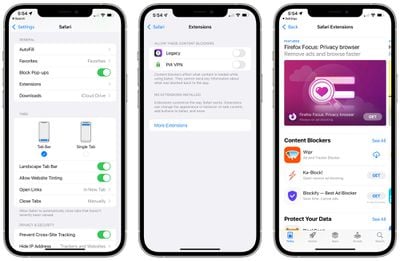
Live Text
With iOS 15, iPhones and iPads are able to use a new Live Text feature to detect text in any image, and this includes images that you find in Safari.
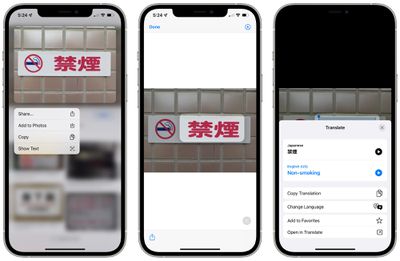
Any Safari image that contains text can be selected, copied, pasted, and translated. To use Live Text in Safari, long press on any image and then tap on "Show Text." From there, you can select the text and interact with it like any other text on an iPhone.
Shared With You
Shared With You, a new option available on the Safari start page, aggregates all of the links that you've been sent in the Messages app and other social networking apps that support the Shared With You feature.
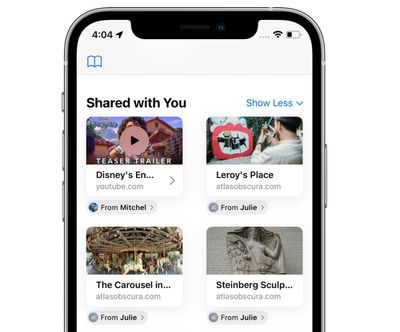
This new section is designed to ensure that you don't miss links you've been sent, and it lets you know who sent a link to you so you can get back to them with what you thought.
Guide Feedback
Have questions about the new Safari changes in iOS 15, know of a feature we left out, or want to offer feedback on this guide? Send us an email here.



































