Skip to Content

Everything New With the iOS 15 Notes and Reminders Apps

Those who use the Notes and Reminders apps will be pleased to hear that iOS 15 and iPadOS 15 bring some useful new features. The Notes app has enhanced functionality on the iPad with the Quick Note feature, while Reminders features better Siri integration and natural language support.
iOS 15 Notes Feature
The guide below highlights the new features that you'll find in the Notes and Reminders apps in iOS 15.

Notes

The major new feature in the Notes app, Quick Note, is exclusive to the ‌iPad‌, but Apple has added some general quality of life improvements and new features for those who share notes between multiple people.

Tags

When writing a note, you can use hashtags to tag it with a word or a phrase for organizational purposes. You can use any tag you want, like #cooking, #plants, #work, #reminders, etc.
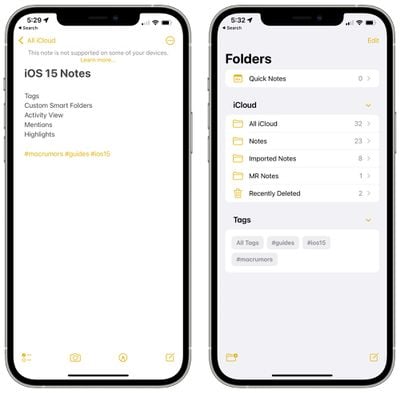
ios 15 notes tags
Once you create a tag, it's added to the "Tags" section in the Notes app overview. You can tap on any of the tag names to see all notes that contain that tag.
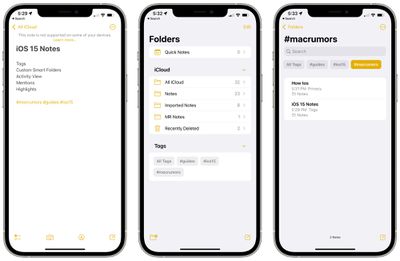
ios 15 notes tag browser

Custom Smart Folders

To go along with tags, there's a new Smart Folders option that you can use to create a folder to house tags.
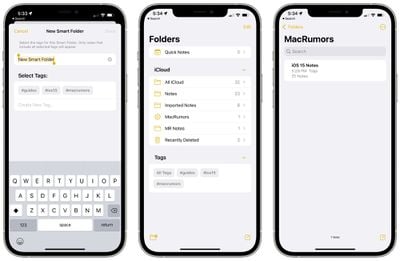
ios 15 smart folders
When creating a Smart Folder, you can choose a name and select which tags you want it to include. You can choose tags you've already created or add new tags that will be used in future notes.

Tags and Smart Folders offer a new way to organize your notes and it's a system that's quicker and more simple than manually organizing your notes into different folders.

Activity View

The Notes app has offered sharing features for some time now, but in iOS 15, Apple is making it easier to collaborate and work on a note with another person.
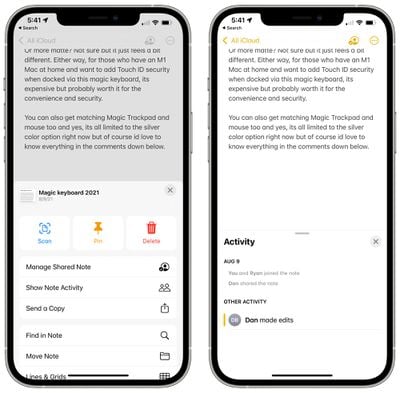
ios 15 notes sharing activity
On any shared note, if you tap the three dots in the upper right hand corner or the little person icon, you can get to an Activity View that shows you the edits that each person has made and who has interacted with the note.

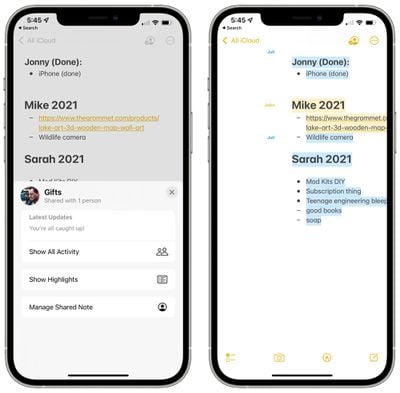
If you tap on "Highlights" or swipe right in a note, you can see an overview of the portions of the note that each person has contributed. If you have a gift list or grocery list, for example, you can see the items that each person involved with the note has added.
ios 15 show highlights collaboration
Edit times and dates are included, and each person's contributions are shown in a different color. When you open a note, you'll also see a notification of the changes that have been made since the last time you opened the note.

Mentions

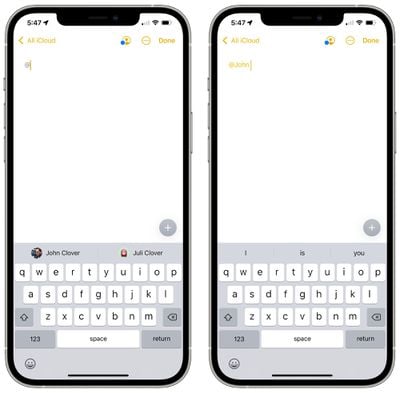
In shared notes or folders, you can add an @ sign and type in the name of a person the note is shared with to bring their attention to it and to let them know if there's been an important update.
ios 15 notes mentions
With an @mention, the person receives a notification about the note, which is similar to how @mentions work in other apps.

Quick Note - iPadOS 15

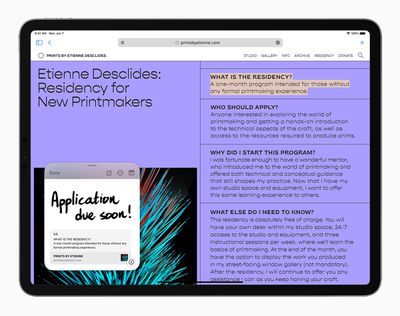
On the ‌iPad‌, if you tap in the lower right corner with an Apple Pencil or swipe with a finger, you can bring up a Quick Note to jot down a thought or an idea.
Apple iPadPro iPadOS15 QuickNote Safari 060721 big carousel
You can bring up a Quick Note from the Home Screen, in any app, when using Split View, or anywhere else in iPadOS.

You can type in a Quick Note or use the ‌Apple Pencil‌ to write, and Quick Note size can be adjusted or it can be collapsed down to the side of the ‌iPad‌ so you can bring it right back up when you need it.

Links from an app or website can be added to Quick Note for context, and when you go back to the same place in the app or on the site, a thumbnail of the Quick Note appears to remind you of your earlier note.

Quick Notes are all stored in the Quick Note folder in the Notes app and they can be viewed on the iPhone or a device that doesn't support Quick Note as a standard note.

Reminders

Some of the same new features that Apple added to Notes are also available in the Reminders app, along with a few useful bonus features like natural language support.

Tags

As with Notes, you can now add any hashtag to a reminder as a new organizational method. You can group up all reminders that are tagged with a certain word, such as "groceries," so it's a great way to split your reminders up without having to use different lists.
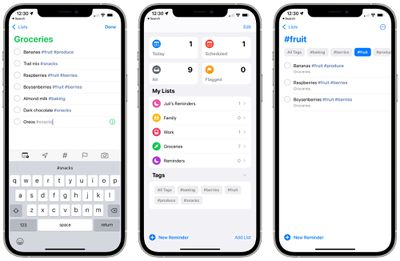
ios 15 reminders tags
Once you've added at least one tag to a reminder, the Reminders app will have a new Tag Browser that aggregates all of the tag names. Tapping on a tag shows all of the reminders using that tag.

Custom Smart Lists

Smart Lists are how your different Reminder tags can be aggregated together. Smart Lists can be made to organize reminders based on tags, dates, times, locations, flags, and priority.
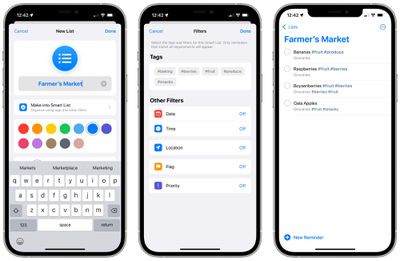
ios 15 reminders smart lists
For tags, you can create lists that will aggregate multiple tags like #cooking and #groceries so you can create the organizational system that works for you.

Natural Language Support

In iOS 15, you can use more natural phrases to create reminders more quickly. "Jog every other morning," will create an every other day reminder, for example. You can use phrases like "clean the kitchen every Friday" or "check the mail every day at 4:00 p.m." and the iPhone and ‌iPad‌ will accurately interpret what you're aiming for.
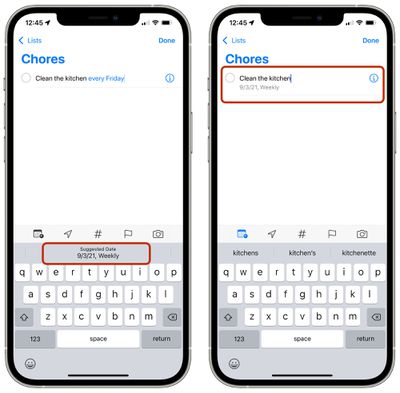
ios 15 reminders natural language

Deleting Completed Reminders

It's easier to delete completed roundups in iOS 15. In any list with a lot of reminders, you can tap on the new "Clear" label. Depending on how old the reminder is, you might see options for deleting all completed reminders, completed reminders older than a year, completed reminders older than six months, and completed reminders older than a month.
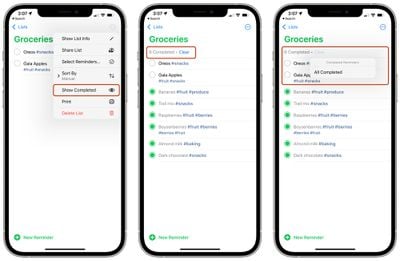
ios 15 reminders delete completed
If your completed reminders aren't visible, you can tap on the icon with the three dots and then select "Show Completed." From there, the "Clear" option for removing finished reminders will be available.

Swiping to delete, a feature that was already available, can also be used to clear completed reminders, but the new feature for clearing all finished reminders is quicker.

Announce Reminders with Siri

When a reminder that you need to attend to pops up when you're wearing AirPods or compatible Beats headphones, ‌Siri‌ will announce it similar to notifications or incoming messages.

ios 15 reminders announce notifications
This feature can be toggled on in the Settings app under ‌Siri‌ and Search > Announce Notifications > Reminders.

Expand Suggested Attributes

Adding a tag is a new quick suggestion in the Reminders toolbar along with date, location, flag, and photo.
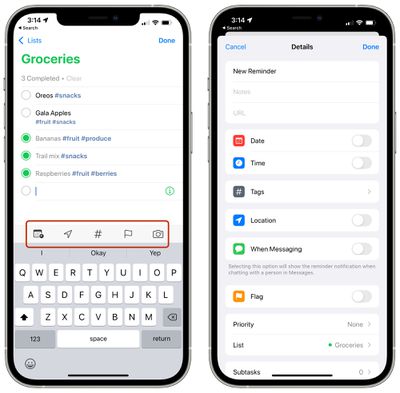
ios 15 reminders toolbar
Tapping on the info icon also now provides tags as an option alongside date, time, location, flags, when messaging a certain person, and priority.

Guide Feedback

Have questions about the new Notes and Reminders changes in iOS 15, know of a feature we left out, or want to offer feedback on this guide? Send us an email here.


Related Forum: iOS 15

Popular Stories

apple design award 2025

Apple Announces 2025 Design Award Winners Ahead of WWDC 2025

Tuesday June 3, 2025 10:14 am PDT by
As we wait for WWDC to kick off next Monday, Apple today announced the winners of its annual Apple Design Awards, recognizing apps and games for their innovation, ingenuity, and technical achievement. The 2025 Apple Design Award winners are listed below, with one app and one game selected per category: Delight and Fun - CapWords (App) and Balatro (Game) Innovation - Play (App) and PBJ -...
1password deal blue

1Password Security Breach: What Was Accessed and What Wasn't

Wednesday November 25, 2026 1:09 pm PST by
Popular password management app 1Password today said it experienced a security breach earlier this month. 1Password says some customer names and email addresses were accessed, but no customer vault contents were compromised. On November 19, 1Password saw indications that an employee's GitHub account had been breached and began investigating. The company says the breached GitHub account was...
Apple 2026 Black Friday Event Hero

Apple's Official 2026 Black Friday Offer Starts Rolling Out

Thursday November 26, 2026 8:37 am PST by
Apple's annual four-day Black Friday through Cyber Monday shopping event is now live in Australia, New Zealand, and Thailand, and it will continue to roll out across Europe, the U.S., and Canada as the calendar turns to Friday, November 27 around the world. In the U.S., Apple's terms and conditions say the promotion begins on November 27 at 12 a.m. Pacific Time and ends on November 30 at...

Top Rated Comments

68 months ago

I may be in the minority here but I have a hard time remembering to even use the Reminder app.
You should set a reminder for that
Score: 19 Votes (Like | Disagree)
zorinlynx Avatar
68 months ago

I may be in the minority here but I have a hard time remembering to even use the Reminder app.
I use it quite a bit! Think of it not only as a reminders app, but also as a list-keeping app. Anything that you need to keep a list of, you can put in there.

For example, I use it for groceries, I can even put a picture of the exact item I want to buy so I can reference it when shopping. And you can check off things on the list as you put them in the cart, and uncheck them at home when you need to buy more. I've gotten to the point where I don't have to type much at all to update my grocery list because all the things I regularly buy are already in there!

I also put in things like movies I want to get around to watching, etc... all in different lists.

And of course it lives up to its name, reminding me to pill my cat, pay my bills, etc. It truly is a great app.
Score: 10 Votes (Like | Disagree)
68 months ago
I may be in the minority here but I have a hard time remembering to even use the Reminder app.
Score: 10 Votes (Like | Disagree)
TheYayAreaLiving 🎗️ Avatar
68 months ago
Lovely! Notes App have come a really long way. I’m glad Apple is able to make it extremely useful.
Score: 9 Votes (Like | Disagree)
Mr Todhunter Avatar
68 months ago
I deleted the Reminders app from all my iOS devices because I find it incomprehensible.
Score: 8 Votes (Like | Disagree)
68 months ago
I'm glad that Apple is purposely adding features to Notes SLOWLY. Rather than trying to jam a lot of features and complexity into the application.

For me, that's the approach Evernote took 7 or so years ago making it less enjoyable and more complicated to use. And why I then switched to Notes and never looked back. I appreciate its simplicity and "just works" aspect among the devices my notes sync across, always without issue. Notes is an app I use everyday and depend on.
Score: 5 Votes (Like | Disagree)
Latest Stories
The 50+ Best Apple Black Friday Deals Still Available on AirPods, iPads, and More
11 hours ago
HomePod Mini 2 in (RED) Seemingly Spotted Ahead of Announcement
8 hours ago
Apple's M6 and PROLED MacBook Pro Reach New Low Prices for Black Friday
19 hours ago
The MacRumors Show: iPhone Air 2 and iPhone 18 Are Coming
19 hours ago
Apple Store in Brisbane Reopening Next Month With New Design
19 hours ago
The 60+ Best Black Friday Accessory Deals on iPhone Chargers, TVs, Headphones, and More
20 hours ago
GTA VI Now (Barely) Running on Apple Silicon Macs
20 hours ago
The Best Black Friday Streaming Deals on Apple TV, Disney+, and More
21 hours ago
Apple TV's 'Carême' Wins International Emmy for Best Drama
22 hours ago
iPhone 18 Production Delay Leaves Apple Little Time Before Launch
22 hours ago
The Best Black Friday AirPods Deals Still Available
14 hours ago
The Best Black Friday Deals on Apple Home Products
23 hours ago
The Best Black Friday iPhone Deals Still Available
14 hours ago
The Best Black Friday iPad Deals Still Available
14 hours ago
The Best Black Friday Apple Watch Deals Still Available
14 hours ago
The Best Black Friday AirTag Deals Still Available
14 hours ago
The Best Black Friday Mac Deals Still Available
14 hours ago
iPhone Share of US Smartphone Market Hits 57% as Rivals Slip
1 day ago
iPhone 20 Pro Rumored to Feature 3D-Printed Titanium Frame
1 day ago
Apple's Official 2026 Black Friday Offer Starts Rolling Out
2 days ago
Halide Adds Fill Light Feature for iPhone Duo
2 days ago
MacBook Air Black Friday Deals Now Live With Massive $399 Savings
2 days ago
Amazon Discounts All MacBook Neo Models by $99 for Black Friday
2 days ago
Kodak Launches Unique AirTag Rival With E-Ink Display
2 days ago
Here's Why the Apple Store is Going Down
2 days ago
Apple Still Working on Giant Foldable iPad That Could Cost $5,000
2 days ago
iPhones Dominate China's Weak Singles' Day Smartphone Sales
2 days ago
iPhone 20 Pro Could Feature Ceramic in Limited-Edition Model
2 days ago
Apple Faces Korean Regulator Review Over iPhone 16 AI Advertising
2 days ago
Apple Watch Ultra 4 Hits New Best-Ever Price of $649.99 for Black Friday
2 days ago
Related Apple News: Iphone 17e | Aqara Camera Hub G350 | Force Quit Apple Watch Apps Watchos 27 | Ios 18 New Features | Find My Network Accessory Program





























