Skip to Content

How to Use iOS 15's Focus Mode to Stay on Task

Apple has long had a Do Not Disturb function that can be activated when you want to mute incoming notifications to avoid being bothered, but with iOS 15, Apple is taking Do Not Disturb to a new level with Focus.
iOS 15 Focus Feature
With Focus, you set an activity that you're doing, such as working, exercising, reading, or spending time with family, and block out the notifications that are unrelated to those tasks. It's basically Do Not Disturb but with more options for refining what you see and what you don't see. This guide highlights everything that you need to know about iOS 15's Focus mode.

Accessing Focus Mode

Focus, like Screen Time, lives in the Settings app. It's grouped up with Notifications, Sounds & Haptics, and Screen Time on iOS.
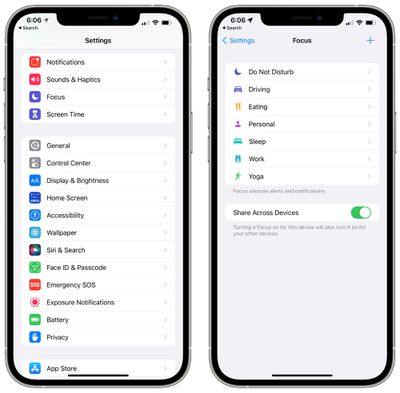
ios 15 focus settings app
You can also activate, manage, and create new focuses through the Control Center on iPhone, iPad, and Mac.
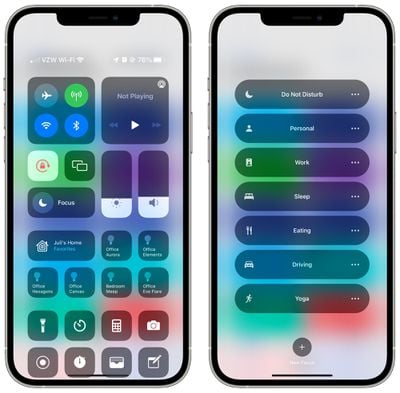
ios 15 focus control center activation

Creating and Editing Focuses

In a nutshell, with any Focus mode, you can select who can contact you and which apps, if any, can send you notifications. Focus mode lets you personalize the people and apps able to contact you based on what you're doing.
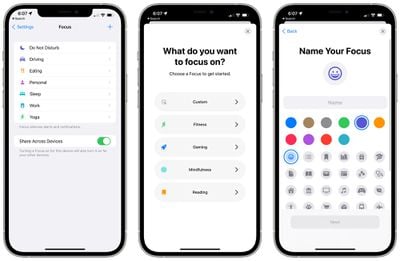
ios 15 focus mode creation
Apple has several pre-made Focus options like Do Not Disturb, Driving, and Sleep, but you can also create your own Focus modes and choose which apps are able to send you notifications.

You can set up different Focus modes for work, personal time, working out, gaming, reading, cooking, or anything else you can think of where you don't want to be disturbed.

In the Focus section of Settings or through the Control Center, you can tap on the "+" button to create a new Focus, or tap on one of the existing Focus modes to tailor it to better suit your needs.

You can select a pre-prepared Focus goal or create something entirely custom, choosing an icon and an icon color. With any Focus mode, you can decide if you want to get notifications from people during the Focus, and if so, which people.
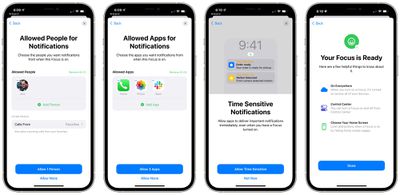
ios 15 focus mode creation 2
From there, you can select which apps are allowed to send you notifications, and then you can choose whether or not you want to receive Time Sensitive notifications.
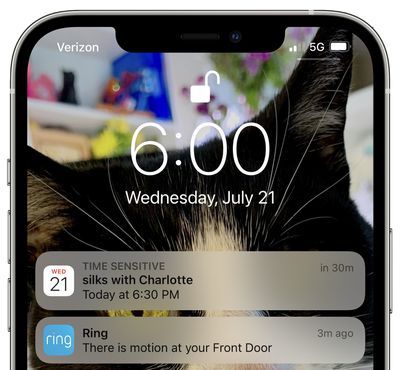
time sensitive notifications focus mode
Time Sensitive notifications are a new notification class in iOS 15. A notification marked as time sensitive can be allowed to bypass Focus mode. Notifications that are classed as time sensitive are those that are immediately important, such as someone at the door, a food delivery, a ride pickup, and more.

Focus Setup Suggestions

When creating a Focus, your device will use on-device intelligence and data gathered about your past activity to suggest apps and people you might want to allow notifications from.
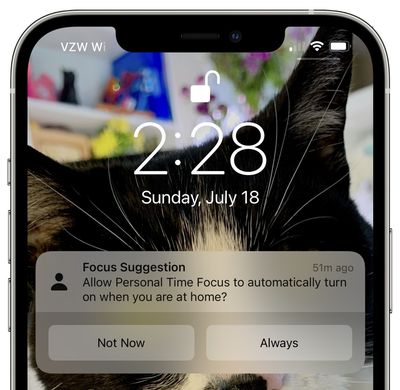
ios 15 focus suggestions

Activating a Focus

To activate one of your Focus modes, just toggle it on using the Control Center. This is the simplest way to turn on a Focus, disable a Focus, and swap between Focus modes.
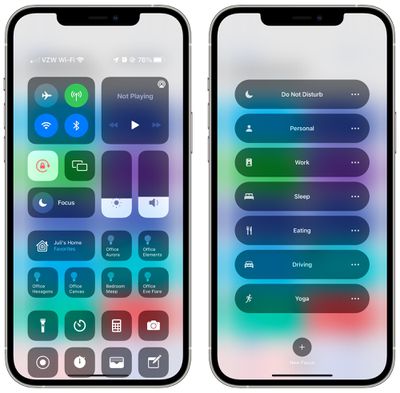
ios 15 focus control center activation 1
When a Focus is active, the Control Center will display the name and the icon of the Focus mode, so you know at a glance that a Focus is turned on. Focus modes also display on the Lock Screen of your iPhone.

Cross Device Functionality

When you activate a Focus on one device, it activates across all of the devices you're signed into with your Apple ID so you won't be disrupted even if you switch from an iPhone to an ‌iPad‌ or a Mac.

If you want Focus mode to be activated on one device and not another, you can toggle off "Share Across Devices" in the Focus mode section of the Settings app.

Letting People Know Focus Mode is Active

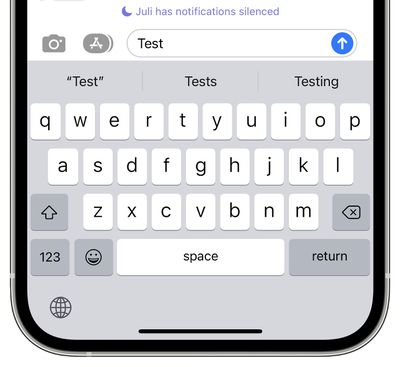
In any Focus that you create or edit, you can opt to toggle on the "Focus Status" option. This option lets apps like Messages tell people that you have your notifications silenced.
ios 15 focus mode alerts
When someone goes to send you an iMessage, if Share Focus Status is toggled on, they'll see a small message at the bottom of the app that says "[Person] has notifications silenced." People can choose to send a message anyway regardless of Focus status if there's something important that needs to be shared.

Focus Status sharing is available in Apple's built-in apps like Messages and there's also an API for developers to build it into their apps too.

Auto-Reply

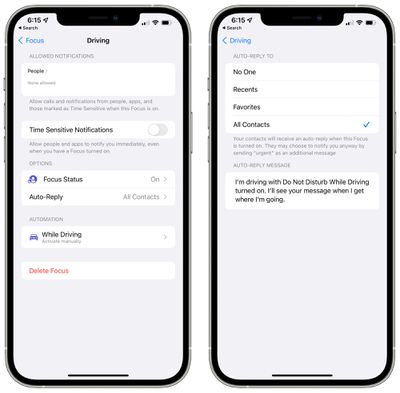
For some Focus modes like Driving, you can activate an "Auto-Reply" option that will let people know that you're busy and will get back to them later. Auto-Reply messages can be customized, and this is an option for the previous Do Not Disturb While Driving feature that has been folded into Focus.
ios 15 focus mode auto reply

Breakthrough Messages

If you have your Focus Status on and are blocking incoming notifications, people can opt to send an urgent message. You can choose to allow or or disallow urgent messages, which bypass your restrictions.

Lock and Home Screen Refinements

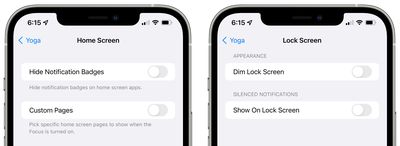
With a Focus mode enabled, you can choose to show only select app pages and hide all notification badges from the Home Screen. With this feature, you can dedicate a specific screen of apps to a given Focus mode, blocking out distractions like social networking apps and leaving you only with what's relevant.
ios 15 focus mode home lock screen
On the Lock Screen, you can choose to use a dim feature and decide whether silenced notifications should be shown on the Lock Screen.

Focus Smart Activation

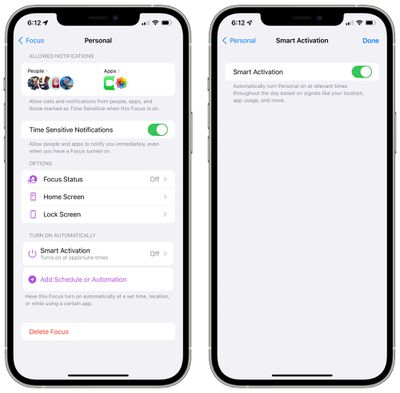
If you toggle on the Focus Smart Activation feature, your device will use signals like your location and app usage to decide when to automatically turn on a Focus mode throughout the day. With this enabled, your iPhone might activate a work Focus mode when you leave the house in the morning to head to the office, turning it off again when you get home.
ios 15 focus mode smart activation

Focus Automations

You can set a Focus mode to activate at a certain time, at a certain location, or when a specific app is opened using Automations.
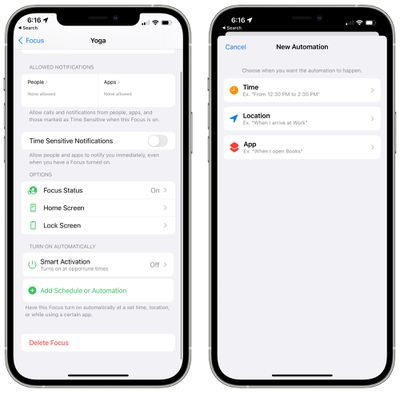
ios 15 focus mode automation

Guide Feedback

Have questions about Focus in iOS 15, know of a feature we left out, or want to offer feedback on this guide? Send us an email here.


Related Forum: iOS 15

Popular Stories

apple design award 2025

Apple Announces 2025 Design Award Winners Ahead of WWDC 2025

Tuesday June 3, 2025 10:14 am PDT by
As we wait for WWDC to kick off next Monday, Apple today announced the winners of its annual Apple Design Awards, recognizing apps and games for their innovation, ingenuity, and technical achievement. The 2025 Apple Design Award winners are listed below, with one app and one game selected per category: Delight and Fun - CapWords (App) and Balatro (Game) Innovation - Play (App) and PBJ -...
1password deal blue

1Password Security Breach: What Was Accessed and What Wasn't

Wednesday November 25, 2026 1:09 pm PST by
Popular password management app 1Password today said it experienced a security breach earlier this month. 1Password says some customer names and email addresses were accessed, but no customer vault contents were compromised. On November 19, 1Password saw indications that an employee's GitHub account had been breached and began investigating. The company says the breached GitHub account was...
Apple 2026 Black Friday Event Hero

Apple's Official 2026 Black Friday Offer Starts Rolling Out

Thursday November 26, 2026 8:37 am PST by
Apple's annual four-day Black Friday through Cyber Monday shopping event is now live in Australia, New Zealand, and Thailand, and it will continue to roll out across Europe, the U.S., and Canada as the calendar turns to Friday, November 27 around the world. In the U.S., Apple's terms and conditions say the promotion begins on November 27 at 12 a.m. Pacific Time and ends on November 30 at...

Top Rated Comments

70 months ago
Is there a Focus mode for when you’re setting up Focus modes?
Score: 12 Votes (Like | Disagree)
jclo Avatar
70 months ago

OK. Please repost when the rest of the world gets iOS 15. Thanks.
I will! I'm making a master guide that has all of our iOS 15 content so we'll have something great when iOS 15 launches.
Score: 10 Votes (Like | Disagree)
contacos Avatar
70 months ago
My life must be so boring. If I don’t want to be disturbed, I just put away my phone 🤷🏼‍♂️ My phone has been on mute since iPhone 4
Score: 7 Votes (Like | Disagree)
70 months ago

Am I missing something in regards to focus mode? I’ve tried to use it on the beta but it doesn’t seem to do what I want it to do.

When it comes to setting up the different focus modes I want to be able to set “Allow calls from anybody” and “Allow notifications from all apps except selected apps” but these don’t appear to be options.

Bascially I want to set a focus mode that blocks notifications from the apps I only use for work like Teams and Outlook.
This is what I wanted too. I want to block work related notifications (people and apps) when I’m not at work.
Some people don’t get I’m off work. I also don’t want to block them 🤔
Score: 5 Votes (Like | Disagree)
70 months ago
Am I missing something in regards to focus mode? I’ve tried to use it on the beta but it doesn’t seem to do what I want it to do.

When it comes to setting up the different focus modes I want to be able to set “Allow calls from anybody” and “Allow notifications from all apps except selected apps” but these don’t appear to be options.

Bascially I want to set a focus mode that blocks notifications from the apps I only use for work like Teams and Outlook.
Score: 5 Votes (Like | Disagree)
70 months ago

It doesn't exactly work this way but you could just check all the apps except those two, which isn't too hard since there are just checkboxes to tap and you can select multiples at once.
That works for notifications and contacts but is a bit of a ball-ache when you have hundreds of apps installed. Plus it would mean having to modify the lists every time you install a new app or add a new contact.

Apple adding an “All except…” option would seem to be a relatively trivial thing to do. Perhaps I’ll submit it though the feedback app.
Score: 4 Votes (Like | Disagree)
Latest Stories
The 50+ Best Apple Black Friday Deals Still Available on AirPods, iPads, and More
11 hours ago
HomePod Mini 2 in (RED) Seemingly Spotted Ahead of Announcement
8 hours ago
Apple's M6 and PROLED MacBook Pro Reach New Low Prices for Black Friday
18 hours ago
The MacRumors Show: iPhone Air 2 and iPhone 18 Are Coming
18 hours ago
Apple Store in Brisbane Reopening Next Month With New Design
19 hours ago
The 60+ Best Black Friday Accessory Deals on iPhone Chargers, TVs, Headphones, and More
20 hours ago
GTA VI Now (Barely) Running on Apple Silicon Macs
20 hours ago
The Best Black Friday Streaming Deals on Apple TV, Disney+, and More
21 hours ago
Apple TV's 'Carême' Wins International Emmy for Best Drama
21 hours ago
iPhone 18 Production Delay Leaves Apple Little Time Before Launch
22 hours ago
The Best Black Friday AirPods Deals Still Available
14 hours ago
The Best Black Friday Deals on Apple Home Products
23 hours ago
The Best Black Friday iPhone Deals Still Available
14 hours ago
The Best Black Friday iPad Deals Still Available
14 hours ago
The Best Black Friday Apple Watch Deals Still Available
14 hours ago
The Best Black Friday AirTag Deals Still Available
14 hours ago
The Best Black Friday Mac Deals Still Available
14 hours ago
iPhone Share of US Smartphone Market Hits 57% as Rivals Slip
1 day ago
iPhone 20 Pro Rumored to Feature 3D-Printed Titanium Frame
1 day ago
Apple's Official 2026 Black Friday Offer Starts Rolling Out
2 days ago
Halide Adds Fill Light Feature for iPhone Duo
2 days ago
MacBook Air Black Friday Deals Now Live With Massive $399 Savings
2 days ago
Amazon Discounts All MacBook Neo Models by $99 for Black Friday
2 days ago
Kodak Launches Unique AirTag Rival With E-Ink Display
2 days ago
Here's Why the Apple Store is Going Down
2 days ago
Apple Still Working on Giant Foldable iPad That Could Cost $5,000
2 days ago
iPhones Dominate China's Weak Singles' Day Smartphone Sales
2 days ago
iPhone 20 Pro Could Feature Ceramic in Limited-Edition Model
2 days ago
Apple Faces Korean Regulator Review Over iPhone 16 AI Advertising
2 days ago
Apple Watch Ultra 4 Hits New Best-Ever Price of $649.99 for Black Friday
2 days ago
Related Apple News: Iphone | Local News | Buyers Guide | South Africa | Reviews






























