Skip to Content

Apple Silicon Unified Memory: How Much Mac RAM Do You Need?

When choosing a new Mac, one of the most important decisions you'll make is how much memory to configure. This guide helps you to work out how much RAM you need.
apple silicon feature joeblue
With the advent of Apple silicon and its unified memory architecture in 2020, the traditional understanding of RAM has evolved, leading to new considerations for users when selecting a memory option. Unlike traditional PC RAM, where separate components like the CPU and GPU each have their own dedicated memory pools, Apple's unified memory architecture allows all processing units to access a single, shared pool of high-bandwidth, low-latency memory.

As a result, in Apple silicon systems, data doesn't need to be copied between multiple memory areas, significantly improving speed and power efficiency. By uniting memory, Apple devices with this technology theoretically deliver superior performance across multitasking, creative workflows, and demanding applications while minimizing the latency typically associated with data transfer between separate memory types. With the optimizations of macOS, this means that less memory can go further than before, for most Mac users.

All Mac models now start with 16GB of memory, up from 8GB, with the option to upgrade to higher configurations with build-to-order models. However, choosing to do so can add considerable cost to the base price of a new Mac.

To help you make the best choice for your workflow and budget, here's a breakdown of who should choose each memory tier currently available in the entire Mac lineup and why it may be the right fit for you:

  • 16GB: General users, students, and professionals with standard workloads should opt for 16GB. This configuration is perfect for those who primarily browse the web, stream content, use productivity apps, and perform multitasking. Thanks to the performance of Apple silicon and the efficiency of macOS, 16GB is more than sufficient for a smooth experience with everyday tasks.
  • 24GB: Users who need slightly more headroom for multitasking and moderate creative work should consider 24GB. This tier is ideal for those who work with slightly heavier applications such as video editing, gaming, graphic design, or coding but do not push these tasks to the absolute extreme. It provides an additional buffer for users who run multiple intensive apps simultaneously and perform more multitasking than what 16GB can handle comfortably.
  • 32GB, 36GB, or 48GB: Professionals engaging in intensive creative workflows, such as video editing in 4K, music production with multiple tracks, or large-scale coding projects, should opt for 32GB, 36GB, or 48GB. These configurations suit users who frequently use memory-heavy applications like Adobe Creative Cloud apps, Xcode, or virtual machines. It provides sufficient power for consistent performance without frequent reliance on disk swapping, even under substantial workloads.
  • 64GB: Power users and creative professionals who manage high-resolution media and extensive multitasking should choose 64GB. It is ideal for those working on large 3D modeling projects, editing 8K video, or handling complex simulations and data analysis. This memory quantity should support running multiple virtual machines or advanced software development environments without any slowdown.
  • 96GB: High-end creative professionals and developers handling intensive projects involving large datasets or media should consider 96GB. This tier offers significant overhead for those who need more than 64GB, ensuring seamless performance when editing multiple streams of high-resolution video, detailed 3D rendering, or working with substantial datasets that need to be kept in active memory.
  • 128GB: Professionals in specialized fields like film editing, data science, or engineering should look at 128GB. This memory configuration is designed for workflows that involve extremely large projects and require vast amounts of data to be kept in active memory. It is perfect for those working on high-resolution visual effects in cinema, simulation-based software, or advanced scientific computations, providing robust multitasking and peak performance across demanding tasks.
  • 192GB: Enterprise-level users, researchers, and industry professionals dealing with mission-critical, memory-intensive applications should opt for 192GB. This option is suitable for large-scale data processing, machine learning, or AI development, ensuring maximum efficiency and reducing the need for data swapping between RAM and storage. It is also ideal for developers working on complex server-side projects requiring powerful single-machine testing.

With Apple silicon's Unified Memory Architecture and macOS's efficient memory management, the base 16GB configuration now meets the needs of most users, providing a good balance of cost and performance for everyday computing tasks and moderate creative work.

The increasing importance of demanding artificial intelligence features like Apple Intelligence and the potential for more intensive applications over time mean that those with more demanding workflows or plans for longevity should consider upgrading the memory. Opting for 24GB or 32GB can provide an added buffer for the future, supporting heavier multitasking, creative software, and emerging AI features. Higher configurations, such as 64GB or more, are better for professionals in fields that require significant data handling, including video production, 3D rendering, and machine learning.

For users who already own an Apple silicon Mac, it will be worthwhile to evaluate your current system's performance to determine whether you'll need more memory next time around. Consider whether your current memory configuration handles your typical workload efficiently or if you experience slowdowns during multitasking or when using resource-intensive applications. Ultimately, your decision should balance your current workload, any anticipated future requirements, and cost—especially since adding memory can be expensive and it cannot be changed after purchase.


Popular Stories

grand theft auto iv

GTA VI Now (Barely) Running on Apple Silicon Macs

Friday November 27, 2026 7:46 am PST by
"Grand Theft Auto VI" can theoretically now run on Apple silicon Macs via unofficial community projects, despite Rockstar Games offering no official Mac version. Developers have adapted the Xbox Series version of the game to work on macOS unofficially, with some reporting that they can explore scenes and control the camera. Unfortunately, the projects remain experimental and performance is...

apple design award 2025

Apple Announces 2025 Design Award Winners Ahead of WWDC 2025

Tuesday June 3, 2025 10:14 am PDT by
As we wait for WWDC to kick off next Monday, Apple today announced the winners of its annual Apple Design Awards, recognizing apps and games for their innovation, ingenuity, and technical achievement. The 2025 Apple Design Award winners are listed below, with one app and one game selected per category: Delight and Fun - CapWords (App) and Balatro (Game) Innovation - Play (App) and PBJ -...
1password deal blue

1Password Security Breach: What Was Accessed and What Wasn't

Wednesday November 25, 2026 1:09 pm PST by
Popular password management app 1Password today said it experienced a security breach earlier this month. 1Password says some customer names and email addresses were accessed, but no customer vault contents were compromised. On November 19, 1Password saw indications that an employee's GitHub account had been breached and began investigating. The company says the breached GitHub account was...

Top Rated Comments

nutmac Avatar
27 months ago
MacRumors forgot to add:

16GB: For Chrome users with 1 tab.
24GB: For Chrome users with 2 tabs.
32GB or 36GB: For Chrome users with 3 tabs.
64GB: For Chrome users with 4 tabs.
96GB: For Chrome users with 5 tabs.
128GB: For Chrome users with 6 tabs.
192GB: For Chrome users with 7 tabs.

/s
Score: 70 Votes (Like | Disagree)
27 months ago
As much as you can put to use and afford. And, if you can afford some more, then get at least 50% more spare capacity for future needs.
Score: 51 Votes (Like | Disagree)
Darajavahus Avatar
27 months ago
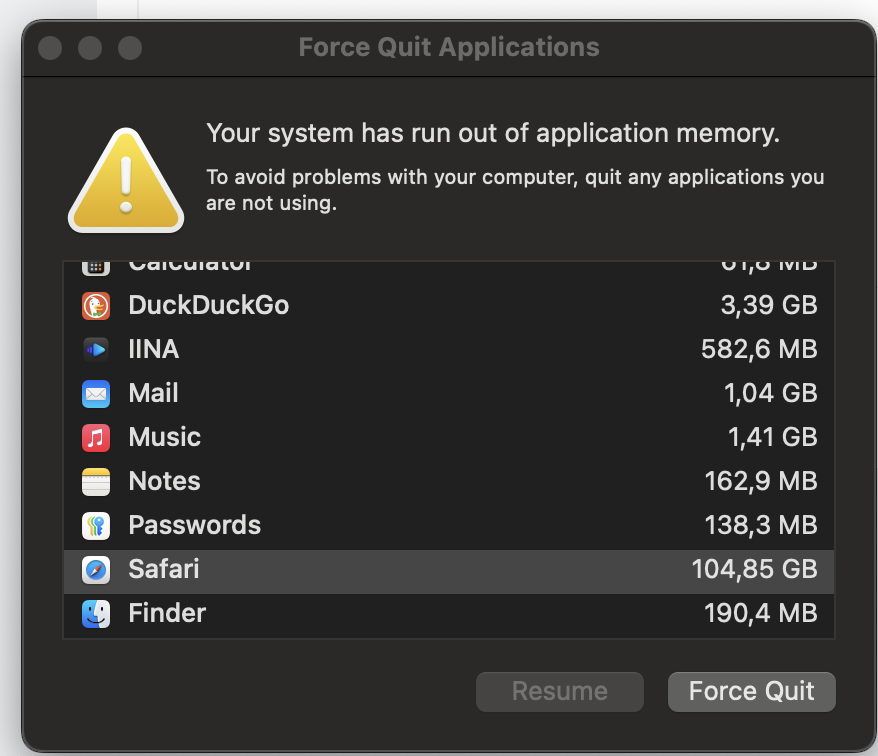
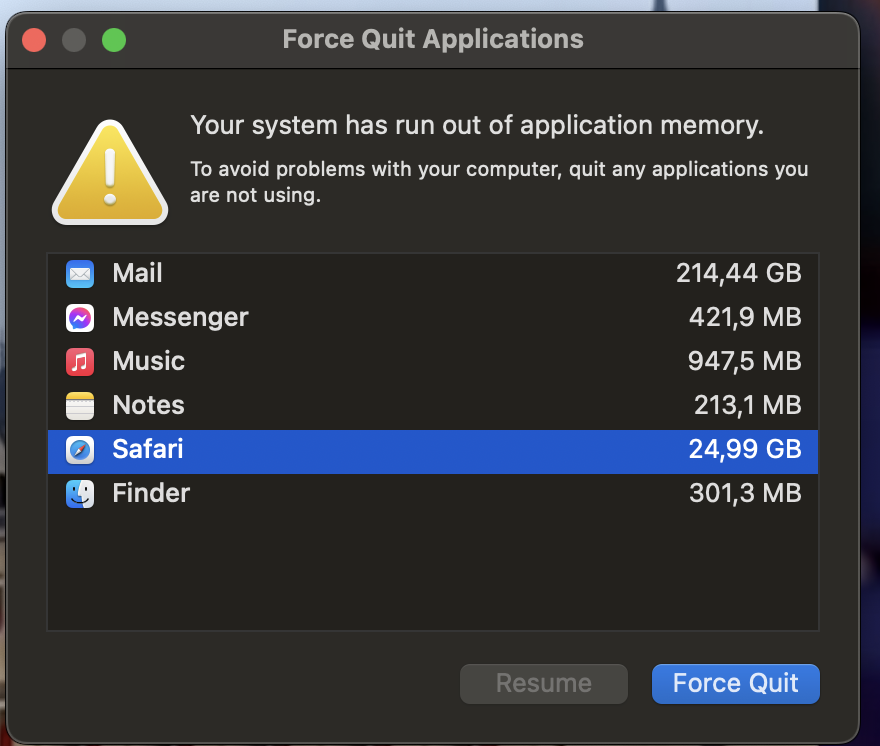
How do you explain just Mail or Safari wanting over 200GB??? I'm not Hollywood movie editor or enterprise-level researcher, I just have bunch of tabs when I'm researching what air fryer to buy and then system runs out of memory 🤷 whyyyy???

Attachment Image

Attachment Image
Score: 36 Votes (Like | Disagree)
27 months ago
This should be fun... a welcome distraction from the days events!


Says every poster to every other poster on this topic!

Attachment Image
Score: 34 Votes (Like | Disagree)
tonywalker23 Avatar
27 months ago
Don't know why anyone would ever need more than the 128mb in my PowerBook G4.
Score: 29 Votes (Like | Disagree)
27 months ago

Expect RAM use to grow over the life of your Mac. Plan accordingly...

My Advice: If you have an Apple Silicon (M1, M2, or M3) Mac now with only 8GB of RAM, consider selling it on eBay ...
The vast majority of Mac users use their computers for almost nothing. Shopping on Amazon and watching videos or maybe email. That's it. For those people, a Chromebook would work well. And even the M1 with 8GB is overkill.

Seriously, when was the last time you used Logic on an orchestral assignment with two dozen sampled tracks? And when you did, I bet it worked well enough with 16GB RAM. Most people use just one app, the web browser.
Score: 28 Votes (Like | Disagree)
Latest Stories
The 50+ Best Apple Black Friday Deals Still Available on AirPods, iPads, and More
3 hours ago
HomePod Mini 2 in (RED) Seemingly Spotted Ahead of Announcement
11 minutes ago
Apple's M6 and PROLED MacBook Pro Reach New Low Prices for Black Friday
11 hours ago
The MacRumors Show: iPhone Air 2 and iPhone 18 Are Coming
11 hours ago
Apple Store in Brisbane Reopening Next Month With New Design
11 hours ago
The 60+ Best Black Friday Accessory Deals on iPhone Chargers, TVs, Headphones, and More
12 hours ago
GTA VI Now (Barely) Running on Apple Silicon Macs
12 hours ago
The Best Black Friday Streaming Deals on Apple TV, Disney+, and More
13 hours ago
Apple TV's 'Carême' Wins International Emmy for Best Drama
14 hours ago
iPhone 18 Production Delay Leaves Apple Little Time Before Launch
14 hours ago
The Best Black Friday AirPods Deals Still Available
6 hours ago
The Best Black Friday Deals on Apple Home Products
15 hours ago
The Best Black Friday iPhone Deals Still Available
6 hours ago
The Best Black Friday iPad Deals Still Available
6 hours ago
The Best Black Friday Apple Watch Deals Still Available
6 hours ago
The Best Black Friday AirTag Deals Still Available
6 hours ago
The Best Black Friday Mac Deals Still Available
6 hours ago
iPhone Share of US Smartphone Market Hits 57% as Rivals Slip
16 hours ago
iPhone 20 Pro Rumored to Feature 3D-Printed Titanium Frame
18 hours ago
Apple's Official 2026 Black Friday Offer Starts Rolling Out
1 day ago
Halide Adds Fill Light Feature for iPhone Duo
2 days ago
MacBook Air Black Friday Deals Now Live With Massive $399 Savings
2 days ago
Amazon Discounts All MacBook Neo Models by $99 for Black Friday
2 days ago
Kodak Launches Unique AirTag Rival With E-Ink Display
2 days ago
Here's Why the Apple Store is Going Down
2 days ago
Apple Still Working on Giant Foldable iPad That Could Cost $5,000
2 days ago
iPhones Dominate China's Weak Singles' Day Smartphone Sales
2 days ago
iPhone 20 Pro Could Feature Ceramic in Limited-Edition Model
2 days ago
Apple Faces Korean Regulator Review Over iPhone 16 AI Advertising
2 days ago
Apple Watch Ultra 4 Hits New Best-Ever Price of $649.99 for Black Friday
2 days ago
Related Apple News: Ipados | Apple Ai Strategy 2024 | Apple Vision Pro Review | Airtag | App Store