Skip to Content

How to Use App Privacy Report in the iOS 15.2 Beta

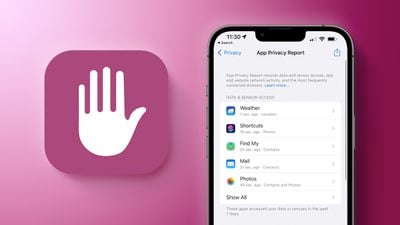
Apple in the iOS 15.2 beta introduced App Privacy Report, a feature that was first shown off at WWDC. App Privacy Report is designed to provide users with information on how often apps are accessing sensitive info provided to them through privacy permissions, such as location, contacts, camera, microphone, and photos.
App Privacy Feature 2
Apple also displays network activity, letting you know which domains apps are contacting in the background.

How to Turn on App Privacy Report

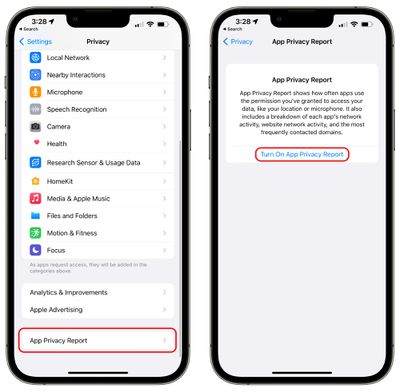
App Privacy Report can be enabled in the Settings app by following these instructions.

  1. Open up the Settings app.
  2. Scroll down and tap on Privacy.
  3. In the Privacy section of the Settings app, scroll down and tap on App Privacy Report. app privacy report turn on
  4. Tap on Turn on App Privacy Report.

If you already had "Record App Activity" enabled in the iOS 15/iOS 15.1 updates, App Privacy Report will be automatically on and it will already be populated with data. If you did not, you may need to use apps and websites for a few minutes before you start seeing data.

Using App Privacy Report

Apple shows data from the last seven days, and the app is split up into several sections to make it easier to get to what you want to know.
app privacy report camera

Data & Sensor Access

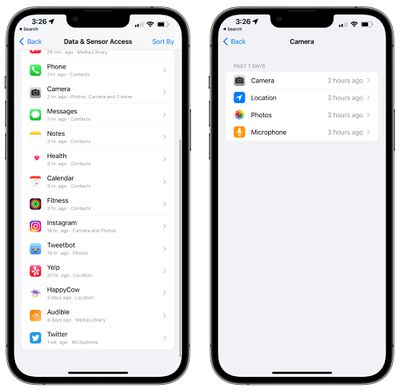
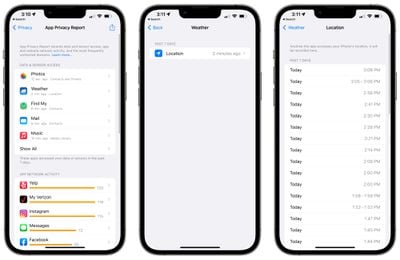
In this section, Apple provides a list of apps that have accessed sensors and data granted to them through privacy permissions, so your most sensitive information.
app privacy report data
Data & Sensor access will tell you when apps have accessed the following:

  • Contacts
  • Location
  • Photos
  • Camera
  • Microphone
  • Media Library

If you tap on an individual app and then tap on the permission that you want to view more about, App Privacy Report will give you a list of every time the app accessed the data in question.

App Network Activity

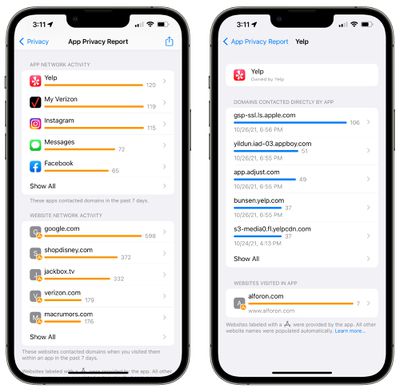
With App Network Activity, you can view a list of all of the different domains that your apps have contacted across the last seven days.
app privacy report app network
This includes various internal domains used by apps, but it also lets you see what third-party websites and services are accessed, such as tracking or analytics tools.

You can tap on any app in the list to see a rundown of all of the domains that have been contacted. If you have Instagram installed, for example, you'll see URLs for things like DoubleClock, Google Analytics, Google Tag Manager, and more, along with internal Instagram and Facebook URLs.

At the bottom of each app's data, you can also get a list of the web sites that you visited within the app.

Website Network Activity

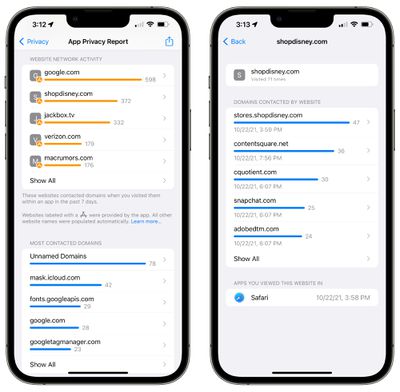
Website Network Activity is basically identical to App Network Activity, but it shows you all of the domains contacted by the websites that you visited in Safari and other apps.
app privacy report website network activity
This will show you all of the different trackers and analytics sites that websites are using.

Most Contacted Domains

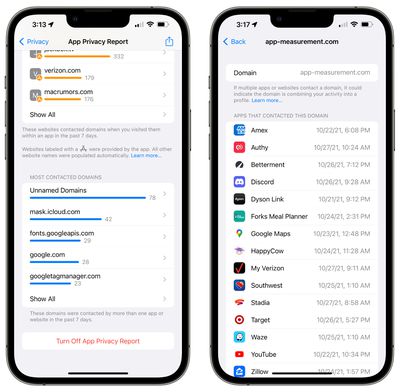
Most Contacted Domains is an aggregated list of the domains that apps have contacted most often, and it is usually populated by various trackers and analytics domains.
app privacy report contacted domains
In this section, you can tap on any of the domains in the list to see which apps or websites used that particular domain.

How to Turn Off App Privacy Report

If you don't want to use App Privacy Report, you can follow these steps:

  1. Open up the Settings app.
  2. Scroll down and tap on Privacy.
  3. In the Privacy section of the Settings app, scroll down and tap on App Privacy Report.
  4. Tap on Turn Off App Privacy Report.

Note that turning off App Privacy Report will delete all collected data. Once it's turned on again, Apple will again begin aggregating data from apps.

Guide Feedback

Have questions about App Privacy Report, know of a feature we left out, or want to offer feedback on this guide? Send us an email here.


Related Forum: iOS 15

Popular Stories

apple design award 2025

Apple Announces 2025 Design Award Winners Ahead of WWDC 2025

Tuesday June 3, 2025 10:14 am PDT by
As we wait for WWDC to kick off next Monday, Apple today announced the winners of its annual Apple Design Awards, recognizing apps and games for their innovation, ingenuity, and technical achievement. The 2025 Apple Design Award winners are listed below, with one app and one game selected per category: Delight and Fun - CapWords (App) and Balatro (Game) Innovation - Play (App) and PBJ -...
1password deal blue

1Password Security Breach: What Was Accessed and What Wasn't

Wednesday November 25, 2026 1:09 pm PST by
Popular password management app 1Password today said it experienced a security breach earlier this month. 1Password says some customer names and email addresses were accessed, but no customer vault contents were compromised. On November 19, 1Password saw indications that an employee's GitHub account had been breached and began investigating. The company says the breached GitHub account was...
apple store down feature

Here's Why the Apple Store is Going Down

Thursday November 26, 2026 5:49 am PST by
Apple's online store is going down for a few hours on a rolling country-by-country basis right now, but do not get your hopes up for new products. Apple takes its online store down for a few hours ahead of Black Friday every year to tease its annual gift card offer with the purchase of select products. The store is down in Australia, New Zealand, and Thailand, right now, and it will...

Top Rated Comments

BWhaler Avatar
66 months ago
Great feature. Thank you Apple.

Next release, please give us:

1. iCloud full encryption
2. IP filtering for apps, not just Safari and Mail
3. Make it impossible for Facebook and Google and the other dark data mining companies to fingerprint our devices.
Score: 9 Votes (Like | Disagree)
66 months ago
Does it tell us how often our iCloud photos are being examined?
Score: 5 Votes (Like | Disagree)
Populus Avatar
66 months ago
Hey, Juli, I wholeheartedly appreciate all this posts explaining this new privacy focused feature.
As I already said on another post, this will probably make me jump to iOS 15, as I don’t quite trust the Privacy sheets on the App Store. This -I assume- is much more reliable.

Thank you!
Score: 4 Votes (Like | Disagree)
NightFox Avatar
66 months ago
A good feature, but I think people are overestimating its impact. the vast majority of iPhone users either aren't going to know this feature exists or won't ever use it. Then there's the 'little knowledge is a dangerous thing' - does anyone remember when custom keyboard apps were first allowed and the panic the system access requests caused? It's not always readily apparent when an app legitimately needs access to a resource to work properly.
Score: 3 Votes (Like | Disagree)
zorinlynx Avatar
66 months ago
Holy crap, this is astounding. Aside from the privacy benefits, I can see this being good for helping people track down unusual battery drain. If there's stuff hitting the network in the background that would explain it for a lot of people.

I'm tempted to hop back on the beta train to try this, but will probably wait until b2.
Score: 3 Votes (Like | Disagree)
66 months ago

I tried using this when I first upgrade to iOS 15 but when it came time to checking the data, I had to export it. I didn’t know what application to open it with. And it looked like a bunch of garbled code. Did I do something wrong?
It's in a format called "json" which is the predominant format for exchanging data, can be read by many applications etc. But it's just data.

Now in 15.2, it seems like Apple added functionality that reads this same data and presents it in the GUI, so the set of features is evolving/improving.
Score: 3 Votes (Like | Disagree)
Latest Stories
The 50+ Best Apple Black Friday Deals Still Available on AirPods, iPads, and More
8 hours ago
HomePod Mini 2 in (RED) Seemingly Spotted Ahead of Announcement
5 hours ago
Apple's M6 and PROLED MacBook Pro Reach New Low Prices for Black Friday
16 hours ago
The MacRumors Show: iPhone Air 2 and iPhone 18 Are Coming
16 hours ago
Apple Store in Brisbane Reopening Next Month With New Design
16 hours ago
The 60+ Best Black Friday Accessory Deals on iPhone Chargers, TVs, Headphones, and More
17 hours ago
GTA VI Now (Barely) Running on Apple Silicon Macs
17 hours ago
The Best Black Friday Streaming Deals on Apple TV, Disney+, and More
18 hours ago
Apple TV's 'Carême' Wins International Emmy for Best Drama
19 hours ago
iPhone 18 Production Delay Leaves Apple Little Time Before Launch
19 hours ago
The Best Black Friday AirPods Deals Still Available
11 hours ago
The Best Black Friday Deals on Apple Home Products
20 hours ago
The Best Black Friday iPhone Deals Still Available
11 hours ago
The Best Black Friday iPad Deals Still Available
11 hours ago
The Best Black Friday Apple Watch Deals Still Available
11 hours ago
The Best Black Friday AirTag Deals Still Available
11 hours ago
The Best Black Friday Mac Deals Still Available
11 hours ago
iPhone Share of US Smartphone Market Hits 57% as Rivals Slip
21 hours ago
iPhone 20 Pro Rumored to Feature 3D-Printed Titanium Frame
23 hours ago
Apple's Official 2026 Black Friday Offer Starts Rolling Out
2 days ago
Halide Adds Fill Light Feature for iPhone Duo
2 days ago
MacBook Air Black Friday Deals Now Live With Massive $399 Savings
2 days ago
Amazon Discounts All MacBook Neo Models by $99 for Black Friday
2 days ago
Kodak Launches Unique AirTag Rival With E-Ink Display
2 days ago
Here's Why the Apple Store is Going Down
2 days ago
Apple Still Working on Giant Foldable iPad That Could Cost $5,000
2 days ago
iPhones Dominate China's Weak Singles' Day Smartphone Sales
2 days ago
iPhone 20 Pro Could Feature Ceramic in Limited-Edition Model
2 days ago
Apple Faces Korean Regulator Review Over iPhone 16 AI Advertising
2 days ago
Apple Watch Ultra 4 Hits New Best-Ever Price of $649.99 for Black Friday
2 days ago
Related Apple News: Iphone | Ipad Mini 2021 Vs 2026 | Apple Tv Deals | Iphone Duo Enable Reachability One Handed Use | Bloomberg Com