Skip to Content

10 Long Press Tips to Reveal Hidden Functions in Safari on iPhone and iPad

On iPhone and iPad, a long press (also known as a press-and-hold) gesture will often initiate a different action in an app that isn't immediately obvious, such as revealing an icon's contextual menu. On recent iPhones, a long press will sometimes also offer haptic feedback in the form of a vibration, which Apple calls Haptic Touch.

Apple has made extensive use of the long press gesture and ‌Haptic Touch‌ in its apps, which means if you don't tend to long press screen elements, you could be unaware of some convenient shortcuts to everyday actions, or you could even be missing out on app functionality altogether.


This is particularly true for Safari, Apple's native mobile browser, which has several handy features that can be accessed with a long press. In this article, we've put together 10 of our favorite long press tips for Safari on iPhones and iPads running iOS 13.

Note that the default minimum period that a finger must press on the screen for the long gesture to be recognized is half a second. If you're having trouble performing a long press, open the Settings app, go to Accessibility -> Haptic Touch, and try selecting a Fast or Slow touch duration. There's also a handy interactive demo area for you to test each setting.

1. Bookmark Multiple Tabs in One Go

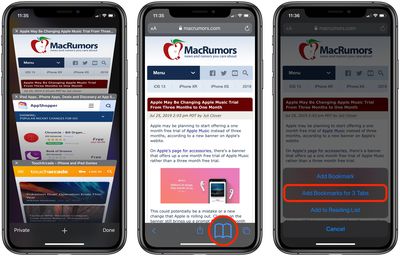
Make sure you have a few tabs open in Safari that you want to reference at a later time. Now, select one of those tabs, and in the main browsing window, long press the Bookmark icon (it looks like an open book).
safari tabs
A popup menu will appear on the screen that includes options to Add to Reading List and Add Bookmarks for X Tabs, X being the number of tabs open. Once you've tapped the latter option, you'll be asked to save the tabs in a new bookmarks folder. Alternately, you can choose an existing folder in which to save the tabs.

2. Bulk Copy Links in a Bookmarks Folder

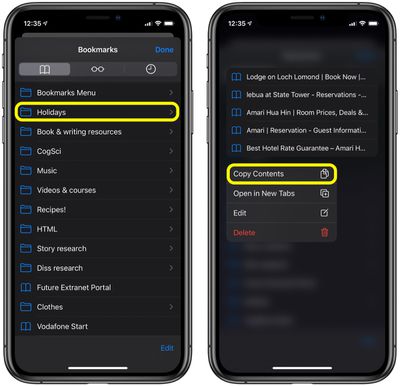
Following on from the last tip, if you long press on a bookmarks folder in Safari, you'll see a Copy Contents option pop up in the contextual menu.
safari
Selecting this will copy a list of every website URL in that folder to your clipboard, allowing you to paste it elsewhere for easy sharing.

3. Fast Scroll Web Pages

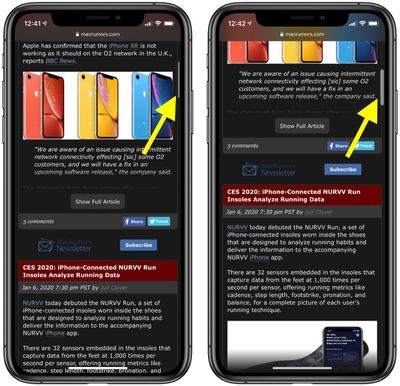
A scroll bar appears on the right-hand side of the Safari window whenever you swipe to navigate a web page.
safari
If the content you're viewing is long, perform a long press on the scroll bar. The bar will swell slightly and you'll be able to drag it up and down and scroll at a much faster rate.

4. Close All Open Tabs

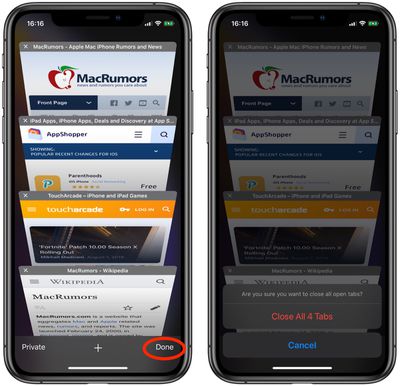
If the number of active tabs has gotten out of hand in your browser session, long press the Tabs icon in the bottom-right corner (top-right on ‌iPad‌) of the web page view to reveal the Close All Tabs option.
safari tabs
If you're in the vertical tabs view, you can reveal the same option by long pressing the Done button, which appears in the same location.

In iOS 13, you‌ can actually get Safari to close tabs on your behalf, based on when you last viewed them. Launch the Settings app and select Safari -> Close Tabs, and you'll find options to make the browser automatically close tabs that have not been viewed After One Day, After One Week, or After One Month.

5. Re-open Recently Closed Tabs

If you've accidentally closed a browser tab in Safari and want to open it back up, open up the Tabs view and long press on the "+" icon to get a look at all of the tabs that you've recently closed.
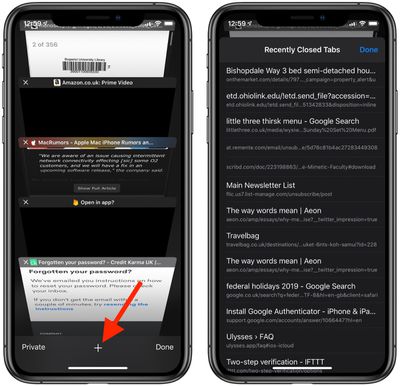
safari
It's worth remembering that this long press option exists, because if someone gets ahold of your phone and checks your browser, even if you've closed out a tab, it's still going to be accessible in Safari, unless you were using a private browser window or have cleared your browsing history.

6. Open All Bookmarks in a Folder in New Tabs

This option appears in the same contextual menu described in tip 2. Long press a bookmarks folder and you'll see an option to Open in New Tabs.
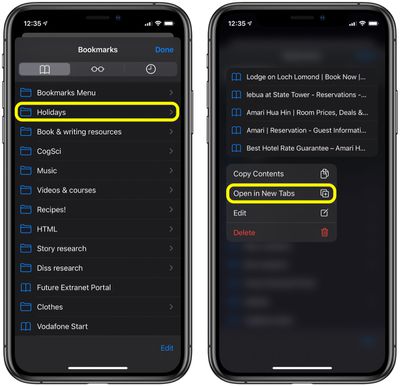
bookmarks open new tabs
Select the option, and Safari will open everything in that folder in separate tabs, ready for perusal.

7. Preview a Favorite Site or Hyperlink

If you want to take a peek at what a specific web page hyperlink has to offer before actually visiting the site, long press the link to get a preview of it. Note that you can also perform this action on the Favorites or Frequently Visited sites that appear in the start page of a new tab.
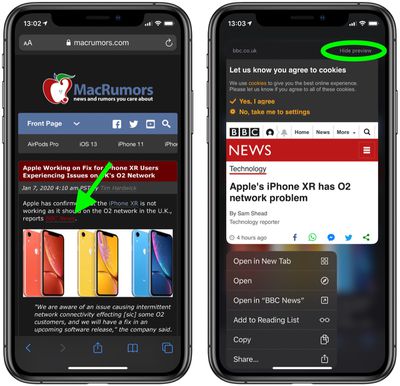
safari
If, say, you just want to copy a URL and would rather not have to wait for the preview to load every time you long press on one, simply tap Hide preview at the top-right corner of a link preview, and you won't get one again.

You can revert this functionality on the same long press screen at any time by selecting Tap to show preview.

8. Merge All Safari Windows

This one is exclusively for ‌iPad‌ users running iPadOS. If you have multiple browser windows open in the background, you can tidy things up by merging all of them, including their tabs, into the active browser window.
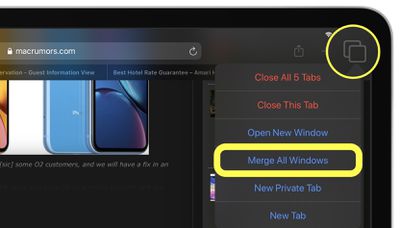
safari
Simply tap and hold the Tabs icon in the top-right corner of the screen and select Merge All Windows.

9. Download a Linked File

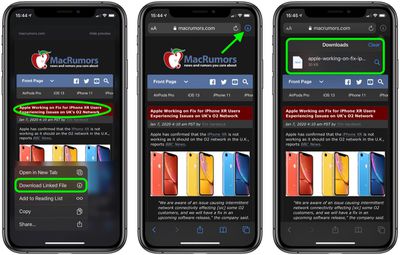
Now that now Safari has a Downloads Manager, you can download files directly from hyperlinks. Simply tap and hold a linked file, then select Download Linked File from the contextual menu. You can tap the Downloads Manager icon in the top-right corner of the address bar to check on its progress.
safari
This option works for web pages, too. If you long press the headline of this article, for example, you can download an HTML version of it.

10. Access the Tab Control Panel

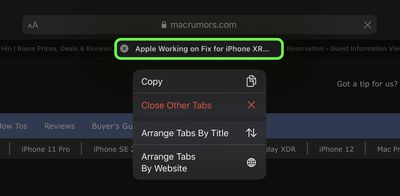
Another one that's just for Safari on ‌iPad‌. Next time you have multiple tabs open, tap and hold one of those tabs to access the new tab control panel.
safari
From this panel, you'll see options to copy the URL of the tab to the clipboard, close all other tabs, and two entirely new options allowing you to Arrange Tabs By Title or Arrange Tabs By Website. Select one of the latter two options, and your open tabs will be arranged alphabetically.


Popular Stories

apple design award 2025

Apple Announces 2025 Design Award Winners Ahead of WWDC 2025

Tuesday June 3, 2025 10:14 am PDT by
As we wait for WWDC to kick off next Monday, Apple today announced the winners of its annual Apple Design Awards, recognizing apps and games for their innovation, ingenuity, and technical achievement. The 2025 Apple Design Award winners are listed below, with one app and one game selected per category: Delight and Fun - CapWords (App) and Balatro (Game) Innovation - Play (App) and PBJ -...
1password deal blue

1Password Security Breach: What Was Accessed and What Wasn't

Wednesday November 25, 2026 1:09 pm PST by
Popular password management app 1Password today said it experienced a security breach earlier this month. 1Password says some customer names and email addresses were accessed, but no customer vault contents were compromised. On November 19, 1Password saw indications that an employee's GitHub account had been breached and began investigating. The company says the breached GitHub account was...
apple store down feature

Here's Why the Apple Store is Going Down

Thursday November 26, 2026 5:49 am PST by
Apple's online store is going down for a few hours on a rolling country-by-country basis right now, but do not get your hopes up for new products. Apple takes its online store down for a few hours ahead of Black Friday every year to tease its annual gift card offer with the purchase of select products. The store is down in Australia, New Zealand, and Thailand, right now, and it will...

Top Rated Comments

90 months ago
I despise long press. I don’t mind if it’s occasional, but I find myself having to long press for so many things, and each time it feels so inefficient. I wish 3D Touch came to iPad.
But great list of functions. I didn’t know a few of those.
Score: 11 Votes (Like | Disagree)
AngerDanger Avatar
90 months ago
To my mind, an interface that presents a lot of basic functionality up front and hides the more complex tasks behind a contextual menu is a good thing.

This way, navigation is easy for beginners, and more experienced users can look up how to perform specific tasks.

Hell, even if users don't look anything up, they can usually figure things out themselves by long pressing whatever they're trying to figure out.
Score: 8 Votes (Like | Disagree)
90 months ago
Seriously, how does that fit with "it just works"?

If you need to "discover" hidden functionality then it means your user interface is broken.
Score: 7 Votes (Like | Disagree)
Jimmy Bubbles Avatar
90 months ago
They took away some of my favorite ones that worked best with 3D Touch. I used to be able to press, then drag my finger down to the option I wanted. Now when I do that, it makes the image shrink and move, not allowing for that. Apple broke a beautiful, functional feature.
Score: 7 Votes (Like | Disagree)
Skylar. Avatar
90 months ago
Rip 3D Touch
2015-2019
Haptic Touch will never be a sufficient replacement.
Score: 3 Votes (Like | Disagree)
TracesOfArsenic Avatar
90 months ago
Talk about unintuitive.
Score: 2 Votes (Like | Disagree)
Latest Stories
The 50+ Best Apple Black Friday Deals Still Available on AirPods, iPads, and More
1 hour ago
Apple's M6 and PROLED MacBook Pro Reach New Low Prices for Black Friday
9 hours ago
The MacRumors Show: iPhone Air 2 and iPhone 18 Are Coming
9 hours ago
Apple Store in Brisbane Reopening Next Month With New Design
9 hours ago
The 60+ Best Black Friday Accessory Deals on iPhone Chargers, TVs, Headphones, and More
10 hours ago
GTA VI Now (Barely) Running on Apple Silicon Macs
11 hours ago
The Best Black Friday Streaming Deals on Apple TV, Disney+, and More
11 hours ago
Apple TV's 'Carême' Wins International Emmy for Best Drama
12 hours ago
iPhone 18 Production Delay Leaves Apple Little Time Before Launch
13 hours ago
The Best Black Friday AirPods Deals Still Available
5 hours ago
The Best Black Friday Deals on Apple Home Products
13 hours ago
The Best Black Friday iPhone Deals Still Available
5 hours ago
The Best Black Friday iPad Deals Still Available
5 hours ago
The Best Black Friday Apple Watch Deals Still Available
5 hours ago
The Best Black Friday AirTag Deals Still Available
5 hours ago
The Best Black Friday Mac Deals Still Available
5 hours ago
iPhone Share of US Smartphone Market Hits 57% as Rivals Slip
14 hours ago
iPhone 20 Pro Rumored to Feature 3D-Printed Titanium Frame
16 hours ago
Apple's Official 2026 Black Friday Offer Starts Rolling Out
1 day ago
Halide Adds Fill Light Feature for iPhone Duo
1 day ago
MacBook Air Black Friday Deals Now Live With Massive $399 Savings
1 day ago
Amazon Discounts All MacBook Neo Models by $99 for Black Friday
1 day ago
Kodak Launches Unique AirTag Rival With E-Ink Display
2 days ago
Here's Why the Apple Store is Going Down
2 days ago
Apple Still Working on Giant Foldable iPad That Could Cost $5,000
2 days ago
iPhones Dominate China's Weak Singles' Day Smartphone Sales
2 days ago
iPhone 20 Pro Could Feature Ceramic in Limited-Edition Model
2 days ago
Apple Faces Korean Regulator Review Over iPhone 16 AI Advertising
2 days ago
Apple Watch Ultra 4 Hits New Best-Ever Price of $649.99 for Black Friday
2 days ago
New Apple Store Opening in India, Download the Special Wallpaper Now
2 days ago
Related Apple News: Local News | Sport | World News | Opinion | Ipad






























