Skip to Content

watchOS 27.2 Code Hints at iPhone-Style Screenshot Previews

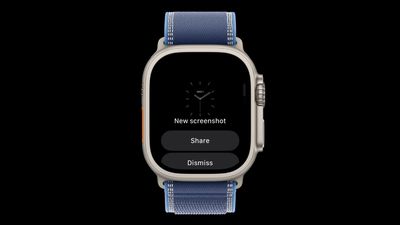
watchOS 27.2 could introduce a feature that lets Apple Watch screenshots be previewed with options to share or delete, similar to how screenshots work on the iPhone.
watchos 27 2 screenshot
Signs of the feature were found in watchOS 27.2 by code explorer pdfu. The option is hidden behind a feature flag that's not enabled, but it could be introduced in a later watchOS 27.2 beta.


Right now, taking a screenshot on the Apple Watch sends it directly to the iPhone Photos app with no confirmation screen. It's easy to accidentally take a screenshot since it only requires pressing the Digital Crown and side button at the same time.

On the iPhone, taking a screenshot shows either a full-screen preview or a thumbnail preview depending on your settings, but both options let you save, share, or delete the screenshot with a couple taps.

Screenshots on Apple Watch are disabled by default but can be turned on through the Settings app on the watch or the Apple Watch app on iPhone. An option to save or delete screenshots would add more control than a simple on or off toggle.

Related Roundups: watchOS 26, watchOS 27
Related Forum: Apple Watch

Popular Stories

siri recap live rewind

watchOS 27.3 Brings Live Rewind and Siri Recap to Apple Watch

Tuesday November 3, 2026 10:35 am PST by
With the first beta of watchOS 27.3, Apple is introducing new Audio Intelligence features it previewed for the Apple Watch Series 12 and Ultra 4 earlier this year. Powered by the S11 chip, Audio Intelligence includes Live Rewind, Siri Recap, Sound Recognition, and Shazam Music Recognition. Sound Recognition and Shazam are already on the watch, but Live Rewind and Siri Recap are now available ...
apple watch series 12 siri recap

Siri Recap Hands-On: Private, But Not Very Useful

Friday November 20, 2026 1:45 pm PST by
With the watchOS 27.3 beta, Apple started testing Siri Recap. Siri Recap lets the Series 12 and Ultra 4 Apple Watch models listen to conversations to generate a brief summary of what was discussed. Actual audio is sectioned off from apps, Apple, and the rest of the OS, and then discarded after a summary is generated. It's a privacy-forward way of tracking what's going on around you, but...
watchos 27

Apple Releases watchOS 27.2.1 and visionOS 27.2.1 With Security Fixes

Monday November 9, 2026 10:08 am PST by
Apple today released new watchOS 27.2.1 and visionOS 27.2.1 updates, with the software coming two weeks after the launch of watchOS 27.2 and visionOS 27.2. According to Apple's release notes, the watchOS update includes security fixes, while the visionOS 27.2.1 update includes security updates and bug fixes. The new software can be installed using the Settings app on each device. ...

Top Rated Comments

mattkally Avatar
9 weeks ago
Useless.
Score: 7 Votes (Like | Disagree)
CarlJ Avatar
9 weeks ago

Hell no. What a stupid feature. It’s not “easy to accidentally take a screen shot” as you describe. No one accidentally presses both side buttons at once. This just adds an extra step to an already awkward process.
Sure they do. I have screenshots turned on, on my Watch, because I want to take them occasionally, and I get accidental screenshots from time to time.

Totally agreed though on the extra steps. The "automatic full screen preview of screenshots" is one of the first things I turn off on iPhone and iPad - frequently I want a screenshot of something that's happening in real time (like layout of pieces in a real-time game), and I DO NOT WANT the screen taken over by the "here's your new screenshot, what would you like to do with it" "feature" - great, now you pulled me out of the game for 5 seconds and I lost the round - I wanted that screenshot to look at LATER, not now.

It's already infuriating that if I take a screenshot on the Watch of my current stats in the fitness app while exercising, it "helpfully" pauses the workout. 🤬 I've had once or twice where I'll exercise for 30 minutes and find that the last 15 minutes wasn't recorded, because I took a screenshot and the app decided to pause the workout for some ****ing reason. I don't want any extra "help" from Apple with screenshots on the Watch. There better be a way to turn this off.

ETA: going on a clue from elsewhere in this thread, I worked out that pausing the workout is an intentional overloading of this combination press by Apple. Fortunately, in Settings > Workout it's possible to switch off what they call "Press to Pause".

(Related, when they added the buttons for asking AI about the screenshot, to the full-screen screenshot UI, they seem to have removed the button for OCR - you can still select and copy text from a screenshot, but it tries much less hard when not in OCR mode, so it doesn't always work now. I've been in the habit for a while now, of if an app puts text on the screen I want to copy, and it doesn't make it selectable, I'll hit screenshot, tap the thumbnail to go fullscreen, then select and copy the text from there, and dismiss the fullscreen UI with "X" so it doesn't add the screenshot to my photo library.)
Score: 3 Votes (Like | Disagree)
awshucks Avatar
9 weeks ago
I have the screenshot feature turned off anyways. They’re not really useful on my watch.
Score: 3 Votes (Like | Disagree)
Rychiar Avatar
9 weeks ago
I've never taken a screenshot of my watch that wasn't accidental....
Score: 3 Votes (Like | Disagree)
Radeon85 Avatar
9 weeks ago

I wish Apple would do a pass on watchOS design to remove all of the scrolls required to reach buttons. So much scrolling in the OS, it drives me bananas. I feel like they could get more creative.

It used to be so much better with 3D Touch until they made the stupid decision to remove it. Instead of scrolling to reach the "clear all" button, I could tap on the screen anywhere in the list and tap clear. So many other things were quicker with it.

They need to bring this back to the watch and the iPhone.
Score: 2 Votes (Like | Disagree)
9 weeks ago
SHARING screenshots is very useful!
Score: 2 Votes (Like | Disagree)
Latest Stories
Here Are the Best Apple Black Friday Leftover Deals You Can Get Today
6 hours ago
HomePod Mini 2 in (RED) Seemingly Spotted Ahead of Announcement
17 hours ago
Apple's M6 and PROLED MacBook Pro Reach New Low Prices for Black Friday
1 day ago
The MacRumors Show: iPhone Air 2 and iPhone 18 Are Coming
1 day ago
Apple Store in Brisbane Reopening Next Month With New Design
1 day ago
The 60+ Best Black Friday Accessory Deals on iPhone Chargers, TVs, Headphones, and More
5 hours ago
GTA VI Now (Barely) Running on Apple Silicon Macs
1 day ago
The Best Black Friday Streaming Deals on Apple TV, Disney+, and More
1 day ago
Apple TV's 'Carême' Wins International Emmy for Best Drama
1 day ago
iPhone 18 Production Delay Leaves Apple Little Time Before Launch
1 day ago
The Best Black Friday AirPods Deals Still Available
23 hours ago
The Best Black Friday Deals on Apple Home Products
1 day ago
The Best Black Friday iPhone Deals Still Available
23 hours ago
The Best Black Friday iPad Deals Still Available
23 hours ago
The Best Black Friday Apple Watch Deals Still Available
23 hours ago
The Best Black Friday AirTag Deals Still Available
23 hours ago
The Best Black Friday Mac Deals Still Available
23 hours ago
iPhone Share of US Smartphone Market Hits 57% as Rivals Slip
1 day ago
iPhone 20 Pro Rumored to Feature 3D-Printed Titanium Frame
1 day ago
The 50+ Best Apple Black Friday Deals Still Available on AirPods, iPads, and More
7 hours ago
Apple's Official 2026 Black Friday Offer Starts Rolling Out
2 days ago
Halide Adds Fill Light Feature for iPhone Duo
2 days ago
MacBook Air Black Friday Deals Now Live With Massive $399 Savings
2 days ago
Amazon Discounts All MacBook Neo Models by $99 for Black Friday
2 days ago
Kodak Launches Unique AirTag Rival With E-Ink Display
2 days ago
Here's Why the Apple Store is Going Down
2 days ago
Apple Still Working on Giant Foldable iPad That Could Cost $5,000
2 days ago
iPhones Dominate China's Weak Singles' Day Smartphone Sales
2 days ago
iPhone 20 Pro Could Feature Ceramic in Limited-Edition Model
2 days ago
Apple Faces Korean Regulator Review Over iPhone 16 AI Advertising
2 days ago
Related Apple News: Ipad | Motoring | Travel | Iphone | Iphone