Skip to Content

Which iOS 27 CarPlay Features Actually Work in Your Car?

In iOS 27, available now, CarPlay gets its biggest update in years, but some features depend on what type of car you have rather than your iPhone model. Some of the biggest additions won't do anything in the vast majority of vehicles on the road today. Here's how the new features pan out.
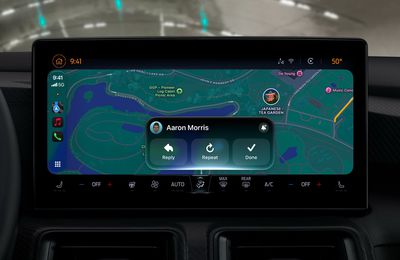
ios 27 carplay liquid glass

Works in Any CarPlay Vehicle

  • Custom widgets: In iOS 27, CarPlay is no longer limited to Apple's handful of stock widgets. Any compatible widget from your iPhone's Home Screen can now be added to the CarPlay dashboard. To do so, go to Settings ➝ General ➝ CarPlay, tap your car, then tap Widgets ➝ Add Widgets. You can drag widgets to rearrange them, tap to remove them, and toggle Smart Rotate and Widget Suggestions.
  • Audio scrubbing: The Now Playing screen now has a proper progress bar, allowing you to drag to any point in a song or podcast rather than having to tap skip repeatedly. There's also a persistent mini-player that keeps artwork and controls on screen while you browse.
  • Apple Music Filters: In Apple Music on CarPlay, you can filter your library to sort playlists, albums, artists, and songs by categories like "Favorites" or "All Playlists." Apple says third-party music apps can adopt it too.
  • New wallpapers: New wave designs found in iOS 27 and macOS 27 are now available in CarPlay in 14 color options. In previous years, most of Apple's platforms shipped with their own distinct wallpaper. This year, they all share a design called "Celosia," featuring sweeping, overlapping curves and soft shadows inspired by layered flower petals or folded paper.
  • Maps improvements: Apple extended natural language search to navigation, and that also works with Apple Maps in CarPlay. You can ask Siri for directions that avoid toll roads, highways, and more.
  • Better wireless reliability: Apple says wireless CarPlay connections are more dependable in iOS 27, with improved GPS accuracy and better navigation heading detection. These are phone-side changes, so no new hardware is required.

Needs the Right Car

  • Video apps: Apple made a song and dance about this feature, but it's the one that fewest people can use right now. Video browsing in the CarPlay interface requires automakers to certify AirPlay video integration for the vehicle. In other words, an iOS update alone can't enable it. That makes sense when you think about it – playback only works when the vehicle is parked (it switches to audio if you shift into drive) and the car needs to be able to share its drive state with iOS. As of writing, no manufacturer has announced plans to support the feature.
  • Sharing routes to your car's own screens: Navigation apps can now pass route data to a vehicle's built-in infotainment or digital instrument cluster, including EV charging stops and range. Again though, your car has to support it, so your mileage may vary (no pun intended).

Needs a Supported iPhone

  • Siri AI: The upgraded Siri now handles back-and-forth conversation in the car, while chats sync to the Siri app on your iPhone so you can pick them up later. It does however require an iPhone that supports Apple Intelligence, plus there's a Siri AI waitlist to get access, which you can join on your iPhone in Settings ➝ Siri.
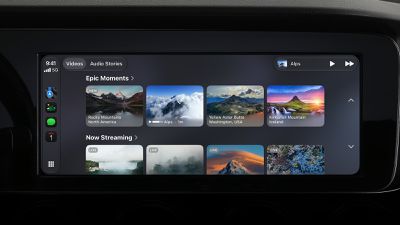
CarPlay iOS 27 Video Apps

Video apps in Carplay require dedicated vehicle support

One to Watch

Apple has given developers a voice control template that any category of CarPlay app can adopt for voice conversations. But nothing will change until individual app makers make use of it, so expect this to arrive gradually.

Bottom Line

If you have a car with CarPlay and a recent iPhone running iOS 27, you'll immediately be able to take advantage of third-party widgets, audio scrubbing, new wallpapers, and Maps improvements. For video and route sharing, you'll need to wait for your car's manufacturer to add support. iOS 27 was released on September 14 and is available to download now.

Related Roundups: CarPlay, iOS 27, iPadOS 27

Popular Stories

iphone duo yellow hand

Apple Adds Facial Unlock Option on iPhone Duo in iOS 27.3

Monday November 16, 2026 10:17 am PST by
Apple today added a new option for unlocking the iPhone Duo using the front-facing camera, giving device users multiple ways to access their content. The feature is available in the second iOS 27.3 beta. The option to unlock with facial recognition is only available on the Lock Screen, and authentication via Touch ID is still needed for Apple Pay purchases, adding passwords and logins, and...
bug security vulnerability issue fix larry

Here's What Apple Fixed in iOS 27.2.1 and macOS 27.2.1

Monday November 9, 2026 3:07 pm PST by
The iOS 27.2.1, iPadOS 27.2.1, and macOS 27.2.1 updates Apple released today fix a handful of security vulnerabilities. With the security fixes implemented, it's a good idea to update as soon as you can. A bug with iMessage could let a remote attacker join a group chat to receive its messages, and another could let users see messages sent before they joined a group chat. Most of the...
iOS 27

Apple Releases iOS 27.2.1 With Bug Fixes

Monday November 9, 2026 10:09 am PST by
Apple today released iOS 27.2.1, a minor update to the iOS 27 operating system. iOS 27.2.1 comes two weeks after the launch of iOS 27.2. iOS 27.2.1 includes addresses bugs and patches security vulnerabilities according to Apple's release notes for the update. You can download iOS 27.2.1 over the air by going to Settings > General > Software Update. Apple has also released iOS 26.7.3...

Top Rated Comments

Jpcope Avatar
10 weeks ago
The scrubbing feature is HUGE. Been waiting for this forever
Score: 15 Votes (Like | Disagree)
michaeljk Avatar
10 weeks ago
This could be really great for me and many others like me. I have type 1 diabetes. I use a Continuous Glucose Monitor. I have a phone app that tells me every five minutes where my blood sugar is, and where it is headed. Up until now, when driving, I need to actually pick up my phone, hit the Dexcom app button, find the right screen in the app, and then can see my blood sugar. Now, finally, I can add the widget to CarPlay, so I get near-realtime information about my blood sugar just by looking at my dash. Huge!
Score: 11 Votes (Like | Disagree)
hortod1 Avatar
10 weeks ago
As someone that rents cars on a regular basis there needs to be a way to save CarPlay preferences, specifically apps and layout. Every time I connect to a new car it defaults to a new car setup, having to take time to fix everything, or deal with a million apps that I don’t use and completely out of any logical order
Score: 8 Votes (Like | Disagree)
10 weeks ago
I drive a 2025 BMW X2. In iOS 26, Apple Maps could display on the instrument cluster behind the steering wheel and the HUD would show turn-by-turn directions. However, the center main screen would only show a high-level overview of the entire route.

With iOS 27 CarPlay, I can still display Apple Maps behind the wheel, but the center screen now simultaneously shows the regular, real-time moving map. This is a big improvement.
Score: 4 Votes (Like | Disagree)
10 weeks ago
I've had Widgets long before iOS27, though most of what populated beyond the most obvious/popular ones were usually almost useless in CarPlay.
My huge beef is how I keep seeing "14 new Wallpapers". I see 9, two of those being solid black and gray. The rest are different permutations of the same wave pattern in different hues. I hate all of them. Most are too bright, and the variety of colors frankly sucks. (Now that I think about it, are they matching the new iPhone colors? Maybe that's why there's no green/teal or anything else I like...)
I'm just fed up with having such limited options for wallpaper when custom ones are totally feasible... and having the ones I've at least settled for then taken away at random later.
Score: 3 Votes (Like | Disagree)
9 weeks ago

It should be stated more clearly that to use CarPlay you MUST have Siri enabled on your phone. Siri off = no CarPlay. Won’t even open.
Confirmed with a search, I’ve been using CarPlay since 2018 and never knew that.
Score: 2 Votes (Like | Disagree)
Latest Stories
The 50+ Best Apple Black Friday Deals Still Available on AirPods, iPads, and More
8 hours ago
HomePod Mini 2 in (RED) Seemingly Spotted Ahead of Announcement
5 hours ago
Apple's M6 and PROLED MacBook Pro Reach New Low Prices for Black Friday
15 hours ago
The MacRumors Show: iPhone Air 2 and iPhone 18 Are Coming
15 hours ago
Apple Store in Brisbane Reopening Next Month With New Design
16 hours ago
The 60+ Best Black Friday Accessory Deals on iPhone Chargers, TVs, Headphones, and More
16 hours ago
GTA VI Now (Barely) Running on Apple Silicon Macs
17 hours ago
The Best Black Friday Streaming Deals on Apple TV, Disney+, and More
17 hours ago
Apple TV's 'Carême' Wins International Emmy for Best Drama
18 hours ago
iPhone 18 Production Delay Leaves Apple Little Time Before Launch
19 hours ago
The Best Black Friday AirPods Deals Still Available
11 hours ago
The Best Black Friday Deals on Apple Home Products
19 hours ago
The Best Black Friday iPhone Deals Still Available
11 hours ago
The Best Black Friday iPad Deals Still Available
11 hours ago
The Best Black Friday Apple Watch Deals Still Available
11 hours ago
The Best Black Friday AirTag Deals Still Available
11 hours ago
The Best Black Friday Mac Deals Still Available
11 hours ago
iPhone Share of US Smartphone Market Hits 57% as Rivals Slip
21 hours ago
iPhone 20 Pro Rumored to Feature 3D-Printed Titanium Frame
22 hours ago
Apple's Official 2026 Black Friday Offer Starts Rolling Out
2 days ago
Halide Adds Fill Light Feature for iPhone Duo
2 days ago
MacBook Air Black Friday Deals Now Live With Massive $399 Savings
2 days ago
Amazon Discounts All MacBook Neo Models by $99 for Black Friday
2 days ago
Kodak Launches Unique AirTag Rival With E-Ink Display
2 days ago
Here's Why the Apple Store is Going Down
2 days ago
Apple Still Working on Giant Foldable iPad That Could Cost $5,000
2 days ago
iPhones Dominate China's Weak Singles' Day Smartphone Sales
2 days ago
iPhone 20 Pro Could Feature Ceramic in Limited-Edition Model
2 days ago
Apple Faces Korean Regulator Review Over iPhone 16 AI Advertising
2 days ago
Apple Watch Ultra 4 Hits New Best-Ever Price of $649.99 for Black Friday
2 days ago
Related Apple News: South Africa | Lifestyle | Ipad | Ipad | Motoring