Skip to Content

macOS Tahoe 26.4 Adds Slow Charger Indicator for MacBooks

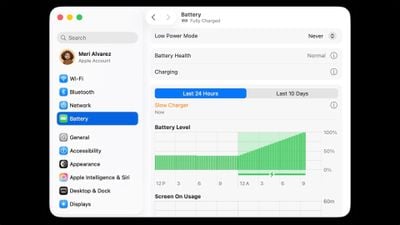
macOS Tahoe 26.4 includes a new slow charger indicator that tells MacBook users when their charging setup isn't delivering full power.
macos slow charger warning%402x
As described in an updated Apple support document, a "Slow Charger" label now appears in orange text in the battery status menu and above the Battery Level graph in Battery settings. The indicator is accompanied by an info button for more details.

Apple says that to charge more quickly, users should use a power adapter and cable that deliver at least the minimum wattage recommended for their MacBook model.

The feature is similar to one Apple added to iPhone with iOS 18, where periods of slow charging appear as an orange bar in the Battery section of the Settings app.

The slow charger indicator is one of two battery-related changes in macOS 26.4. The update also adds a Charge Limit feature that lets MacBook users set a maximum charge level anywhere from 80 to 100 percent, with the aim of preserving long-term battery health.

macOS Tahoe 26.4 is available now via System Settings ➝ General ➝ Software Update.

Related Roundup: macOS Tahoe
Related Forum: macOS Tahoe

Popular Stories

apple design award 2025

Apple Announces 2025 Design Award Winners Ahead of WWDC 2025

Tuesday June 3, 2025 10:14 am PDT by
As we wait for WWDC to kick off next Monday, Apple today announced the winners of its annual Apple Design Awards, recognizing apps and games for their innovation, ingenuity, and technical achievement. The 2025 Apple Design Award winners are listed below, with one app and one game selected per category: Delight and Fun - CapWords (App) and Balatro (Game) Innovation - Play (App) and PBJ -...
1password deal blue

1Password Security Breach: What Was Accessed and What Wasn't

Wednesday November 25, 2026 1:09 pm PST by
Popular password management app 1Password today said it experienced a security breach earlier this month. 1Password says some customer names and email addresses were accessed, but no customer vault contents were compromised. On November 19, 1Password saw indications that an employee's GitHub account had been breached and began investigating. The company says the breached GitHub account was...
apple store down feature

Here's Why the Apple Store is Going Down

Thursday November 26, 2026 5:49 am PST by
Apple's online store is going down for a few hours on a rolling country-by-country basis right now, but do not get your hopes up for new products. Apple takes its online store down for a few hours ahead of Black Friday every year to tease its annual gift card offer with the purchase of select products. The store is down in Australia, New Zealand, and Thailand, right now, and it will...

Top Rated Comments

M4irmidnight Avatar
9 months ago

macOS Tahoe 26.4 includes a new slow charger indicator that tells MacBook users when their charging setup isn't delivering full power.


As described in an updated Apple support document ('https://support.apple.com/en-us/102397'), a "Slow Charger" label now appears in orange text in the battery status menu and above the Battery Level graph in Battery settings. The indicator is accompanied by an info button for more details.

Apple says that to charge more quickly, users should use a power adapter and cable that deliver at least the minimum wattage recommended for their MacBook model ('https://support.apple.com/en-us/109509').

The feature is similar to one Apple added to iPhone with iOS 18 ('https://www.macrumors.com/2024/06/11/ios-18-slow-charger-battery-settings/'), where periods of slow charging appear as an orange bar in the Battery section of the Settings app.

The slow charger indicator is one of two battery-related changes in macOS 26.4. The update also adds a Charge Limit feature ('https://www.macrumors.com/2026/02/16/mac-charge-limit-macos-tahoe-26-4/') that lets MacBook users set a maximum charge level anywhere from 80 to 100 percent, with the aim of preserving long-term battery health.

macOS Tahoe 26.4 is available now via System Settings ➝ General ➝ Software Update.

Article Link: macOS Tahoe 26.4 Adds Slow Charger Indicator for MacBooks ('https://www.macrumors.com/2026/03/25/macos-tahoe-26-4-slow-charger-macbooks/')
I wish MagSafe would turn green once it’s hit the desired charge limit, rather than staying orange.
Score: 11 Votes (Like | Disagree)
needsomecoffee Avatar
9 months ago
Why did Apple hide setting the charge level action behind the information button ?? Also, setting mine to 80% was my first encounter with the "glass" slider control. Do not care so to criticize too much about Liquid Glass or 26 overall (run with transparency down and contrast up). However, the way the slider control turns to this transparent, barely visible, glass object really threw me at first. Very, very unintuitive. Hiding the battery level charger set-level action in an information dialog, though, is the worst UI decision I can recall. The slider button... sort of the cherry on top of the cake. Is this Craig's cake?? Who owns these decisions?? HTH, NSC

Score: 10 Votes (Like | Disagree)
Apple_Robert Avatar
9 months ago
Nice feature. I just wish Apple did a better job of not burying features behind menus and make it more intuitive where things are.
Score: 8 Votes (Like | Disagree)
Agent007 Avatar
9 months ago

the worst UI decision I can recall
IMO not as bad as the ENTIRE settings panel being a narrow, iOSified joke. Many UI sacrifices made for no apparent gains other than "it feels new cause it's different".
Score: 7 Votes (Like | Disagree)
turbineseaplane Avatar
9 months ago
Ironically, it also has a “garbage interface” indicator…

Known as liquid glass
Score: 5 Votes (Like | Disagree)
davidg4781 Avatar
9 months ago

*UPDATE*

I have Optimized Battery Charging - enabled. I have put charge limit to 80% (Option available thanks to the MacOS Tahoe 26.4 update)

So I shutdown my MacBook Pro and charge it. Its battery level was at 65%

After I'd say 45 minutes of charging, I boot up MacBook Pro and it's now at 100%

So it didn't respect my charge limit. UNLESS...

I suspect that Apple rather wants us to use the sleep mode function than shutdown so the charge limit can work?
I believe macOS has to be running to know to limit the charging to 80%. I noticed when I updated my iPhone last night, it was charged to 85%. I'm assuming while it was updating, iOS wasn't running to limit the charging so it just charged up.

Now I'm curious about what happens when it hits 80%. Does the macOS go into bypass mode and just power from the charger, leaving the battery to sit there? Is that better for battery life/cycle count? It will still drain but slightly.
Score: 3 Votes (Like | Disagree)
Latest Stories
The 50+ Best Apple Black Friday Deals Still Available on AirPods, iPads, and More
8 hours ago
HomePod Mini 2 in (RED) Seemingly Spotted Ahead of Announcement
5 hours ago
Apple's M6 and PROLED MacBook Pro Reach New Low Prices for Black Friday
15 hours ago
The MacRumors Show: iPhone Air 2 and iPhone 18 Are Coming
16 hours ago
Apple Store in Brisbane Reopening Next Month With New Design
16 hours ago
The 60+ Best Black Friday Accessory Deals on iPhone Chargers, TVs, Headphones, and More
17 hours ago
GTA VI Now (Barely) Running on Apple Silicon Macs
17 hours ago
The Best Black Friday Streaming Deals on Apple TV, Disney+, and More
18 hours ago
Apple TV's 'Carême' Wins International Emmy for Best Drama
18 hours ago
iPhone 18 Production Delay Leaves Apple Little Time Before Launch
19 hours ago
The Best Black Friday AirPods Deals Still Available
11 hours ago
The Best Black Friday Deals on Apple Home Products
20 hours ago
The Best Black Friday iPhone Deals Still Available
11 hours ago
The Best Black Friday iPad Deals Still Available
11 hours ago
The Best Black Friday Apple Watch Deals Still Available
11 hours ago
The Best Black Friday AirTag Deals Still Available
11 hours ago
The Best Black Friday Mac Deals Still Available
11 hours ago
iPhone Share of US Smartphone Market Hits 57% as Rivals Slip
21 hours ago
iPhone 20 Pro Rumored to Feature 3D-Printed Titanium Frame
23 hours ago
Apple's Official 2026 Black Friday Offer Starts Rolling Out
2 days ago
Halide Adds Fill Light Feature for iPhone Duo
2 days ago
MacBook Air Black Friday Deals Now Live With Massive $399 Savings
2 days ago
Amazon Discounts All MacBook Neo Models by $99 for Black Friday
2 days ago
Kodak Launches Unique AirTag Rival With E-Ink Display
2 days ago
Here's Why the Apple Store is Going Down
2 days ago
Apple Still Working on Giant Foldable iPad That Could Cost $5,000
2 days ago
iPhones Dominate China's Weak Singles' Day Smartphone Sales
2 days ago
iPhone 20 Pro Could Feature Ceramic in Limited-Edition Model
2 days ago
Apple Faces Korean Regulator Review Over iPhone 16 AI Advertising
2 days ago
Apple Watch Ultra 4 Hits New Best-Ever Price of $649.99 for Black Friday
2 days ago
Related Apple News: South Africa | Travel | Ipad | News | Culture





























