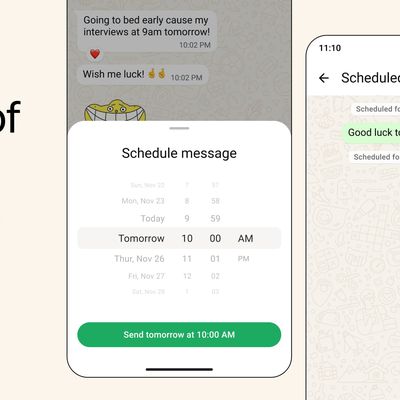
WhatsApp Working on Scheduled Messages Feature
WhatsApp developers are working to bring scheduled messages to the Meta-owned platform, reports WABetaInfo.

A scheduled message allows users to type a message and choose a specific date and time for it to be sent automatically. Telegram already has the feature, while Apple has offered a similar Send Later option in its Messages app since iOS 18.
While the feature is yet to be functioning in the latest WhatsApp beta on TestFlight, WABetaInfo shared an image showing a new Scheduled Messages option in a group chat info page. From here, users will apparently be able to view the number of messages they have scheduled and access options to manage them. The feature is expected to work for both individual chats and groups.
The ability to schedule messages is one of the app's most requested features, so this should come as welcome news to users. Currently, the only way to schedule a WhatsApp message is to use a shortcut workaround in Apple's Shortcuts app.
Popular Stories
WhatsApp is rolling out its first-party cloud backup service to some users on the beta version of the app for iOS, reports WABetaInfo.
WhatsApp cloud backup options in iOS beta (image: WABetaInfo)
The option is said to be appearing to some users on WhatsApp beta version 26.45.10.71, currently in TestFlight, providing users with an alternative to iCloud chat backup for the first time.
Code...
WhatsApp is allowing group chats to have up to 1,500 members on iPhone and Android, up from the previous limit of 1,024 participants, according to WABetaInfo.
The increase means group chat admins have room for another 476 people in a single conversation. The jump should make it easier for schools, clubs, and other large organizations to communicate with their members, rather than having to...
Wednesday November 25, 2026 12:38 pm PST by
Juli CloverPopular messaging app WhatsApp was today updated with an option to schedule messages, which the company says was one of its most requested features.
WhatsApp users can create a message and schedule it to arrive from 10 minutes to 14 days later in one-to-one chats and group chats. Scheduling a message can be done by pressing and holding the send button after composing and then choosing a date ...