Skip to Content

Apple Watch Users Claim Workout App Is Now Worse in Every Way

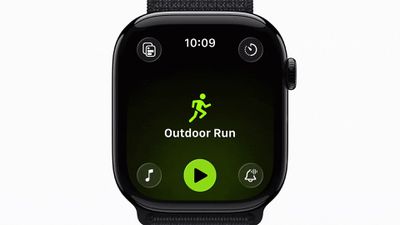
Apple Watch owners have been voicing their frustration online over changes to the Workout app that Apple introduced in watchOS 26, with many finding the redesigned interface makes starting exercises difficult and exasperating.
watchos 26 workout app
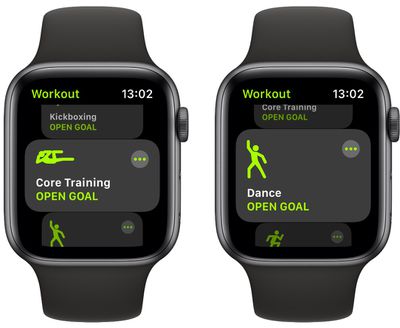
When Apple launched watchOS 26 in September, the Workout app went from large, easily tapped workout tiles to a scrolling, corner-button interface. Instead of tapping a workout once to begin, users now select the workout type, and then tap a smaller play button that appears after a brief animation. Apple has also integrated music and podcast setup directly into the Workout app itself, so users can configure audio to automatically begin playing when they start exercising.

However, many of the changes appear to have become a major source of frustration over the last couple of months, based on a Reddit thread on r/AppleWatch that's full of complaints. "Touch targets are way too small," one user wrote. "Often times I have to tap the play button several times to get the workout to start."

Another user said the update has been "absolutely horrible," adding that "activating a swimming workout has become impossible once in the pool." Several swimmers echoed this view. One notes that the latest design makes it "impossible to reliably start or switch workouts once you're wet or mid-lap."

The redesigned layout also moves common controls like goal settings, quick-start options, and frequently used workouts into different positions. Long-time users say this breaks years of muscle memory. "What I used to be able to do in my sleep without thinking now takes my full brain capacity and always annoys me just before my workout," one user noted.

Some users also report reliability issues, like tapping the start button and seeing the press animation without the workout actually starting, or walking workouts failing to register completely. Mis-starts are another recurring issue. "I've accidentally started the wrong workout so many times," one user wrote. "The play button loads late, so I think I'm scrolling, but I actually tap it the moment it appears." Another said they've watched the button animate when tapped, "and then found out later that it didn't actually register."
workout

The old Workout interface in watchOS 11

"The scrolling is so bad now," wrote another user, while others said the interface simply feels laggy. One explained that "the delay between selecting and starting is so long that I constantly overshoot or open the wrong thing."

Some users have turned to Siri voice commands to bypass the new interface altogether, while others rely on the Action button on Apple Watch Ultra models to start workouts directly. A few say they've been letting auto-detection handle walking and cycling sessions simply because it's less tedious than navigating the UI.

What have your experiences been with the Workout app on Apple Watch since the watchOS 26 update? Do you get on with the redesigned interface, or is it a step backwards from watchOS 11? Let us know in the comments.


Popular Stories

apple design award 2025

Apple Announces 2025 Design Award Winners Ahead of WWDC 2025

Tuesday June 3, 2025 10:14 am PDT by
As we wait for WWDC to kick off next Monday, Apple today announced the winners of its annual Apple Design Awards, recognizing apps and games for their innovation, ingenuity, and technical achievement. The 2025 Apple Design Award winners are listed below, with one app and one game selected per category: Delight and Fun - CapWords (App) and Balatro (Game) Innovation - Play (App) and PBJ -...
1password deal blue

1Password Security Breach: What Was Accessed and What Wasn't

Wednesday November 25, 2026 1:09 pm PST by
Popular password management app 1Password today said it experienced a security breach earlier this month. 1Password says some customer names and email addresses were accessed, but no customer vault contents were compromised. On November 19, 1Password saw indications that an employee's GitHub account had been breached and began investigating. The company says the breached GitHub account was...
apple store down feature

Here's Why the Apple Store is Going Down

Thursday November 26, 2026 5:49 am PST by
Apple's online store is going down for a few hours on a rolling country-by-country basis right now, but do not get your hopes up for new products. Apple takes its online store down for a few hours ahead of Black Friday every year to tease its annual gift card offer with the purchase of select products. The store is down in Australia, New Zealand, and Thailand, right now, and it will...

Top Rated Comments

vertsix Avatar
13 months ago
I'm a triathlete. It is. And let me explain why. Do note, some of this stuff has been carried over for many years.

1. The interface is slow and clunky. When you are working out, the last thing you need is an unresponsive interface. It needs to be quick and actionable. The animations take forever. Reduce Motion helps this a bit, but all the movement is awful for precision tracking and utility.

2. The digital buttons are small. Why are they so small? Make them big so the touch surface for them is easier to hit.

3. Wi-Fi, Cellular and Bluetooth remain enabled when starting a water workout. Why is this a thing? These communications do not work underwater. This also causes significant battery drain during a water workout.

4. Ending a workout and starting another immediately is glitchy and slow. Same applies for adding one to the previous one is as well. Sometimes it works immediately, sometimes it takes 10 seconds. This is important to me because I chug through runs, rides and swims back-to-back.

5. Workout metrics get covered whenever custom intervals start. This is terrible because I like to check my metrics as soon as intervals start to adjust as needed. The mitigation is to tap the screen to jump back to your custom views.

6. Default settings make little sense for the user experience. For example, Precision Start is off by default; Voice Feedback is on by default; Press to Pause is off by default. Should be inversed. Press to Pause takes over the screenshot functionality, I get it, but what's more important in a watch? Screenshots or pausing a workout?

7. When you go to Custom Workouts for a specific workout type, it "suggests" my Custom Workouts. **** off. I know what I'm doing, and it's not what I want to do most of the time. It also defaults to this view.

8. You cannot delete race routes. Why is the app setting these without an option to remove?

9. Autoplay Media shuffles a playlist in a specific order and it affixes that order. This is a bug and needs to be fixed.

And don't let me get started on Siri...

In general, it is clear that the Workout app is handled by a design and engineering team which have no idea or interest in what athletes need. It's disappointing. And third-party alternative apps are not much better. Every day I'm inching closer to getting a Garmin or Coros.
Score: 95 Votes (Like | Disagree)
13 months ago
what the hell happened to the people responsible for UX at apple?
Score: 55 Votes (Like | Disagree)
DocMultimedia Avatar
13 months ago
I do many types of workouts. The new GUI is miserable. Not just the Workout app.

I regret doing this update on my watch/phone/computer/tv.
Score: 44 Votes (Like | Disagree)
tomtad Avatar
13 months ago
Don't understand the 'play' button, shouldn't this say 'Go', or 'Start'?

Also why can't I just press the big activity icon in the middle to start?

Crap UI again from Apple
Score: 40 Votes (Like | Disagree)
13 months ago
Runner here. Can confirm, the new workout app is terrible. On the Apple Watch Ultra, the process used to be: "click action button to launch workout" Scroll to "Outdoor Run" and tap anywhere on it - it begins acquiring signal while i finish prepping for the run. Tap the Action Button to start (i use the precision start feature). Now it's: "Click action button to launch workout app". Scroll to "Outdoor Run", "wait for a tiny Play button to appear" ... "can't tap anywhere on the screen, must land precisely on the tine play button"...which doesn't actually start the workout. Then tap action button to begin the workout.

Once running, scrolling between stat screens never works...you have to position the watch comically forward in front f your face before it will let you scroll between screens. And the new finger tap gesture certainly doesn't work for switching between stats because you have to be positioned just right to do it and when you're on mile 10 of a long run, I just want to see the stats i need, for the love of all that's holy. Why not use Siri?? Well, because Siri's dumb as all hell and can't read your current running stats even though they are RIGHT THERE ON THE SCREEN. And Workout Buddy only works when your phone is with you. I activated the 5G so i wouldn't have to run with my phone. Just makes me wonder if anyone at Apple has actually used the Apple Watch on a real run before.

Swim workouts are equally frustrating. Can't do anything on the screen when it's wet and it mis-calculates laps far more than it used to.

Apple, you can do better.
Score: 29 Votes (Like | Disagree)
CharlesShaw Avatar
13 months ago
I agree and have been meaning to send Apple feedback on this. We all should.
Score: 28 Votes (Like | Disagree)
Latest Stories
The 50+ Best Apple Black Friday Deals Still Available on AirPods, iPads, and More
8 hours ago
HomePod Mini 2 in (RED) Seemingly Spotted Ahead of Announcement
5 hours ago
Apple's M6 and PROLED MacBook Pro Reach New Low Prices for Black Friday
16 hours ago
The MacRumors Show: iPhone Air 2 and iPhone 18 Are Coming
16 hours ago
Apple Store in Brisbane Reopening Next Month With New Design
16 hours ago
The 60+ Best Black Friday Accessory Deals on iPhone Chargers, TVs, Headphones, and More
17 hours ago
GTA VI Now (Barely) Running on Apple Silicon Macs
17 hours ago
The Best Black Friday Streaming Deals on Apple TV, Disney+, and More
18 hours ago
Apple TV's 'Carême' Wins International Emmy for Best Drama
19 hours ago
iPhone 18 Production Delay Leaves Apple Little Time Before Launch
19 hours ago
The Best Black Friday AirPods Deals Still Available
11 hours ago
The Best Black Friday Deals on Apple Home Products
20 hours ago
The Best Black Friday iPhone Deals Still Available
11 hours ago
The Best Black Friday iPad Deals Still Available
11 hours ago
The Best Black Friday Apple Watch Deals Still Available
11 hours ago
The Best Black Friday AirTag Deals Still Available
11 hours ago
The Best Black Friday Mac Deals Still Available
11 hours ago
iPhone Share of US Smartphone Market Hits 57% as Rivals Slip
21 hours ago
iPhone 20 Pro Rumored to Feature 3D-Printed Titanium Frame
23 hours ago
Apple's Official 2026 Black Friday Offer Starts Rolling Out
2 days ago
Halide Adds Fill Light Feature for iPhone Duo
2 days ago
MacBook Air Black Friday Deals Now Live With Massive $399 Savings
2 days ago
Amazon Discounts All MacBook Neo Models by $99 for Black Friday
2 days ago
Kodak Launches Unique AirTag Rival With E-Ink Display
2 days ago
Here's Why the Apple Store is Going Down
2 days ago
Apple Still Working on Giant Foldable iPad That Could Cost $5,000
2 days ago
iPhones Dominate China's Weak Singles' Day Smartphone Sales
2 days ago
iPhone 20 Pro Could Feature Ceramic in Limited-Edition Model
2 days ago
Apple Faces Korean Regulator Review Over iPhone 16 AI Advertising
2 days ago
Apple Watch Ultra 4 Hits New Best-Ever Price of $649.99 for Black Friday
2 days ago
Related Apple News: Iphone Duo Separate Lock Screen Rotation | Wwdc 2024 Announcements | Productred | Ios | Rockstar Games





























