iOS 26.1 Beta 4 Adds Toggle to Turn Off Lock Screen Camera Swipe
The fourth beta of iOS 26.1 includes an option to turn off the Lock Screen swipe that activates the camera, a feature that iPhone users have been wanting for years.
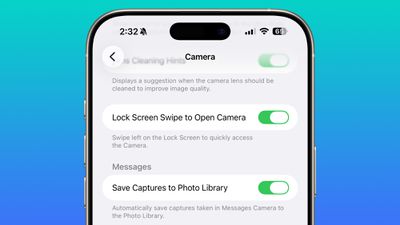
In the Camera section of the Settings app, there's a Lock Screen Swipe to Open Camera setting, and turning it off disables the feature where you can swipe left to open the camera.
The iPhone has long allowed users to open the Camera app directly from the Lock Screen with a swipe, but it can be a setting that's easy to activate, and it provides a way for someone that gets ahold of an iPhone to use it to take unwanted photos.
There was previously no way to turn off Lock Screen camera activation without disabling the camera app entirely.
Popular Stories
As we wait for WWDC to kick off next Monday, Apple today announced the winners of its annual Apple Design Awards, recognizing apps and games for their innovation, ingenuity, and technical achievement.
The 2025 Apple Design Award winners are listed below, with one app and one game selected per category:
Delight and Fun - CapWords (App) and Balatro (Game)
Innovation - Play (App) and PBJ -...
Popular password management app 1Password today said it experienced a security breach earlier this month. 1Password says some customer names and email addresses were accessed, but no customer vault contents were compromised.
On November 19, 1Password saw indications that an employee's GitHub account had been breached and began investigating. The company says the breached GitHub account was...
Apple's online store is going down for a few hours on a rolling country-by-country basis right now, but do not get your hopes up for new products.
Apple takes its online store down for a few hours ahead of Black Friday every year to tease its annual gift card offer with the purchase of select products.
The store is down in Australia, New Zealand, and Thailand, right now, and it will...





































