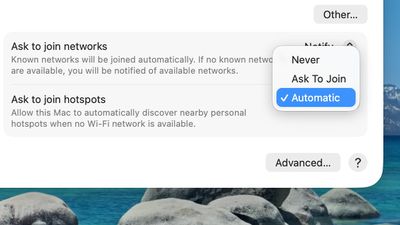
macOS Tahoe 26 includes support for automatically joining your iPhone's Personal Hotspot when no Wi-Fi network is available, so you no longer need to manually connect.
To set up automatic joining in macOS Tahoe, you can click on the Wi-Fi button in the menu bar or Control Center to open up Wi-Fi Settings. From there, scroll down to the bottom where it says "Ask to join hotspots" and click to select the Automatic option.
With Auto-Join Hotspot turned on, when your Mac doesn't have Wi-Fi available and is near an iPhone or iPad providing a Personal Hotspot, it will automatically attempt to join it.
Auto-Join works with Family Sharing, so you can set up your Mac to automatically connect to a family member's Personal Hotspot, or allow their Mac to automatically connect to yours.
As we wait for WWDC to kick off next Monday, Apple today announced the winners of its annual Apple Design Awards, recognizing apps and games for their innovation, ingenuity, and technical achievement.
The 2025 Apple Design Award winners are listed below, with one app and one game selected per category:
Delight and Fun - CapWords (App) and Balatro (Game)
Innovation - Play (App) and PBJ -...
Wednesday November 25, 2026 1:09 pm PST by Juli Clover
Popular password management app 1Password today said it experienced a security breach earlier this month. 1Password says some customer names and email addresses were accessed, but no customer vault contents were compromised.
On November 19, 1Password saw indications that an employee's GitHub account had been breached and began investigating. The company says the breached GitHub account was...
Thursday November 26, 2026 5:49 am PST by Joe Rossignol
Apple's online store is going down for a few hours on a rolling country-by-country basis right now, but do not get your hopes up for new products.
Apple takes its online store down for a few hours ahead of Black Friday every year to tease its annual gift card offer with the purchase of select products.
The store is down in Australia, New Zealand, and Thailand, right now, and it will...
Since my cell carrier has a strong signal, blazing fast speeds, and cheap prices, I no longer have a WiFi at home and exclusively use my hotspot.
It has been quite annoying to have to turn it on on the phone so frequently, so this is a much asked feature from me (via feedback app) (and no doubt many in my situation).
One question that I haven’t tested yet is that frequently I see my neighbor’s iPhone hotspot.
Does auto join any hotspot or only those it has been authenticated to like during manual join?
I think it must be the latter but ask out of an abundance of caution as I’m not keen (spoof hotspot for MIM attack?) on just attaching to any hotspot in the neighborhood, train or plane.
I did the same and haven’t had a Wi-Fi router for a few years so this is welcome as I feel your pain in manually connecting.
You can forget networks so can set your neighbours phone to ignore. Also your Mac would need to know their hotspot password anyway which I assume you don’t have?
All kinds of useless stuff and you still can't resize the finder window and let it stay like that after a reboot. Simple, useful, and something that should be "allowed". But no, Apple knows best. Still can't do a basic click-through. Have to go and activate the window then you can start clicking. Still the "End" button on the keyboard won't take a blinking cursor to the end of a line. It scrolls down a full page as if that's even related when you're in the middle of typing anyway. Apple loves adding useless features to their os systems. Beyond crazy.