Skip to Content

Five iPhone Security Features You Should Be Using

Apple has quite a few security features that it's added to iPhones, iPads, and Macs over the years. Now more than ever, it's important to make sure you're taking advantage of the built-in security tools that are available to keep yourself and your data safe, so we've rounded up a list of the most important options.

iPhone Security Feature 25
If you don't already have these enabled, you might want to consider turning some of them on.

Two-Factor Authentication

With two-factor authentication, you need to verify your identify when you sign into iCloud on a new device or on the web. It works by sending a six-digit code to a device where you're already signed in, and it won't authorize a sign-in on the new device unless you input that code from your existing device.
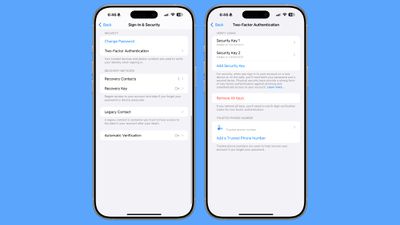
two factor authentication
If you have an iPhone and want to sign into your ‌iCloud‌ account on your Mac, for example, when you enter your Apple Account name and password, you'll get a pop-up on your iPhone with a code that you input for identity verification. Alternatively, you can set a trusted phone number where you can also get a code in case you forget your password.

Apple tries really hard to get people to use two-factor authentication, so chances are you have it enabled, but if you don't, it's a first line of defense to protect your data. There are even some iOS features that don't work without it.

You can manage two-factor authentication by going to Settings > Sign-In and Security.

Security Keys

For an extra layer of protection with two-factor authentication, you can add physical security keys, such as the YubiKey. With a security key set up, you verify your identity with a physical dongle via USB-C or NFC.

Security keys make sure no one can break into your account even if they have access to one of your trusted devices, but you definitely don't want to lose a security key. You can set this up in the two-factor authentication section of the Settings app.

Stolen Device Protection

Stolen Device Protection is a feature that Apple added after criminals got clever and started watching people enter their passcodes before stealing an iPhone.
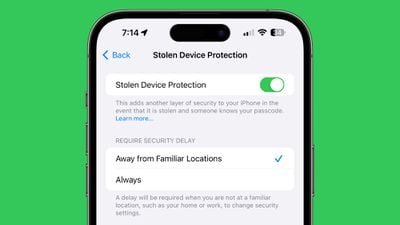
ios 17 4 stolen device protection
When you turn on Stolen Device Protection, a passcode won't work for accessing sensitive information like passwords and credit card data. Instead, Face ID or Touch ID biometric authentication is required, so if a thief has your iPhone and your passcode, they won't be able to get into your accounts.

There's also a security delay that keeps your Apple Account password from being changed without two instances of biometric authentication and an hour-long delay.

Thieves are blocked from accessing passwords, making purchases, turning off Lost Mode on an iPhone, applying for an Apple Card, using an iPhone to set up a new device, and accessing credit cards and Apple Cash. There are delays for signing out of an Apple Account, changing a password, resetting settings, and turning off Stolen Device Protection.

By default, Stolen Device Protection is only on when you're away from familiar locations like your home or your work, but if you want it on at all times, you just need to change the toggle to Always.

You can get to the Stolen Device Protection settings by opening up the Settings app, going to the ‌Face ID‌ and Passcode section, and tapping on Stolen Device Protection.

Private Relay

Private Relay is more of a privacy feature than a security feature, but it's something that you should have on. It hides your IP address and browsing activity in Safari and protects unencrypted internet traffic so no one can see what you're doing even if you're on an unsecured network.
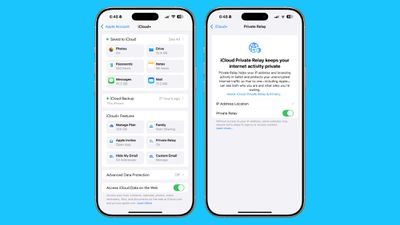
icloud private relay
Private Relay is an ‌iCloud‌+ feature that you get access to as long as you pay Apple at least $0.99 a month for 50GB of ‌iCloud‌ Storage, and it's well worth it. You should also take advantage of Hide My Email whenever possible, as it will give you temporary email addresses that you can revoke at any time.

Private Relay can be enabled by opening up Settings, tapping on your profile picture, and tapping on the ‌iCloud‌ section.

Advanced Data Protection

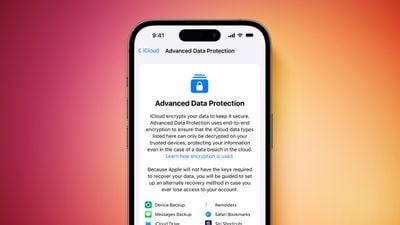
By default, some of the data that's saved in ‌iCloud‌ backups and uploaded to ‌iCloud‌ is not end-to-end encrypted, which means that Apple can provide ‌iCloud‌ backup data to law enforcement.

Apple advanced security Advanced Data Protection screen Feature Orange
Advanced Data Protection encrypts your ‌iCloud‌ data so that it cannot be decrypted except for on your personal devices signed into your Apple Account. It is Apple's highest security option for cloud data.

The feature protects device backups, Messages backups, iCloud Drive files, Notes, Photos, Reminders, Safari bookmarks, Siri Shortcuts, Voice Memos, and Wallet Passes, all of which can otherwise be accessed in ‌iCloud‌ backups by subpoena.

Advanced Data Protection is a good idea to turn on, but keep in mind that it means even Apple can't recover your data if a password is lost. To use Advanced Data Protection, Apple requires you to have a recovery key saved or a recovery contact set up as a way to regain access to your account should you lose your password.

You can get to Advanced Data Protection by opening up the Settings app, tapping on your profile picture, selecting ‌iCloud‌, and then scrolling down to the Advanced Data Protection section. You can also turn it on in the Privacy and Security section of the Settings app.

Lockdown Mode

Lockdown Mode is an extreme security option that most people won't want to turn on, but it's good to know where it is in case you need it.
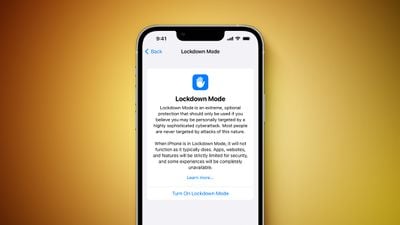
Lockdown Mode Feature
Apple designed this feature for journalists, activists, government employees, and others who might be in danger of being subject to sophisticated cyber attacks and mercenary spyware.

Lockdown Mode disables a lot of iPhone features, blocking Message attachments, web technologies like JIT (just-in-time JavaScript compilation), FaceTime calls from unknown contacts, shared albums in the ‌Photos‌ app, invites for Apple services from unknown people, physical device connections, and configuration profiles.

It essentially removes common attack vectors by limiting iPhone functionality, so it's not something you're going to want to use day-to-day unless you need it. Lockdown Mode can be turned on by opening up Settings, going to Privacy and Security, and tapping on the Lockdown Mode option.

Contact Key Verification

Similar to Lockdown Mode, Contact Key Verification is designed for a limited number of people who need to confirm the identify of who they are speaking to. It provides an option to compare contact verification codes with someone in person or over the phone, so no one can impersonate that person at a later date.


Popular Stories

1password deal blue

1Password Security Breach: What Was Accessed and What Wasn't

Wednesday November 25, 2026 1:09 pm PST by
Popular password management app 1Password today said it experienced a security breach earlier this month. 1Password says some customer names and email addresses were accessed, but no customer vault contents were compromised. On November 19, 1Password saw indications that an employee's GitHub account had been breached and began investigating. The company says the breached GitHub account was...
apple design award 2025

Apple Announces 2025 Design Award Winners Ahead of WWDC 2025

Tuesday June 3, 2025 10:14 am PDT by
As we wait for WWDC to kick off next Monday, Apple today announced the winners of its annual Apple Design Awards, recognizing apps and games for their innovation, ingenuity, and technical achievement. The 2025 Apple Design Award winners are listed below, with one app and one game selected per category: Delight and Fun - CapWords (App) and Balatro (Game) Innovation - Play (App) and PBJ -...
ipad pro prime

Apple Has iPads Running macOS Internally, Says Gurman

Wednesday November 25, 2026 4:55 am PST by
Apple has iPads running macOS internally and has had them "for some time," according to Bloomberg's Mark Gurman, although he says no work is currently being done to bring the Mac operating system to iPads. Speaking on his latest Power On podcast, Gurman said there is "no work being done to consumerize macOS on the iPad." Rather, Apple will continue to bring Mac features and apps like Final Cut ...

Top Rated Comments

scorpio vega Avatar
21 months ago
Two factor authentication is amazing however it is a double edged sword.

I had to change my number awhile back due to it being posted on some shady adult websites and had pervs messaging me.

Anyway the number was changed and updated it under email and phone numbers in settings. I didn’t think much of it.


When I got my iPhone 16 pro max, I had deleted my old iPhone and had given it to someone else and I tried to set up the iPhone 16 with my Apple account and I couldn’t bc while I changed the number I had forgotten to update it in the 2 factor authentication as well thus it was still trying to contact my old phone number and I didn’t have any other devices that I could access my iCloud.

So I literally couldn’t access my iCloud for nearly a month. It was a nightmare lol.

So be warned to always make sure it’s up to date.

Score: 14 Votes (Like | Disagree)
21 months ago
Having lost my business partner of 25 years recently (who operated company vendor accounts on a locked, encrypted iPhone, or internet services with 2FA enabled to verify via his locked iPhone), another security feature you should list here is Legacy Contact, which allows a designated Contact (preferably a trusted relative or your executor) to unlock your Apple accounts and your devices after your death.
Score: 9 Votes (Like | Disagree)
fredrik9 Avatar
21 months ago

Am I the only one here who disables all lock screen security just to shave off a few microseconds when the phone wakes up?
Yes
Score: 7 Votes (Like | Disagree)
21 months ago
I use 9999 as my passcode so that someone would have to go through 10,000 different codes before they get to mine. Oooops, forget I told you that. By the way, I only recently realized that they started allowing six digit codes starting with iOS 9. Bet you can guess my NEW passcode -- that will take even longer for a bad person to brute force.
Score: 7 Votes (Like | Disagree)
Parowdy Avatar
21 months ago
One big thing to point out about Advanced Data Protection:
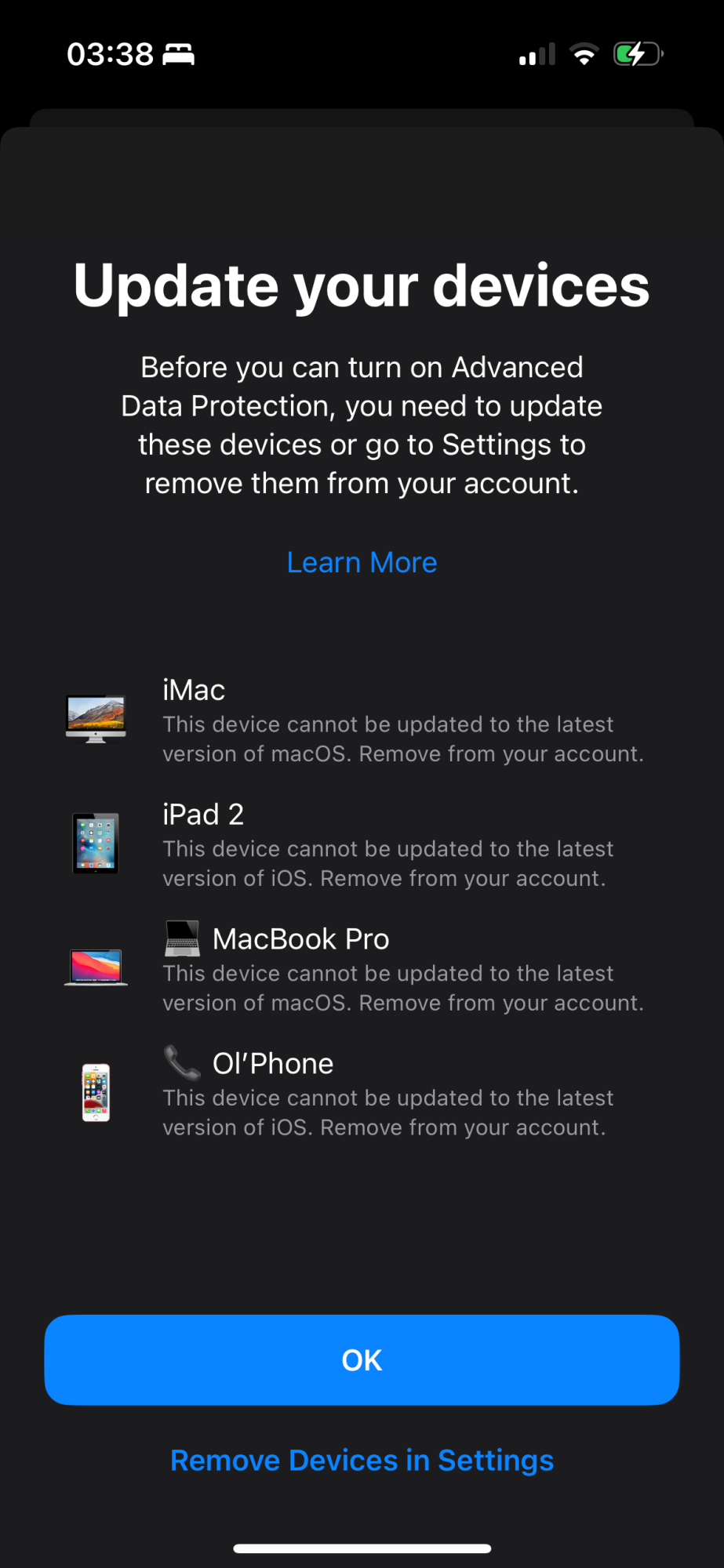
You can NOT have any old devices singed into your account!

It makes sense and it also explains why I had a recovery contact set up but the feature itself turned off, I can’t follow through. At least the old SE can not be removed as it’s my backup phone. Interesting that my „obsolete“ 2017 MBP isn’t listed.
This is unfortunately pretty useless for many (especially Apple fans).

Attachment Image
Score: 7 Votes (Like | Disagree)
21 months ago
Unlike other vendors, turning on Apple two factor is a one way street after two weeks you can’t turn it off.
Score: 7 Votes (Like | Disagree)
Latest Stories
The 50+ Best Apple Black Friday Deals on AirPods, iPads, MacBooks, and More
12 hours ago
Apple's Official 2026 Black Friday Offer Starts Rolling Out
17 hours ago
Halide Adds Fill Light Feature for iPhone Duo
17 hours ago
MacBook Air Black Friday Deals Now Live With Massive $399 Savings
18 hours ago
Amazon Discounts All MacBook Neo Models by $99 for Black Friday
18 hours ago
Kodak Launches Unique AirTag Rival With E-Ink Display
19 hours ago
Here's Why the Apple Store is Going Down
19 hours ago
Apple Still Working on Giant Foldable iPad That Could Cost $5,000
20 hours ago
iPhones Dominate China's Weak Singles' Day Smartphone Sales
20 hours ago
iPhone 20 Pro Could Feature Ceramic in Limited-Edition Model
21 hours ago
Apple Faces Korean Regulator Review Over iPhone 16 AI Advertising
22 hours ago
Apple Watch Ultra 4 Hits New Best-Ever Price of $649.99 for Black Friday
22 hours ago
New Apple Store Opening in India, Download the Special Wallpaper Now
1 day ago
Redesigned OLED MacBook Air Could Launch in 2027 or 2028
1 day ago
AirPods Pro 3 for $149 is One of The Best Black Friday Deals This Year
1 day ago
1Password Security Breach: What Was Accessed and What Wasn't
2 days ago
WhatsApp Finally Adds Scheduled Messages
2 days ago
Get Apple's Cheapest iPad for $379 During Amazon's Black Friday Sale
2 days ago
Rumor: iOS 28 to Revamp Notifications
2 days ago
iPhone 18 Pro Max Battery Exhausts a Toy Cyclops in New Apple Ad
2 days ago
$799 Smart Glasses Promise Vision Pro-Style Controls in a 45g Frame
2 days ago
How To Get an iPhone Duo or iPhone 18 Pro at No Cost Through T-Mobile for Black Friday
2 days ago
Apple Has an iPhone Notifications Problem
2 days ago
Amazon Sweetens Black Friday Deals on PROLED MacBook Pro
2 days ago
Apple Has iPads Running macOS Internally, Says Gurman
2 days ago
Apple Is Far From Done With 2026: Here's What's Still Coming
2 days ago
Threads App for iPad Now Available
2 days ago
Claude Now Lets You Install Artifacts as Desktop Apps
2 days ago
Tidal Bans AI Music, While Apple Music Sticks to Labels
2 days ago
Add Holiday Lights and Snow to Your Mac With Festivitas
2 days ago
Related Apple News: Local News | Technology | Opinion | Mac | Politics