Skip to Content

How to Use iOS 18.4's New Ambient Music Feature in Control Center

The upcoming iOS 18.4 update for the iPhone adds an Ambient Music feature to Control Center. Below, we take a closer look at how it works.
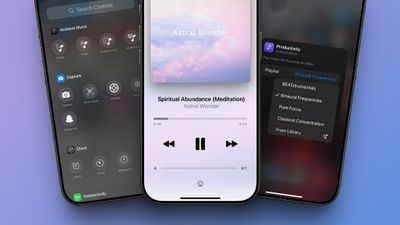
iOS 18 4 Ambient Music Control Center
iOS 18.4 is currently in beta, so the Ambient Music feature is not widely available yet. The update will likely be released to the general public next week.

To use the feature on iOS 18.4, open Control Center and tap on the plus sign in the top-left corner. Then, tap on "Add a Control" at the bottom of the screen, scroll down to the Ambient Music section, and add one or more of the controls.

Here is how Apple describes the four Ambient Music themes:

  • Sleep: Music for a restful sleep.
  • Chill: Music for relaxation.
  • Productivity: Music for focusing on tasks.
  • Wellbeing: Music for meditation and self-care.

You can add any of the four Ambient Music controls to your Control Center, and then tap on one to start a playlist of songs that matches the theme. The feature is free and easy to use, with no Apple Music subscription or app download required.

While the Ambient Music feature is turned on, music controls will appear on the screen, and there is also Dynamic Island integration on newer iPhones.

There are four playlists available for each theme, or you can set your own. To change the playlist, open Control Center, and then tap on the plus sign in the top-left corner of the screen. Next, tap on an Ambient Music control that you added to Control Center, and tap on the playlist name. A drop-down menu will show additional playlist options.

  • Sleep: Sleep Sounds, Bedtime Beats, Sound Bath, and Piano Sleep.
  • Chill: Piano Chill, Ambient Chill, Lo-Fi Jazz, and Pure Chill.
  • Productivity: BEATstrumentals, Binaural Frequencies, Pure Focus, and Classical Concentration.
  • Wellbeing: Pure Meditation, Spa, Beats & Breath, and Pure Calm.

To update your iPhone to iOS 18.4, once the update is released, open the Settings app and select General → Software Update.


Related Forums: iOS 18, iPadOS 18

Popular Stories

apple design award 2025

Apple Announces 2025 Design Award Winners Ahead of WWDC 2025

Tuesday June 3, 2025 10:14 am PDT by
As we wait for WWDC to kick off next Monday, Apple today announced the winners of its annual Apple Design Awards, recognizing apps and games for their innovation, ingenuity, and technical achievement. The 2025 Apple Design Award winners are listed below, with one app and one game selected per category: Delight and Fun - CapWords (App) and Balatro (Game) Innovation - Play (App) and PBJ -...
1password deal blue

1Password Security Breach: What Was Accessed and What Wasn't

Wednesday November 25, 2026 1:09 pm PST by
Popular password management app 1Password today said it experienced a security breach earlier this month. 1Password says some customer names and email addresses were accessed, but no customer vault contents were compromised. On November 19, 1Password saw indications that an employee's GitHub account had been breached and began investigating. The company says the breached GitHub account was...
apple store down feature

Here's Why the Apple Store is Going Down

Thursday November 26, 2026 5:49 am PST by
Apple's online store is going down for a few hours on a rolling country-by-country basis right now, but do not get your hopes up for new products. Apple takes its online store down for a few hours ahead of Black Friday every year to tease its annual gift card offer with the purchase of select products. The store is down in Australia, New Zealand, and Thailand, right now, and it will...

Top Rated Comments

22 months ago
I had no idea you can change the playlists. Awesome, that's why I enjoy MacRumors. 👍 But this is pretty hidden, isn't it? :D

However, are these playlists updated because I was listening to Chill and it was pretty repetitive.


Does this require an Apple Music subscription to work?
No, it does not.
Score: 9 Votes (Like | Disagree)
blodyholy Avatar
22 months ago
I’m confused as to why this feature was relegated to the control center only? Seems like a stand alone or Music app integration as well makes sense.
Score: 7 Votes (Like | Disagree)
22 months ago

As someone else pointed out, I see no option to set a timer. Please inform us how?
You need to use the Timer app in the clock app and instead of a sound you can select „stop playing“ „when the timer ends“.

It’s rather convoluted and not at all intuitive.
Score: 4 Votes (Like | Disagree)
tennisproha Avatar
22 months ago
This is nice but Apple Music needs a Sleep Timer like the Podcasts app. Can't really use any of the sleep or meditation playlists on Apple Music because otherwise they play all night.

Also can't use the Timer app as a workaround because then you have to change the timer sound every time you need to set an actual timer.
Score: 4 Votes (Like | Disagree)
neotint Avatar
22 months ago

I’m confused as to why this feature was relegated to the control center only? Seems like a stand alone or Music app integration as well makes sense.
Because the control center allows 2 touch access if it's placed higher on the page. It's for common regular daily work or personal wellness needs. Verses accessing your Music app, where these stations exist along with dozens of other options that only trigger more ADHD content choice overload that you can't change the menu order of.

e.g. I've saved the Pure Focus playlist in Apple Music, and I use it many times a week, but it's never/rarely shown on my inital Apple Music load home screen, unless it's in recently played and I haven't listened to more than 3 other items. I have to search for it or click and scroll across many playlists just to find it.

Apple is making a user friendly iOS UI surfacing of several of its existing ambient Apple Music playlists, free for all iOS users regardless of Apple Music subscription. This is a great example of Apple doing human-centered design aligned with digital wellness.
Score: 4 Votes (Like | Disagree)
22 months ago

This is nice but Apple Music needs a Sleep Timer like the Podcasts app. Can't really use any of the sleep or meditation playlists on Apple Music because otherwise they play all night.

Also can't use the Timer app as a workaround because then you have to change the timer sound every time you need to set an actual timer.
Yes! This has always been so stupid. Let's get a sleep timer within the music app please! (And also for this new feature.)
Score: 3 Votes (Like | Disagree)
Latest Stories
The 50+ Best Apple Black Friday Deals Still Available on AirPods, iPads, and More
9 hours ago
HomePod Mini 2 in (RED) Seemingly Spotted Ahead of Announcement
6 hours ago
Apple's M6 and PROLED MacBook Pro Reach New Low Prices for Black Friday
16 hours ago
The MacRumors Show: iPhone Air 2 and iPhone 18 Are Coming
16 hours ago
Apple Store in Brisbane Reopening Next Month With New Design
17 hours ago
The 60+ Best Black Friday Accessory Deals on iPhone Chargers, TVs, Headphones, and More
18 hours ago
GTA VI Now (Barely) Running on Apple Silicon Macs
18 hours ago
The Best Black Friday Streaming Deals on Apple TV, Disney+, and More
19 hours ago
Apple TV's 'Carême' Wins International Emmy for Best Drama
19 hours ago
iPhone 18 Production Delay Leaves Apple Little Time Before Launch
20 hours ago
The Best Black Friday AirPods Deals Still Available
12 hours ago
The Best Black Friday Deals on Apple Home Products
21 hours ago
The Best Black Friday iPhone Deals Still Available
12 hours ago
The Best Black Friday iPad Deals Still Available
12 hours ago
The Best Black Friday Apple Watch Deals Still Available
12 hours ago
The Best Black Friday AirTag Deals Still Available
12 hours ago
The Best Black Friday Mac Deals Still Available
12 hours ago
iPhone Share of US Smartphone Market Hits 57% as Rivals Slip
22 hours ago
iPhone 20 Pro Rumored to Feature 3D-Printed Titanium Frame
23 hours ago
Apple's Official 2026 Black Friday Offer Starts Rolling Out
2 days ago
Halide Adds Fill Light Feature for iPhone Duo
2 days ago
MacBook Air Black Friday Deals Now Live With Massive $399 Savings
2 days ago
Amazon Discounts All MacBook Neo Models by $99 for Black Friday
2 days ago
Kodak Launches Unique AirTag Rival With E-Ink Display
2 days ago
Here's Why the Apple Store is Going Down
2 days ago
Apple Still Working on Giant Foldable iPad That Could Cost $5,000
2 days ago
iPhones Dominate China's Weak Singles' Day Smartphone Sales
2 days ago
iPhone 20 Pro Could Feature Ceramic in Limited-Edition Model
2 days ago
Apple Faces Korean Regulator Review Over iPhone 16 AI Advertising
2 days ago
Apple Watch Ultra 4 Hits New Best-Ever Price of $649.99 for Black Friday
2 days ago
Related Apple News: News | Opinion | Reviews | Ipad | Education






























