Skip to Content

10 New Things Your iPhone Can Do in iOS 18.2

Apple is set to release iOS 18.2 in December, bringing the second round of Apple Intelligence features to iPhone 15 Pro and iPhone 16 models. This update brings several major advancements to Apple's AI integration, including completely new image generation tools and a range of Visual Intelligence-based enhancements. There are a handful of new non-AI related feature controls incoming as well.

New Things Your iPhone Can Do in iOS 18
While not all advertised Apple Intelligence features will be available immediately, iOS 18.2 introduces several capabilities that aim to make your iPhone smarter and more intuitive. Below, we've listed 10 new things your iPhone will be able to do when the update rolls out in December.

Adjust Media Volume on Lock Screen
ios 18 2 volume control lock screen
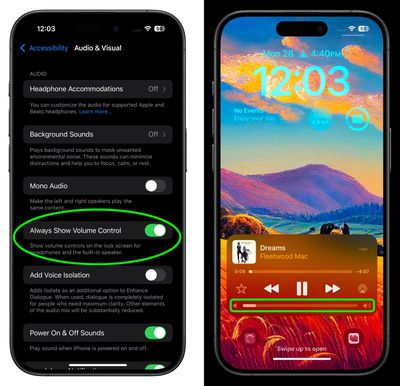
Prior to 2022, the volume slider was a familiar presence on the Lock Screen whenever media was playing. When Apple released iOS 16, however, it removed the control without explaining the reason, much to the dismay of many users.

Thankfully, Apple is bringing the control back as an option in iOS 18.2. If you're already on the iOS 18.2 beta, you'll find a toggle in Settings ➝ Accessibility ➝ Audio & Visual, labeled "Always Show Volume Control". Enable the switch, and you'll be able to adjust volume from the Lock Screen without having to unlock your ‌iPhone‌ or use the physical volume buttons.

Play Daily Sudoku Puzzles
Sudoku Apple News iOS 18
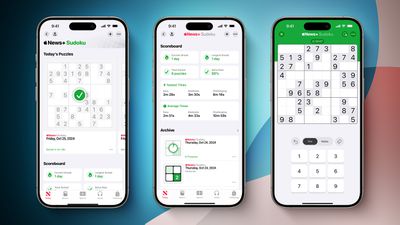
With iOS 18.2, Apple News+ subscribers in the U.S. will gain access to daily sudoku puzzles, offering easy, moderate, and challenging difficulty levels. A scoreboard will keep track of your sudoku statistics, including the total number of puzzles solved and your fastest completion times for each difficulty level.

This addition will be the fourth puzzle game available with an Apple News+ subscription, joining Crossword, Crossword Mini, and Quartiles.

Easily Manage Default Apps
ios 18 2 default apps
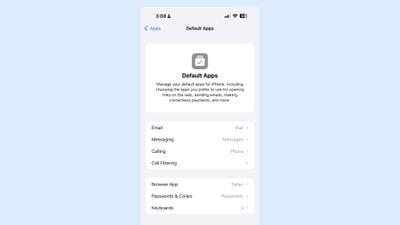
iOS 18.2 includes a new "Default Apps" section that can be found in the Settings app, which can be used to manage your default apps for the iPhone. This is a feature that Apple promised would be coming to the European Union, but it looks as if it may become available worldwide, based on the beta.

In the latest beta, US users can access the Default App interface to choose their preferred Email, Call Filtering, Browser, and Passwords, and Keyboards. EU users should have more options for choosing non-Apple apps as their default, as they are able to delete core apps like Messages, App Store, Safari, Camera, and Photos.

Categorize Emails in Mail
ios 18 mail app
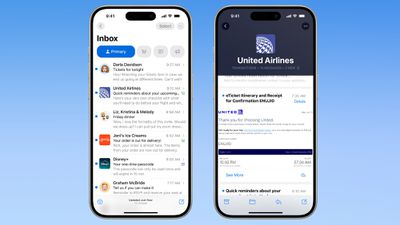
In iOS 18.2, Apple is introducing an updated version of the Mail app for built-in categorization. Mail Categories effectively organize your incoming emails into distinct sections for easier navigation.

Important emails are grouped in a "Primary" category, while other types are categorized into three additional sections. The "Transactions" section streamlines access to receipts, orders, and shipping information, allowing you to quickly locate your purchases. Meanwhile, the "Updates" section gathers newsletters, appointment reminders, and various subscription emails, keeping you informed. Lastly, the "Promotions" category highlights special offers and promotional messages, to make sure you don’t miss out on any deals.

Generate Images Using Prompts
ios 18 2 image playground styles
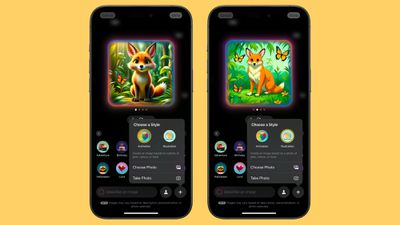
Image Playground is a totally new app designed to help you create images based on your ideas. Similar to ChatGPT, you can generate images by providing a prompt, and Apple offers suggested categories like themes, locations, and costumes to inspire your creativity. The app specializes in stylized content, meaning the generated images won't be realistic, but can choose from Animation and Illustration styles.

Additionally, you can include likenesses of friends and family by pulling images directly from your Photos app. While Image Playground functions as a standalone app, it can also be integrated into apps like Notes and Messages and added to third-party applications.

Generate Images With Sketches
ios 18 image playground
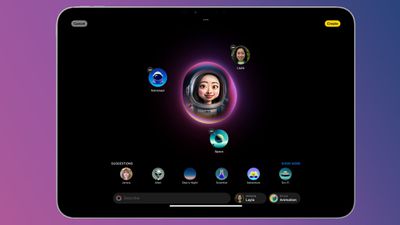
In the Notes app, Image Wand can be used to generate an image that fits into the content of your note. You can use it by circling an empty space – Image Wand will create a new image that's inspired by your text. Alternatively, you can draw something with your finger and circle it with the tool to get a new related image. And on iPad, you can draw a sketch with the Apple Pencil to have Image Wand generate an appropriate image.

Create Custom Emoji Characters
iOS 18 Genmoji WWDC
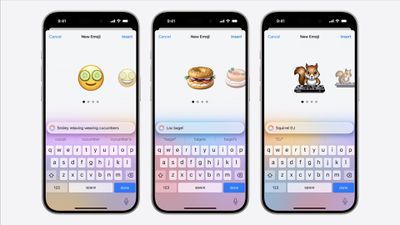
Genmoji are akin to traditional emojis but offer enhanced functionality. With Genmoji, you can create virtually any emoji you desire, freeing you from the limitations of the standard emoji set.

While they function like emojis on Apple devices, they are not encoded characters from the Unicode Consortium. Instead, Apple developed a unique API for Genmoji, ensuring they display correctly in any application that supports rich text. You can generate a Genmoji by providing a description of your desired design, and you even have the option to create Genmoji that resemble individuals from your Photos library.

Query ChatGPT via Siri
iOS 18 ChatGPT
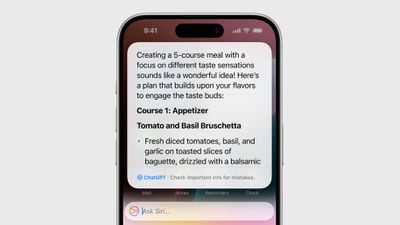
Apple is collaborating with OpenAI to incorporate ChatGPT into the iPhone, iPad, and Mac. This partnership allows Siri to handle complex requests by referring them to ChatGPT, such as generating images or creating text from scratch. With the Writing Tools feature, ChatGPT can produce and illustrate original content, expanding its capabilities beyond what Siri can currently offer.

For instance, you can open a lengthy PDF and ask Siri to summarize information on a specific topic; Siri can then pass this request to ChatGPT to generate a comprehensive summary. Apple envisions Siri as a facilitator for AI models and tools, optimizing available resources to provide you with answers without the need to switch between multiple apps.

Visual Intelligence

Apple Visual Intelligence
If you have an iPhone 16, you can make use of Visual Intelligence, a feature that offers insights about your surroundings. For instance, when you open the camera and aim it at a restaurant, you'll receive details such as opening hours and reviews.

Additional capabilities of Visual Intelligence include reading text aloud, identifying phone numbers and addresses for adding to Contacts, copying text, and summarizing information. Users can also search Google to find where to purchase a specific item they see, and by pointing the camera at an object, they can access further information through ChatGPT. Apple intends to enhance this feature by introducing more functionalities in the future.

More Options in Writing Tools
notes
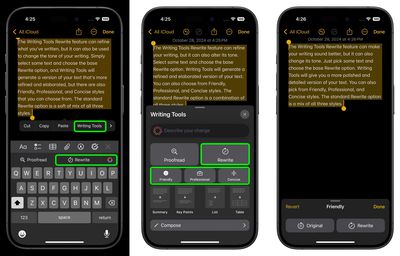
Apple is upgrading the Writing Tools feature to include options for more open-ended modifications. In iOS 18.1, Writing Tools can only adjust the tone to friendly, professional, or a simplified version. However, with the release of iOS 18.2, users will be able to specify the desired tone or content changes, such as incorporating more action words or transforming an email into a poem.


Popular Stories

apple design award 2025

Apple Announces 2025 Design Award Winners Ahead of WWDC 2025

Tuesday June 3, 2025 10:14 am PDT by
As we wait for WWDC to kick off next Monday, Apple today announced the winners of its annual Apple Design Awards, recognizing apps and games for their innovation, ingenuity, and technical achievement. The 2025 Apple Design Award winners are listed below, with one app and one game selected per category: Delight and Fun - CapWords (App) and Balatro (Game) Innovation - Play (App) and PBJ -...
1password deal blue

1Password Security Breach: What Was Accessed and What Wasn't

Wednesday November 25, 2026 1:09 pm PST by
Popular password management app 1Password today said it experienced a security breach earlier this month. 1Password says some customer names and email addresses were accessed, but no customer vault contents were compromised. On November 19, 1Password saw indications that an employee's GitHub account had been breached and began investigating. The company says the breached GitHub account was...
Apple 2026 Black Friday Event Hero

Apple's Official 2026 Black Friday Offer Starts Rolling Out

Thursday November 26, 2026 8:37 am PST by
Apple's annual four-day Black Friday through Cyber Monday shopping event is now live in Australia, New Zealand, and Thailand, and it will continue to roll out across Europe, the U.S., and Canada as the calendar turns to Friday, November 27 around the world. In the U.S., Apple's terms and conditions say the promotion begins on November 27 at 12 a.m. Pacific Time and ends on November 30 at...

Top Rated Comments

NightFox Avatar
27 months ago

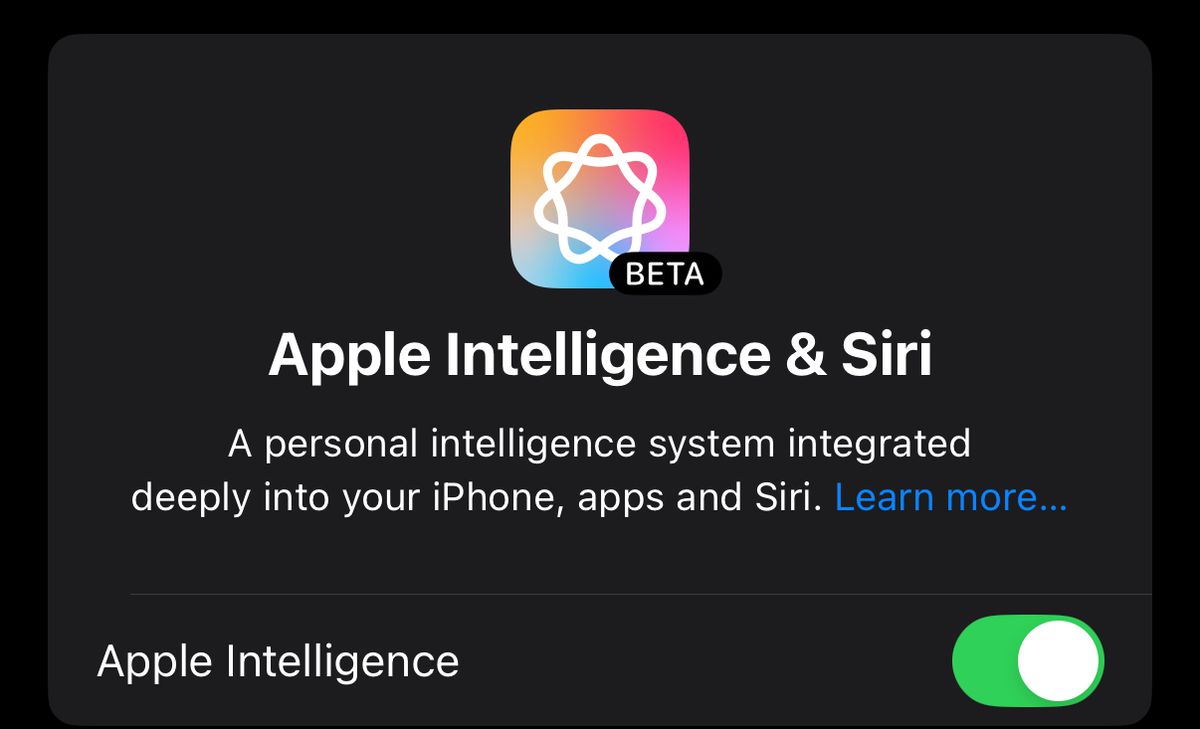
All I want to know about AI is how to turn it off.
If anyone on here knows how to to it please let me know 👍
Well, there's a big switch in Settings labelled "Apple Intelligence". You leave that turned off.


(with apologies to all the people who wanted it to be difficult so they could get angry about it)

Attachment Image
Score: 19 Votes (Like | Disagree)
27 months ago
Meh, nothing compelling
Score: 7 Votes (Like | Disagree)
27 months ago
Can Apple Intelligence do the Sudoku puzzles for me? I don’t have the time so that would be awesome.
Score: 4 Votes (Like | Disagree)
WarmWinterHat Avatar
27 months ago

All I want to know about AI is how to turn it off.
If anyone on here knows how to to it please let me know 👍
It's off by default.

Settings/Apple Intelligence & Siri/Apple Intelligence
Score: 4 Votes (Like | Disagree)
jz0309 Avatar
27 months ago
Well, my iPhone won’t be able to do half of those, and I’m totally fine with that.
I will update just to get the security fixes that will be in there… 13PM
Score: 4 Votes (Like | Disagree)
27 months ago
I don’t understand why the 15 Pro/Pro Max do not have Visual Intelligence.
Score: 3 Votes (Like | Disagree)
Latest Stories
The 50+ Best Apple Black Friday Deals Still Available on AirPods, iPads, and More
9 hours ago
HomePod Mini 2 in (RED) Seemingly Spotted Ahead of Announcement
6 hours ago
Apple's M6 and PROLED MacBook Pro Reach New Low Prices for Black Friday
17 hours ago
The MacRumors Show: iPhone Air 2 and iPhone 18 Are Coming
17 hours ago
Apple Store in Brisbane Reopening Next Month With New Design
17 hours ago
The 60+ Best Black Friday Accessory Deals on iPhone Chargers, TVs, Headphones, and More
18 hours ago
GTA VI Now (Barely) Running on Apple Silicon Macs
18 hours ago
The Best Black Friday Streaming Deals on Apple TV, Disney+, and More
19 hours ago
Apple TV's 'Carême' Wins International Emmy for Best Drama
19 hours ago
iPhone 18 Production Delay Leaves Apple Little Time Before Launch
20 hours ago
The Best Black Friday AirPods Deals Still Available
12 hours ago
The Best Black Friday Deals on Apple Home Products
21 hours ago
The Best Black Friday iPhone Deals Still Available
12 hours ago
The Best Black Friday iPad Deals Still Available
12 hours ago
The Best Black Friday Apple Watch Deals Still Available
12 hours ago
The Best Black Friday AirTag Deals Still Available
12 hours ago
The Best Black Friday Mac Deals Still Available
12 hours ago
iPhone Share of US Smartphone Market Hits 57% as Rivals Slip
22 hours ago
iPhone 20 Pro Rumored to Feature 3D-Printed Titanium Frame
1 day ago
Apple's Official 2026 Black Friday Offer Starts Rolling Out
2 days ago
Halide Adds Fill Light Feature for iPhone Duo
2 days ago
MacBook Air Black Friday Deals Now Live With Massive $399 Savings
2 days ago
Amazon Discounts All MacBook Neo Models by $99 for Black Friday
2 days ago
Kodak Launches Unique AirTag Rival With E-Ink Display
2 days ago
Here's Why the Apple Store is Going Down
2 days ago
Apple Still Working on Giant Foldable iPad That Could Cost $5,000
2 days ago
iPhones Dominate China's Weak Singles' Day Smartphone Sales
2 days ago
iPhone 20 Pro Could Feature Ceramic in Limited-Edition Model
2 days ago
Apple Faces Korean Regulator Review Over iPhone 16 AI Advertising
2 days ago
Apple Watch Ultra 4 Hits New Best-Ever Price of $649.99 for Black Friday
2 days ago
Related Apple News: South Africa | Lifestyle | Iphone | Mac | Local News