Skip to Content

Here Are All the New Features in macOS Sequoia 15.1

Apple today released macOS Sequoia‌ 15.1, bringing to Macs the first Apple Intelligence features such as Writing Tools, new Siri features, Smart Replies, and more. In addition, macOS 15.1 adds a handful of welcome tweaks and improvements to existing Mac capabilities.

macOS Sequoia Feature
Here's what you can expect from the first major update to macOS Sequoia after you have downloaded and installed the update (System Settings ➝ General ➝ Software Update). Note that Apple Intelligence features require Macs powered by Apple silicon.

iPhone Mirroring Drag and Drop Support

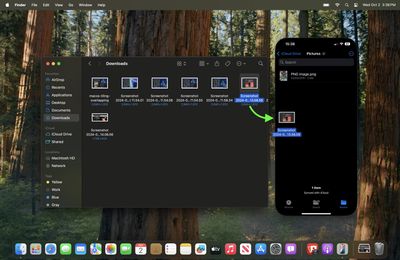
One of the most anticipated iPhone Mirroring features coming in macOS 15.1 is support for drag and drop. After updating to the new software, you will be able to drag files from an ‌iPhone‌ to a Mac and vice versa.

finder
‌iPhone‌ Mirroring makes file transfers between devices effortless, even when the ‌iPhone‌ is locked and charging. With an iPhone running iOS 18.1, you can drag files, such as photos, from your Mac directly to the open Photos app on your ‌iPhone‌, and they'll transfer instantly. For PDFs, open the Files app and drag the document from your Mac to the ‌iPhone‌. Transferring files from ‌iPhone‌ to Mac follows the same process — simply drag the file to your desired location on the Mac.

New Low Power Mode Toggle

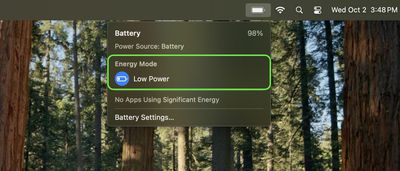
Low Power Mode is a long-standing ‌iPhone‌ feature for conserving battery, and was introduced to the Mac with macOS Monterey. Since then, it has remained hidden in System Settings, but in macOS 15.1, Apple is simplifying access by adding a Low Power Mode toggle to the Battery menu for MacBook users, allowing it to be enabled or disabled in just two clicks.
Mac
The battery icon also now turns yellow when Low Power Mode is active, similar to iOS. It's worth noting that some advanced settings, like automatically enabling Low Power Mode when unplugged, remain within System Settings. When enabled, Low Power Mode optimizes the system to conserve energy by slightly reducing performance, suspending background tasks, lowering screen brightness, and capping ProMotion display refresh rates at 60Hz where applicable.

Writing Tools

Apple Intelligence

You can select any text on your Mac and use Apple Intelligence to access Writing Tools for summaries and other features. The proofreading feature scans your text for spelling and grammar errors, providing suggestions for word choice and sentence structure improvements. You can quickly accept all recommendations or review them individually with accompanying explanations.

writing tools macos 01
If you're looking to refine your writing style, the rewrite function allows for tone adjustment without altering the core content. You can choose from options such as Friendly, Professional, or Concise to tailor your message to your intended audience.

writing tools macos
Additionally, the update introduces versatile summarization capabilities. You can select text and generate concise summaries in various formats, including paragraphs, key points, lists, or tables. This feature seamlessly integrates with apps like Mail and Messages, making it easier to distill and share written information.

Enhanced Siri

Apple Intelligence

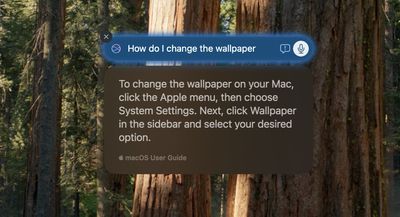
The Siri window now offers greater flexibility, allowing you to position it anywhere on their screen. A new responsive glow animation provides visual feedback, indicating when Siri is actively listening without disrupting ongoing tasks.
siri
If you prefer typing, the Type to Siri feature can be quickly accessed by double-pressing the Command key, and it now includes suggested requests. Siri's improved contextual awareness also lets you ask follow-up questions without repeating previously established information.

The update also brings more natural language processing capabilities. Siri can now better understand and interpret you if you stumble over your words or change direction mid-sentence, making interactions feel more conversational and less rigid.

Lastly, Siri's knowledge base has been expanded to include comprehensive information about Apple products and support, so you can inquire about device features and settings. Siri can even locate specific settings even if you're unsure of their exact names.

Smart Replies and Mail Summaries

Apple Intelligence

To facilitate faster responses, Mail and Messages now include a Smart Reply feature. This intelligent system offers contextual quick-tap responses based on the content of received messages, allowing you to reply promptly with minimal effort.
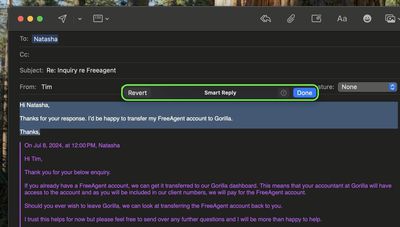
mail smart reply

In Mail, a new summarize button allows you to quickly distill the content of incoming emails, providing concise overviews at a glance. This feature also extends to multiple Messages notifications and your Mail inbox, where brief summaries replace the first few lines of each message. Mail also prioritizes time-sensitive communications by automatically elevating them to the top of your inbox.

Photos Cleanup Tool

Apple Intelligence

With macOS Sequoia 15.1, Apple is bringing a powerful new feature to the Photos app called Clean Up. Thanks to advanced object detection algorithms, this editing tool can automatically identify potentially unwanted objects in your images, allowing you to effortlessly remove them.

macos 15 1 cleanup tool1
At the same time, users retain full control over the editing process, with the ability to manually select objects for removal by clicking, circling, or brushing over them.

photos
You can zoom in on images to meticulously remove smaller blemishes or imperfections using brush strokes. Notably, Clean Up is designed to preserve the integrity of main subjects like people, even if they are inadvertently selected during the editing process.

Transcription Summaries

Apple Intelligence

In macOS Sequoia, Apple added a transcription feature to Notes that lets you capture audio recordings and automatically generates a verbatim transcript of the content.
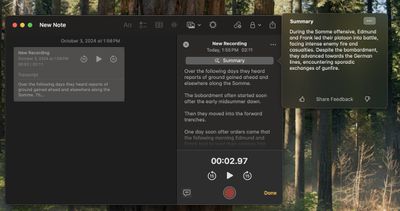
notes
In macOS Sequoia 15.1, the feature also provides a concise summary of the transcribed text, offering a quick overview of the recorded material. The transcript is useful for recording lectures and meetings as it ensures that no important details are missed, while the addition of a summary provides a quick reference for key topics, action items, or main discussion points.

Focus Modes

Apple Intelligence

A dedicated new Reduce Interruptions Focus Mode filters out all but the most important notifications, ensuring you only see those that require your attention.
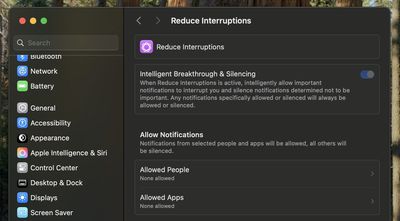
reduce interruptions focus
When customizing or creating a new Focus mode, there's a new option to enable Intelligent Breakthrough and Silencing. This feature lets critical notifications come through while muting less important ones, similar to how the Reduce Notifications Focus works.

Popular Stories

iOS 27

Apple Says iOS 27.3 Beta Coming Next Week

Friday October 30, 2026 2:45 pm PDT by
Apple today announced that the first iOS 27.3 developer beta will be released next week and enable some Apple Intelligence features in China. In a press release shared on the Apple Newsroom website in China, Apple said the beta will be released on Wednesday, November 4, but that likely means Tuesday, November 3 in the U.S. due to time zone differences. Apple said iOS 27.3 will then be...
General iCloud App Feature

Apple Says iCloud+ Plans Will Not Include Increased Siri AI Usage in UK

Tuesday November 17, 2026 7:07 am PST by
Apple on Monday announced that it is implementing daily usage limits on Siri AI and select other Apple Intelligence features that rely on "powerful server models" starting with iOS 27.3 and corresponding software updates, but increased access will be included with most iCloud+ plans at no additional cost in most countries, with one notable exception. In a support document, Apple said...
Siri AI Icon

Apple Continues to Say Some AI Features Will Have Fees for Extra Usage

Monday November 9, 2026 9:45 am PST by
Apple continues to advise customers that certain Apple Intelligence features that rely on its server-side Private Cloud Compute system have daily usage limits, with expanded access to such features to be "available for a fee in the future." Apple has repeatedly mentioned these upcoming fees in press releases over the past several months, but it has yet to provide any specific details about...

Top Rated Comments

turbineseaplane Avatar
27 months ago
Hopefully lots of bug fixes

I won't personally use any features mentioned in the article, but I would certainly welcome bug fixes

The list is long

I worry we are just adding more bugs as they try to get AI features out the door here :confused:
Score: 16 Votes (Like | Disagree)
27 months ago

I hope so. Blocking iPhone Mirroring is particularly weird.
It's not weird at all. The EU governments and regulators are nut jobs. If Apple allows iPhone mirroring, they will demand apple allow Android Mirroring or get fined.
Score: 8 Votes (Like | Disagree)
theolderoldcoot Avatar
27 months ago
Have to agree with @turbineseaplane. The can introduce all this AI stuff they want but they should come out with bug fixes first and they had better have fixed the Mail app not only on the Mac side of thing but also on iOS and iPad.
Score: 8 Votes (Like | Disagree)
27 months ago
Photos Cleanup Tool: "Thanks to advanced object detection algorithms, this editing tool can automatically identify potentially unwanted objects in your images, allowing you to effortlessly remove them."

Proceeds to remove the kid from the image. 😁
Score: 6 Votes (Like | Disagree)
27 months ago
I'm not gonna get any of the AI stuff, but I guess since it's a .1 update I'll go ahead and update my 2019 MBP. Strangely, even as an Intel machine, it does most of what I need it to do, so no rush to update until Intel support is dropped.
Score: 4 Votes (Like | Disagree)
PsykX Avatar
27 months ago

Photo Cleanup is something I look forward to. #1 to me is fix them bugs and clean it up! I may skip the auto update and install and run this manually to update.
Use the patch tool from Pixelmator, it also relies on AI, and not only does it do a better job, it's also so much faster.

I'm seriously disappointed by this feature.
Score: 3 Votes (Like | Disagree)
Latest Stories
The 50+ Best Apple Black Friday Deals Still Available on AirPods, iPads, and More
9 hours ago
HomePod Mini 2 in (RED) Seemingly Spotted Ahead of Announcement
6 hours ago
Apple's M6 and PROLED MacBook Pro Reach New Low Prices for Black Friday
17 hours ago
The MacRumors Show: iPhone Air 2 and iPhone 18 Are Coming
17 hours ago
Apple Store in Brisbane Reopening Next Month With New Design
17 hours ago
The 60+ Best Black Friday Accessory Deals on iPhone Chargers, TVs, Headphones, and More
18 hours ago
GTA VI Now (Barely) Running on Apple Silicon Macs
18 hours ago
The Best Black Friday Streaming Deals on Apple TV, Disney+, and More
19 hours ago
Apple TV's 'Carême' Wins International Emmy for Best Drama
19 hours ago
iPhone 18 Production Delay Leaves Apple Little Time Before Launch
20 hours ago
The Best Black Friday AirPods Deals Still Available
12 hours ago
The Best Black Friday Deals on Apple Home Products
21 hours ago
The Best Black Friday iPhone Deals Still Available
12 hours ago
The Best Black Friday iPad Deals Still Available
12 hours ago
The Best Black Friday Apple Watch Deals Still Available
12 hours ago
The Best Black Friday AirTag Deals Still Available
12 hours ago
The Best Black Friday Mac Deals Still Available
12 hours ago
iPhone Share of US Smartphone Market Hits 57% as Rivals Slip
22 hours ago
iPhone 20 Pro Rumored to Feature 3D-Printed Titanium Frame
1 day ago
Apple's Official 2026 Black Friday Offer Starts Rolling Out
2 days ago
Halide Adds Fill Light Feature for iPhone Duo
2 days ago
MacBook Air Black Friday Deals Now Live With Massive $399 Savings
2 days ago
Amazon Discounts All MacBook Neo Models by $99 for Black Friday
2 days ago
Kodak Launches Unique AirTag Rival With E-Ink Display
2 days ago
Here's Why the Apple Store is Going Down
2 days ago
Apple Still Working on Giant Foldable iPad That Could Cost $5,000
2 days ago
iPhones Dominate China's Weak Singles' Day Smartphone Sales
2 days ago
iPhone 20 Pro Could Feature Ceramic in Limited-Edition Model
2 days ago
Apple Faces Korean Regulator Review Over iPhone 16 AI Advertising
2 days ago
Apple Watch Ultra 4 Hits New Best-Ever Price of $649.99 for Black Friday
2 days ago
Related Apple News: Ipad | Entertainment | Mac | Sport | Travel