WhatsApp has added new text formatting options to the chat platform, enabling users to message each other everything from grocery lists to step-by-step instructions in mid-conversation.
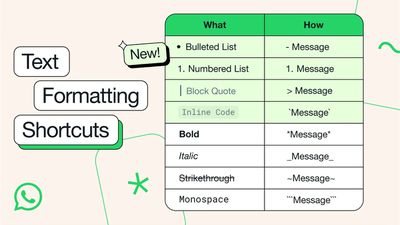
Following Wednesday's update, WhatsApp users can now use bulleted and numbered lists, block quotes, and inline code to communicate more effectively.
The new formatting options join the existing bold, italic, strikethrough, and monospaced formats that have been available to WhatsApp users for a while now.
How to Use New WhatsApp Text Formatting Options
Bulleted list: Start a new line with a - (dash) symbol, followed by a space.
Numbered list: Start a new line with 1 or 2 digits, followed by a period and a space.
Block quote: Start a new line with the > symbol, followed by a space.
Inline code: Wrap any code or text you want to highlight using the ` (backtick) symbol.
All of WhatsApp's text formatting options (Image: WhatsApp)
Last month, WhatsApp introduced a custom sticker creation tool for iPhone users running iOS 17 or later. In a future update, WhatsApp also plans to add passkey support, allowing iPhone users to sign in to the app with Face ID, Touch ID, or their device's passcode.
Wednesday November 18, 2026 5:14 am PST by Tim Hardwick
WhatsApp is rolling out its first-party cloud backup service to some users on the beta version of the app for iOS, reports WABetaInfo.
WhatsApp cloud backup options in iOS beta (image: WABetaInfo)
The option is said to be appearing to some users on WhatsApp beta version 26.45.10.71, currently in TestFlight, providing users with an alternative to iCloud chat backup for the first time.
Code...
Friday November 20, 2026 4:43 am PST by Tim Hardwick
WhatsApp is allowing group chats to have up to 1,500 members on iPhone and Android, up from the previous limit of 1,024 participants, according to WABetaInfo.
The increase means group chat admins have room for another 476 people in a single conversation. The jump should make it easier for schools, clubs, and other large organizations to communicate with their members, rather than having to...
Wednesday November 25, 2026 12:38 pm PST by Juli Clover
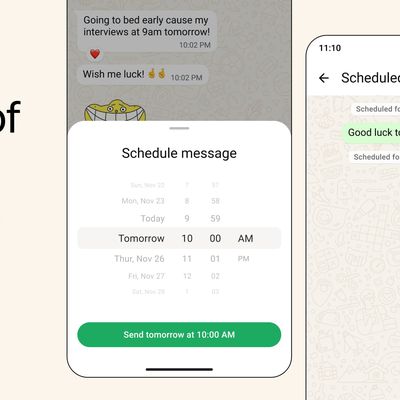
Popular messaging app WhatsApp was today updated with an option to schedule messages, which the company says was one of its most requested features.
WhatsApp users can create a message and schedule it to arrive from 10 minutes to 14 days later in one-to-one chats and group chats. Scheduling a message can be done by pressing and holding the send button after composing and then choosing a date ...
Wish iMessage would add more features - not gimmicky ones, but really useful ones like WhatsApp has. Lot of our clients prefer to use WhatsApp to communicate, instead of emails. WhatsApp is very very useful for business chats.
iMessage on other hand is not intuitive or business user friendly much...
Sometimes in these threads it seems that a lot of people think that WhatsApp only gets used because some people aren't blessed with iMessage. Well, as you pointed out WhatsApp is a very well put together app, simple and effective.
Wish iMessage would add more features - not gimmicky ones, but really useful ones like WhatsApp has. Lot of our clients prefer to use WhatsApp to communicate, instead of emails. WhatsApp is very very useful for business chats.
iMessage on other hand is not intuitive or business user friendly much...
Surely iMessage as a business tool is a non-starter anyway due to its single-platform nature? A business communications app for me has to be cross platform, if I can't message colleagues on Windows and Linux with it then it's no use.