WhatsApp Rolls Out Voice Chats for Large Groups
WhatsApp is rolling out a new voice chats feature in groups that lets users start voice calls without disturbing everyone in the group.

Previously in WhatsApp group chats, the only option was to start a voice call, which rings every member in the group. If no-one joins, the call doesn't go ahead.
In contrast, voice chats can be initiated in a group without anyone joining, and users are prompted to join discreetly via a silent push notification. The feature is available for those WhatsApp groups with 33 to 128 members.
Group members not participating in the voice chat can see who is active in the call from the chat header and the Calls tab, and people can join or leave at any time. If the encrypted chat remains empty for 60 minutes, it automatically ends.
As noted by WABetaInfo, the feature is now appearing for users on iOS and Android who have installed the latest WhatsApp update from the App Store and Google Play Store, respectively.
Popular Stories
WhatsApp is rolling out its first-party cloud backup service to some users on the beta version of the app for iOS, reports WABetaInfo.
WhatsApp cloud backup options in iOS beta (image: WABetaInfo)
The option is said to be appearing to some users on WhatsApp beta version 26.45.10.71, currently in TestFlight, providing users with an alternative to iCloud chat backup for the first time.
Code...
WhatsApp is allowing group chats to have up to 1,500 members on iPhone and Android, up from the previous limit of 1,024 participants, according to WABetaInfo.
The increase means group chat admins have room for another 476 people in a single conversation. The jump should make it easier for schools, clubs, and other large organizations to communicate with their members, rather than having to...
Wednesday November 25, 2026 12:38 pm PST by
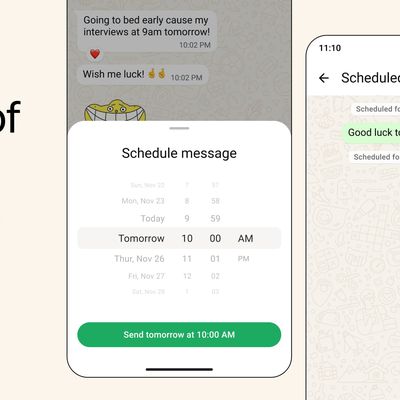
Juli CloverPopular messaging app WhatsApp was today updated with an option to schedule messages, which the company says was one of its most requested features.
WhatsApp users can create a message and schedule it to arrive from 10 minutes to 14 days later in one-to-one chats and group chats. Scheduling a message can be done by pressing and holding the send button after composing and then choosing a date ...