Skip to Content

macOS Sonoma Tidbits: New FaceTime UI, Safari Profiles, Screen Sharing Improvements, and More

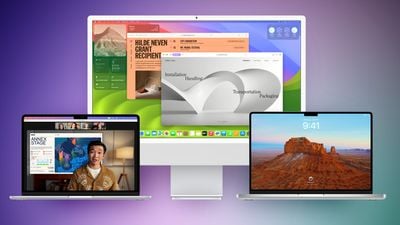
The first macOS Sonoma beta was released to developers and early adopters this week, and changes in the newest version of Apple's macOS operating system are still being unearthed. Below are just a handful of notable differences that may have passed you by.
macos sonoma feature purple green

System Settings

In macOS Ventura, Apple replaced System Preferences with System Settings to align it with iOS and iPadOS, but the way controls were organized left many users wanting.
macos sonoma tidbits2
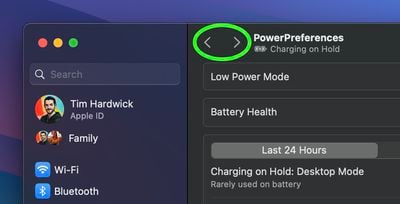
The same System Settings interface remains in macOS Sonoma, but it is now easier to navigate through different menu screens you have visited without continually scrolling through the side bar, thanks to the addition of backward and forward buttons.

FaceTime UI and Reactions

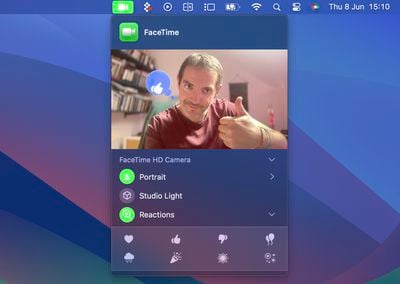
Apple has changed the way FaceTime integrates with the menu bar. The video effects options no longer appear in the Control Center, and instead have a new home in a dedicated green ‌FaceTime‌ menu bar item, which also includes a mini webcam view and buttons to trigger Reactions.
macos sonoma tidbits1
Reactions include Love, Like, Dislike, Balloons, Rain, Confetti, Lasers, and Fireworks. Some reactions are even triggered automatically by the user's physical actions: One thumb up triggers a Like, and two thumbs up are attended by Fireworks. Similarly, one thumb down counts as a dislike, and two thumbs down initiates a rain shower.

Safari Profiles

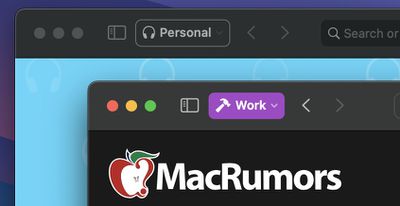
Safari has gained a new feature called Profiles, which is designed to help keep your browsing separate for topics like Work, School, or Personal.
macos sonoma tidbits3
Each profile gets its own icon and silos your history, Tab Groups, favorites, and cookies. You can even assign specific extensions to different profiles to optimize your browsing experience based on the task at hand.

Seamless Keyboard Input and Dictation

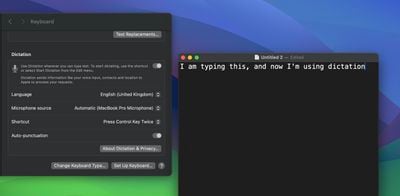
macOS Sonoma supports simultaneous use of keyboard input and Dictation, without any disruption in your flow of thought.
macos sonoma tidbits4
In other words, you can keep typing after hitting the Dictation shortcut. So whenever your fingers need a rest, you can complete the sentence you were just typing by saying it out loud.

Screen Sharing Improvements

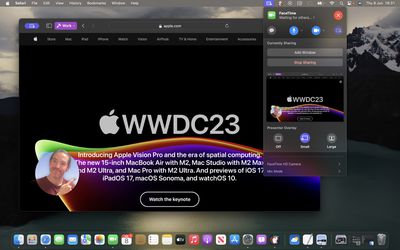
When you're in a ‌FaceTime‌ or Zoom call, click-hold the green traffic light in the corner of an open app window and you'll see a screen sharing option, and a new Presenter Overlay feature can be used to keep you on screen and better able to point to details.
macos sonoma tidbits7
When on a video call, you can either place yourself inside a movable bubble in the corner of the window or desktop that you're sharing, or you can bring on-screen content into the background of your own environment so that it looks as if you're standing just in front of it.

Docked Web Apps

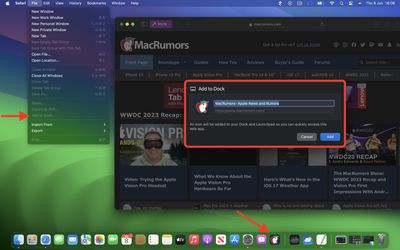
Thanks to a new option in Safari, you can now create independent web apps that can be added to your Dock.
macos sonoma tidbits6
All you have to do is visit a website and select File -> Add to Dock.... You can then give the web app a name and even change its icon. When you open a docked web app, it will open in its own separate window that includes back and forward buttons for simple navigation.

Other Notable Tidbits

  • New visual Caps Lock indicator
  • Mail search prioritizes upcoming travel-related emails
  • Use the Share button to send a note in Notes into Pages.
  • New Zoom and Pan controls for Continuity Camera

Developers are still learning what else has changed in macOS Sonoma, so be sure to check back for more coverage here on MacRumors.


Related Forum: macOS Sonoma

Popular Stories

apple design award 2025

Apple Announces 2025 Design Award Winners Ahead of WWDC 2025

Tuesday June 3, 2025 10:14 am PDT by
As we wait for WWDC to kick off next Monday, Apple today announced the winners of its annual Apple Design Awards, recognizing apps and games for their innovation, ingenuity, and technical achievement. The 2025 Apple Design Award winners are listed below, with one app and one game selected per category: Delight and Fun - CapWords (App) and Balatro (Game) Innovation - Play (App) and PBJ -...
1password deal blue

1Password Security Breach: What Was Accessed and What Wasn't

Wednesday November 25, 2026 1:09 pm PST by
Popular password management app 1Password today said it experienced a security breach earlier this month. 1Password says some customer names and email addresses were accessed, but no customer vault contents were compromised. On November 19, 1Password saw indications that an employee's GitHub account had been breached and began investigating. The company says the breached GitHub account was...
Apple 2026 Black Friday Event Hero

Apple's Official 2026 Black Friday Offer Starts Rolling Out

Thursday November 26, 2026 8:37 am PST by
Apple's annual four-day Black Friday through Cyber Monday shopping event is now live in Australia, New Zealand, and Thailand, and it will continue to roll out across Europe, the U.S., and Canada as the calendar turns to Friday, November 27 around the world. In the U.S., Apple's terms and conditions say the promotion begins on November 27 at 12 a.m. Pacific Time and ends on November 30 at...

Top Rated Comments

TheYayAreaLiving 🎗️ Avatar
45 months ago
The widgets on the desktop are amazing! Apple did a great job with that! Well-refined!
Score: 12 Votes (Like | Disagree)
45 months ago
What I most want for Safari is for every top-level domain to sandboxed. That is, even if foo.com sets a bunch of Google and Facebook tracking cookies, when you visit bar.com, it has no access to them whatsoever. And, of course, if bar.com sets those same cookies, foo.com can’t see them, either.

Of course, not just cookies, but all Website data.

That’s the reason why I always use private browsing everywhere. I’m okay with MacRumors knowing which articles I click through to, but I’m not okay with Google knowing that I read both MacRumors and, say, the Times. And that I might then click through to the Wirecutter and compare prices for a given product on a few different retailers.

Ideally, this should work even as I click through links from one domain to another. So, if MacRumors links to the Times and I click on it, the Times should have no way to access anything that MacRumors might have set. If I go back (or re-visit) MacRumors, it shouldn’t have any clue that I even know that the Times exists.

And, of course, with embedded media … a YouTube video embedded in a MacRumors page shouldn’t be able to know that I’ve logged into MacRumors with my ID. Indeed, YouTube shouldn’t know anything other than the URL of the embedded video. If I then click, “Open in YouTube” and I’ve logged in to YouTube, it should see that as me directly pasting that link into YouTube, with no knowledge of how I got the link. If I’ve never visited YouTube before, or if I’ve cleared history for YouTube, then YouTube should get a completely clean slate. It would also be nice to designate sites as “always private (don’t save data),” so YouTube couldn’t build an anonymous profile of what I watch and then match that up should I log in later. Or, the reverse: everything private, but with an exception list for sites I don’t mind staying signed into across sessions.

Make that the default behavior … and Apple will have done as much to protect user privacy as everything else they’ve done combined. (And, to be sure, that’s an awful lot more than any other big company has done.)

b&
Score: 11 Votes (Like | Disagree)
45 months ago
Another tiny but nice tweak: The text input cursor now smoothly fades in and out like on iOS 🥰
Score: 9 Votes (Like | Disagree)
45 months ago

for people using Sonoma already, do you need to have safari itself opened , in order to launch a web app/pwa ? or can it be open undependantly?
Just tried - it opens independently. 👍
Score: 7 Votes (Like | Disagree)
45 months ago
I love the new moving screensavers/wallpapers, they’re really mesmerizing. They should really bring them to iOS and tvOS.

Web apps are finally here, too. Now I can just use those instead of native apps that suck up all our personal data. Tracking protection and extensions will be there now, too.
Score: 7 Votes (Like | Disagree)
gmanist1000 Avatar
45 months ago
The Safari profiles are confusing. I created two profiles, Work and Home. When I open Safari fresh, it opens.... neither profile... it's just a normal window. I have to navigate to the menu bar and click New > Work, or Home. How do I set a default to open automatically??
Score: 7 Votes (Like | Disagree)
Latest Stories
The 50+ Best Apple Black Friday Deals Still Available on AirPods, iPads, and More
10 hours ago
HomePod Mini 2 in (RED) Seemingly Spotted Ahead of Announcement
7 hours ago
Apple's M6 and PROLED MacBook Pro Reach New Low Prices for Black Friday
17 hours ago
The MacRumors Show: iPhone Air 2 and iPhone 18 Are Coming
18 hours ago
Apple Store in Brisbane Reopening Next Month With New Design
18 hours ago
The 60+ Best Black Friday Accessory Deals on iPhone Chargers, TVs, Headphones, and More
19 hours ago
GTA VI Now (Barely) Running on Apple Silicon Macs
19 hours ago
The Best Black Friday Streaming Deals on Apple TV, Disney+, and More
20 hours ago
Apple TV's 'Carême' Wins International Emmy for Best Drama
20 hours ago
iPhone 18 Production Delay Leaves Apple Little Time Before Launch
21 hours ago
The Best Black Friday AirPods Deals Still Available
13 hours ago
The Best Black Friday Deals on Apple Home Products
22 hours ago
The Best Black Friday iPhone Deals Still Available
13 hours ago
The Best Black Friday iPad Deals Still Available
13 hours ago
The Best Black Friday Apple Watch Deals Still Available
13 hours ago
The Best Black Friday AirTag Deals Still Available
13 hours ago
The Best Black Friday Mac Deals Still Available
13 hours ago
iPhone Share of US Smartphone Market Hits 57% as Rivals Slip
23 hours ago
iPhone 20 Pro Rumored to Feature 3D-Printed Titanium Frame
1 day ago
Apple's Official 2026 Black Friday Offer Starts Rolling Out
2 days ago
Halide Adds Fill Light Feature for iPhone Duo
2 days ago
MacBook Air Black Friday Deals Now Live With Massive $399 Savings
2 days ago
Amazon Discounts All MacBook Neo Models by $99 for Black Friday
2 days ago
Kodak Launches Unique AirTag Rival With E-Ink Display
2 days ago
Here's Why the Apple Store is Going Down
2 days ago
Apple Still Working on Giant Foldable iPad That Could Cost $5,000
2 days ago
iPhones Dominate China's Weak Singles' Day Smartphone Sales
2 days ago
iPhone 20 Pro Could Feature Ceramic in Limited-Edition Model
2 days ago
Apple Faces Korean Regulator Review Over iPhone 16 AI Advertising
2 days ago
Apple Watch Ultra 4 Hits New Best-Ever Price of $649.99 for Black Friday
2 days ago
Related Apple News: Birdy Feeders And Bird Bath | Business | South Korea | Iphone 16 Pro Vs 18 Pro | Lg Ultrafine 6k 32u990a Display






























