Skip to Content

macOS Ventura Bug Spits Out Perpetual 'Background Items Added' Notifications at Login, Here's a Potential Fix

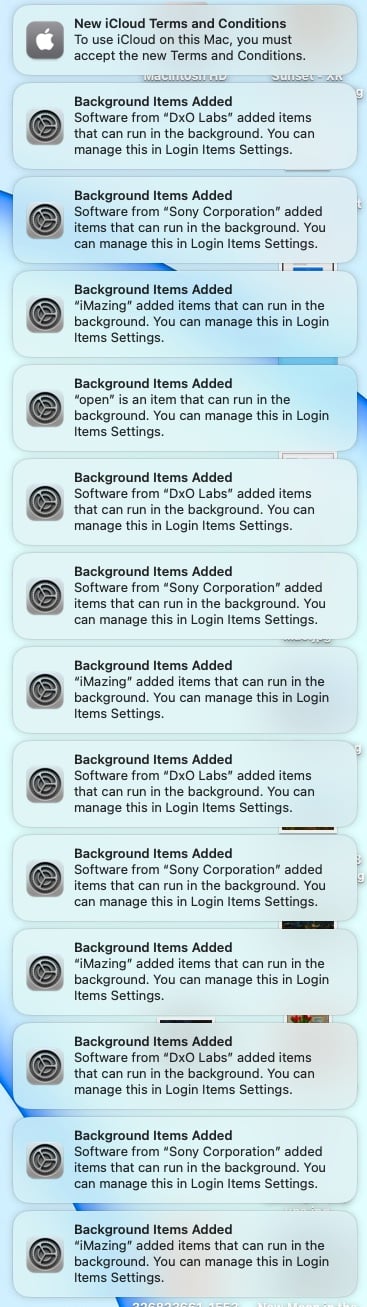
Numerous Mac users are repeatedly encountering a bug in macOS Ventura that throws up Login Items notifications for various background app processes every time they start up their machine, even when the processes in question have been disabled.
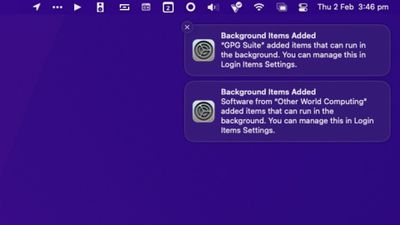
background items notifications
If notification previews are disabled (via System Settings -> Notifications -> Show Previews) the annoying notifications appear as "Login Items." If previews are enabled, the notifications are labelled "Background Items Added" and contain the message "[app/process name] added items that can run in the background. You can manage this in Login Items Settings."

Curiously, there is no option in System Settings -> General -> Login Items to remove background items added to macOS by installed apps. Users can only disable listed items by toggling switches. Doing this however seems to have no impact on the notifications, and in some cases can cause more to appear.

Complaints across Reddit, Twitter, Apple Support Community discussions, and various other app-specific forums repeatedly cite app processes such as Google Updater, Adobe CC Helper, and Dropbox as culprits, but these only appear to be referenced more often because they are popular apps with background processes. Almost any third-party background process can seemingly be referenced in the persistent Login Items notifications.


In all but a minority of cases, trashing or uninstalling the related apps does not fix the problem, and if the notifications do subsequently disappear, reinstalling the app usually brings them back. Some users have even erased their Mac and reinstalled macOS Ventura to defeat the bug, but are then hesitant to install the associated apps.

Only a few users have been successful at ridding their Mac of the notifications by carrying out the following actions, although caution should be applied and users do so at their own risk.

  1. Open Finder, then select Go -> Go to Folder... in the menu bar.
  2. Copy and paste the following address into the input field and press Enter: ~/Library/LaunchAgents
  3. A Finder window will open at the LaunchAgents folder. Show the items as a list organized by name, then search for the app or developer name associated with the process that's causing the Login Items notifications.
  4. Delete the .plist file, then empty the Trash.
  5. Restart your Mac.
  6. If the above steps don't work, look in the ~/Library/LaunchDaemons folder. If there are launch daemons in there associated with the app/developer, delete those too, empty Trash, and restart.

Based on reports, the bug has been around since early beta versions of macOS Ventura, but there have been more frequent incidences reported on Macs running macOS 13.1 and later. Apple is seemingly aware of the problem, but has not commented.


Have you been affected by the Login Items notifications bug? If so, have you found a solution that worked for you? Let us know in the comments.


Related Forum: macOS Ventura

Popular Stories

1password deal blue

1Password Security Breach: What Was Accessed and What Wasn't

Wednesday November 25, 2026 1:09 pm PST by
Popular password management app 1Password today said it experienced a security breach earlier this month. 1Password says some customer names and email addresses were accessed, but no customer vault contents were compromised. On November 19, 1Password saw indications that an employee's GitHub account had been breached and began investigating. The company says the breached GitHub account was...
apple design award 2025

Apple Announces 2025 Design Award Winners Ahead of WWDC 2025

Tuesday June 3, 2025 10:14 am PDT by
As we wait for WWDC to kick off next Monday, Apple today announced the winners of its annual Apple Design Awards, recognizing apps and games for their innovation, ingenuity, and technical achievement. The 2025 Apple Design Award winners are listed below, with one app and one game selected per category: Delight and Fun - CapWords (App) and Balatro (Game) Innovation - Play (App) and PBJ -...
ipad pro prime

Apple Has iPads Running macOS Internally, Says Gurman

Wednesday November 25, 2026 4:55 am PST by
Apple has iPads running macOS internally and has had them "for some time," according to Bloomberg's Mark Gurman, although he says no work is currently being done to bring the Mac operating system to iPads. Speaking on his latest Power On podcast, Gurman said there is "no work being done to consumerize macOS on the iPad." Rather, Apple will continue to bring Mac features and apps like Final Cut ...

Top Rated Comments

sw1tcher Avatar
50 months ago

Numerous Mac users are repeatedly encountering a bug in macOS Ventura that throws up Login Items notifications for various background app processes every time they start up their machine, even when the processes in question have been disabled.

Apple is seemingly aware of the problem, but has not commented.
An Apple spokesperson just acknowledged the issues and apologized


We are aware that a small number of users are having issues with their third-generation butterfly keyboard macOS 13 Ventura and for that we are sorry. The vast majority of Mac notebook macOS 13 Ventura customers are having a positive experience with the new keyboard macOS.
:p
Score: 16 Votes (Like | Disagree)
50 months ago
Remember when Apple used to run commercials against Microsoft for excessive prompts on Windows? My how the times have changed.
Score: 14 Votes (Like | Disagree)
ivan86 Avatar
50 months ago
Have this bug since day one on Ventura.

I am surprised that this pig slipped into 13.2.

For sure it will be gone in 13.3, since MacRumors made the whole post about it…)
Score: 13 Votes (Like | Disagree)
ratspg Avatar
50 months ago
This bug is probably the most annoying one I have dealt with. It's the gift that keeps on giving lol. Does. Not. Stop. Quality control for macOS sucks lately.
Score: 12 Votes (Like | Disagree)
50 months ago
edge is a nasty piece of crap. I just opened it to test this issue, and it kept trying to change my login settings and add stuff. That is it for me, Edge is going in the trash bin along with any other MS product.
Score: 12 Votes (Like | Disagree)
arkitect Avatar
50 months ago
👍
Thank you! Thank you!

Its been driving me nuts.

Score: 10 Votes (Like | Disagree)
Latest Stories
The 50+ Best Apple Black Friday Deals on AirPods, iPads, MacBooks, and More
14 hours ago
iPhone 20 Pro Rumored to Feature 3D-Printed Titanium Frame
31 minutes ago
Apple's Official 2026 Black Friday Offer Starts Rolling Out
18 hours ago
Halide Adds Fill Light Feature for iPhone Duo
19 hours ago
MacBook Air Black Friday Deals Now Live With Massive $399 Savings
19 hours ago
Amazon Discounts All MacBook Neo Models by $99 for Black Friday
20 hours ago
Kodak Launches Unique AirTag Rival With E-Ink Display
21 hours ago
Here's Why the Apple Store is Going Down
21 hours ago
Apple Still Working on Giant Foldable iPad That Could Cost $5,000
22 hours ago
iPhones Dominate China's Weak Singles' Day Smartphone Sales
22 hours ago
iPhone 20 Pro Could Feature Ceramic in Limited-Edition Model
22 hours ago
Apple Faces Korean Regulator Review Over iPhone 16 AI Advertising
1 day ago
Apple Watch Ultra 4 Hits New Best-Ever Price of $649.99 for Black Friday
1 day ago
New Apple Store Opening in India, Download the Special Wallpaper Now
1 day ago
Redesigned OLED MacBook Air Could Launch in 2027 or 2028
1 day ago
AirPods Pro 3 for $149 is One of The Best Black Friday Deals This Year
2 days ago
1Password Security Breach: What Was Accessed and What Wasn't
2 days ago
WhatsApp Finally Adds Scheduled Messages
2 days ago
Get Apple's Cheapest iPad for $379 During Amazon's Black Friday Sale
2 days ago
Rumor: iOS 28 to Revamp Notifications
2 days ago
iPhone 18 Pro Max Battery Exhausts a Toy Cyclops in New Apple Ad
2 days ago
$799 Smart Glasses Promise Vision Pro-Style Controls in a 45g Frame
2 days ago
How To Get an iPhone Duo or iPhone 18 Pro at No Cost Through T-Mobile for Black Friday
2 days ago
Apple Has an iPhone Notifications Problem
2 days ago
Amazon Sweetens Black Friday Deals on PROLED MacBook Pro
2 days ago
Apple Has iPads Running macOS Internally, Says Gurman
2 days ago
Apple Is Far From Done With 2026: Here's What's Still Coming
2 days ago
Threads App for iPad Now Available
2 days ago
Claude Now Lets You Install Artifacts as Desktop Apps
2 days ago
Tidal Bans AI Music, While Apple Music Sticks to Labels
2 days ago
Related Apple News: Sport | Culture | Business | Mac | Iphone