Skip to Content

Apple Explains iOS 16.3's New Security Keys Feature

Apple this week shared a support document with details about its new Security Keys for Apple ID feature, available starting with iOS 16.3, iPadOS 16.3, and macOS 13.2. The document provides an overview of the feature and explains how to use it.
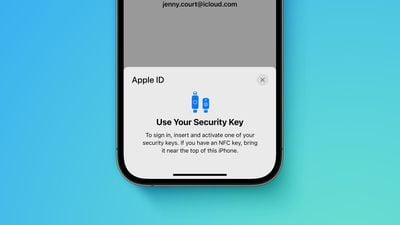
Apple advanced security Security Keys screen Feature crop
Apple says the optional security feature is designed for individuals who want "extra protection from targeted attacks, such as phishing or social engineering scams." When it is enabled, signing into an Apple ID requires entering your account's password and then using a FIDO Certified security key to complete two-factor authentication, instead of a traditional six-digit verification code from another Apple device.

Those who enable the feature must be very careful not to lose their security keys, as this could result in losing access to your Apple ID account permanently. For this reason, you must set up at least two security keys, with up to six supported in total.

Apple recommends keeping security keys in more than one place. For example, you could hide a key somewhere at home as a backup solution.

"Keep your security keys in a safe place, and consider keeping a security key in more than one place," the document says. "For example, keep one key at home and one key at work. If you're traveling, you might want to leave one of your security keys at home."

To enable Security Keys for Apple ID on an iPhone or iPad, open the Settings app, tap your name, tap "Password & Security," select "Add Security Keys" and follow the on-screen instructions. On the Mac, open the System Settings app, click on your name, click "Password & Security," click "Add" next to "Security Keys," and follow the steps.

Security keys can be removed at any time by repeating the steps outlined above and tapping or clicking on "Remove All Security Keys," at which point your Apple ID reverts to using a six-digit verification code for two-factor authentication.

Many security keys look similar to a USB thumb drive, with some options available with NFC for wireless use and others equipped with Lightning, USB-C, and/or USB-A ports for direct connectivity with iPhones, iPads, and Macs. Apple recommends a few security keys in the document, such as the YubiKey 5Ci with both Lightning and USB-C.

Apple's document provides some other important details, so it is worth reviewing before enabling the feature. For example, you can't sign in to iCloud for Windows when the feature is enabled, and some types of Apple ID accounts are not supported.


Related Forum: iOS 16

Popular Stories

apple design award 2025

Apple Announces 2025 Design Award Winners Ahead of WWDC 2025

Tuesday June 3, 2025 10:14 am PDT by
As we wait for WWDC to kick off next Monday, Apple today announced the winners of its annual Apple Design Awards, recognizing apps and games for their innovation, ingenuity, and technical achievement. The 2025 Apple Design Award winners are listed below, with one app and one game selected per category: Delight and Fun - CapWords (App) and Balatro (Game) Innovation - Play (App) and PBJ -...
1password deal blue

1Password Security Breach: What Was Accessed and What Wasn't

Wednesday November 25, 2026 1:09 pm PST by
Popular password management app 1Password today said it experienced a security breach earlier this month. 1Password says some customer names and email addresses were accessed, but no customer vault contents were compromised. On November 19, 1Password saw indications that an employee's GitHub account had been breached and began investigating. The company says the breached GitHub account was...
Apple 2026 Black Friday Event Hero

Apple's Official 2026 Black Friday Offer Starts Rolling Out

Thursday November 26, 2026 8:37 am PST by
Apple's annual four-day Black Friday through Cyber Monday shopping event is now live in Australia, New Zealand, and Thailand, and it will continue to roll out across Europe, the U.S., and Canada as the calendar turns to Friday, November 27 around the world. In the U.S., Apple's terms and conditions say the promotion begins on November 27 at 12 a.m. Pacific Time and ends on November 30 at...

Top Rated Comments

50 months ago
iPhone Forum:

I lost my security key and forgot my password. Am I screwed?
Score: 21 Votes (Like | Disagree)
krspkbl Avatar
50 months ago
I bought 2x Yubico Keys for this. Well, not just Apple but my other accounts too obviously. I've been thinking of getting a key for a while but now Apple supports it I might as well jump on it now.

I got the Yubico 5 NFC key. Won't arrive for a couple days but excited to set it up. I'll have a read over the document to familiarise myself with how to set it up. Unfortunatly most people won't care about security keys so I am one of the few who see this is as the biggest feature of 16.3!

Requiring 2x keys will put a lot of people off, I think. I spent almost £100 on the 2 keys. Other accounts allow you to set them up with just 1. I think it's good that Apple requires 2 keys to set it up. If you don't want to spend £100 on security then might as well not bother using a key at all.
Score: 13 Votes (Like | Disagree)
50 months ago
“For example, you could hide a key somewhere at home as a backup solution.”

No; please don’t do this. You’ll just forget where you put it

“ … and one key at work.”

*PLEASE* don’t do this! Whoever owns the company can trivially steal your account if you do so. Even if you’re the person who owns the company, whoever cleans your office could steal your account.

You should have a secure place at home to keep important documents. At the very least, a drawer of a filing cabinet, but a small fireproof safe is preferable. You can decide the level of security you need, all the way up to a personal bank vault — but don’t rely on obscurity to keep it secure. Keep the backup there.

And it’s a good idea to have a safe deposit box at a bank. Keep the other backup there.

If you really need more than those two backups, then add more safe deposit boxes at different banks, or a locked fireproof safe at a trusted family member’s home, or some other variation on the theme. But you almost certainly don’t need nor want that many backups.

Incidentally, these are also where you should be keeping portable hard drives with backups of whatever data you most care about.

b&
Score: 7 Votes (Like | Disagree)
riverfreak Avatar
50 months ago

Two-factor authentication is enough major PITA. I don't work for the NSA, so major pass.

Anyone else want a phone dongle?

Wonder how long it will be before a future iOS update turns it on by default.

Here's a scenario; some of the ppl using these things will be dealing with nuclear emergencies and will lose their dongle and backup dongle or have them appropriated for espionage. Doesn't anyone at Apple ever think of worst-case scenarios?

I know. Corporate culture.
2FA is a total pain? So is having your bank account drained.

I don’t use sites or services that can’t be bothered to implement 2FA, at a bare minimum via SMS which I despise as it isn’t always VOIP or travel-friendly. I’ve even moved financial institutions as they refused for years to add 2FA.

Security keys FTW. Different strokes I guess.
Score: 6 Votes (Like | Disagree)
krspkbl Avatar
50 months ago

Two-factor authentication is enough major PITA. I don't work for the NSA, so major pass.

Anyone else want a phone dongle?

Wonder how long it will be before a future iOS update turns it on by default.

Here's a scenario; some of the ppl using these things will be dealing with nuclear emergencies and will lose their dongle and backup dongle. Doesn't anyone at Apple ever think of worst-case scenarios?

I know. Corporate culture.
You already need 2FA enabled on your Apple account for things like Airtags, iCloud Keychain, Find my iPhone, Apple Card/Cash, and Sign in with Apple.

I don't think they'll force people to use physical keys but they'll keep pushing 2FA. As it is I don't mind having 2FA enabled as it makes my account secure.
Score: 5 Votes (Like | Disagree)
50 months ago
If Apple would kindly put NFC in iPads and Macs as well this would be even better, and quicker to use.
Not sure why it isn’t.

Regards keeping one at work, ‘they’ would still need to know the actual account username and password, so fairly low risk, and for most people the most obvious/easiest off site option.
Advantage of course if you work in IT and have access to a media safe 😉
Score: 5 Votes (Like | Disagree)
Latest Stories
The 50+ Best Apple Black Friday Deals Still Available on AirPods, iPads, and More
10 hours ago
HomePod Mini 2 in (RED) Seemingly Spotted Ahead of Announcement
7 hours ago
Apple's M6 and PROLED MacBook Pro Reach New Low Prices for Black Friday
18 hours ago
The MacRumors Show: iPhone Air 2 and iPhone 18 Are Coming
18 hours ago
Apple Store in Brisbane Reopening Next Month With New Design
18 hours ago
The 60+ Best Black Friday Accessory Deals on iPhone Chargers, TVs, Headphones, and More
19 hours ago
GTA VI Now (Barely) Running on Apple Silicon Macs
19 hours ago
The Best Black Friday Streaming Deals on Apple TV, Disney+, and More
20 hours ago
Apple TV's 'Carême' Wins International Emmy for Best Drama
21 hours ago
iPhone 18 Production Delay Leaves Apple Little Time Before Launch
21 hours ago
The Best Black Friday AirPods Deals Still Available
13 hours ago
The Best Black Friday Deals on Apple Home Products
22 hours ago
The Best Black Friday iPhone Deals Still Available
13 hours ago
The Best Black Friday iPad Deals Still Available
13 hours ago
The Best Black Friday Apple Watch Deals Still Available
13 hours ago
The Best Black Friday AirTag Deals Still Available
13 hours ago
The Best Black Friday Mac Deals Still Available
13 hours ago
iPhone Share of US Smartphone Market Hits 57% as Rivals Slip
23 hours ago
iPhone 20 Pro Rumored to Feature 3D-Printed Titanium Frame
1 day ago
Apple's Official 2026 Black Friday Offer Starts Rolling Out
2 days ago
Halide Adds Fill Light Feature for iPhone Duo
2 days ago
MacBook Air Black Friday Deals Now Live With Massive $399 Savings
2 days ago
Amazon Discounts All MacBook Neo Models by $99 for Black Friday
2 days ago
Kodak Launches Unique AirTag Rival With E-Ink Display
2 days ago
Here's Why the Apple Store is Going Down
2 days ago
Apple Still Working on Giant Foldable iPad That Could Cost $5,000
2 days ago
iPhones Dominate China's Weak Singles' Day Smartphone Sales
2 days ago
iPhone 20 Pro Could Feature Ceramic in Limited-Edition Model
2 days ago
Apple Faces Korean Regulator Review Over iPhone 16 AI Advertising
2 days ago
Apple Watch Ultra 4 Hits New Best-Ever Price of $649.99 for Black Friday
2 days ago
Related Apple News: Motoring | Mac | Reviews | Health | News






























