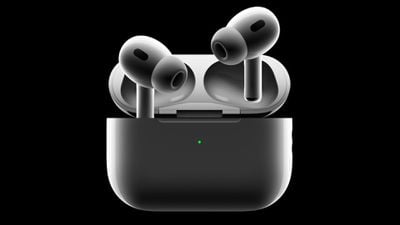
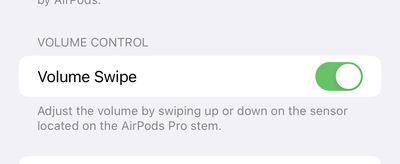
In the iOS 16.1 beta, Apple is giving users of the second-generation AirPods Pro the ability to disable touch controls for volume.
One feature of the new AirPods Pro is that users can increase or decrease volume by swiping up or down on the touch sensors on the individual stems. While some users may find the feature convenient, others may not. On iOS 16.0.2, the current public release of iOS 16, users cannot disable touch controls for volume.
In the iOS 16.1 beta, there is a new toggle inside the Accessibility page for the second-generation AirPods Pro to enable or disable touch controls for volume. As before, users can customize the press-and-hold functionality of the AirPods Pro stems, including to switch among Active Noise Cancellation, Transparency mode, and Off, or to invoke Siri.
iOS 16.1 is available for developers and members of Apple's public beta program, with a public release expected in October. In addition to the new toggle for the AirPods Pro, iOS 16.1 will include changes to the battery indicator and more.
Tuesday November 10, 2026 12:11 pm PST by Juli Clover
Apple today released new firmware for the AirPods Pro 2, AirPods Pro 3, AirPods 4, AirPods 5, and AirPods Max 2. The firmware has a build number of 9B47, up from 9A348/9A350.
Apple has been beta testing the new firmware for the last several weeks. In a support document, Apple merely mentioned the new firmware contains "bug fixes and other improvements."
Firmware updates can be downloaded...
Apple plans to unveil its first smart glasses at WWDC in June 2027 and begin shipping them before the end of the year, according to Bloomberg's Mark Gurman.
In the latest edition of his "Power On" newsletter, Gurman shared new details about the glasses' design, charging system, and Siri features.
Current prototypes of the glasses, internally code-named "N50," are reportedly slightly...
As we wait for WWDC to kick off next Monday, Apple today announced the winners of its annual Apple Design Awards, recognizing apps and games for their innovation, ingenuity, and technical achievement.
The 2025 Apple Design Award winners are listed below, with one app and one game selected per category:
Delight and Fun - CapWords (App) and Balatro (Game)
Innovation - Play (App) and PBJ -...
I wonder if it's your sleeves or cuffs making that accidental swipe.
That is why I wear my watch on the left wrist configured with the crown to the left. My gloves for yard work and weight training were playing havoc with that volume function, and also pushing on the crown too, most distracting. I was overjoyed to find out that I could set it up this way and avoid it happening. It works so well in winter too. Not having that option, I could have seen dropping the AW.
You can? Also I do it by mistake ALL THE TIME. I don’t know how but I always manage to somehow adjust the volume from my watch, either all the way down or up. Happens to my echos plying music or my AirPods
I wonder if it's your sleeves or cuffs making that accidental swipe.
Apple should make other features available not this one....here we just dont swipe if we dont want to adjust the volume from the airpods themselves. In 2 days i never from mistake swipe and adjust the volume while trying to do different things
Not sure I fully agree with this. There can be some differently abled users who have a hard time not accidentally changing the volume of their pods when trying to remove or put in the pod. I see it as good to have the option to disable swipe volume control.