Skip to Content

WhatsApp Stops Auto-Saving Media From Disappearing Messages on iPhone

WhatsApp is changing the way the platform handles media sent over chats with disappearing messages enabled, reports WABetaInfo.

Whatsapp Feature

Going forward, WhatsApp will no longer automatically save images and other visual media to your iPhone’s Photos library if they appear within a chat thread that has disappearing messages turned on. The "Save to Camera Roll" option is now automatically turned off for disappearing chats, meaning images, videos, and GIFs won't be saved even if the general auto-save setting is enabled.

The previous default of saving images from disappearing chats to the Photos app was a discrepancy given the privacy focus of disappearing messages, so the change is likely to be welcomed by those who depend on the feature to share sensitive media.

Having said that, WhatsApp users can still manually save media that appears in disappearing chats they’ve received, or even take a screenshot of the chat thread, so what you send using the feature can still be potentially saved by the recipient after the message has disappeared.
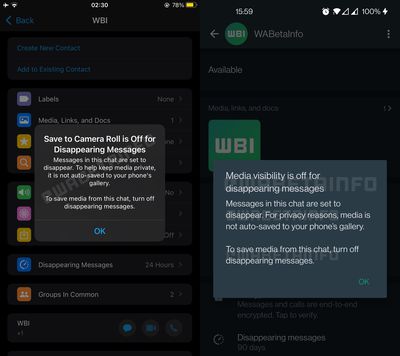
whatsapp media disappearing messages no longer saved

In another change coming to WhatsApp and highlighted by WABetaInfo, the drawing interface is being tweaked so that the blur tool appears at the bottom of the screen, where it will sit alongside two new drawing pencils.

The change to the way WhatsApp handles media in disappearing messages is rolling out now to all users on iOS, but it’s not clear when the drawing interface tweaks will come out of beta and be made available to the chat platform’s wider user base.

Popular Stories

Whatsapp Feature

WhatsApp's iCloud Backup Alternative Rolls Out to Beta Users on iPhone

Wednesday November 18, 2026 5:14 am PST by
WhatsApp is rolling out its first-party cloud backup service to some users on the beta version of the app for iOS, reports WABetaInfo. WhatsApp cloud backup options in iOS beta (image: WABetaInfo) The option is said to be appearing to some users on WhatsApp beta version 26.45.10.71, currently in TestFlight, providing users with an alternative to iCloud chat backup for the first time. Code...

Whatsapp Feature

WhatsApp Raises Group Chat Limit to 1,500 Members

Friday November 20, 2026 4:43 am PST by
WhatsApp is allowing group chats to have up to 1,500 members on iPhone and Android, up from the previous limit of 1,024 participants, according to WABetaInfo. The increase means group chat admins have room for another 476 people in a single conversation. The jump should make it easier for schools, clubs, and other large organizations to communicate with their members, rather than having to...
whatsapp scheduled messages

WhatsApp Finally Adds Scheduled Messages

Wednesday November 25, 2026 12:38 pm PST by
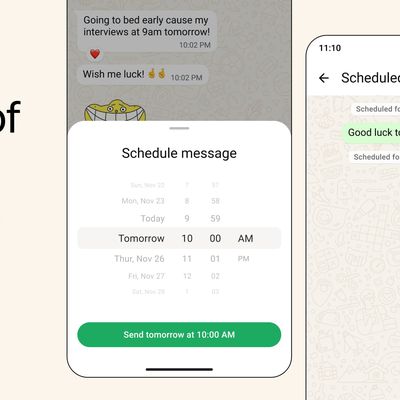
Popular messaging app WhatsApp was today updated with an option to schedule messages, which the company says was one of its most requested features. WhatsApp users can create a message and schedule it to arrive from 10 minutes to 14 days later in one-to-one chats and group chats. Scheduling a message can be done by pressing and holding the send button after composing and then choosing a date ...

Top Rated Comments

Danfango Avatar
61 months ago

This is an example of a privacy-friendly feature, though.
No it's not. It's not even remotely privacy oriented. I prefer to refer to it as digital flashing. For the disempowered at the receiving end it allows people to send stuff to them with no evidence that it was ever sent. For those who can take a screenshot on their phone, it completely removes the privacy stance of it. Thus it's stupid and it's not privacy friendly.


Apple needs to have a look at WhatsApp and steal how they handle attachments. It is such a mess on iMessage, especially with iCloud Messages enabled. I also hate how it doesn’t automatically save photos to the photo library (shared with you just isn’t the same).

I delete a photo right from the messaging app and it sometimes appears again after closing the app (or it just doesn’t let me delete it at all). I delete an image but somehow they still appear under iPhone storage, i delete all photos in iPhone storage yet it still shows photos in the messaging app. I delete every single photo but iCloud claims i have 3GB of iMessage attachments, yet there is NOTHING. Or I delete all iMessage photos on my iPhone but my Mac shows me images that do not appear for the same conversation on my iPad or iPhone whatsoever.

there isn’t even a button to remove all attachments at once! You literally have to tap on each individually because for some reason swipe to select doesn’t work either, unlike the photos app
You just tap to save the ones you want. I'm not sure what the issue is. Literally I don't want my photos library cluttered with every meme my kids send me. If you delete the conversation then the attachments go with it. I have about 6Gb in iMessage at the moment. It's mostly a non-issue for me as I've saved everything worth keeping as I go.
Score: 8 Votes (Like | Disagree)
sw1tcher Avatar
61 months ago

There is no valid usage for "this message will self destruct" that I can think of.
Jim Phelps would disagree. :p


Attachment Image
Score: 5 Votes (Like | Disagree)
chucker23n1 Avatar
61 months ago

No it's not. It's not even remotely privacy oriented. I prefer to refer to it as digital flashing. For the disempowered at the receiving end it allows people to send stuff to them with no evidence that it was ever sent. For those who can take a screenshot on their phone, it completely removes the privacy stance of it. Thus it's stupid and it's not privacy friendly.
That's quite a cynical read. I imagine such scenarios happen, but "I want to share something but with a time limit" has tons and tons of users who aren't malicious like that at all; they really just want stuff to remain private.


Score: 3 Votes (Like | Disagree)
contacos Avatar
61 months ago
Apple needs to have a look at WhatsApp and steal how they handle attachments. It is such a mess on iMessage, especially with iCloud Messages enabled. I also hate how it doesn’t automatically save photos to the photo library (shared with you just isn’t the same).

I delete a photo right from the messaging app and it sometimes appears again after closing the app (or it just doesn’t let me delete it at all). I delete an image but somehow they still appear under iPhone storage, i delete all photos in iPhone storage yet it still shows photos in the messaging app. I delete every single photo but iCloud claims i have 3GB of iMessage attachments, yet there is NOTHING. Or I delete all iMessage photos on my iPhone but my Mac shows me images that do not appear for the same conversation on my iPad or iPhone whatsoever.

there isn’t even a button to remove all attachments at once! You literally have to tap on each individually because for some reason swipe to select doesn’t work either, unlike the photos app
Score: 3 Votes (Like | Disagree)
sos47 Avatar
61 months ago
i turned disappearing messages on a while ago because i dont wont that others flood my iphone with their attachments. i can’t understand why i should automatically save content to my photos lib. even if i get some nice family pics the resolution is really bad, i always demand sending interesting content with iMessage
Score: 1 Votes (Like | Disagree)
61 months ago

There is no valid usage for "this message will self destruct" that I can think of.
Well, if you can’t think of it, I guess it doesn’t exist ;)
Score: 1 Votes (Like | Disagree)
Latest Stories
The 50+ Best Apple Black Friday Deals Still Available on AirPods, iPads, and More
2 hours ago
Apple's M6 and PROLED MacBook Pro Reach New Low Prices for Black Friday
6 hours ago
The MacRumors Show: iPhone Air 2 and iPhone 18 Are Coming
6 hours ago
Apple Store in Brisbane Reopening Next Month With New Design
7 hours ago
The 60+ Best Black Friday Accessory Deals on iPhone Chargers, TVs, Headphones, and More
7 hours ago
GTA VI Now (Barely) Running on Apple Silicon Macs
8 hours ago
The Best Black Friday Streaming Deals on Apple TV, Disney+, and More
8 hours ago
Apple TV's 'Carême' Wins International Emmy for Best Drama
9 hours ago
iPhone 18 Production Delay Leaves Apple Little Time Before Launch
10 hours ago
The Best Black Friday AirPods Deals Still Available
2 hours ago
The Best Black Friday Deals on Apple Home Products
10 hours ago
The Best Black Friday iPhone Deals Still Available
2 hours ago
The Best Black Friday iPad Deals Still Available
2 hours ago
The Best Black Friday Apple Watch Deals Still Available
2 hours ago
The Best Black Friday AirTag Deals Still Available
2 hours ago
The Best Black Friday Mac Deals Still Available
2 hours ago
iPhone Share of US Smartphone Market Hits 57% as Rivals Slip
12 hours ago
iPhone 20 Pro Rumored to Feature 3D-Printed Titanium Frame
13 hours ago
Apple's Official 2026 Black Friday Offer Starts Rolling Out
1 day ago
Halide Adds Fill Light Feature for iPhone Duo
1 day ago
MacBook Air Black Friday Deals Now Live With Massive $399 Savings
1 day ago
Amazon Discounts All MacBook Neo Models by $99 for Black Friday
1 day ago
Kodak Launches Unique AirTag Rival With E-Ink Display
1 day ago
Here's Why the Apple Store is Going Down
1 day ago
Apple Still Working on Giant Foldable iPad That Could Cost $5,000
1 day ago
iPhones Dominate China's Weak Singles' Day Smartphone Sales
1 day ago
iPhone 20 Pro Could Feature Ceramic in Limited-Edition Model
1 day ago
Apple Faces Korean Regulator Review Over iPhone 16 AI Advertising
2 days ago
Apple Watch Ultra 4 Hits New Best-Ever Price of $649.99 for Black Friday
2 days ago
New Apple Store Opening in India, Download the Special Wallpaper Now
2 days ago
Related Apple News: Ipad | Philips Hue Festavia String Lights | Airpods 4 Release Date | Ios 27 3 Beta Features | Antitrust




























