Skip to Content

Popular Drag-and-Drop Mac App 'Yoink' Gains Configurable Clipboard History Widget and Browser

Popular Mac drag-and-drop app Yoink received a substantial update on Monday that brings back a much-improved Yoink clipboard history widget with several highly configurable features.
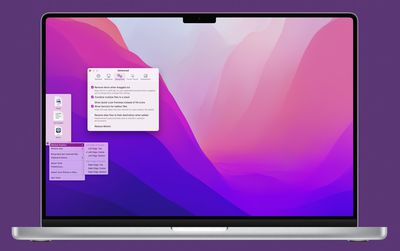
yoink mac
For those unfamiliar with the app, Yoink aims to simplify the action of dragging and dropping files and app-content on the macOS desktop by providing a temporary place for files to be dragged to. Yoink's shelf fades in when you start a drag - either with files from Finder or app-content, like an image from a website - offering you a temporary place for your dragged files.

With files temporarily docked in the Yoink shelf and the cursor free, users can more easily navigate to the intended destination of files, which is handy when moving and copying files between different windows, Spaces, fullscreen apps, or devices via Handoff.

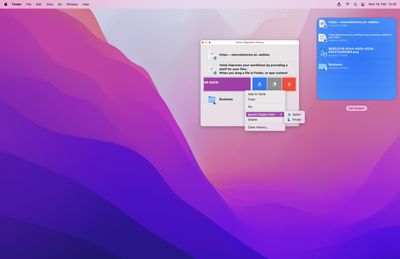
Today's v3.6.5 update brings back the defunct Objective-C based Yoink widget, only now written in Swift, offering previously unavailable functions. The widget comes in medium and large sizes, and provides quick access to Yoink's clipboard history, allowing users to select up to six previous copies of items in the medium widget and up to 12 in the larger one. Clicking an item in the widget copies it to the clipboard, ready for pasting elsewhere.

Yoink supports the use of up to three widgets simultaneously that can be configured to show the most recent copies, older copies, and oldest copies. So for example it's possible to have one large and one medium widget to show the last 18 copied items, or three large widgets to show the last 36 copied items.
2 Clipboard History
Individual widgets can also be configured to show specific data types (images, text, links, or files), and each widget has a Pin feature that allows items to be pinned to the top so that it doesn't go away when other items populate the clipboard.

In addition, Yoink v3.6.5 comes with a clipboard history browser, where users can organize copied items with actions like pin, unpin, delete, send to Yoink, copy, and clear history.

In other changes, rather than a TIFF file, a PNG file is now created when pasting image data into Yoink. Yoink also transparently provides PNG and JPEG data when dragging out images of the types HEIC, HEIF or TIFF to broaden compatibility with other apps.

Yoink runs natively on Apple Silicon and Intel Macs, although note that this version of Yoink increases the minimum system requirements from macOS 10.10 Yosemite to macOS 10.12 Sierra. Yoink v3.6.5 is available on the Mac App Store as a $8.99 one-time purchase and updates are free to existing customers. Yoink is also available for iPad and iPhone.


Tag: Yoink

Popular Stories

apple design award 2025

Apple Announces 2025 Design Award Winners Ahead of WWDC 2025

Tuesday June 3, 2025 10:14 am PDT by
As we wait for WWDC to kick off next Monday, Apple today announced the winners of its annual Apple Design Awards, recognizing apps and games for their innovation, ingenuity, and technical achievement. The 2025 Apple Design Award winners are listed below, with one app and one game selected per category: Delight and Fun - CapWords (App) and Balatro (Game) Innovation - Play (App) and PBJ -...
1password deal blue

1Password Security Breach: What Was Accessed and What Wasn't

Wednesday November 25, 2026 1:09 pm PST by
Popular password management app 1Password today said it experienced a security breach earlier this month. 1Password says some customer names and email addresses were accessed, but no customer vault contents were compromised. On November 19, 1Password saw indications that an employee's GitHub account had been breached and began investigating. The company says the breached GitHub account was...
apple store down feature

Here's Why the Apple Store is Going Down

Thursday November 26, 2026 5:49 am PST by
Apple's online store is going down for a few hours on a rolling country-by-country basis right now, but do not get your hopes up for new products. Apple takes its online store down for a few hours ahead of Black Friday every year to tease its annual gift card offer with the purchase of select products. The store is down in Australia, New Zealand, and Thailand, right now, and it will...

Top Rated Comments

m.gansrigler Avatar
62 months ago

Wow, sounds cool. It's what I really miss on Mac after migrating from windows (Win + V). Does this app impact performance\response time?
Hi, I'm the developer of Yoink.
I can safely say that it doesn't, it's very light-weight (and continuously improve upon it).
There's a free, 30-day demo at https://eternalstorms.at/yoink/mac if you'd like to try before you buy!
Score: 20 Votes (Like | Disagree)
wanha Avatar
62 months ago

This should really be built-in functionality. I really like the look of it, it's super slick, but will I need it enough to justify a £9 spend? At least it's not a monthly subscription!
It should only be a built-in functionality IF Apple is committed to maintaining and developing it.

Apple has chosen certain things it will build, maintain, and develop and has left the rest up to app developers like Yoink.

The moment Apple builds something into the OS, most independent competitors will be forced out of the market. And if Apple doesn't continue developing the app/functionality, then what?

The way it is seems more than ok to me.
Score: 5 Votes (Like | Disagree)
No5tromo Avatar
62 months ago
Magnet for windows management and Yoink for drag and drop, both paid apps, cause it's very hard to have essential desktop OS features built in like, I don't know, Windows maybe
Score: 5 Votes (Like | Disagree)
m.gansrigler Avatar
62 months ago

Anyone who's tried the update -- does the clipboard widget have the security function some clipboard apps have of allowing you to not index the clipboard copies from some apps (like a password app)?
(I'm the developer).

Users can make Yoink ignore specific apps completely, and Yoink itself tries not to store sensitive data. It does so by:
- Ignoring copies from any app that contains one of the following in its name:
Keychain, Enpass, 1Password, KeePass, LastPass, Password, Kaspersky, mSecure, AppLocker, Keeper Password, Passwort, oneSafe, Secrets, Strongbox, RememBear, Dashlane and Bitwarden.
- It also ignores copied content if one of the following data types is present in the current copy:
com.agilebits.onepassword, org.nspasteboard.TransientType, org.nspasteboard.ConcealedType, org.nspasteboard.AutoGeneratedType (as openly suggested by developers, for developers, on http://nspasteboard.org ('http://nspasteboard.org/'))

As for actively looking at copied content and trying to figure out if it's a password or somesuch, I don't do that, that's too creepy for my tastes.

Yoink's Clipboard History is off by default, and once activated can be deactivated anytime in its Preferences > Extension, and doesn't have to be used for the rest of the app to work, of course. Items in the history can be deleted in Yoink's History Browser.

I hope that clears things up. Also, please refer to my privacy policy (eternalstorms.at/privacy ('https://eternalstorms.at/privacy')) - I don't use any type of analytics or tracking in my apps and websites, and don't do any usage tracking in any of my apps or websites. If your internet connection is used in one of my apps, it's for a specific function of the app that's relevant to the user. In the case of Yoink, that's for optionally loading favicons for links dragged to it, for loading the Splash screen videos from my server, and for previewing URLs in Quick Look.

- Matthias
Score: 3 Votes (Like | Disagree)
62 months ago

I really like the look of it, it's super slick, but will I need it enough to justify a £9 spend?
wow a whole £9... how much was that phone you're holding in your hand? Developers need to eat too.
Score: 3 Votes (Like | Disagree)
star-affinity Avatar
62 months ago

Magnet for windows management and Yoink for drag and drop, both paid apps, cause it's very hard to have essential desktop OS features built in like, I don't know, Windows maybe
I think the majority of stuff is done better in macOS. But I do agree windows management is better in Windows by default.

Why does the apps of the window go into full screen in macOS when I hold down the mouse button on the green dot in the upper left corner of a window and choose ”Tile Window to Left of Screen”?

Fortunately there is the free and open source Rectangle: https://rectangleapp.com/
Score: 3 Votes (Like | Disagree)
Latest Stories
The 50+ Best Apple Black Friday Deals Still Available on AirPods, iPads, and More
2 hours ago
Apple's M6 and PROLED MacBook Pro Reach New Low Prices for Black Friday
6 hours ago
The MacRumors Show: iPhone Air 2 and iPhone 18 Are Coming
6 hours ago
Apple Store in Brisbane Reopening Next Month With New Design
7 hours ago
The 60+ Best Black Friday Accessory Deals on iPhone Chargers, TVs, Headphones, and More
8 hours ago
GTA VI Now (Barely) Running on Apple Silicon Macs
8 hours ago
The Best Black Friday Streaming Deals on Apple TV, Disney+, and More
9 hours ago
Apple TV's 'Carême' Wins International Emmy for Best Drama
9 hours ago
iPhone 18 Production Delay Leaves Apple Little Time Before Launch
10 hours ago
The Best Black Friday AirPods Deals Still Available
2 hours ago
The Best Black Friday Deals on Apple Home Products
10 hours ago
The Best Black Friday iPhone Deals Still Available
2 hours ago
The Best Black Friday iPad Deals Still Available
2 hours ago
The Best Black Friday Apple Watch Deals Still Available
2 hours ago
The Best Black Friday AirTag Deals Still Available
2 hours ago
The Best Black Friday Mac Deals Still Available
2 hours ago
iPhone Share of US Smartphone Market Hits 57% as Rivals Slip
12 hours ago
iPhone 20 Pro Rumored to Feature 3D-Printed Titanium Frame
13 hours ago
Apple's Official 2026 Black Friday Offer Starts Rolling Out
1 day ago
Halide Adds Fill Light Feature for iPhone Duo
1 day ago
MacBook Air Black Friday Deals Now Live With Massive $399 Savings
1 day ago
Amazon Discounts All MacBook Neo Models by $99 for Black Friday
1 day ago
Kodak Launches Unique AirTag Rival With E-Ink Display
1 day ago
Here's Why the Apple Store is Going Down
1 day ago
Apple Still Working on Giant Foldable iPad That Could Cost $5,000
1 day ago
iPhones Dominate China's Weak Singles' Day Smartphone Sales
1 day ago
iPhone 20 Pro Could Feature Ceramic in Limited-Edition Model
1 day ago
Apple Faces Korean Regulator Review Over iPhone 16 AI Advertising
2 days ago
Apple Watch Ultra 4 Hits New Best-Ever Price of $649.99 for Black Friday
2 days ago
New Apple Store Opening in India, Download the Special Wallpaper Now
2 days ago
Related Apple News: Reviews | Motoring | South Africa | Technology | Iphone






























