Skip to Content

OneDrive Mac Users Unhappy With Buggy Update That Removes Ability to Keep Local Copies of Synced Files

Changes to the way OneDrive syncs files and folders on Mac has caused upset among users of the cloud storage service, following Microsoft's rollout last month of a new "Files On-Demand Experience" for Macs running macOS 12.1 and later.

OneDrive
In a change coming with macOS 12.3, currently still in beta, Apple is deprecating the kernel extensions originally used by OneDrive's syncing features, so the Mac client is now using Apple's File Provider extensions instead. Microsoft says this new technology stack should make the feature "much better integrated with the operating system compared to the first version." Judging by feedback though, that has not been the experience of many users, with slowdowns and bugs variously reported.

Worsening matters, in tandem with the new macOS extensions integration, Microsoft has also made Files On-Demand the default behavior of its OneDrive client. The Files On-Demand feature is designed to allow users to access files in the cloud without having to download them and use storage space on their Mac. Previously, it was an optional feature and users could disable it. However, the latest update has controversially removed the original user setting to disable it, further angering customers who now have no way of keeping local copies of their synced files.

What this has meant in practice for many users is that any local copies of files synced to OneDrive have been summarily wiped from their Mac since the update was rolled out. Responding to the change on Microsoft's community answers forum, one customer complained:

What is going on? Why would you enforce Files On-Demand on your customers, isn't it enough to enable it by default? My 70GB of cloud data is not local anymore, sometimes I have no internet, you are locking me away from my files. Also making it impossible for me to do full text searches. Files On-Demand is also too slow, waiting a second to display folder contents is too much when you organize things in deep folder structures.

How I can disable Files On-Demand? Will you please stop knowing the best for your customers? We aren't toddlers. Thanks!

If Files On-Demand is enforced by policy, I will leave your cloud service once and for all.

Responding to the question, another user wrote:

You could have asked instead of just deleting everything so I have to download all of my files again. So angry at Microsoft over this. Returning my files to local has been a gigantic pain in the rear end. I have far better things to do than to painstakingly select each folder and choose "always keep on this device".
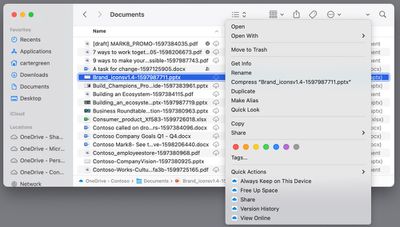
onedrive always keep on device

Microsoft includes an ability in OneDrive's Finder integration to mark synced files as "Always Keep on This Device" (internally referred to as "pinning"), and some users have resorted to exhaustively re-downloading all their files and folders using this option, but not without a high degree of syncing fails. Another user writes:

The proposed solution of doing this on the root doesn't work. If I select this option for more than a couple of folders, I am greeted with a Finder error citing "cannot communicate with the helper." I've been working on this for hours and it appears I have several hours to go. Already provided feedback via the option on OneDrive. Bad form, Microsoft.

On top of these errors, some users are also experiencing problems with files refusing to download or open correctly in their default application. One Redditor posts:

Prior to today, when I double clicked a Word document, PPT, etc. in the Finder that resided in my OneDrive folder, the Office app would open the OneDrive version and autosave my changes. Today, when I do that, it just treats it as a local file and won't sync it with OneDrive. I still have the setting "Use Office applications to sync Office files that I open" enabled, but the new version seems to have broken that.

Hundreds of similar complaints about the enforced changes and associated bugs can be found on Microsoft's OneDrive blog, the MacRumors Forums, and scattered over Reddit, with many users saying they will move to a rival cloud storage syncing solution unless the ability to store synced files locally is brought back and the syncing bugs are fixed. We've reached out to Microsoft to provide more clarity on the situation and will update this article if we hear back.


Popular Stories

microsoft

Major Microsoft 365 Outage Continues

Friday November 13, 2026 3:55 am PST by
The worldwide Microsoft 365 outage continues, leaving users unable to access email and disrupting features in Teams, Copilot, and other services, although Microsoft says recovery efforts are making progress. Issues emerged on Thursday, November 12, with nearly 130,000 Outlook reports recorded on Downdetector shortly after 1 p.m. Eastern, according to the Associated Press. The disruption...

Apple iPhone Duo optimized apps Zoom Feature

Zoom and These Microsoft Apps Now Optimized for iPhone Duo

Monday November 2, 2026 6:14 am PST by
Over the weekend, the video calling app Zoom was updated with iPhone Duo optimization. On the device's large inner display, users can now see shared content such as the host's desktop and other participants on a call at the same time. In addition, four Microsoft apps were updated with iPhone Duo optimization today: Word, PowerPoint, Excel, and OneNote. Microsoft Outlook was already optimized ...
Black Apple Event Logo

Russia Places Apple on State Surveillance Registry

Friday October 30, 2026 7:58 am PDT by
Apple faces Russian data retention and disclosure requirements after being added to the country's state surveillance registry, Bloomberg reports. Russia's communications regulator, Roskomnadzor, listed Apple and Microsoft on October 2 as "organizers of information dissemination," a classification that carries obligations to preserve communications and make data available to Russian security...

Top Rated Comments

63 months ago
I'm guessing the complainers haven't been reading the news as of late.
https://www.macrumors.com/2022/01/27/macos-12-3-deprecates-dropbox-onedrive-kexts/
https://techcommunity.microsoft.com/t5/microsoft-onedrive-blog/inside-the-new-files-on-demand-experience-on-macos/ba-p/3058922

Don't blame the vendor, when Apple is implementing the restrictions the vendor has to live with.
Score: 24 Votes (Like | Disagree)
63 months ago

This is honestly why I stick to Dropbox for high priority needs, even if I only have 20 GB of space. Dropbox just works, and it has always just worked. I also have "unlimited" Google Drive but I don't have any local syncing because it's low priority files.
These same changes are coming to DropBox too
Score: 21 Votes (Like | Disagree)
b4rtw Avatar
63 months ago
Apple: We're changing stuff.
Microsoft: Ok, we will adjust our app to your new API's
Users: Microsoft, WTF!?!

Typical.
Score: 16 Votes (Like | Disagree)
63 months ago
The way the changes in macOS are described by MacRumors and generally interpreted is wrong. I have little experience with Dropbox but OneDrive does not nor has it ever used kernel extensions. It is available from the Mac App Store, and that precludes the inclusion of any kernel extensions (yes, there is also a direct download version, but AFAIK it works essentially the same).

The changes in 12.3 force the cloud providers to change the way Files on Demand work, yes. But nobody forced Microsoft to make Files on Demand mandatory, they could have made sure to keep the “all files are local” mode available – but they did not.

Even the oft-maligned iCloud Drive lets you keep all files locally (by switching off Optimize Mac Storage).
Score: 9 Votes (Like | Disagree)
63 months ago
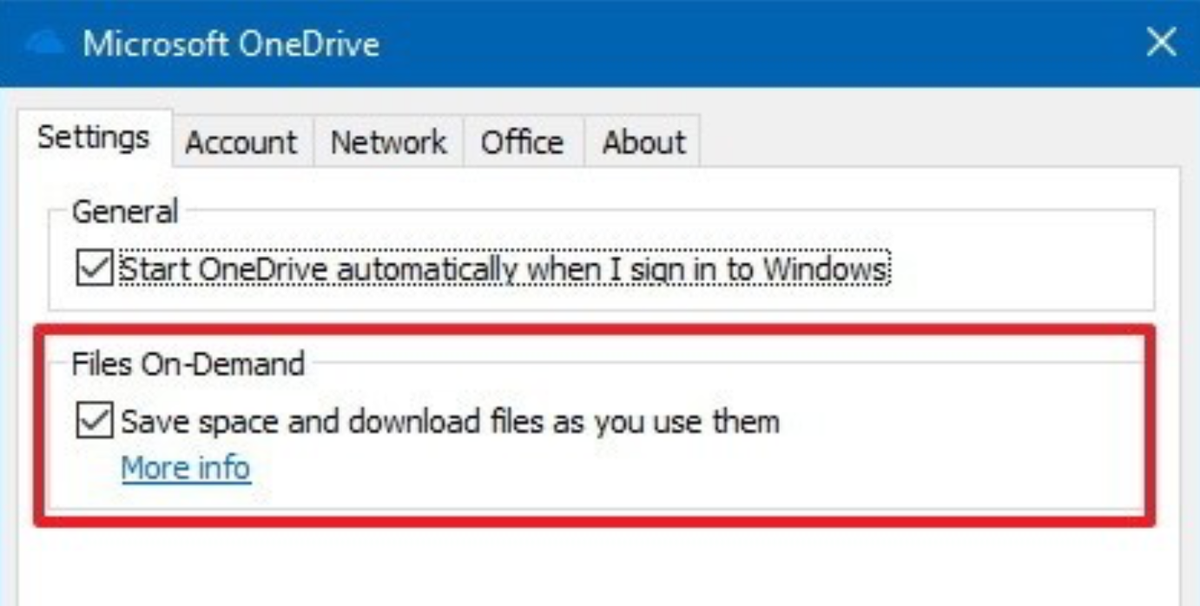
OneDrive for Windows:


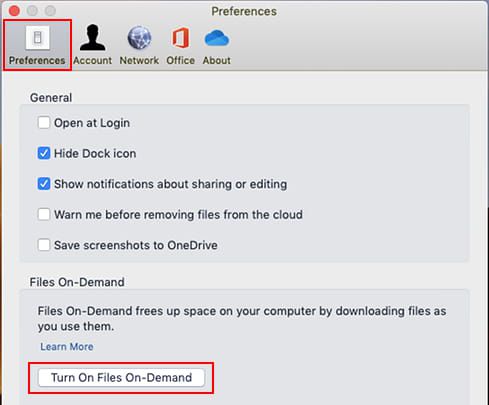
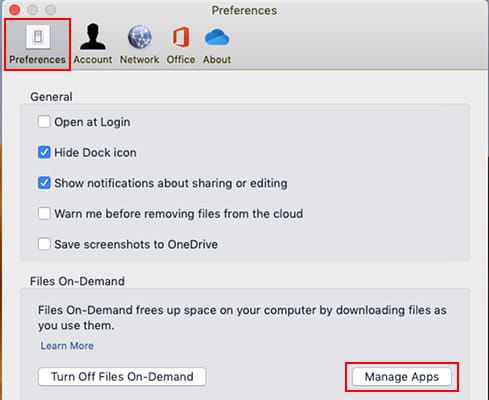
OneDrive for Mac, before update:


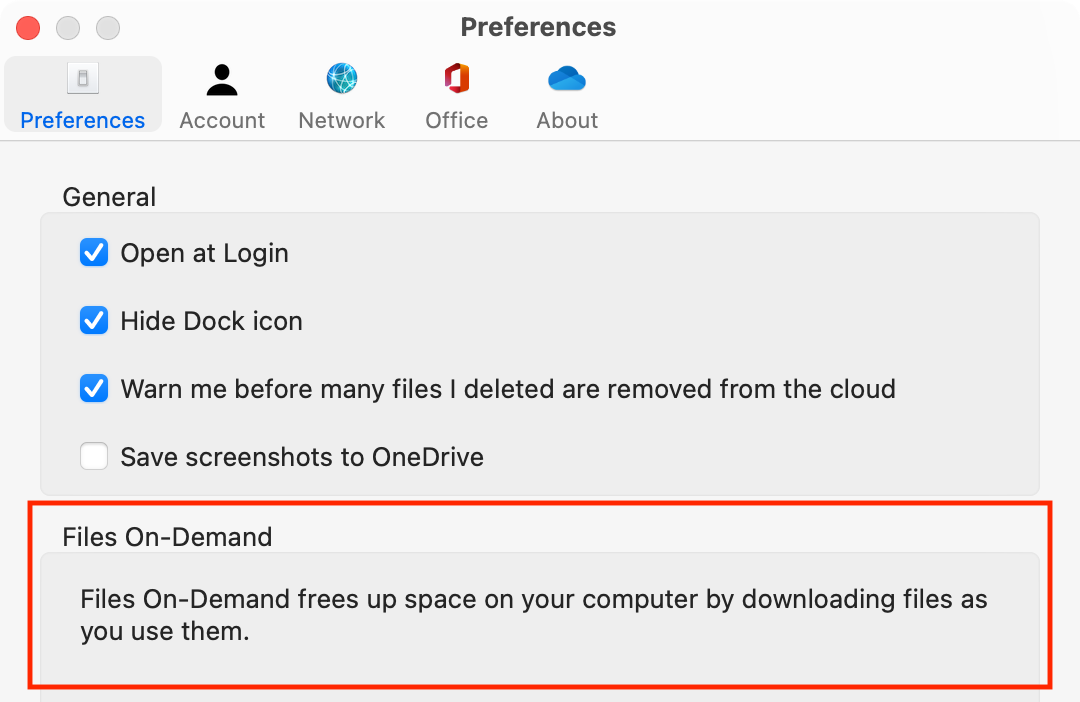
OneDrive for Mac, after update:


Attachment Image

Attachment Image

Attachment Image

Attachment Image
Score: 9 Votes (Like | Disagree)
Wildkraut Avatar
63 months ago
Sounds like they are laying out the way to gatekeep macOS.
Score: 9 Votes (Like | Disagree)
Latest Stories
The 50+ Best Apple Black Friday Deals Still Available on AirPods, iPads, and More
2 hours ago
Apple's M6 and PROLED MacBook Pro Reach New Low Prices for Black Friday
6 hours ago
The MacRumors Show: iPhone Air 2 and iPhone 18 Are Coming
6 hours ago
Apple Store in Brisbane Reopening Next Month With New Design
7 hours ago
The 60+ Best Black Friday Accessory Deals on iPhone Chargers, TVs, Headphones, and More
8 hours ago
GTA VI Now (Barely) Running on Apple Silicon Macs
8 hours ago
The Best Black Friday Streaming Deals on Apple TV, Disney+, and More
9 hours ago
Apple TV's 'Carême' Wins International Emmy for Best Drama
9 hours ago
iPhone 18 Production Delay Leaves Apple Little Time Before Launch
10 hours ago
The Best Black Friday AirPods Deals Still Available
2 hours ago
The Best Black Friday Deals on Apple Home Products
11 hours ago
The Best Black Friday iPhone Deals Still Available
2 hours ago
The Best Black Friday iPad Deals Still Available
2 hours ago
The Best Black Friday Apple Watch Deals Still Available
2 hours ago
The Best Black Friday AirTag Deals Still Available
2 hours ago
The Best Black Friday Mac Deals Still Available
2 hours ago
iPhone Share of US Smartphone Market Hits 57% as Rivals Slip
12 hours ago
iPhone 20 Pro Rumored to Feature 3D-Printed Titanium Frame
13 hours ago
Apple's Official 2026 Black Friday Offer Starts Rolling Out
1 day ago
Halide Adds Fill Light Feature for iPhone Duo
1 day ago
MacBook Air Black Friday Deals Now Live With Massive $399 Savings
1 day ago
Amazon Discounts All MacBook Neo Models by $99 for Black Friday
1 day ago
Kodak Launches Unique AirTag Rival With E-Ink Display
1 day ago
Here's Why the Apple Store is Going Down
1 day ago
Apple Still Working on Giant Foldable iPad That Could Cost $5,000
1 day ago
iPhones Dominate China's Weak Singles' Day Smartphone Sales
1 day ago
iPhone 20 Pro Could Feature Ceramic in Limited-Edition Model
1 day ago
Apple Faces Korean Regulator Review Over iPhone 16 AI Advertising
2 days ago
Apple Watch Ultra 4 Hits New Best-Ever Price of $649.99 for Black Friday
2 days ago
New Apple Store Opening in India, Download the Special Wallpaper Now
2 days ago
Related Apple News: Counterpoint | Mac | Iphone Duo Activate Standby Mode When Not Charging | Mac | Forums