Skip to Content

Luna Display Gains PC-to-Mac Mode, 5K Support and More

The Luna Display dongle that's meant to turn an iPad or Mac into a secondary display for a primary machine today received a major 5.1 software update, introducing new features.
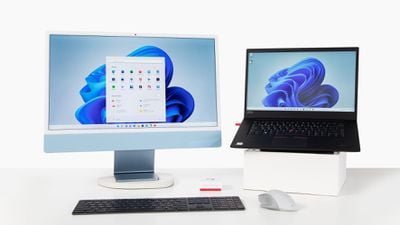
luna display mac to pc
With the new PC-to-Mac Mode, Luna Display owners can turn a Mac into a secondary display for a PC. PC-to-Mac mode follows PC-to-iPad mode, which was introduced in October. Thanks to the updated software, any old Mac or ‌iPad‌ can now be used as a secondary display with either a PC or a Mac.

Along with PC-to-Mac mode, the update introduces support for 4K and 5K resolutions. Computers that have a 4K or 5K display can be used as a secondary display at their full resolution, with the USB-C Luna Display required for this functionality.


There's also a new Teleprompter Mode for the PC, Office Mode for PC users, and Magic Keyboard Support for iPhone owners. The Magic Keyboard and trackpad can now be used with an ‌iPad‌ when using Luna Display.

The USB-C Luna Display that works interchangeably with Macs and PCs can be purchased for $129.99, though there is a discount for the next two days that drops the price to $97.50. The discount will show up when the Luna Display is added to the cart for purchase.

Popular Stories

apple design award 2025

Apple Announces 2025 Design Award Winners Ahead of WWDC 2025

Tuesday June 3, 2025 10:14 am PDT by
As we wait for WWDC to kick off next Monday, Apple today announced the winners of its annual Apple Design Awards, recognizing apps and games for their innovation, ingenuity, and technical achievement. The 2025 Apple Design Award winners are listed below, with one app and one game selected per category: Delight and Fun - CapWords (App) and Balatro (Game) Innovation - Play (App) and PBJ -...
1password deal blue

1Password Security Breach: What Was Accessed and What Wasn't

Wednesday November 25, 2026 1:09 pm PST by
Popular password management app 1Password today said it experienced a security breach earlier this month. 1Password says some customer names and email addresses were accessed, but no customer vault contents were compromised. On November 19, 1Password saw indications that an employee's GitHub account had been breached and began investigating. The company says the breached GitHub account was...
Apple 2026 Black Friday Event Hero

Apple's Official 2026 Black Friday Offer Starts Rolling Out

Thursday November 26, 2026 8:37 am PST by
Apple's annual four-day Black Friday through Cyber Monday shopping event is now live in Australia, New Zealand, and Thailand, and it will continue to roll out across Europe, the U.S., and Canada as the calendar turns to Friday, November 27 around the world. In the U.S., Apple's terms and conditions say the promotion begins on November 27 at 12 a.m. Pacific Time and ends on November 30 at...

Top Rated Comments

rawweb Avatar
65 months ago
Just tried this update on my M1M 16" and 2017 27" iMac as a second display. Pretty lackluster, even over a thunderbolt wire. Experience the usual lag/pixelation.

Would be fine for still content?

Score: 10 Votes (Like | Disagree)
StrangeNoises Avatar
65 months ago
Posting late to the thread but others interested in the product might find themselves here anyway on a search so here's to you. 😀 I was put off from buying during the discounted period by some of the earlier posts in this thread, but eventually went ahead even though it was at full price. You see, it's my curse: Nothing is ever on a sale when I've decided I actually want it. (aka: won't be rushed into a too-quick decision by a short-term discount)

TL;DR: It's brilliant. Better than expected, and WHEN 😉 the new Apple monitors come next year the decision to get one is just a little bit harder. (But I will; but it looks like I'll have had a year of use out of this by then.)

My use case is, a 2021 MacBook Pro (M1Pro) as the primary, a 2019 iMac Retina 5K as the secondary. I'm a programmer, and most else I do is also mostly text-based, so what I'm looking for is super sharp text, and relative slowness of the display is of less importance. I just really really wanted the 5K. I have an older 4K monitor, but the 5K on the iMac spoiled me.

I did find on a wifi connection it was on the sluggish side; latency was too high, and quite a lot of pixellation. I expected that, and always expected to use a wired connection.

With a thunderbolt 3 cable directly connecting the two machines things were much better, and for my purposes entirely usable. I basically don't see any pixellation or other compression artefacts. All I see is that the refresh rate seems a little low. It's probably at the 45fps point, I'm guessing. (It doesn't definitively tell me, and I tell it manually it can go up to 60Hz, but that's what it feels like. Just a little less smooth than the 60Hz display next to it.) This is acceptable for my use case. Dragging windows, scrolling windows, using the trackpad is still responsive enough, and that's what I wasn't really expecting to be the case, so it's a bonus as far as I'm concerned.

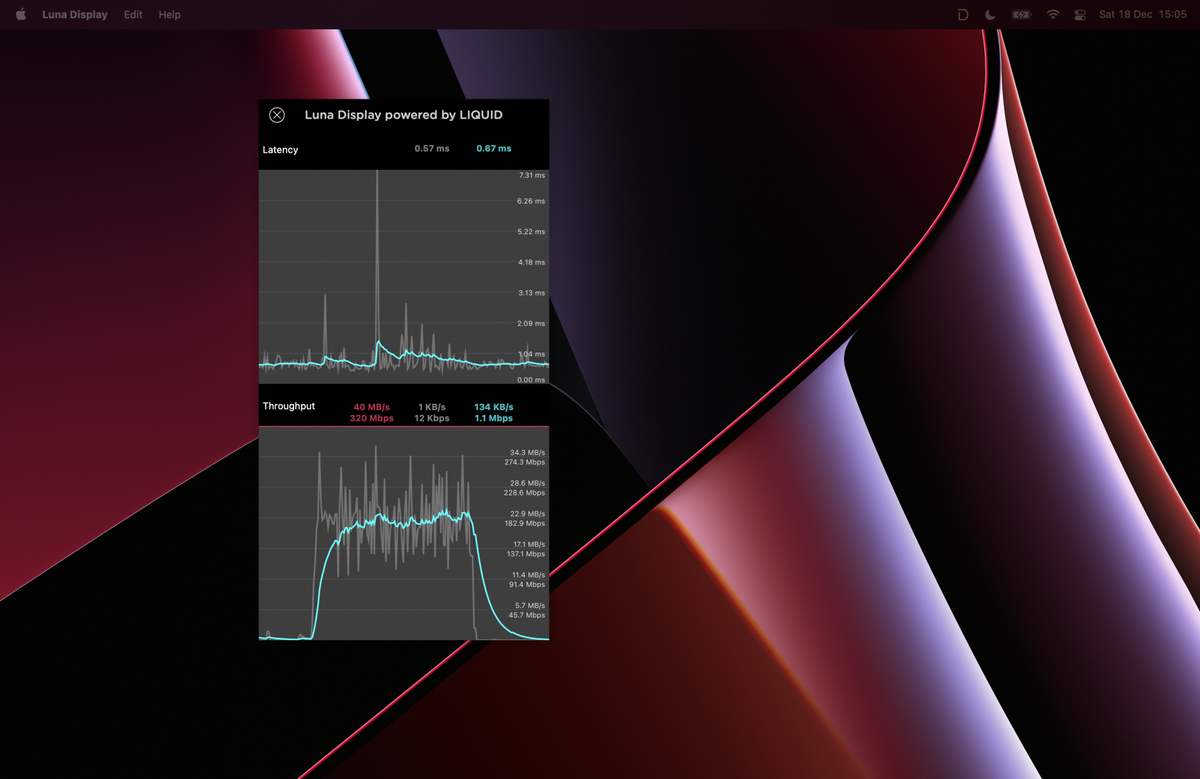
I'm also trying using a Thunderbolt 3 dock (Caldigit TS3), with the Luna Display dongle connected to the onward-facing thunderbolt port on the dock, and a real 4K monitor connected to the dock's DisplayPort, and using an ethernet connection from the dock, via a nearby switching hub (into which the iMac is also connected). I needed to opt-open prefs and set a connectivity rate to manual and drag it all the way to maximum (40MB/s / 320Mbps) and this... seems to work as well as the direct thunderbolt connection did; although as noted, I am pushing it to prioritise the traffic, whereas the thunderbolt connection was fast enough without changing any defaults. In further use I may yet find that the ethernet gets more contention than the direct thunderbolt would, but that's not been an issue yet.

Videos are watchable, but don't really keep up in full screen, so frames get dropped. That was expected, and not important to me. (I can play those on the real 4K monitor attached.)

It comes with a bandwidth meter (selectable from the app main menu), shown below just after I'd been scribble-dragging this browser window around on the Luna Display. (The meter window is on the internal screen so it doesn't itself take up bandwidth.) 320Mbps seems to be a hard upper limit on the bandwidth it'll take on any interface, but it also seems sufficient. (I wonder if you could use more to get 60Hz on a 5K screen, you'd get diminishing returns as it would use up more computing resources on both ends, to capture, encode, decode, display that, to the point of possibly sacrificing performance in other respects.)


Wants:

I wish it also provided an audio output on the DisplayPort, so it could pass that through to be played out of the selected audio output on the secondary.

Given my secondary is an iMac that isn't that old or that much of a slouch, yet, and is also the place where I run apps that aren't Apple Silicon capable yet (I refuse to install Rosetta 2, more than a year into transition), it would also be nice if you could switch easily and quickly between it being a Luna Display and showing its own desktop; ideally as if Luna Display was just running in its own space ("as if" in user interface/control terms, I'm pretty sure it's driving the screen more directly than that). You can switch in the sense of just turning Luna Display *off* (quitting the app), but sometimes I'd just like to cmd-tab to another iMac app or mission control to its main desktop using its own keyboard & trackpad, and then switch right back.

Summary: Totally worth the full price, being able to use the Retina 5K screen on my shiny new MacBook Pro is a balm to my tired eyes. It definitely looks like this will do me until those new Apple monitors arrive. 😉

Attachment Image
Score: 6 Votes (Like | Disagree)
65 months ago
For those on a 27" iMac, I think i found a good compromise for Retina Quality/Frame Rate. If you go into Luna settings and select max resolution 4K, max refresh rate 60hz and then under Settings -> Displays -> Scaled -> 2560x1440, this makes it looks "retina" (I can't tell the difference between 4k and 5k) but allow you to keep 60hz.

Make sure to restart Luna Display for the 4k to take effect.
Score: 5 Votes (Like | Disagree)
65 months ago
Thank you Luna Display
Score: 5 Votes (Like | Disagree)
65 months ago
I tested this for a while today, primarily comparing it to JumpDesktop.

I’ve got a Retina iMac with attached Thunderbolt Display and an M1 Mac Mini which is temporarily intended to be the primary Mac for some applications until the MBP arrives.

LunaDisplay visual quality on my Retina iMac is so much better than JumpDesktop - I don’t think I can not use it.
There are downsides though, the 2nd monitor attached to the iMac is not useable when using Luna Display, whereas with Jump Desktop I can have a dual monitor setup (2 iMac displays and 2 Mini displays with 3-finger swiping between Macs).

I did try the settings suggested here but I ended going back to the auto settings with 5K as I found no issue with it for my purposes - I do use the Macs connected via Ethernet not wifi.

Therefore I suspect when my new MBP arrives I will use the MBP as the central/main Mac with the external monitor connected to it directly and the iMac used as a Retina display via Luna Display. The shortage of ports on the M1 Mini is a bit limiting so am looking forward to the extras on the MBP. I’ll likely end up upgrading the Thunderbolt Display at some point.

I also tried a few options for connecting my iPad Pro as another display at the same time - I found Sidecar to be the best option for me - especially with ZBrush. I couldn’t get Easy Canvas working correctly when connected via Luna Display and when using Jump Desktop I found the screen aspect ratio too “off” compared to using the native “move window to iPad Pro”. It may be that Easy Canvas is better than SideCar for a few things such as pressure curves and touch gestures - but the combination of the aspect ratio weirdness and losing Retina display on iMac when using JumpDesktop pushed me to SideCar. I do have my physical keyboard in front of the iPad so keyboard shortcuts are not a concern - I would prefer if the Magic Keyboard worked more fully though. I’m tempted to try Astropad in case it is even better but I can’t see what it would give me for ZBrush that I don’t have with Sidecar.

Someone said VNC didn’t work with Luna Display (and I think I’ve been guilty of repeating that) but today I had no issues to that effect - at one point I had both working at the same time - I had them connected with Jump Desktop and also had the iMac connected via Luna Display at the same time. So I could have the iMac displaying the M1 Mini in Retina mode and when I wanted to use the 2nd monitor I could quit Luna and use the M1 Mini dual displays and then launch Luna to go back to single M1 Mini display on the Retina iMac.
Score: 4 Votes (Like | Disagree)
65 months ago
Sooo Target Display Mode is back… sort of …by a third party? I’ll take it!
Score: 4 Votes (Like | Disagree)
Latest Stories
The 50+ Best Apple Black Friday Deals Still Available on AirPods, iPads, and More
11 hours ago
HomePod Mini 2 in (RED) Seemingly Spotted Ahead of Announcement
8 hours ago
Apple's M6 and PROLED MacBook Pro Reach New Low Prices for Black Friday
19 hours ago
The MacRumors Show: iPhone Air 2 and iPhone 18 Are Coming
19 hours ago
Apple Store in Brisbane Reopening Next Month With New Design
19 hours ago
The 60+ Best Black Friday Accessory Deals on iPhone Chargers, TVs, Headphones, and More
20 hours ago
GTA VI Now (Barely) Running on Apple Silicon Macs
20 hours ago
The Best Black Friday Streaming Deals on Apple TV, Disney+, and More
21 hours ago
Apple TV's 'Carême' Wins International Emmy for Best Drama
21 hours ago
iPhone 18 Production Delay Leaves Apple Little Time Before Launch
22 hours ago
The Best Black Friday AirPods Deals Still Available
14 hours ago
The Best Black Friday Deals on Apple Home Products
23 hours ago
The Best Black Friday iPhone Deals Still Available
14 hours ago
The Best Black Friday iPad Deals Still Available
14 hours ago
The Best Black Friday Apple Watch Deals Still Available
14 hours ago
The Best Black Friday AirTag Deals Still Available
14 hours ago
The Best Black Friday Mac Deals Still Available
14 hours ago
iPhone Share of US Smartphone Market Hits 57% as Rivals Slip
1 day ago
iPhone 20 Pro Rumored to Feature 3D-Printed Titanium Frame
1 day ago
Apple's Official 2026 Black Friday Offer Starts Rolling Out
2 days ago
Halide Adds Fill Light Feature for iPhone Duo
2 days ago
MacBook Air Black Friday Deals Now Live With Massive $399 Savings
2 days ago
Amazon Discounts All MacBook Neo Models by $99 for Black Friday
2 days ago
Kodak Launches Unique AirTag Rival With E-Ink Display
2 days ago
Here's Why the Apple Store is Going Down
2 days ago
Apple Still Working on Giant Foldable iPad That Could Cost $5,000
2 days ago
iPhones Dominate China's Weak Singles' Day Smartphone Sales
2 days ago
iPhone 20 Pro Could Feature Ceramic in Limited-Edition Model
2 days ago
Apple Faces Korean Regulator Review Over iPhone 16 AI Advertising
2 days ago
Apple Watch Ultra 4 Hits New Best-Ever Price of $649.99 for Black Friday
2 days ago
Related Apple News: Iphone Duo Activate Standby Mode When Not Charging | Mac | Ipados | Ipad Mini Vs Ipad Air 2026 | Apple Watch Se