Skip to Content

Apple Explains How to Custom Calibrate the New MacBook Pro Displays

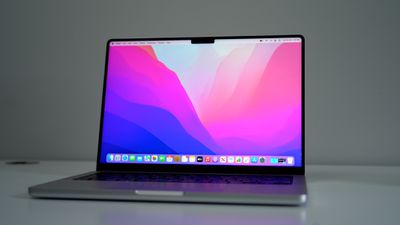
In a new support document, Apple has detailed how to measure and fine-tune the calibration of the display on the new 14-inch and 16-inch MacBook Pro models.
macbook pro 3
The new MacBook Pro models feature XDR displays with mini-LED backlighting and support for one billion colors, but certain workflows may require custom calibration:

Every MacBook Pro with Liquid Retina XDR display undergoes a state-of-the-art factory display calibration process on the assembly line to ensure the accuracy of the P3 wide color panel and the individual backlight LEDs. In addition, the factory calibration process enables sophisticated built-in algorithms to accurately reproduce a variety of color spaces used by media workflows today, including sRGB, BT.601, BT.709,​ and even P3-ST.2084 (HDR).

The factory display calibration process lets MacBook Pro users enjoy an exceptional viewing experience right out of the box. If your workflow requires custom calibration, you can measure your display, then fine-tune the calibration.

The process involves using a spectroradiometer and a set of QuickTime movie test patterns from Apple to evaluate the calibration of the display. The test patterns can be downloaded from the AVFoundation page on Apple's website under Related Resources > Color Test Patterns, with complete instructions available in Apple's support document.

In System Preferences > Displays, users can fine-tune the calibration of the MacBook Pro's display by providing the white point and luminance values measured by the spectroradiometer and the expected values for their target.

Apple's support document includes additional tips for measuring and fine-tuning the calibration.
Related Roundup: MacBook Pro
Buyer's Guide: MacBook Pro (Buy Now)
Related Forum: MacBook Pro

Popular Stories

MacBook Pro Glowing Apple Logo

'Backglow' Lets You Customize New MacBook Pro's Glowing Apple Logo

Saturday November 7, 2026 12:44 pm PST by
A new "Backglow" app created by designer Juan Buis lets you customize the illuminated Apple logo on the lid of the new MacBook Pro models. The free version of the app allows you to manually adjust the brightness level of the Apple logo, independent of the MacBook Pro's display brightness level. You can also turn it off entirely with a single click, rather than having to use Terminal....
MacBook Pro with PROLED XDR Display First Impressions Thumb

Hands-On With Apple's New OLED Touchscreen MacBook Pro

Friday November 6, 2026 2:05 pm PST by
Happy touch your Mac day! Apple's new PROLED MacBook Pro is now in the hands of customers. We picked up one of the new machines to get our greasy fingerprints all over that pristine OLED display. Subscribe to the MacRumors YouTube channel for more videos. It's been five years since Apple last redesigned the MacBook Pro, so it was due for an update. The PROLED MacBook Pro looks a lot like the...
MacBook Pro PROLED Touch 1

MacBook Pro PROLED XDR Reviews Are In: Is the Touchscreen Worth It?

Thursday November 5, 2026 7:35 am PST by
The first reviews of the new 14-inch and 16-inch MacBook Pro models with PROLED XDR displays have been published ahead of the laptops launching on Friday. One of the key new features is a touchscreen. Is it worth it, though? Here's what reviews say. The Verge's David Pierce said that, in his testing so far, touch input has not been something that "meaningfully changes the laptop...

Top Rated Comments

Sowelu Avatar
66 months ago
So wait... They removed or hid the built in Display Calibration Assistant and color profiles for these presets where you are limited to adjusting the white point and luminance only? Apple's factory calibrations have always been and continue to be awful (to my eyes) - and the default calibration on the XDR displays are no exception. Color correction and color profiles are a big part of display calibration.

If you like displays with a dingy green hue and with reds that border on dark orange, you're all set. If you prefer to calibrate your display using the built in and easy to use Display Calibration Assistant, Apple decided that their factory calibrations are the best, and 'pros' shouldn't be able to color correct the displays on their $4,000++ MacBooks using a simple built in tool that has been around for decades.

See my thread here ('https://forums.macrumors.com/threads/cant-calibrate-display-14-macbook-pro-missing-color-button-calibration-option.2319627/') for more info and a workaround. I certainly hope they unhide the Display Calibration Assistant and color profiles option - both color profiles and presets can coexist. I was surmising that hey hid this option because of its new wonky behavior when you do finally access it and they are trying to fix it, but now I am not so sure.
Score: 6 Votes (Like | Disagree)
66 months ago

Colorimetry Research CR-300
Price: $15,990.00 :mad: Apple M1 Max $3,499.00
I found a way to do with X-Rite device. Woraking on a video guide. Will share here when it is done
Score: 5 Votes (Like | Disagree)
David Abrams Avatar
66 months ago
Hi All,

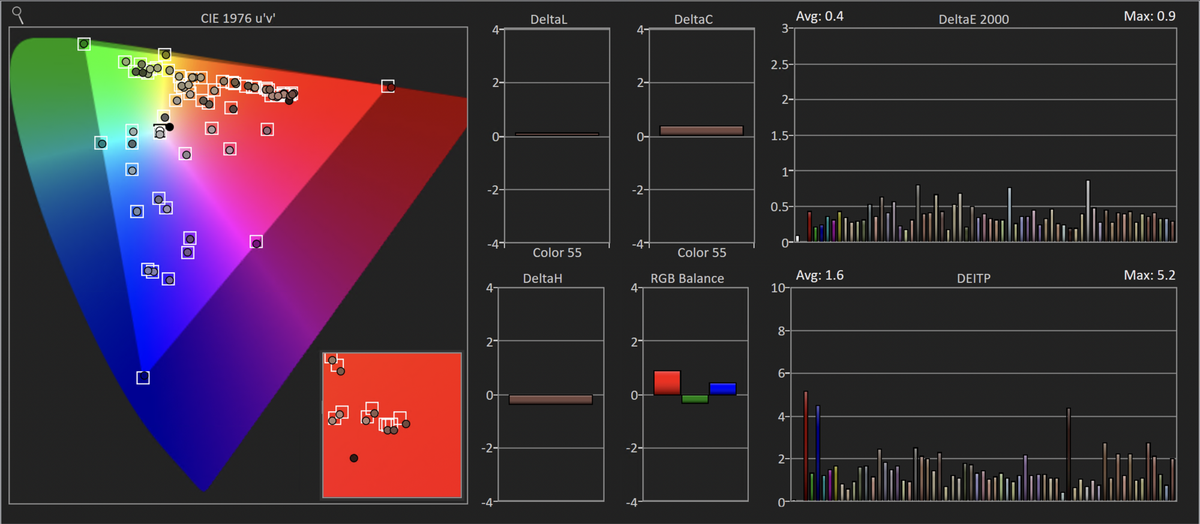
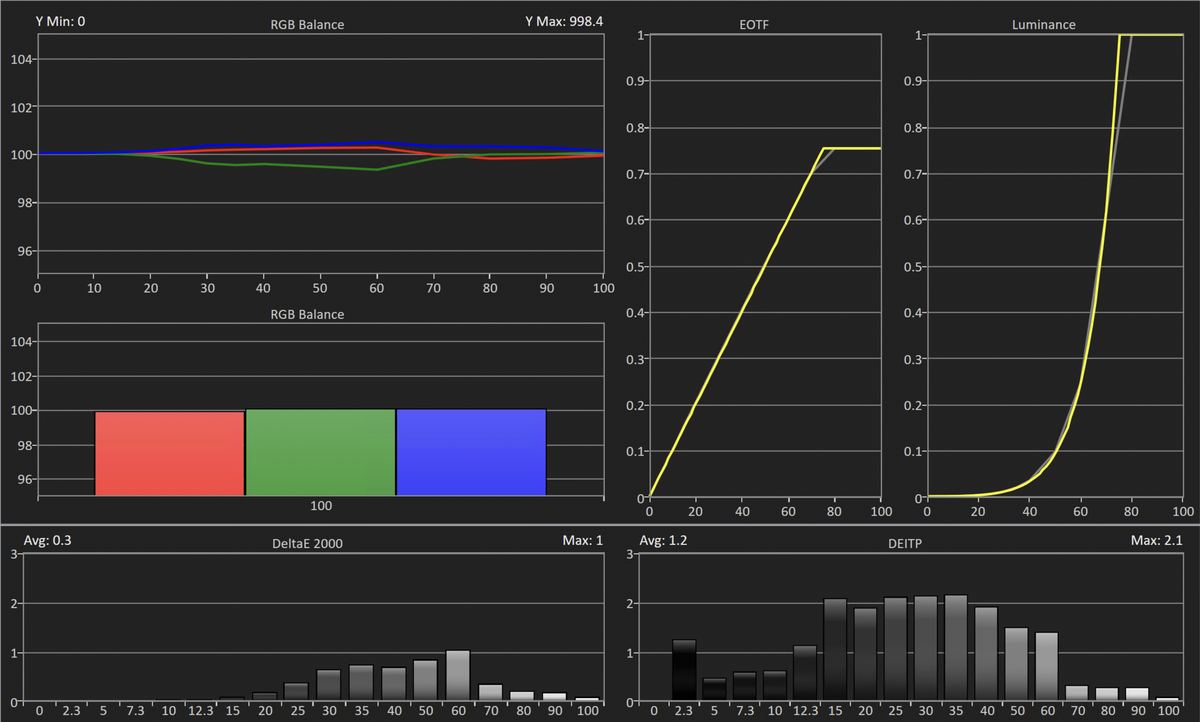
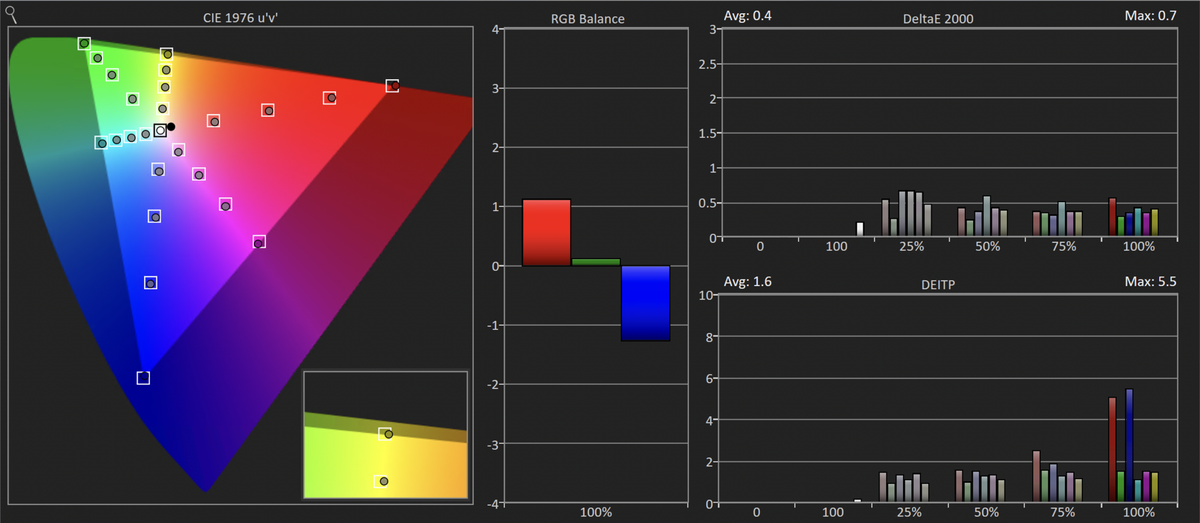
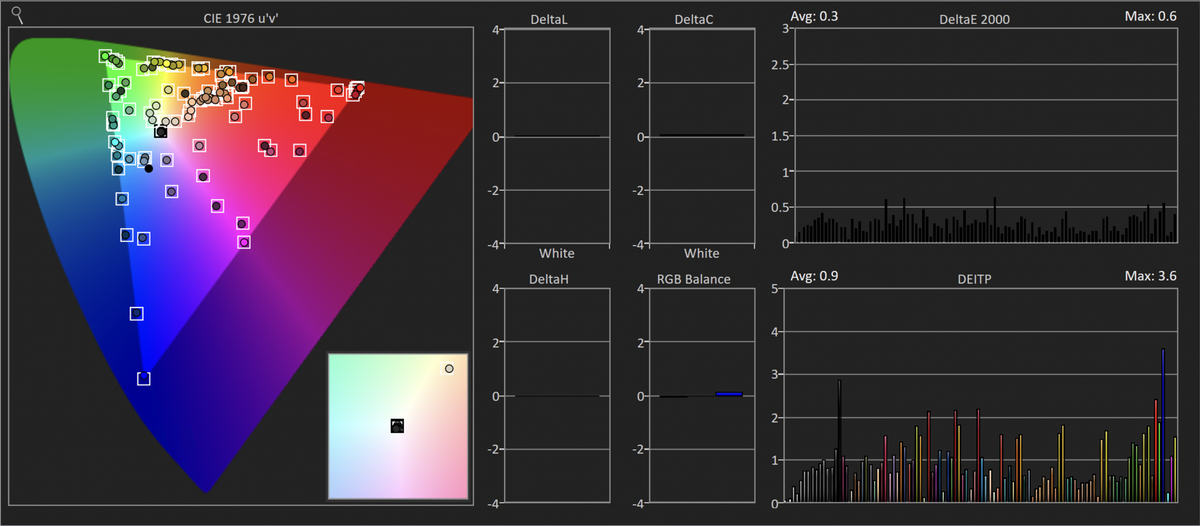
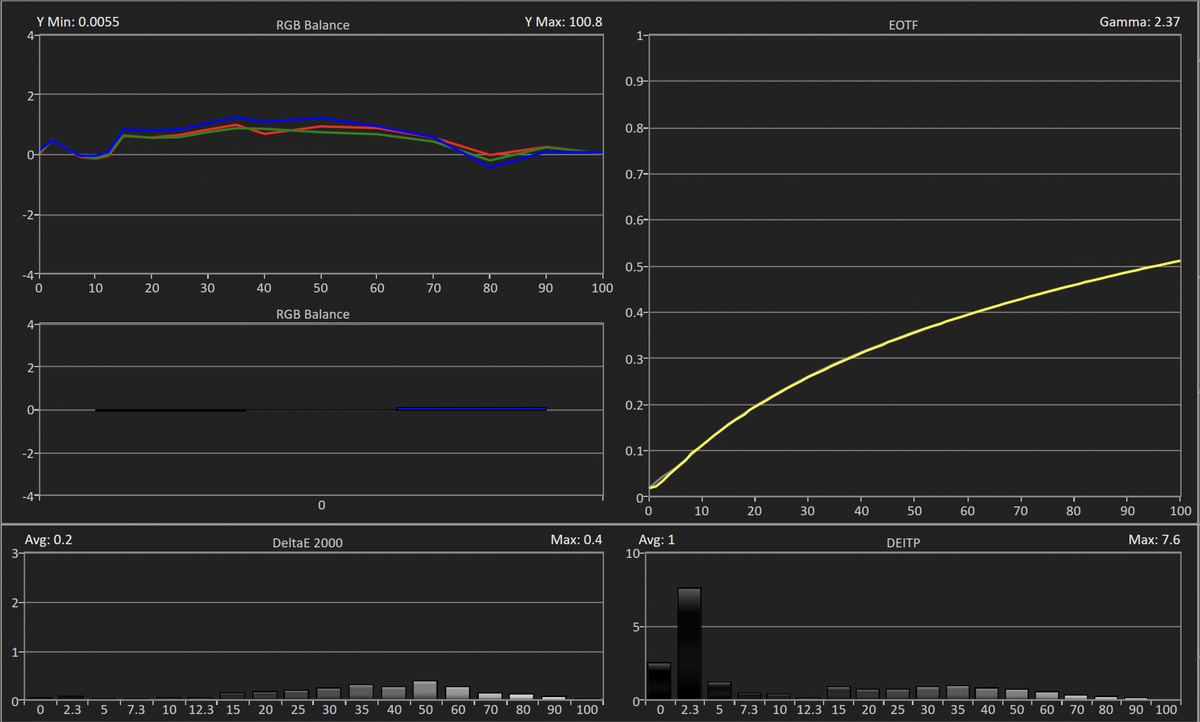
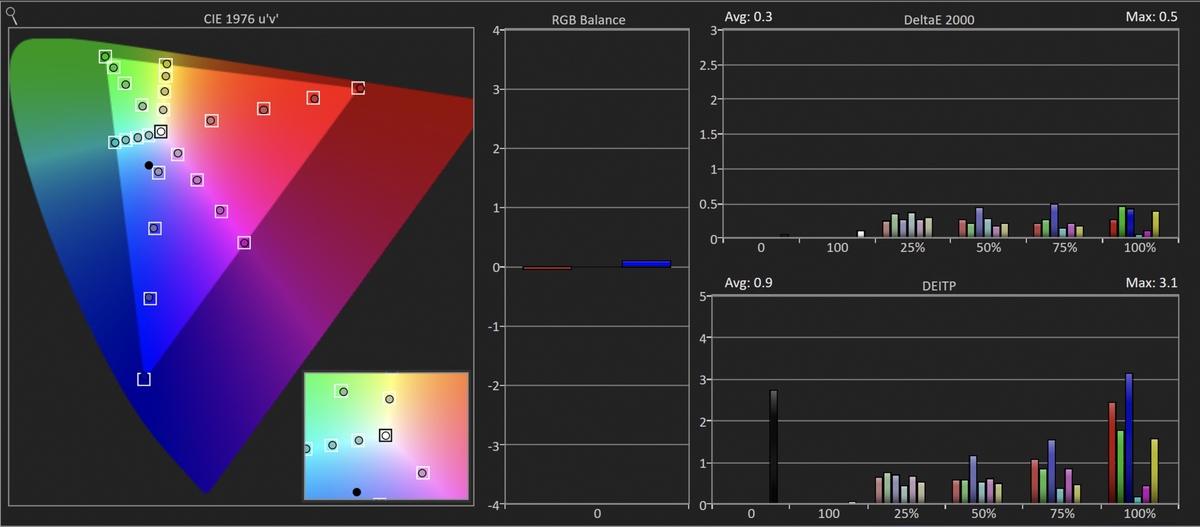
While this isn't the entire story, as it can get very complex, I would like to share a bit of knowledge regarding how Apple's Color Management functions today. Additionally, we were able to calibrate the MacBook Pro w/XDR Display and have included some data. (spoiler: the display calibrates extremely well). Please keep in mind that while we provide data for SDR @ Rec.709 and HDR @ P3, there are many color management targets and scenarios with their own idiosyncrasies that may require consideration.

The Mac is able to display multiple windows that may have different color spaces (targets); as such, it is important to 'manage' the system so that a window (or app) that may be in the sRGB color space will be accurately represented next to another window in a different color space such as Rec.709 or Adobe RGB. To do this, the display profile would inform the color management system as to how the connected display is optimized; at which point, the OS will transform the various color spaces for representation on the target display. In content production, this is similar to applying a LUT (Lookup Table).

sRGB (source) > Apple Color Management > P3-D65 display

In the above scenario Apple Color Management will take an application in sRGB and transform it into the P3-D65 color space. Where this becomes tricky is when a display is unable to fully represent the color space of the source. For example, currently available displays are not quite capable of hitting the Rec.2020, ST.2084 HDR standard-- the standard has a larger color volume and a higher max nit level at 10,000 nits. Apple's specification for the MacBook Pro XDR Display only achieves 1,600 nits. When this happens, some form of tone mapping occurs in an effort to accurately represent the entire image without blowing the highlights out. We can go down a very large rabbit hole with this. :)

In terms of the MacBook Pro XDR, we found the out-of-box measurements to be quite good on the sample tested; of course, there may be manufacturing tolerances where one may be further off, but overall the display wasn't terrible. Thankfully, Apple provides the 'Fine-Tune Calibration' in order to accommodate for out-of-the-box variables and drift over time.

Using the 'Patterns Test Generator ('https://apps.apple.com/us/app/patterns-test-generator/id1534335155?mt=12')' available on the Mac App Store (disclosure: we are involved in this app), and the Calman Ultimate Calibration Software ('https://www.portrait.com/calman-calibration-software/') (we are not involved in this app), we tested various color spaces and how Apple's Color Management handles them. The data attached was taken after both display warm-up and a Fine-Tune Calibration.

SDR


- MacBook Pro XDR set to the 'HDTV Video (BT.709-BT1886)' Preset.
- Patterns Test Generator set to tag patterns (content) as 'BT.709 @ BT.1886'

HDR

- MacBook Pro XDR set to the 'HDR Video (P3-ST 2084)' Preset.
- Patterns Test Generator set to tag patterns (content) as 'Tone Mapped HDR (P3 @ ST 2084)'

We have provided three charts for each SDR and HDR. They are:

Grayscale-EOTF

This chart measures the grayscale from 0% (black) to 100% white. Here we are looking for the RGB Color Balance to line-up on top of each other and for the response curve (EOTF) to track the yellow line. There are two quantifications of error included-- DeltaE 2000 and DeltaE ITP. DeltaE 2000 is most commonly used with SDR content and Delta ITP is most commonly associated with HDR content; however, a truly accurate monitor will have low numbers on both. 😉

Saturation Sweeps

This chart tracks color saturation at 25%, 50%, 75%, and 100%. While many reviewers like to only measure 100% to see how far out the primaries can go, the reality is that very few colors are actually at 100% saturation. The sweeps provide a way to validate if the signal is being mapped into the proper color space.

Color Checker

While the grayscale and saturation sweeps provide quality data, they don't provide any data outside of the primary and secondary colors. To achieve a more well rounded image (pun intended) of how the system is performing a color checker chart provides an quick and efficient way to further test the system. Of course, we could even go further and measure larger datasets of the color volume, but for now these will suffice.

Summary

As the results illustrate, the Fine-Tune Calibration is an effective way to dial in the MacBook Pro XDR display. Please note that while we are evaluating color balance, color space, response curves, we are not evaluating local dimming, blooming (halos) and other things that contribute to what is called a 'reference display'. After all, color calibration is only part of the battle to quality images. :)

Best,

David Abrams

Attachment Image

Attachment Image

Attachment Image

Attachment Image

Attachment Image

Attachment Image
Score: 4 Votes (Like | Disagree)
66 months ago

I have worked with professional colour measuring equipment from a.o. VeriVide. If you need to really trust your monitor for color accuracy you need to constantly re calibrate based on the number of viewing hours. You can’t say it’s factory calibrated so I don’t need that, it doesn’t work that way. Also whitepoint calibration is absolutely not enough to do this and that is by no means a “professional” calibration. So it sounds nice but it’s not enough for people who make money by trusting color accurate displays.

I think it depends on the industry you work in, or what in specific you're working on. I'm a professional graphic designer currently working for a massive food manufacturer and wholesaler. We don't obsess over color accuracy this much even though 90% of what we design gets printed on a box, label, product, etc. We calibrate monitors maybe once a month at the most usually. Usually once the colors are chosen we don't need to worry about it that much unless we're checking proofs, especially if they're spot colors. (you can also use physical pantone swatches to check stuff like spot colors) Someone editing text on a label does not need to see the colors 100% accurate, at that point the colors have already been determined on a good screen that's calibrated. I use a 5K iMac at work and the out of the box color accuracy is actually almost passable for print, in fact I don't think anyone would notice if it weren't my job to care about it. So I think its a bit disingenious to say "its not enough for people who make money by trusting color accurate displays". The company I work for makes a ridiculous amount of money, requires color accuracy, and we very rarely have an issue with colors printing wrong. (over a year without incident and the last one was a new hires mistake that had nothing to do with color inaccuracy on a monitor)
Score: 4 Votes (Like | Disagree)
66 months ago
Dear Apple, can you let us know how to custom calibrate our iPhones to remove the strong yellow tint? The color filter is not the solution.

Thank you.

I hope that one day we'll be allowed to do this.
Score: 4 Votes (Like | Disagree)
66 months ago
Here's a link to the video on how to set up a custom reference mode, fine tune calibration and then do a full calibration along with reasons why you might not want to do that yet
it is longer so use the timestamp to skep to calibration section
Score: 3 Votes (Like | Disagree)
Latest Stories
The 50+ Best Apple Black Friday Deals Still Available on AirPods, iPads, and More
2 hours ago
Apple's M6 and PROLED MacBook Pro Reach New Low Prices for Black Friday
6 hours ago
The MacRumors Show: iPhone Air 2 and iPhone 18 Are Coming
7 hours ago
Apple Store in Brisbane Reopening Next Month With New Design
7 hours ago
The 60+ Best Black Friday Accessory Deals on iPhone Chargers, TVs, Headphones, and More
8 hours ago
GTA VI Now (Barely) Running on Apple Silicon Macs
8 hours ago
The Best Black Friday Streaming Deals on Apple TV, Disney+, and More
9 hours ago
Apple TV's 'Carême' Wins International Emmy for Best Drama
9 hours ago
iPhone 18 Production Delay Leaves Apple Little Time Before Launch
10 hours ago
The Best Black Friday AirPods Deals Still Available
2 hours ago
The Best Black Friday Deals on Apple Home Products
11 hours ago
The Best Black Friday iPhone Deals Still Available
2 hours ago
The Best Black Friday iPad Deals Still Available
2 hours ago
The Best Black Friday Apple Watch Deals Still Available
2 hours ago
The Best Black Friday AirTag Deals Still Available
2 hours ago
The Best Black Friday Mac Deals Still Available
2 hours ago
iPhone Share of US Smartphone Market Hits 57% as Rivals Slip
12 hours ago
iPhone 20 Pro Rumored to Feature 3D-Printed Titanium Frame
14 hours ago
Apple's Official 2026 Black Friday Offer Starts Rolling Out
1 day ago
Halide Adds Fill Light Feature for iPhone Duo
1 day ago
MacBook Air Black Friday Deals Now Live With Massive $399 Savings
1 day ago
Amazon Discounts All MacBook Neo Models by $99 for Black Friday
1 day ago
Kodak Launches Unique AirTag Rival With E-Ink Display
1 day ago
Here's Why the Apple Store is Going Down
1 day ago
Apple Still Working on Giant Foldable iPad That Could Cost $5,000
1 day ago
iPhones Dominate China's Weak Singles' Day Smartphone Sales
1 day ago
iPhone 20 Pro Could Feature Ceramic in Limited-Edition Model
1 day ago
Apple Faces Korean Regulator Review Over iPhone 16 AI Advertising
2 days ago
Apple Watch Ultra 4 Hits New Best-Ever Price of $649.99 for Black Friday
2 days ago
New Apple Store Opening in India, Download the Special Wallpaper Now
2 days ago
Related Apple News: Benq Ma320ug Display | Iphone Duo Enable Reachability One Handed Use | Ipad Mini 2021 Vs 2026 | Iphone Duo Take Selfies With Rear Cameras | Apple Watch