Skip to Content

New macOS 'Compatibility Mode' Options Let Developers Decide How Fullscreen Apps Handle the Notch

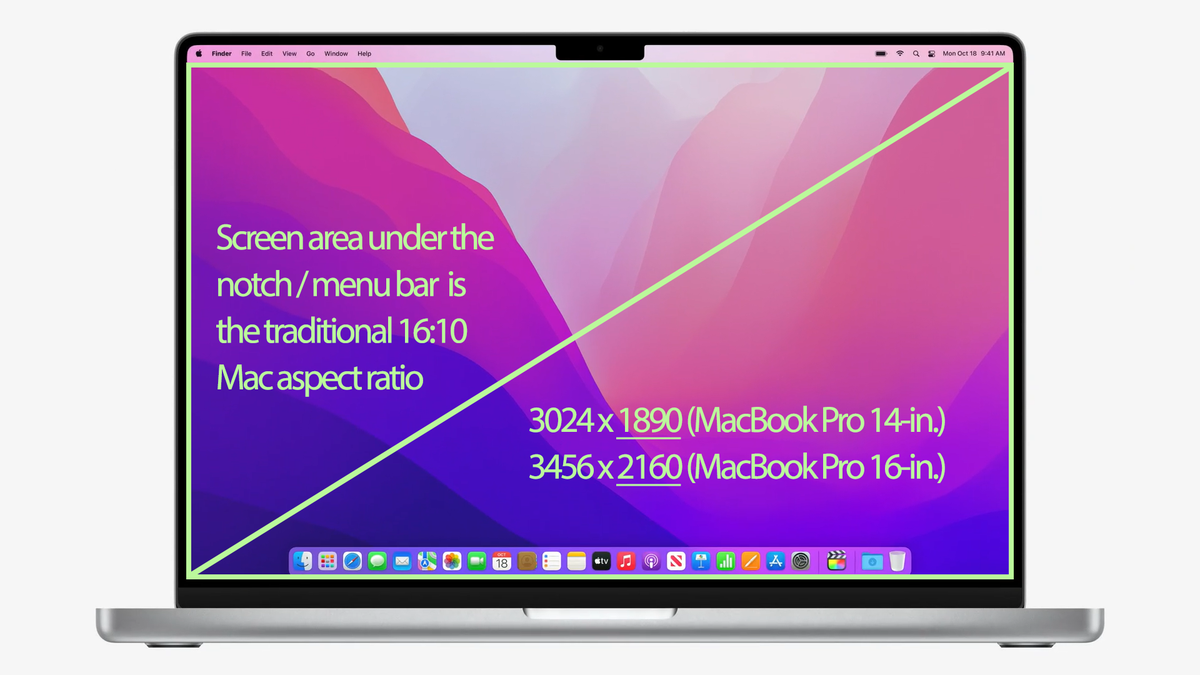
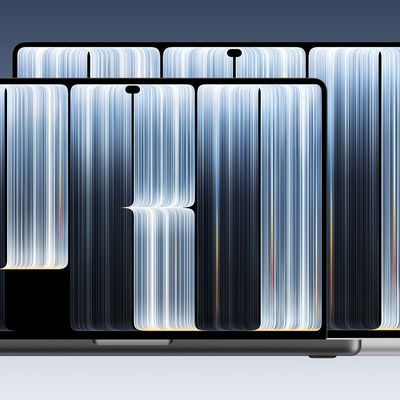
While users and developers come to terms with the fact that the last-minute notch rumor for the new MacBook Pros was true, Apple has released new Human Interface Guidelines explaining how developers can make the best use of the extended screen areas around the camera housing if they think their app would benefit from it.
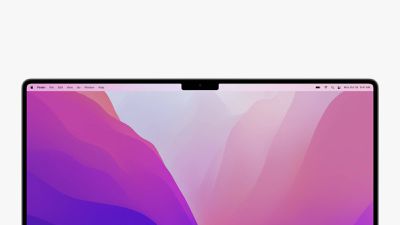
macbook pro 2021 notch
According to the new documentation, the fullscreen mode in macOS Monterey features a "compatibility mode" that automatically accounts for the camera housing by placing a black bar across the top of the screen to hide the notch and prevent app content from being placed there.

However, macOS also includes a new "NSPrefersDisplaySafeAreaCompatibilityMode" property list key that lets developers specify whether their apps should conform to compatibility mode or if their apps can expand to use the space on either side of the notch.

On Macs that include a camera housing in the screen bezel, the system provides a compatibility mode to prevent apps from unintentionally putting content in the region the housing occupies. When this mode is active, the system changes the active area of the display to avoid the camera housing. The new active area ensures your app's contents are always visible and not obscured by the camera housing.

macos notch new macbook pros
On Macs that have a notch, the Finder automatically adds a checkbox to an app's Get Info panel that can be used to manually enable or disable the new compatibility mode. Alternately, developers can force compatibility mode on or off using new code properties that define the safe area of the screen and allow them to make use of the areas on either side of the notch for active content.

Developers should confirm that their app layouts do not overlap with the notch area before setting the NSPrefersDisplaySafeAreaCompatibilityMode key to "false" to bypass compatibility mode.

The inclusion of a notch allowed Apple to make the bezels on the new 14-and 16-inch MacBook Pros considerably thinner compared to the previous 13-inch and 16-inch models. The new Liquid Retina XDR displays also feature ProMotion technology, which allows the screen to run at as high as 120Hz, and as low as 24Hz, similar to the iPad Pro.

The new MacBook Pros are available to order now and begin shipping next week, but delivery dates for various MacBook Pro configurations have already slipped, with some of the 16-inch ‌MacBook Pro‌ models now listing delivery dates ranging from November 2 to November 16, up from the original October 26 delivery date.

Update: This article was updated to clarify how the property list key for compatibility mode functions.
Related Roundup: MacBook Pro
Buyer's Guide: MacBook Pro (Buy Now)
Related Forums: MacBook Pro, macOS Monterey

Popular Stories

Apple MacBook Pro with PROLED XDR Display family lineup feature

Apple Announces OLED MacBook Pro With Touch Display

Wednesday October 28, 2026 10:11 am PDT by
Apple today announced a new high-end MacBook Pro, which is available in 14-inch and 16-inch sizes. The new device has a PROLED XDR display that supports touch gestures, and a glowing rear Apple logo. Pricing on the MacBook Pro starts at $2,899 for the 14-inch model and $3,399 for the 16-inch model. Apple says the MacBook Pro has the "world's best display in a pro laptop." The PROLED...
World Travel Adapter Kit Feature with Charger

Apple Releases Redesigned Mac Chargers and 'World Travel Adapter Kit'

Wednesday October 28, 2026 11:29 am PDT by
Apple today began selling updated versions of its 70W Power Adapter, 140W Power Adapter, and Power Adapter Extension Cable, all with a new "AC Connector 2." The updated power adapters and extension cable are available on Apple's online store in the U.S. and many other countries around the world. Apple also released an updated version of its World Travel Adapter Kit that had disappeared...
MacBook Pro Glowing Apple Logo

'Backglow' Lets You Customize New MacBook Pro's Glowing Apple Logo

Saturday November 7, 2026 12:44 pm PST by
A new "Backglow" app created by designer Juan Buis lets you customize the illuminated Apple logo on the lid of the new MacBook Pro models. The free version of the app allows you to manually adjust the brightness level of the Apple logo, independent of the MacBook Pro's display brightness level. You can also turn it off entirely with a single click, rather than having to use Terminal....

Top Rated Comments

Prabas Avatar
67 months ago
People don't realize that the notch area is extra screen space.

Attachment Image
Score: 66 Votes (Like | Disagree)
Mockletoy Avatar
67 months ago

I feel like this is such a clunky solution for something that we didn't really need? Is this to house a single webcam? In full screen mode your screen size is smaller than it could've been…
It’s really not. In full screen mode your screen is the same size and aspect ratio it would have otherwise been.

In regular desktop mode, you get extra space, bringing the aspect ratio from 16:10 to something much closer to 3:2.

The thing most people seem to be forgetting is that on PC laptops that have have razor thin bezels, no notch, and a webcam, the cam is either in a weird place or it’s a piece of low-res garbage (with a tiny sensor).

I really do not understand why people are so up in arms about this. It makes the screen bigger in one mode, the same size in the other, and the camera vastly better.
Score: 54 Votes (Like | Disagree)
67 months ago
What a relief. I was worried I wouldn't be able to see the notch when using full screen mode.
Score: 36 Votes (Like | Disagree)
Mockletoy Avatar
67 months ago

Let's be clear here: this upper space is NOT an "extended screen area", right? The notch cut's into the regular screen resolution, right? The Finder configuration option therefore cut's away display space and will downscale the full screen app, is it?
That is all entirely wrong.

It is an extended space. In fullscreen, with the notch area blacked out, the screen is regular old Apple 16:10 that it’s always been.

In regular desktop mode, you get extra space for the menu bar and below that is the same old Apple 16:10 rectangle.

So, in desktop mode you get more space for content because the menu bar has been pushed up into the area previously occupied by the bezel, and the overall aspect ratio is closer to 3:2 than 16:10.

You lose nothing, in either mode.
Score: 30 Votes (Like | Disagree)
Mockletoy Avatar
67 months ago
I cannot begin to fathom why people cover their MacBook webcams with tape, for so many reasons.

1) The camera cannot physically activate without turning on the LED. It just can’t. If the camera has power, the LED has power.

2) If someone has so thoroughly owned your computer that they can spy on you through your webcam, then they already have total access to your system and you’re screwed anyway, so worrying that they’re going to catch you picking your nose while they riffle through every file on your system seems a bit hysterical to me.

3) How do you disable the microphones? Or do you just take extra care to never say anything sensitive within earshot of your MacBook?

It’s all quite silly, isn’t it?
Score: 26 Votes (Like | Disagree)
BvizioN Avatar
67 months ago

A larger bezel would be a much much better solution
For you I guess, for many others not. I would rather have a "bezel" I can use for menu icons rather than a dead frame. And lets be honest, not many people are fan of thick bezels. Just the way it is.
Score: 20 Votes (Like | Disagree)
Latest Stories
The 50+ Best Apple Black Friday Deals on AirPods, iPads, MacBooks, and More
14 hours ago
iPhone 20 Pro Rumored to Feature 3D-Printed Titanium Frame
1 hour ago
Apple's Official 2026 Black Friday Offer Starts Rolling Out
19 hours ago
Halide Adds Fill Light Feature for iPhone Duo
19 hours ago
MacBook Air Black Friday Deals Now Live With Massive $399 Savings
20 hours ago
Amazon Discounts All MacBook Neo Models by $99 for Black Friday
21 hours ago
Kodak Launches Unique AirTag Rival With E-Ink Display
22 hours ago
Here's Why the Apple Store is Going Down
22 hours ago
Apple Still Working on Giant Foldable iPad That Could Cost $5,000
23 hours ago
iPhones Dominate China's Weak Singles' Day Smartphone Sales
23 hours ago
iPhone 20 Pro Could Feature Ceramic in Limited-Edition Model
23 hours ago
Apple Faces Korean Regulator Review Over iPhone 16 AI Advertising
1 day ago
Apple Watch Ultra 4 Hits New Best-Ever Price of $649.99 for Black Friday
1 day ago
New Apple Store Opening in India, Download the Special Wallpaper Now
1 day ago
Redesigned OLED MacBook Air Could Launch in 2027 or 2028
2 days ago
AirPods Pro 3 for $149 is One of The Best Black Friday Deals This Year
2 days ago
1Password Security Breach: What Was Accessed and What Wasn't
2 days ago
WhatsApp Finally Adds Scheduled Messages
2 days ago
Get Apple's Cheapest iPad for $379 During Amazon's Black Friday Sale
2 days ago
Rumor: iOS 28 to Revamp Notifications
2 days ago
iPhone 18 Pro Max Battery Exhausts a Toy Cyclops in New Apple Ad
2 days ago
$799 Smart Glasses Promise Vision Pro-Style Controls in a 45g Frame
2 days ago
How To Get an iPhone Duo or iPhone 18 Pro at No Cost Through T-Mobile for Black Friday
2 days ago
Apple Has an iPhone Notifications Problem
2 days ago
Amazon Sweetens Black Friday Deals on PROLED MacBook Pro
2 days ago
Apple Has iPads Running macOS Internally, Says Gurman
2 days ago
Apple Is Far From Done With 2026: Here's What's Still Coming
2 days ago
Threads App for iPad Now Available
2 days ago
Claude Now Lets You Install Artifacts as Desktop Apps
2 days ago
Tidal Bans AI Music, While Apple Music Sticks to Labels
3 days ago
Related Apple News: Iphone | Reviews | Lifestyle | Opinion | World News