Skip to Content

Ulysses Gains Enhanced Blog Publishing and Session History Features

Popular writing app Ulysses today reached version 23, and this update improves its blog publishing features as well as the way session histories and writing goals are calculated.
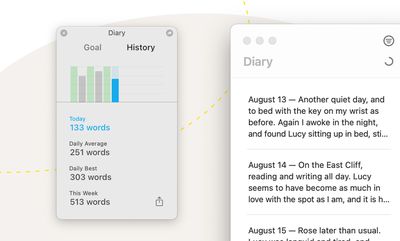
Writing Session History ulysses
For a while now, Ulysses has offered a writing goal feature to help writers foster a writing habit. The goal feature allows them to set a daily target – 500 words, say – and monitor their progress towards achieving it. Version 23 revamps the way the associated session history feature calculates those goals.

"Our original approach had a couple of design flaws," says lead developer Götz Fabian. "We must take numerous outlying factors into account, for example, when users sync through iCloud or collect material, which should not count toward their writing target. That's why a profound rewrite became necessary."

As well as providing a focused writing environment, Ulysses offers ways to publish texts from within the app to various blogging platforms. Version 23 refines the feature by indicating uploaded posts with a paper plane icon, making them easier to spot in the editor, while a text's publishing status now appears in the dashboard sidebar.

Users now also have the option to update previously published Ghost posts from within Ulysses. Up until now, updating was only available for WordPress, but the developers plan to add it for Micro.blog in the coming months.
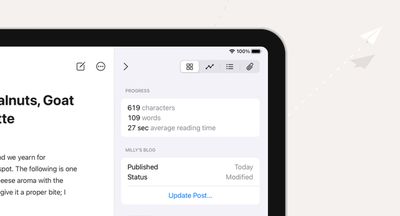
Publishing Status ulysses
Ulysses can be downloaded for free on the App Store, with version 23 rolling out to existing users today. After a 14-day trial period, a subscription is required to unlock the app on all devices. A monthly subscription costs $5.99, while a yearly subscription is $49.99.

Students can use Ulysses at a discounted price of $11.99 per six months. The discount is granted from within the app. Ulysses is also included in Setapp, the subscription-based service for Mac applications created by MacPaw.


Tag: Ulysses

Popular Stories

apple design award 2025

Apple Announces 2025 Design Award Winners Ahead of WWDC 2025

Tuesday June 3, 2025 10:14 am PDT by
As we wait for WWDC to kick off next Monday, Apple today announced the winners of its annual Apple Design Awards, recognizing apps and games for their innovation, ingenuity, and technical achievement. The 2025 Apple Design Award winners are listed below, with one app and one game selected per category: Delight and Fun - CapWords (App) and Balatro (Game) Innovation - Play (App) and PBJ -...
1password deal blue

1Password Security Breach: What Was Accessed and What Wasn't

Wednesday November 25, 2026 1:09 pm PST by
Popular password management app 1Password today said it experienced a security breach earlier this month. 1Password says some customer names and email addresses were accessed, but no customer vault contents were compromised. On November 19, 1Password saw indications that an employee's GitHub account had been breached and began investigating. The company says the breached GitHub account was...
Apple 2026 Black Friday Event Hero

Apple's Official 2026 Black Friday Offer Starts Rolling Out

Thursday November 26, 2026 8:37 am PST by
Apple's annual four-day Black Friday through Cyber Monday shopping event is now live in Australia, New Zealand, and Thailand, and it will continue to roll out across Europe, the U.S., and Canada as the calendar turns to Friday, November 27 around the world. In the U.S., Apple's terms and conditions say the promotion begins on November 27 at 12 a.m. Pacific Time and ends on November 30 at...

Top Rated Comments

Mockletoy Avatar
70 months ago

Ulysses is really good. Was a top choice at one time, alongside Scrivener about a decade ago.

But Obsidian ('https://obsidian.md/') can do more than either Ulysses or Scrivener, and it is free for private use.

It also has fully featured apps for iOS, macOS, Windows and Android, which neither Ulysses nor Scrivener offer.

Why would anyone use Ulysses or Scrivener when there are much better, much more powerful apps out there these days?
I prefer to write in Ulysses, which is sleek and beautiful and thoughtfully designed, but I only use it for small/quick projects and only then because I get it free in Setapp. I try it every now and then for the bigger stuff, but for wrangling a large project nothing compares to Scrivener. And when you're done it can output the final product in a mind-boggling array of formats at the click of a button. It's kinda clunky and persnickety and has about a million options I don't even use, but with a little patience you can make it do just about anything you can imagine. Also, Scrivener's licensing is about as friendly as it gets. You buy a single license for your platform of choice and you use it on as many devices of that type as you own for as long as you want. When the next major version comes out you get a discount if you upgrade, or you keep using the version you bought and never pay them anything else ever again. That includes syncing, for which Obsidian charges a monthly fee.

The one area where Ulysses truly shines in comparison to Scrivener is syncing. Ulysses sync has been pretty much bulletproof and almost freakishly instantaneous, while Scrivener's sync requires a bit of care and feeding if you don't want to have a bad time. And its project package format is wildly (seriously, don't do it or you're gonna have a bad time) incompatible with iCloud Drive, OneDrive, Google Drive, Box, etc. It only works with Dropbox, and even then it needs a fair amount of hand holding if you're moving between devices. Still, once you get the knack of it, it's not a bad experience, it just feels a bit dated.

As for Obsidian being able to do "more" than Scrivener, that's a bit disingenuous, don't you think? Much of what Scrivener can do is niche, but if your workflow happens to fall within that niche there's really nothing else quite like it. I wouldn't even consider Obsidian (or Ulysses) a competitor to Scrivener, let alone an alternative. It's like saying a motorcycle is the superior alternative to a pickup truck. Well, sure, if you just need to get across town I suppose it is. But if you need to haul a sofa? Not so much. I could make the same argument about TextEdit and Notepad or even nano/pico as replacements for Scrivener and Ulysses, depending on what you're writing.

It seems quite strange to me to push a personal wiki / notes application as a replacement for a professional grade and highly specialized manuscript production package like Scrivener. Go take a look at Scrivener's project compilation function. They could probably spin "Compile..." off into a separate program and make a bunch of money on that alone. Check out all the ways you can tag scenes to keep track of their individual revision status. The way you can seamlessly add notes to any document that are visible in the main window at all times (if you want them to be). The way you can add a synopsis to each scene and then view those synopses on a virtual cork board that allows you to do drag and drop reordering. The way Scrivener can highlight parts of speech ("Linguistic Focus"). The way I can split the editor and work on two scenes at once side by side, or use a second document as a reference while I work. The list goes on and on.

Let me know when Obsidian can do all that. Until then the suggestion that Obsidian can do "more" than Scrivener is patently absurd. And, no, I have no vested interest in Scrivener or the company that makes it, but I do use it every day of my professional life. I'd be happy to switch away to something better and more capable, but someone's going to have to release it first.
Score: 7 Votes (Like | Disagree)
70 months ago
I'm a professional novelist (as in, that's my day job), and while I have tried Ulysses, iA Writer, and various others, I can never understand why on earth anyone would try and write prose in a markup editor. Just the paragraph breaks alone were enough for me to give up and go back to Scrivener for first drafts.

Yes, Ulysses and iA Writer look amazing (which is important for me when it comes to drafting, I need a clean, focussed workspace), but... raw markup? Yeeeesh. And a subscription! Why? At least Scrivener is a one-off purchase.

I'm actually trying to draft my current book in Pages, after another writer friend swore by it. It certainly has the nicest font rendering of any Mac app.
Score: 4 Votes (Like | Disagree)
70 months ago
Still subscription based? Still a "thx but no thx" from me.
Score: 3 Votes (Like | Disagree)
Mockletoy Avatar
70 months ago

I don’t use Ulysses because of any “distraction free“ feature. Like you said, that’s available on pretty much any app if you use it right. Are use it because it’s very good at sync and organizing and search.
I don’t get all the hype around “distraction free” editors. When I’m in the zone my desk could be on fire and I wouldn’t notice, so I don’t think a couple of toolbar buttons are going to destroy my ability to work.

I haven’t tried Ulysses for a highly structured project in a year or so. Last time I tried it I found the organizational abilities too simplistic. It felt like everything was too flat. Just a long list of files. I couldn’t “feel” the structure, if that makes sense. It felt like a table with a bunch of crap thrown onto its surface rather than a filing cabinet with everything slotted into its proper place.

In Scrivener I enjoy the clearly delineated structure. It’s the old fashioned file/folder metaphor, but it works.

Plus, Ulysses put me off by lumping everything I’ve ever written in one shared workspace. So maybe I do need a bit of a distraction free environment in that sense because when I’m working on a project I want a dedicated workspace for it. That’s just the way my mind works.

Anyway, maybe Ulysses has changed for the better. I should check it out again.
Score: 2 Votes (Like | Disagree)
Traverse Avatar
70 months ago
I know that the subscription structure was controversial, but I’ve used Ulysses multiple times a week for years now.

The Shortcuts integration, clean U.I., and flexible smart collections make it my go-app application for writing. I’m happy to support an app I use so much.
Score: 1 Votes (Like | Disagree)
70 months ago

How do these feature-loaded writing apps reduce distraction? Just a white page and a cursor is all you need to write it. Then, after you’ve written it, paste it into one of these so-called “writing” apps to jazz up and share.
I don’t use Ulysses because of any “distraction free“ feature. Like you said, that’s available on pretty much any app if you use it right. Are use it because it’s very good at sync and organizing and search.
Score: 1 Votes (Like | Disagree)
Latest Stories
The 50+ Best Apple Black Friday Deals Still Available on AirPods, iPads, and More
11 hours ago
HomePod Mini 2 in (RED) Seemingly Spotted Ahead of Announcement
8 hours ago
Apple's M6 and PROLED MacBook Pro Reach New Low Prices for Black Friday
19 hours ago
The MacRumors Show: iPhone Air 2 and iPhone 18 Are Coming
19 hours ago
Apple Store in Brisbane Reopening Next Month With New Design
19 hours ago
The 60+ Best Black Friday Accessory Deals on iPhone Chargers, TVs, Headphones, and More
20 hours ago
GTA VI Now (Barely) Running on Apple Silicon Macs
20 hours ago
The Best Black Friday Streaming Deals on Apple TV, Disney+, and More
21 hours ago
Apple TV's 'Carême' Wins International Emmy for Best Drama
22 hours ago
iPhone 18 Production Delay Leaves Apple Little Time Before Launch
22 hours ago
The Best Black Friday AirPods Deals Still Available
15 hours ago
The Best Black Friday Deals on Apple Home Products
23 hours ago
The Best Black Friday iPhone Deals Still Available
15 hours ago
The Best Black Friday iPad Deals Still Available
15 hours ago
The Best Black Friday Apple Watch Deals Still Available
15 hours ago
The Best Black Friday AirTag Deals Still Available
15 hours ago
The Best Black Friday Mac Deals Still Available
15 hours ago
iPhone Share of US Smartphone Market Hits 57% as Rivals Slip
1 day ago
iPhone 20 Pro Rumored to Feature 3D-Printed Titanium Frame
1 day ago
Apple's Official 2026 Black Friday Offer Starts Rolling Out
2 days ago
Halide Adds Fill Light Feature for iPhone Duo
2 days ago
MacBook Air Black Friday Deals Now Live With Massive $399 Savings
2 days ago
Amazon Discounts All MacBook Neo Models by $99 for Black Friday
2 days ago
Kodak Launches Unique AirTag Rival With E-Ink Display
2 days ago
Here's Why the Apple Store is Going Down
2 days ago
Apple Still Working on Giant Foldable iPad That Could Cost $5,000
2 days ago
iPhones Dominate China's Weak Singles' Day Smartphone Sales
2 days ago
iPhone 20 Pro Could Feature Ceramic in Limited-Edition Model
2 days ago
Apple Faces Korean Regulator Review Over iPhone 16 AI Advertising
2 days ago
Apple Watch Ultra 4 Hits New Best-Ever Price of $649.99 for Black Friday
2 days ago
Related Apple News: Apple Vision Pro | Apple Store | Iphone Duo Let Someone Join Facetime Outer Display | Mac | Apple Intelligence






























