Skip to Content

iOS 15 Includes Secure Paste Feature That Hides the Clipboard From Developers

iOS 15 has multiple significant privacy-focused improvements such as new protections in the Mail app to prevent tracking, an App Privacy section that shows you how often apps access sensitive information like location, and on-device Siri processing, but there are also some smaller but equally important changes.
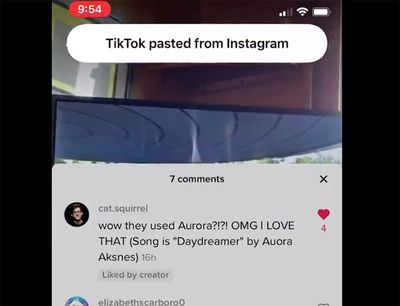
tiktokclipboard
One of these updates is a new Secure Paste function for developers, which can be built into apps. With this feature implemented, users can paste something from a different app, with the content of what's copied hidden unless it's pasted into the developer's own app.

If secure paste is implemented, users can copy and paste from one app to another without being alerted through the clipboard notification that was introduced in iOS 14, giving them peace of mind that what they've copied is secure.

This feature sounds complicated, but it stems from a major privacy issue that surfaced last year. Back in March 2020, it came to light that many iPhone and iPad apps were "snooping" on pasteboard data, as developers could access whatever was on the pasteboard without the user being aware.

Apps like TikTok, Hotels.com, Reddit, Zillow and others could see whatever a user copied from another app, which was a concern because sometimes sensitive information like a password is copied.

Apple addressed this issue in iOS 14 by implementing a small banner that notifies you whenever an app accesses the clipboard, which means apps can no longer see the clipboard without your knowledge. iOS 15 takes it further with the secure paste feature that prevents developers from seeing the clipboard entirely unless you opt to copy something from one app and paste it into the app you're actively using.

With secure paste, developers can let users paste from a different app without having access to what was copied until the user takes action to paste it into their app. When developers use secure paste, users will be able to paste without being alerted via the pasteboard transparency notification, helping give them peace of mind.

After Apple first implemented the iOS 14 feature to unveil when apps were accessing the clipboard, many apps were found to be copying the clipboard on a frequent basis, though some apps like TikTok claimed that this was a mistake.


Related Forum: iOS 15

Popular Stories

apple design award 2025

Apple Announces 2025 Design Award Winners Ahead of WWDC 2025

Tuesday June 3, 2025 10:14 am PDT by
As we wait for WWDC to kick off next Monday, Apple today announced the winners of its annual Apple Design Awards, recognizing apps and games for their innovation, ingenuity, and technical achievement. The 2025 Apple Design Award winners are listed below, with one app and one game selected per category: Delight and Fun - CapWords (App) and Balatro (Game) Innovation - Play (App) and PBJ -...
1password deal blue

1Password Security Breach: What Was Accessed and What Wasn't

Wednesday November 25, 2026 1:09 pm PST by
Popular password management app 1Password today said it experienced a security breach earlier this month. 1Password says some customer names and email addresses were accessed, but no customer vault contents were compromised. On November 19, 1Password saw indications that an employee's GitHub account had been breached and began investigating. The company says the breached GitHub account was...
Apple 2026 Black Friday Event Hero

Apple's Official 2026 Black Friday Offer Starts Rolling Out

Thursday November 26, 2026 8:37 am PST by
Apple's annual four-day Black Friday through Cyber Monday shopping event is now live in Australia, New Zealand, and Thailand, and it will continue to roll out across Europe, the U.S., and Canada as the calendar turns to Friday, November 27 around the world. In the U.S., Apple's terms and conditions say the promotion begins on November 27 at 12 a.m. Pacific Time and ends on November 30 at...

Top Rated Comments

mazz0 Avatar
72 months ago
What a confusingly written article. I still have no idea what this feature means.

Score: 12 Votes (Like | Disagree)
alexkli Avatar
72 months ago
To clarify what’s happening as far as I understand it:

1. In the old days before iOS 14 the clipboard api was completely open. Once an app ran it could read what was on the clipboard using some “read clipboard” api. Users could not see this happening it at all.

2. After some malicious use cases where detected, Apple made a simple change with iOS 14 where it would show a banner to the user whenever an app calls the “read clipboard” api. That was all, apps could still read the clipboard if they wanted, it simply started to become noticeable.

3. Now with iOS 15 Apple is adding a new alternative clipboard api. This new api means apps can’t read the clipboard when they want but only after a user clicks on “paste”. This is actually what is done in modern browsers with the javascript clipboard api. It requires an active user interaction where the user knowingly says “yes, I want to paste this into the app”. Afterwards the app has that piece of content. But it prevents it from reading it without user interaction. It seems this is opt-in for apps, as probably Apple can’t change the behavior of the existing clipboard api to be more restrictive without breaking too many (good) apps out there.

For a user that means to treat that banner as a warning of something bad happening. “Good” apps should be switching to the new api going forward, so that user interaction is always required and that banner never pops up. Also wouldn’t be surprised if Apple might disable the old api entirely in a few years.
Score: 6 Votes (Like | Disagree)
FSMBP Avatar
72 months ago
I must be 100% naive because before iOS 14, I had no idea apps could 'see' what I had in my clipboard. Unless I pasted something, why should the app have access?

Edit: Grammar, spelling, carelessness.
Score: 6 Votes (Like | Disagree)
Apple_Robert Avatar
72 months ago

I was under the impression that password apps like 1Password already worked this way? For instance, on my Mac, I can paste something from 1Password but it doesn’t show up in the clipboard of the Paste app, which manages the clipboard. Another thing 1Password does by default is it clears your pasteboard a minute or so after you copy something from it (by default).
1Password is the exception because they made that action part of their app by default.
Score: 4 Votes (Like | Disagree)
mazz0 Avatar
72 months ago

From what I saw...

1) If you copy material from the current app you are using, the developer of the app has no way to see what you copied.

2) If you copy material from one app and paste it into another app, the app being used will be able to see what you copied from the clipboard.

The way I interpreted it, it means...

1) App ABC can't read what's on your clipboard directly...

2) ...UNLESS that clipboard content was copied from app ABC. E.G. If you copy something from app XYZ, app ABC can't read it.

I believe pasting into input fields works fine, but the app won't be able to read your clipboard directly without action on your part. E.G. if you paste into a search field, the app can read the search field, but it can't gain access to your clipboard content directly unless that content came from the same app.
To be honest I’m still unclear.

Let’s see what Apple says: (https://www.apple.com/newsroom/2021/06/apple-advances-its-privacy-leadership-with-ios-15-ipados-15-macos-monterey-and-watchos-8/)


* With secure paste, developers can let users paste from a different app without having access to what was copied until the user takes action to paste it into their app. When developers use secure paste, users will be able to paste without being alerted via the pasteboard transparency notification, helping give them peace of mind.

So, if I’m understanding that correctly, you can set a permission so that your app is not able to see the clipboard except when a user-initiated paste occurs, in which case the notification doesn’t appear.

That’s it? Seems pointless to me. Seeing that notification when I manually-paste is not an inconvenience (in fact it’s a reassuring reminder that that feature exists). In fact given that seeing that notification increases my peace of mind, this change will actual lower it!
Score: 3 Votes (Like | Disagree)
contacos Avatar
72 months ago
Why would THEY decide to actually implement something like that if it isn’t enforced
Score: 3 Votes (Like | Disagree)
Latest Stories
The 50+ Best Apple Black Friday Deals Still Available on AirPods, iPads, and More
11 hours ago
HomePod Mini 2 in (RED) Seemingly Spotted Ahead of Announcement
8 hours ago
Apple's M6 and PROLED MacBook Pro Reach New Low Prices for Black Friday
19 hours ago
The MacRumors Show: iPhone Air 2 and iPhone 18 Are Coming
19 hours ago
Apple Store in Brisbane Reopening Next Month With New Design
19 hours ago
The 60+ Best Black Friday Accessory Deals on iPhone Chargers, TVs, Headphones, and More
20 hours ago
GTA VI Now (Barely) Running on Apple Silicon Macs
21 hours ago
The Best Black Friday Streaming Deals on Apple TV, Disney+, and More
21 hours ago
Apple TV's 'Carême' Wins International Emmy for Best Drama
22 hours ago
iPhone 18 Production Delay Leaves Apple Little Time Before Launch
23 hours ago
The Best Black Friday AirPods Deals Still Available
15 hours ago
The Best Black Friday Deals on Apple Home Products
23 hours ago
The Best Black Friday iPhone Deals Still Available
15 hours ago
The Best Black Friday iPad Deals Still Available
15 hours ago
The Best Black Friday Apple Watch Deals Still Available
15 hours ago
The Best Black Friday AirTag Deals Still Available
15 hours ago
The Best Black Friday Mac Deals Still Available
15 hours ago
iPhone Share of US Smartphone Market Hits 57% as Rivals Slip
1 day ago
iPhone 20 Pro Rumored to Feature 3D-Printed Titanium Frame
1 day ago
Apple's Official 2026 Black Friday Offer Starts Rolling Out
2 days ago
Halide Adds Fill Light Feature for iPhone Duo
2 days ago
MacBook Air Black Friday Deals Now Live With Massive $399 Savings
2 days ago
Amazon Discounts All MacBook Neo Models by $99 for Black Friday
2 days ago
Kodak Launches Unique AirTag Rival With E-Ink Display
2 days ago
Here's Why the Apple Store is Going Down
2 days ago
Apple Still Working on Giant Foldable iPad That Could Cost $5,000
2 days ago
iPhones Dominate China's Weak Singles' Day Smartphone Sales
2 days ago
iPhone 20 Pro Could Feature Ceramic in Limited-Edition Model
2 days ago
Apple Faces Korean Regulator Review Over iPhone 16 AI Advertising
2 days ago
Apple Watch Ultra 4 Hits New Best-Ever Price of $649.99 for Black Friday
2 days ago
Related Apple News: Opinion | Buyers Guide | Ipad | Reviews | South Africa





























