Skip to Content

PSA: Google Photos Unlimited Storage Ends Next Month, Here's How to Export Your Pictures to iCloud

For as long as it's existed, Google Photos has offered free unlimited storage for uploading images at a reduced yet good enough quality for most users. From June 1, 2021, however, all photos and videos uploaded to Google accounts will count against users' cloud storage. If you've been relying on Google to back up your media library, it may be time to move that content elsewhere. This article shows you how.

google photos

High Quality vs Original Quality Uploads

Google Photos has traditionally offered two storage options: "Original Quality," for which photos count against your storage quota, and "High Quality," which is the free and unlimited option, although it shrinks images bigger than 16 megapixels and videos over 1080p.

Whichever option you rely on, from next month both of these options will count against your Google cloud storage allocation. That could present a problem if you rely on the 15GB of free storage that comes with every Google account, or even if you already pay Google for extra storage.

What Does That Mean for My Existing Uploads?

It's important to note that any "High Quality" images already uploaded before June 1 will be exempt from this change and won't count against your storage quota, but anything uploaded after that date will eat up your allowance, so unless you plan on upping your Google storage with a paid plan, it may be time to export your photos and store them elsewhere. If you're already invested in Apple's ecosystem, iCloud is the obvious choice.

Google One storage costs $2/month for 100GB, $3/month for 200GB, and $10/month for 2TB, with discounted annual payment options also available. As for Apple's iCloud, storage options are $1/month for 50GB, $3/month for 200GB, and $10/month for 2TB. Apple One bundles also include storage allowances alongside other digital services like Apple Music, Apple Arcade, and Apple TV+.

How to Export Your Google Photos

By using the Share option in the Google Photos app, you can export individual images from Google Photos, but if you're looking for a bulk-export option, the following steps walk through the process.

  1. Using a desktop browser, navigate to takeout.google.com and sign in using your Google account credentials.
  2. Under "Create a New Export," in the section titled "Select Data to include," click Deselect all.
    google

  3. Scroll down to Google Photos and check the relevant box, then scroll to the bottom and click the Next step button.
    google

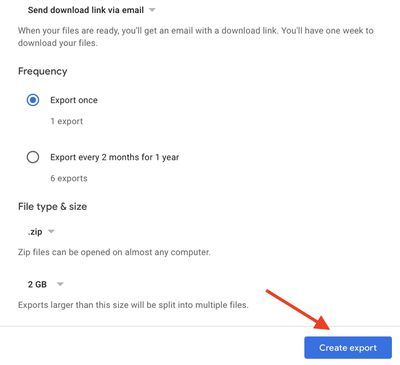
  4. Choose your export file type, frequency, and destination, then click the Create export button.

    google

Once the request has been made, you'll see an "Export progress" message. The time it takes for your export to finish depends on the size of your media library, but Google will send an email to let you know when it's ready. Alternately, leave the page open and you'll see a Download button when the export is ready.
photos
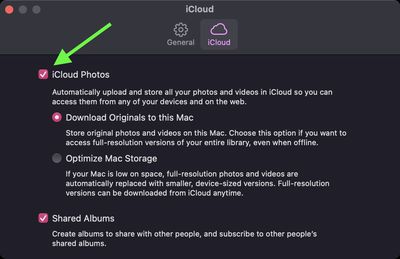
Once you've received your exported images, you can drag them into the Photos app on your Mac. To ensure the changes are synced to your Apple devices, check that iCloud Photos is turned on: You can find the switch in he iCloud tab in Photos' preferences (click Photos -> Preferences in the menu bar). Note that you can also upload photos via a browser by going to the iCloud Photos section on the icloud.com website.


Popular Stories

apple design award 2025

Apple Announces 2025 Design Award Winners Ahead of WWDC 2025

Tuesday June 3, 2025 10:14 am PDT by
As we wait for WWDC to kick off next Monday, Apple today announced the winners of its annual Apple Design Awards, recognizing apps and games for their innovation, ingenuity, and technical achievement. The 2025 Apple Design Award winners are listed below, with one app and one game selected per category: Delight and Fun - CapWords (App) and Balatro (Game) Innovation - Play (App) and PBJ -...
1password deal blue

1Password Security Breach: What Was Accessed and What Wasn't

Wednesday November 25, 2026 1:09 pm PST by
Popular password management app 1Password today said it experienced a security breach earlier this month. 1Password says some customer names and email addresses were accessed, but no customer vault contents were compromised. On November 19, 1Password saw indications that an employee's GitHub account had been breached and began investigating. The company says the breached GitHub account was...
apple store down feature

Here's Why the Apple Store is Going Down

Thursday November 26, 2026 5:49 am PST by
Apple's online store is going down for a few hours on a rolling country-by-country basis right now, but do not get your hopes up for new products. Apple takes its online store down for a few hours ahead of Black Friday every year to tease its annual gift card offer with the purchase of select products. The store is down in Australia, New Zealand, and Thailand, right now, and it will...

Top Rated Comments

gimmesomemo Avatar
72 months ago
The thought of asking iCloud to upload a good 20,000 files fills me with dread
Score: 21 Votes (Like | Disagree)
72 months ago
Not sure why people would switch to iCloud, Google Photos is still better. iCloud is what $120 a year for 2 TB, Google Storage is $100 TB. Google Photos has far superior tagging and searching capabilities which are critical for finding photos these days since we take so many. I mean those two reasons alone would make me want to keep my photos on Google Photos. Nothing is free, storage costs money, mobile apps cost money. I have no issues with Google Photos costing money as it is the best photo storage service still. My one complaint is the massive hole between their 2TB tier and the 10TB tier.. why not a 5TB tier in the middle?
Score: 15 Votes (Like | Disagree)
72 months ago
I've completely removed myself from all Google products at this point. If they aren't going to kill/kneecap a service or product they are going to harvest every last shred of data from you.

Switched to Duckduckgo and love having uncensored results once again.

I've basically totally entrenched myself in Apple's ecosystem and see no reason to move, privacy, support, best hardware/software around. Not saying there's not areas Apple can't improve but they pretty much have the best of the best.
iPhone, AirPods, M1 MacBook Pro, Apple Watch all integrated together - show me an alternative to that? This is coming from an engineer who's historically been a Windows/Linux guy.
Score: 11 Votes (Like | Disagree)
72 months ago
I went through this process last month, and I'm sorry to say that this article hardly even skims the surface about how painful this process actually is. Here's why:

* If you have a lot of photos, Google Takeout will export them as 2GB zip files, which you have to download one by one. I had around 130 to download, which took ages. Also, your Google Takeout export only remains available for around 2 weeks before it's deleted, so you're against the clock to do the below.
* When downloading these files, you better have a MacBook that has enough storage. I have a MBP with 256GB which I ended up completely resetting so that I could have enough space to download the files.
* The killer bit of all this: when you upload the photos through Apple's Photos app, Photos essentially makes a copy of them in its Library file. This very quickly takes up any leftover space on the MacBook, at which point Photos refuses to upload them to iCloud, citing lack of storage space. I ended up having to follow some steps to create a separate partition of my hard drive with a limited amount of space, and move my Photos Library file into there. That way, Apple Photos would pick up sooner that the drive was full, and delete uploaded files from the local drive.
* If you're transitioning from an Android phone, there's extra, pretty awful news; iCloud distinguishes the date of your photos by a certain EXIF date ("DateTimeOriginal"), but Android does it by the photo's "File Created" date. This has the side effect of meaning that the Photos app thinks all of your photos were taken on the same day (i.e. the day you downloaded them), because it couldn't find a date stamp. This meant I had to buy a separate Mac app, which would go through my photos and copy the Date Created field to the relevant EXIF fields.

So just to be clear:
[LIST=1]
* Download a couple of zip files from Google Photos
* Unzip them and run them through a tool that will change the date stamps as above
* Import to Photos app, wait for them to upload
* Delete zip and unzipped files.
* Repeat 1-4

Hopefully you can see now, this is not an easy process, and took me at least a week. It's really frustrating when you consider that there's a tool for moving your iCloud photos to Google Photos ('https://support.apple.com/en-gb/HT208514') in the cloud, but not the reverse.
Score: 11 Votes (Like | Disagree)
velocityg4 Avatar
72 months ago
I guess the value of AI training people were providing (most without realizing it). Plus the value of data mining is no longer cost efficient for Google. Given how much larger files are with high res pictures, live photos, HDR and 4k 60FPS video shot by phones.

So, if I pay for storage. Does that mean Google no longer gets free data mining or AI training from me?
Score: 11 Votes (Like | Disagree)
zorinlynx Avatar
72 months ago
Two things:

1) On the free tier, Google recompresses your original photos before upload. If you have access to the original full quality photos, you probably want to import THAT into iCloud Photo Library instead of what's on Google.


2) Google used to keep all your photos synced in Google Drive, which would then sync to your local computers, providing you with a continuously updated local copy of your photo library. They stopped doing this at some point, and now the only way to get a full local copy of your photo library is to use Google Takeout. However, all photos synced up to that point will be in Google Drive. It's important to NOT assume that is your entire photo library; it will be missing photos taken after they stopped doing that.

Frankly, Google Photos has become a less viable solution over the years. The lack of a continuously synced local copy of your photos, along with the lack of a great local native app to manage your library on a computer (like Photos.app on the Mac) pretty much destroyed it for me.
Score: 7 Votes (Like | Disagree)
Latest Stories
The 50+ Best Apple Black Friday Deals Still Available on AirPods, iPads, and More
3 hours ago
Apple's M6 and PROLED MacBook Pro Reach New Low Prices for Black Friday
7 hours ago
The MacRumors Show: iPhone Air 2 and iPhone 18 Are Coming
7 hours ago
Apple Store in Brisbane Reopening Next Month With New Design
7 hours ago
The 60+ Best Black Friday Accessory Deals on iPhone Chargers, TVs, Headphones, and More
8 hours ago
GTA VI Now (Barely) Running on Apple Silicon Macs
9 hours ago
The Best Black Friday Streaming Deals on Apple TV, Disney+, and More
9 hours ago
Apple TV's 'Carême' Wins International Emmy for Best Drama
10 hours ago
iPhone 18 Production Delay Leaves Apple Little Time Before Launch
10 hours ago
The Best Black Friday AirPods Deals Still Available
3 hours ago
The Best Black Friday Deals on Apple Home Products
11 hours ago
The Best Black Friday iPhone Deals Still Available
3 hours ago
The Best Black Friday iPad Deals Still Available
3 hours ago
The Best Black Friday Apple Watch Deals Still Available
3 hours ago
The Best Black Friday AirTag Deals Still Available
3 hours ago
The Best Black Friday Mac Deals Still Available
3 hours ago
iPhone Share of US Smartphone Market Hits 57% as Rivals Slip
12 hours ago
iPhone 20 Pro Rumored to Feature 3D-Printed Titanium Frame
14 hours ago
Apple's Official 2026 Black Friday Offer Starts Rolling Out
1 day ago
Halide Adds Fill Light Feature for iPhone Duo
1 day ago
MacBook Air Black Friday Deals Now Live With Massive $399 Savings
1 day ago
Amazon Discounts All MacBook Neo Models by $99 for Black Friday
1 day ago
Kodak Launches Unique AirTag Rival With E-Ink Display
1 day ago
Here's Why the Apple Store is Going Down
1 day ago
Apple Still Working on Giant Foldable iPad That Could Cost $5,000
1 day ago
iPhones Dominate China's Weak Singles' Day Smartphone Sales
1 day ago
iPhone 20 Pro Could Feature Ceramic in Limited-Edition Model
2 days ago
Apple Faces Korean Regulator Review Over iPhone 16 AI Advertising
2 days ago
Apple Watch Ultra 4 Hits New Best-Ever Price of $649.99 for Black Friday
2 days ago
New Apple Store Opening in India, Download the Special Wallpaper Now
2 days ago
Related Apple News: Entertainment | Iphone | South Africa | Ipad | Local News