Google Chrome Beta on iOS Lets You Lock Incognito Tabs With Face ID
Google is testing a new feature for its Google Chrome app for iOS, which will let Incognito tabs be locked with either Face ID or Touch ID on an iPhone or iPad.
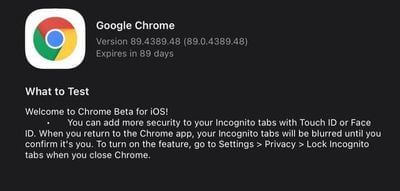
As highlighted by 9to5Google, the latest Chrome beta will blur Incognito tabs in the Chrome app until confirmed with the iPhone's biometric authentication.
The feature can be enabled by going to Settings > Privacy > Lock Incognito tabs when you close Chrome. There's a similar option in the Google Search app that confirms identity with Face ID or Touch ID when returning to an incognito search session after 15 minutes, and there's also a privacy lock built into Google Drive.
Google has not updated the Chrome app for iOS since November as it is delaying new versions of most of its apps at the current time. It's not clear when the new feature might launch in the release version of Chrome, but Chrome 89 is expected to launch next month.
The Incognito tab locking feature is limited to beta testers at the current time, and according to 9to5Google, not all beta users are able to access the locking option as there is a server-side element involved.
Popular Stories
Google today expanded Gemini's capabilities, allowing it to take full advantage of your Mac. Gemini for Mac can use apps, files, and websites to complete multi-step tasks in the background while you work in the foreground.
According to Google, Gemini can do repetitive work, handling clicking, typing, menus, and forms. It works in an isolated window with a live preview in the Gemini chat...
Apple's second-generation iPhone Duo will retain its existing display sizes and side-mounted fingerprint sensor, according to the leaker known as "Digital Chat Station."
In a new post on Weibo, the leaker said information about the iPhone Duo 2 remains limited, but engineering units continue to feature a 7.6-inch inner display, a 5.4-inch outer display, and a fingerprint sensor on the side,...
Google today said it is bringing Google Wallet to iOS in the United States, giving users a way to make payments and manage purchases across Google services.
Google Wallet cannot be used for tap-to-pay purchases in retail locations, but it otherwise serves as an alternative to Apple Wallet. It can store payment cards for online checkout with Google Pay, and it syncs with Gmail and other...