Skip to Content

First Look: See iOS 14 in Action With Home Screen Widgets, App Library, Subtle Call Alerts and More

Apple yesterday unveiled iOS 14, the newest version of the operating system designed for the iPhone, and we thought we'd go hands on with the new software to give MacRumors readers a sneak peek at all the features.


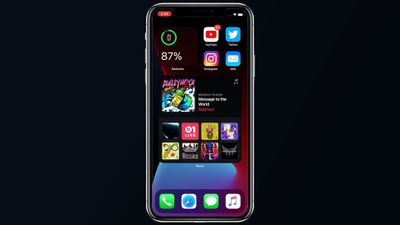
iOS 14 brings some useful new interface changes, including a revamped Home screen. Widgets have been redesigned, and for the first time, they can be dragged out of the Today center and placed right on the Home screen among your apps.
ios14homescreen
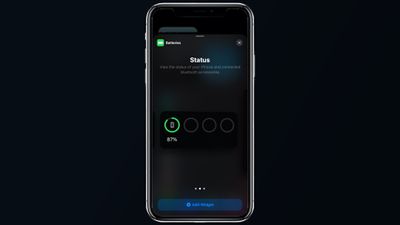
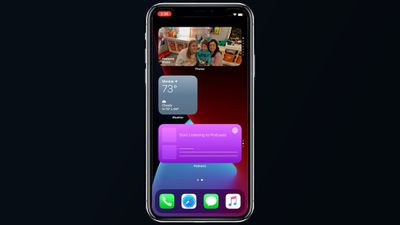
You can choose which widgets you want to use, which app page you want them on, and how big the widget should be, which makes widgets a whole lot more useful because they can be positioned front and center. Up to 10 widgets can be stacked up, and there's even a Smart Stack widget that will automatically display an appropriate widget based on iPhone usage and time of day.
ios14widgets
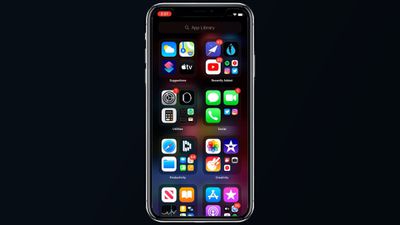
Along with widgets, app pages can be hidden from the Home screen for a cleaner and more customizable look. All of your apps are still accessible thanks to a new App Library feature, which may be one of the best improvements in the update. Swipe all the way to the from right to left on the iPhone to see all of your apps organized into neat little folders.
ios14widgets2
You can search to find an app here, tap on a folder to see its entire contents, or check out the Suggestions folder where Apple makes app recommendations based on usage habits.
ios14applibrary
Siri in iOS 14 is smarter and can access more data sources to provide better answers to complex questions, but even better, ‌Siri‌ no longer takes up the entire iPhone display when activated.

There's an animated ‌Siri‌ icon that pops up at the bottom of the iPhone when you summon ‌Siri‌, and most ‌Siri‌ results also show up in smaller banners at the top of the screen, no longer interrupting what you're doing on your iPhone. Ask for the weather, for example, and it shows up in a small, dismissible banner.
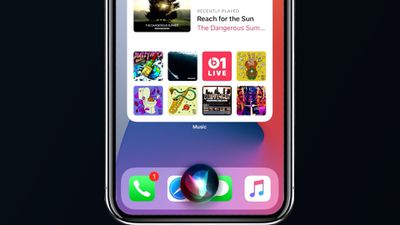
ios14siriinterface
Apple also made another major quality of life improvement that users have been wanting for years now, and phone calls, FaceTime calls, VoIP calls, and more now show up as banners and don't take over the whole screen.
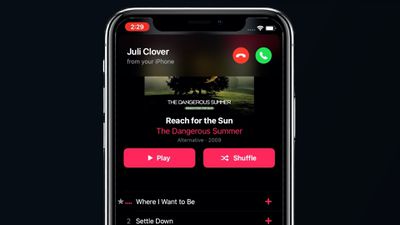
ios14phonecallsinterface
The Maps app received a major overhaul with cycling directions for bike riders and commuters. It features bike paths, lanes, and bike friendly roads, plus info on elevation and incline levels for avoiding stairs. For electric vehicles, there's now an option to create a route that includes charging stations.
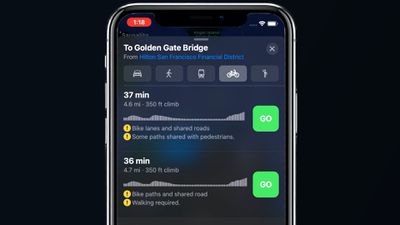
ios14cyclingdirections
Also new to Maps is a Guides feature that allows trusted brands and Apple partners to create guides highlighting notable attractions, places to eat, and more in various cities that you visit. You can create your own Guides too - it's the same as Collections from iOS 13, just with a new name.

The Weather app includes some features from Dark Sky, the app that Apple purchased back in March. It adds info on severe weather events, a next-hour precipitation chart, and minute-by-minute precipitation readings when rain is forecast, which is limited to the U.S. for now.
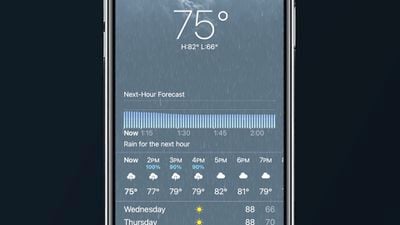
ios14rainforecast
Apple added some great new features to the Messages app, many of which enhance group chats. Up to nine important conversations can be pinned to the top of Messages so you can keep an eye on the chats that matter most, and there's a new inline reply feature that lets you reply to a specific message in a standard chat or a group chat.
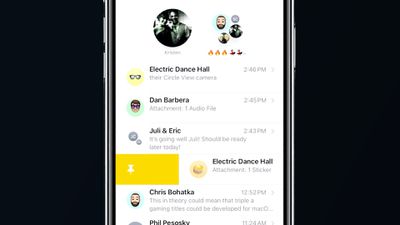
ios14pinnedmessages
Mentions in Messages have been added, so if you want to get someone's attention in a group chat, you can @mention them with their name and it'll pop up a notification even if they have the group chat muted because it's noisy. There are also new options for choosing images for groups, with emojis and Memoji icons.
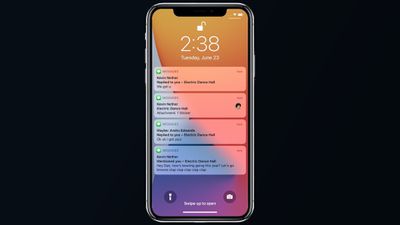
ios14mentionsmessages
Speaking of Memoji, Apple added new Memoji customization options. You can select new hair styles, headwear, or masks, and there are more age options. New Memoji stickers are available for hug, fist bump, and blush.

Apple made an improvement to emoji too, adding a much needed search feature. When you bring up the emoji interface there's now a search bar at the top so you can find a specific emoji by keyword.
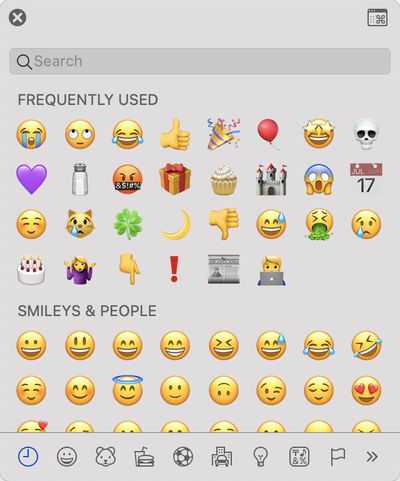
macosemojipicker
A brand new Translate app expands on ‌Siri‌'s translate features in iOS 13, allowing you to type or speak text to have it translated to and from 11 languages that include Arabic, Chinese, English, French, German, Italian, Japanese, Korean, Portuguese, Russian, and Spanish.
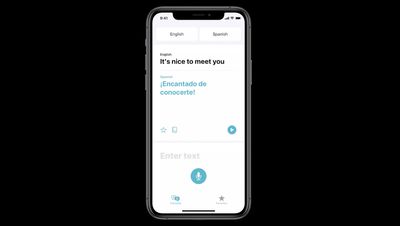
ios 14 translate app
Languages can be downloaded for on-device translation, and ‌Siri‌ can speak your translations for you. Pop the iPhone into landscape mode and it enters what Apple calls "Conversation Mode." In this mode, the app listens for either of the two languages it's set to, translating between each one so you can have a conversation with someone in another language.

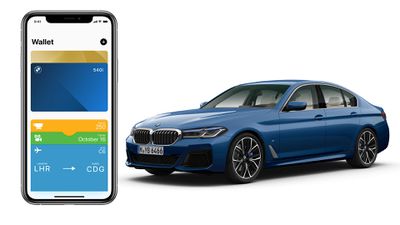
Apple's long rumored Car Key feature was unveiled alongside iOS 14, but it'll ultimately work with devices running iOS 14 and iOS 13. Car Key lets your iPhone or Apple Watch be used in lieu of a physical key to lock, unlock, and start a car using NFC. It has some neat new features like sharing keys over Messages, and in the future, it's going to work without the need to even take your iPhone out of your pocket. Car Key needs to be implemented by car manufacturers and it's coming first to the BMW 5 Series next month.
bmw car key 2
There are a lot more features in iOS 14, including tons of smaller changes, which we'll be covering in future videos. For more on what's new, you can also check out our iOS 14 roundup, which is in the process of being updated and will include a super detailed look at all of the changes introduced in iOS 14.

Later this week, we'll have separate first look videos available for macOS Big Sur, iPadOS 14, and watchOS 7, so keep an eye out for those.

Related Forum: iOS 14

Popular Stories

iphone duo cyber monday

iPhone Duo Could Get More Lock Screen Widgets, Leak Suggests

Sunday November 22, 2026 12:38 pm PST by
An experimental iPhone Duo interface tested by Apple would allow widgets to occupy two separate areas of the Lock Screen, according to findings shared by the leaker known as "pdfu." The unreleased layout adds a vertical pair of circular widgets on the right side of the screen. Crucially, pdfu says this arrangement can be used together with the existing bottom row, giving users access to more ...
1password deal blue

1Password Security Breach: What Was Accessed and What Wasn't

Wednesday November 25, 2026 1:09 pm PST by
Popular password management app 1Password today said it experienced a security breach earlier this month. 1Password says some customer names and email addresses were accessed, but no customer vault contents were compromised. On November 19, 1Password saw indications that an employee's GitHub account had been breached and began investigating. The company says the breached GitHub account was...
apple design award 2025

Apple Announces 2025 Design Award Winners Ahead of WWDC 2025

Tuesday June 3, 2025 10:14 am PDT by
As we wait for WWDC to kick off next Monday, Apple today announced the winners of its annual Apple Design Awards, recognizing apps and games for their innovation, ingenuity, and technical achievement. The 2025 Apple Design Award winners are listed below, with one app and one game selected per category: Delight and Fun - CapWords (App) and Balatro (Game) Innovation - Play (App) and PBJ -...

Top Rated Comments

LeeW Avatar
84 months ago
I mean it all looks great, but I just hate to applaud Apple for adding things that should have already been there.
Score: 18 Votes (Like | Disagree)
newyorksole Avatar
84 months ago
Phone calls and Siri not taking up the entire screen on my iPhone are such welcome updates. I’m excited to have widgets and the new iMessage updates too.
Score: 14 Votes (Like | Disagree)
howispangler Avatar
84 months ago
Woah thanks for the love! That's my band in the screenshots! ha ha. I've been coming to this page for years! Really cool to see that here. ❤️🔥
Score: 9 Votes (Like | Disagree)
TheDailyApple Avatar
84 months ago

Still no iCloud Mail read status sync

EPIC FAIL
I've got no clue what you're talking about. My iCloud mail syncs read status no problem.
Score: 9 Votes (Like | Disagree)
roland.g Avatar
84 months ago
I was excited to see this video. Until I realized it was a landscape video of a device in portrait orientation so there is no way to watch it full screen.
Score: 9 Votes (Like | Disagree)
84 months ago

No, it doesn't.

Apple says iCloud Mail does not support this feature: https://support.apple.com/en-ca/HT203545

You can't have something that Apple says doesn't exist.
That article states, explicitly, that it DOES sync those items, just not via PUSH. You have to access/refresh the mailbox just like you do with any other IMAP account. Only new mail alerts are pushed it what it says.
Score: 4 Votes (Like | Disagree)
Latest Stories
The 50+ Best Apple Black Friday Deals on AirPods, iPads, MacBooks, and More
20 minutes ago
The Best Black Friday AirTag Deals
4 minutes ago
The Best Black Friday Mac Deals
9 minutes ago
The Best Black Friday AirPods Deals
16 minutes ago
iPhone Share of US Smartphone Market Hits 57% as Rivals Slip
55 minutes ago
iPhone 20 Pro Rumored to Feature 3D-Printed Titanium Frame
2 hours ago
Apple's Official 2026 Black Friday Offer Starts Rolling Out
20 hours ago
Halide Adds Fill Light Feature for iPhone Duo
21 hours ago
MacBook Air Black Friday Deals Now Live With Massive $399 Savings
21 hours ago
Amazon Discounts All MacBook Neo Models by $99 for Black Friday
22 hours ago
Kodak Launches Unique AirTag Rival With E-Ink Display
23 hours ago
Here's Why the Apple Store is Going Down
23 hours ago
Apple Still Working on Giant Foldable iPad That Could Cost $5,000
1 day ago
iPhones Dominate China's Weak Singles' Day Smartphone Sales
1 day ago
iPhone 20 Pro Could Feature Ceramic in Limited-Edition Model
1 day ago
Apple Faces Korean Regulator Review Over iPhone 16 AI Advertising
1 day ago
Apple Watch Ultra 4 Hits New Best-Ever Price of $649.99 for Black Friday
1 day ago
New Apple Store Opening in India, Download the Special Wallpaper Now
1 day ago
Redesigned OLED MacBook Air Could Launch in 2027 or 2028
2 days ago
AirPods Pro 3 for $149 is One of The Best Black Friday Deals This Year
2 days ago
1Password Security Breach: What Was Accessed and What Wasn't
2 days ago
WhatsApp Finally Adds Scheduled Messages
2 days ago
Get Apple's Cheapest iPad for $379 During Amazon's Black Friday Sale
2 days ago
Rumor: iOS 28 to Revamp Notifications
2 days ago
iPhone 18 Pro Max Battery Exhausts a Toy Cyclops in New Apple Ad
2 days ago
$799 Smart Glasses Promise Vision Pro-Style Controls in a 45g Frame
2 days ago
How To Get an iPhone Duo or iPhone 18 Pro at No Cost Through T-Mobile for Black Friday
2 days ago
Apple Has an iPhone Notifications Problem
2 days ago
Amazon Sweetens Black Friday Deals on PROLED MacBook Pro
2 days ago
Apple Has iPads Running macOS Internally, Says Gurman
2 days ago
Related Apple News: Entertainment | Motoring | Iphone | Culture | World News