Skip to Content

Hands-On With Apple's New 16-Inch MacBook Pro

With Apple's new 16-inch MacBook Pro now in stores, we were able to pick one up this morning to take a look at it and provide MacRumors readers with our first impressions on the new machine.

Read on below and watch our video to see our overview and our initial thoughts on the new ‌MacBook Pro‌.


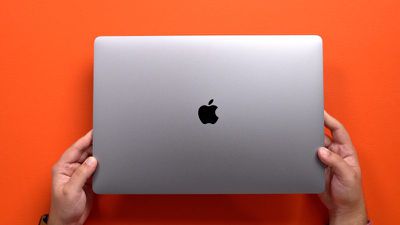
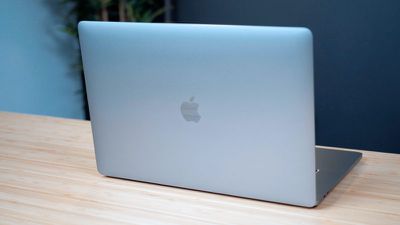
When you glance at the new 16-inch ‌MacBook Pro‌, it's difficult to tell it apart from the 15-inch ‌MacBook Pro‌, because the design is the same general design that Apple has been using for the ‌MacBook Pro‌ for years now.

Apple bumped up the thickness and the weight of the new ‌MacBook Pro‌, though, and there's a lot of heft here. It feels more dense when toting it around, and the extra weight and size is somewhat noticeable.
macbookpro16inch 1
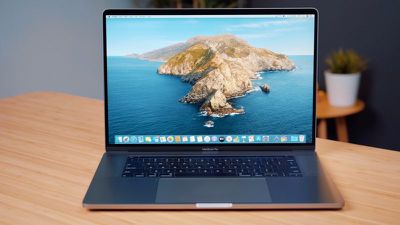
The most notable change to the ‌MacBook Pro‌ is the larger 16-inch display with its slimmed down bezels. The new model has a resolution of 3072 x 1920 at 226 pixels per inch, which is an improvement over the 15-inch ‌MacBook Pro‌. In use, the updated display appears to be somewhat sharper and more vibrant than before, but it's not a huge difference from the 15-inch display and it's probably not the sole reason someone should upgrade.
macbookpro16inchdisplay
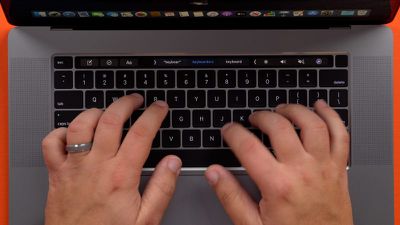
Beyond the display, there are quite a few attractive new features that set the 16-inch machine apart from its predecessors. A new "Magic Keyboard" has been added that does away with the butterfly mechanism and returns to a scissor-style mechanism that's meant to be more reliable and not prone to failure due to crumbs and small particulates.

We liked the feel of the butterfly keyboard in general, and the Magic Keyboard isn't too far off from that feel. There's minimal key travel, but a solid amount of feedback that provides a pleasant typing experience.
macbookpro16inchkeyboard
Apple added a physical Escape key to the 16-inch ‌MacBook Pro‌, an upgrade over the virtual Escape key built into the Touch Bar in previous Macs. Apple's Phil Schiller recently said that not having a physical Escape key was one of the top ‌MacBook Pro‌ complaints, and it's nice that Apple has addressed this issue.

Arrow keys have also been returned to an inverted "T" design, which will also be a welcome change, and the Touch ID button is now a separate button to match the aesthetic of a separate Escape key. Aside from these changes, the Touch Bar is the same. There are also no changes to the Trackpad.

There's a new six-speaker sound system and a three-array microphone setup that we used to record the entirety of our YouTube video. The sound system is impressive for a notebook machine. The speakers are super loud, but sound quality is also noticeably improved. The audio is robust with great clarity and just the right amount of bass.
macbookpro16inchdesign
Battery life in the new ‌MacBook Pro‌ is up an hour compared to the 15-inch model, though we haven't been able to test that out yet. It's using the same Intel processors that were included in the 15-inch models released in May, but the new machine supports up to 64GB of RAM and 8TB of storage, which will appeal to pro users.

What do you think of the 16-inch ‌MacBook Pro‌? Are you upgrading? Let us know in the comments.

We're going to have additional coverage of the 16-inch ‌MacBook Pro‌ coming next week, including a deeper dive into performance, so make sure to stay tuned to MacRumors.
Related Roundup: MacBook Pro
Buyer's Guide: MacBook Pro (Buy Now)
Related Forum: MacBook Pro

Popular Stories

MacBook Pro Glowing Apple Logo

'Backglow' Lets You Customize New MacBook Pro's Glowing Apple Logo

Saturday November 7, 2026 12:44 pm PST by
A new "Backglow" app created by designer Juan Buis lets you customize the illuminated Apple logo on the lid of the new MacBook Pro models. The free version of the app allows you to manually adjust the brightness level of the Apple logo, independent of the MacBook Pro's display brightness level. You can also turn it off entirely with a single click, rather than having to use Terminal....
MacBook Pro with PROLED XDR Display First Impressions Thumb

Hands-On With Apple's New OLED Touchscreen MacBook Pro

Friday November 6, 2026 2:05 pm PST by
Happy touch your Mac day! Apple's new PROLED MacBook Pro is now in the hands of customers. We picked up one of the new machines to get our greasy fingerprints all over that pristine OLED display. Subscribe to the MacRumors YouTube channel for more videos. It's been five years since Apple last redesigned the MacBook Pro, so it was due for an update. The PROLED MacBook Pro looks a lot like the...
MacBook Pro PROLED Touch 1

MacBook Pro PROLED XDR Reviews Are In: Is the Touchscreen Worth It?

Thursday November 5, 2026 7:35 am PST by
The first reviews of the new 14-inch and 16-inch MacBook Pro models with PROLED XDR displays have been published ahead of the laptops launching on Friday. One of the key new features is a touchscreen. Is it worth it, though? Here's what reviews say. The Verge's David Pierce said that, in his testing so far, touch input has not been something that "meaningfully changes the laptop...

Top Rated Comments

aaronhead14 Avatar
92 months ago
I would buy this in a heartbeat if it had no Touch Bar at all, and had an SD card slot.

I still feel like Apple cares more about their own hubris than they care about making a product that's convenient to use. A tiny touch screen control, which is slower than function keys, does NOT help speed along my creative work.

And carrying an SD dongle around isn't a convenient way of using a product that should already be portable. The need to carry around so many dongles negates the product's supposed portability.

All that being said, I applaud Apple for going back to a FANTASTIC keyboard design! Thank you, Apple! And thanks for fixing the thermal issues too! VERY awesome!

And the escape key is great! But I still think there's a massive group of Pro users who just don't want the Touch Bar at all. Especially since it doesn't exist for any of the desktop machines, so its existence on the MacBook Pros automatically creates a disparity across the "professional Mac" product line. (Meaning, there's no sense in getting used to using a Touch Bar while on the go if I can't use a Touch Bar when I'm back on my desktop workstation at the office. So it ultimately ends up being something that's just in the way).
Score: 77 Votes (Like | Disagree)
aaronhead14 Avatar
92 months ago

You don't need to use the Touch Bar, and a one-ounce dongle doesn't "negate ... portability."
Read my post again.

Yes, dongles do indeed negate portability. The point of having something that's portable is to have something that doesn't need to be tied down to a bunch of dangly crap that makes it annoying to use on a lap or on an airplane.

And sure, I don't "need to use the Touch Bar" but you know what I do need to use? The function keys.

And even if I liked the Touch Bar, the problem is that it exists only on the MacBooks, and not on any of the desktop Macs. So there's no sense in even getting used to using it while I'm on the go if I can't use it when I'm back using my desktop at the office. It causes too much disparity between my portable Macs and my desktop Macs, so it ultimately just gets in the way.
Score: 55 Votes (Like | Disagree)
az431 Avatar
92 months ago

I would buy this in a heartbeat if it had no Touch Bar at all, and had an SD card slot.

I still feel like Apple cares more about their own hubris than they care about making a product that's convenient to use. A useless touch screen control, which is slower than function keys, does NOT help speed along my creative work.

And carrying a stupid SD dongle around isn't a convenient way of using a product that should be portable. The need to carry around so many dongles negates the product's supposed portability.
You don't need to use the Touch Bar, and a one-ounce dongle doesn't "negate ... portability."

But feel free to avoid it based solely on principle.
Score: 42 Votes (Like | Disagree)
92 months ago

You don't need to use the Touch Bar, and a one-ounce dongle doesn't "negate ... portability."

But feel free to avoid it based solely on principle.
Yes we have to use the touch bar, since there are no physical Fn keys.
Score: 33 Votes (Like | Disagree)
az431 Avatar
92 months ago

I am highly considering getting this MBP instead of the upcoming Mac Pro. I really like what Apple did here. I just wish we could have a way of upgrading RAM and storage without the stupid soldering component strategy.
The only benefit of upgrading your own RAM is saving money buying third-party RAM. But people who can afford a $3k+ computer are unlikely to want to tear open their own computer to save maybe 5% of the purchase cost. On the other hand, those same people place a premium on the slimmest, lightest laptop possible, which is precisely what soldering RAM allows.
Score: 33 Votes (Like | Disagree)
Scott6666 Avatar
92 months ago

I would buy this in a heartbeat if it had no Touch Bar at all, and had an SD card slot.

I still feel like Apple cares more about their own hubris than they care about making a product that's convenient to use. A useless touch screen control, which is slower than function keys, does NOT help speed along my creative work.

And carrying a stupid SD dongle around isn't a convenient way of using a product that should be portable. The need to carry around so many dongles negates the product's supposed portability.

All that being said, I applaud Apple for going back to a FANTASTIC keyboard design! Thank you, Apple! And thanks for fixing the thermal issues too! VERY awesome!

And the escape key is great! But I still think there's a massive group of Pro users who just don't want the Touch Bar at all. Especially since it doesn't exist for any of the desktop machines, so its existence on the MacBook Pros automatically creates a disparity across the "professional Mac" product line. (Meaning, there's no sense in getting used to using a Touch Bar while on the go if I can't use a Touch Bar when I'm back on my desktop workstation at the office. So it ultimately ends up being something that's just in the way).
Haven't held an SD card in my hand for at least 2 years now. Ever since the iPhone replaced the digital camera there is no need for most people to have an SD slot. And if you're a photographer you carry around so much weight a dongle is irrelevant. You're in the tiny minority here I would think.
Score: 27 Votes (Like | Disagree)
Latest Stories
The 50+ Best Apple Black Friday Deals Still Available on AirPods, iPads, and More
13 hours ago
HomePod Mini 2 in (RED) Seemingly Spotted Ahead of Announcement
10 hours ago
Apple's M6 and PROLED MacBook Pro Reach New Low Prices for Black Friday
20 hours ago
The MacRumors Show: iPhone Air 2 and iPhone 18 Are Coming
20 hours ago
Apple Store in Brisbane Reopening Next Month With New Design
21 hours ago
The 60+ Best Black Friday Accessory Deals on iPhone Chargers, TVs, Headphones, and More
21 hours ago
GTA VI Now (Barely) Running on Apple Silicon Macs
22 hours ago
The Best Black Friday Streaming Deals on Apple TV, Disney+, and More
22 hours ago
Apple TV's 'Carême' Wins International Emmy for Best Drama
23 hours ago
iPhone 18 Production Delay Leaves Apple Little Time Before Launch
1 day ago
The Best Black Friday AirPods Deals Still Available
16 hours ago
The Best Black Friday Deals on Apple Home Products
1 day ago
The Best Black Friday iPhone Deals Still Available
16 hours ago
The Best Black Friday iPad Deals Still Available
16 hours ago
The Best Black Friday Apple Watch Deals Still Available
16 hours ago
The Best Black Friday AirTag Deals Still Available
16 hours ago
The Best Black Friday Mac Deals Still Available
16 hours ago
iPhone Share of US Smartphone Market Hits 57% as Rivals Slip
1 day ago
iPhone 20 Pro Rumored to Feature 3D-Printed Titanium Frame
1 day ago
Apple's Official 2026 Black Friday Offer Starts Rolling Out
2 days ago
Halide Adds Fill Light Feature for iPhone Duo
2 days ago
MacBook Air Black Friday Deals Now Live With Massive $399 Savings
2 days ago
Amazon Discounts All MacBook Neo Models by $99 for Black Friday
2 days ago
Kodak Launches Unique AirTag Rival With E-Ink Display
2 days ago
Here's Why the Apple Store is Going Down
2 days ago
Apple Still Working on Giant Foldable iPad That Could Cost $5,000
2 days ago
iPhones Dominate China's Weak Singles' Day Smartphone Sales
2 days ago
iPhone 20 Pro Could Feature Ceramic in Limited-Edition Model
2 days ago
Apple Faces Korean Regulator Review Over iPhone 16 AI Advertising
2 days ago
Apple Watch Ultra 4 Hits New Best-Ever Price of $649.99 for Black Friday
2 days ago
Related Apple News: Macbook Pro Air Deals | Ipad | How To | Apple Watch Series 12 Vs Ultra 4 | Apple Vision Pro Review