Skip to Content

Hands-On With the HomePod's New Multi-User Detection and Ambient Sound Features

Apple in late October released a new 13.2 software update for the HomePod with a bunch of new features, but it turned out the update was bricking some HomePods.

Apple addressed the bug in an updated 13.2.1 software release a couple days later, making the new functionality available without the risk of ruining a ‌HomePod‌. In our newest YouTube video, we go over all of the new ‌HomePod‌ features for MacRumors readers who may have been put off by the bug reports.

Multi-User Support and Voice Detection

With the new update, ‌HomePod‌ can distinguish between different users in the household, introducing multi-user support for the first time.

Siri is able to tell who is speaking, allowing each person in the home to access their own selection of music, playlists, radio stations, and preferences.
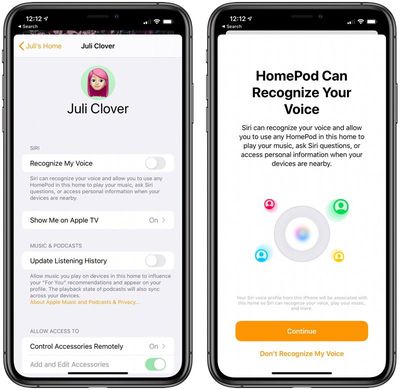
homepodvoicerecognition
Setting up multi-user support requires a device running iOS 13.2 or later, and you need to invite your family members to be a member in the Home app. From there, open the Home app, choose Home Settings, tap on your user profile under people, and then turn on the "Recognize My Voice" option.

Apple has more info on setup in a dedicated support document.

Handoff Support

If you're listening to a song on your iPhone and want to transfer it over to your ‌HomePod‌, you can do so with iOS 13.2.1's new Handoff feature.

To use Handoff, have a song playing on the iPhone and then bring it over to the top of the ‌HomePod‌. The audio playing on the iPhone will swap over to the ‌HomePod‌, pausing audio on the iPhone. You'll get a notification letting you know about the transfer of content, and while this feature is still a bit buggy, it's useful.

Handoff works with the Apple Music app, podcasts, phone calls, and more. If you don't want to use the feature, you can turn it off in the Settings app by going to General > AirPlay > Handoff and toggling off "Transfer to ‌HomePod‌."

Adding Music to HomeKit Scenes

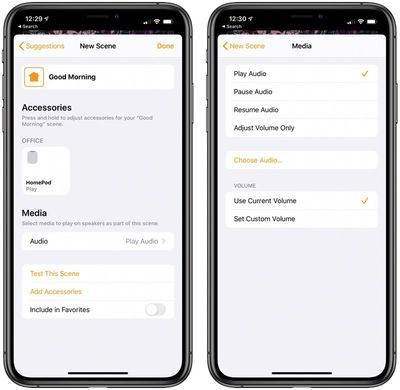
When creating or editing a HomeKit scene, you can now add songs from your ‌Apple Music‌ Library. You can, for example, create a "Good Morning" or "Relax" scene that does things like change the lighting and start a song playing on ‌HomePod‌.

homepodapplemusicscenes
Just select the "‌HomePod‌" option when creating a scene under the list of accessories. From there, choose the "Play Audio" option and then select "Choose Audio" to select a song.

Ambient Sounds

The 13.2.1 update also introduces a neat new feature called Ambient Sounds, which is designed to let you ask Siri to play relaxing sounds like rain, white noise, and more.

There are seven different options that you can choose from:

  • Rain
  • Stream
  • White Noise
  • Fireplace
  • Forest
  • Night
  • Ocean

To use Ambient Sounds, just ask ‌Siri‌. Asking ‌Siri‌ to play Ambient Sounds will select a random sound, but you can also ask for a specific sound with a command like "Hey ‌Siri‌, play rain sounds."

Setting a Sleep Timer

Ambient Sounds can be set up with a sleep timer so that the noise automatically turns off after a set period of time. When an Ambient Sound is playing, ask ‌Siri‌ to set a sleep timer for a set amount of time.

"Hey ‌Siri‌, set a sleep timer for 45 minutes," for example, will play the ambient noises for 45 minutes before the ‌HomePod‌ turns off.

If you don't want to listen to Ambient Sounds, this also works with any music that happens to be playing.

Downloading the Update

Downloading the new ‌HomePod‌ software can be done by opening up the Home app, selecting "Home Settings" after tapping the house icon in the upper left corner, and choosing the "Software Update" option. If the "Install Updates Automatically" feature is turned on, your ‌HomePod‌ has likely already updated to 13.2.1.

Related Roundup: HomePod
Buyer's Guide: HomePod (Caution)

Popular Stories

apple design award 2025

Apple Announces 2025 Design Award Winners Ahead of WWDC 2025

Tuesday June 3, 2025 10:14 am PDT by
As we wait for WWDC to kick off next Monday, Apple today announced the winners of its annual Apple Design Awards, recognizing apps and games for their innovation, ingenuity, and technical achievement. The 2025 Apple Design Award winners are listed below, with one app and one game selected per category: Delight and Fun - CapWords (App) and Balatro (Game) Innovation - Play (App) and PBJ -...
1password deal blue

1Password Security Breach: What Was Accessed and What Wasn't

Wednesday November 25, 2026 1:09 pm PST by
Popular password management app 1Password today said it experienced a security breach earlier this month. 1Password says some customer names and email addresses were accessed, but no customer vault contents were compromised. On November 19, 1Password saw indications that an employee's GitHub account had been breached and began investigating. The company says the breached GitHub account was...
Apple 2026 Black Friday Event Hero

Apple's Official 2026 Black Friday Offer Starts Rolling Out

Thursday November 26, 2026 8:37 am PST by
Apple's annual four-day Black Friday through Cyber Monday shopping event is now live in Australia, New Zealand, and Thailand, and it will continue to roll out across Europe, the U.S., and Canada as the calendar turns to Friday, November 27 around the world. In the U.S., Apple's terms and conditions say the promotion begins on November 27 at 12 a.m. Pacific Time and ends on November 30 at...

Top Rated Comments

goobot Avatar
92 months ago
Open up Bluetooth already Apple. It’s funny how they think Bluetooth is the future for iPhone but somehow not for HomePod. Just like usb c being the future on Mac but somehow not on iPhone. So much greed.
Score: 4 Votes (Like | Disagree)
92 months ago
No worries! There are plenty of things Apple doesn't do that I wish they would (why did you kill back to my mac) but I don't ascribe other motivations beyond their vision is different than mine unless I Know better. Also, you had some misinformation about needing to be on the wifi network to stream to a HomePod. I don't see that changing your mind but don't want to spread bad info ether.


Two questions:
- does voice recognition prevent someone from having access to personal information like text messages and calendar?

- how do you switch phone calls or music from one HomePod to another, if you move to a different room?
Yes and no! It is not designed as a security feature so if someone can fake the sound of your voice they could still access that data as long as your device was nearby. So practically it does but this is not secure biometrics. As for the calls, you would probably have to pull it back to your phone and drop it to the other HomePod.
Score: 3 Votes (Like | Disagree)
92 months ago
I'm with @goobot on bluetooth should be accessed by the user. Funny how my guests and their partners can come to my house and cast whatever they want to my Sony TV or Apple TV. But homepod? Nope. Bose with the Alexa/Google integration solved that issue for me.

I never understood the disdain for having options and then when somethings clearly missing, uninformed unofficial answers are made to why instead of saying..."Yeah why not have both options as there are many users out there with different setups".

The excuses made for bluetooth range are ridiculous. I've been to many events, holiday and house parties where a tablet or phone was playing music over bluetooth and was never a problem.
Score: 3 Votes (Like | Disagree)
goobot Avatar
92 months ago

Yes... an Apple device and Apple ID are needed to setup HomePod. And since an Apple device is needed for setup, clearly an Apple device, or service such as Apple Music, will be used to play music.

That is hardly greed. The same is true for the Apple Watch.
You insinuate that because someone used an iPhone to set up a HomePod that it’s the only device they would ever want to use on it. Something like a HomePod (speakers) is a devices used by an entire family and very often is used by friends. A “smart” speaker that can only be used with a handful of devices isn’t that smart. Also plenty of Apple users use Spotify or would want to use music that they purchased rather than be forced to just stream a service. All of this indicates greed because Apple wants no one but Apple users to be able to use the HomePod. An android user with music purchased from iTunes can’t play that music on HomePod. iPod was Mac only originally, it was vastly more popular when it came to windows.
Score: 3 Votes (Like | Disagree)
92 months ago

Forcing you to use Apple device to play music.
Yes... an Apple device and Apple ID are needed to setup HomePod. And since an Apple device is needed for setup, clearly an Apple device, or service such as Apple Music, will be used to play music.

That is hardly greed. The same is true for the Apple Watch.
Score: 3 Votes (Like | Disagree)
th1nk Avatar
92 months ago

Handoff is my favorite feature on the HomePod right now. When playing a song, waving my iPhone transitions the song over to the HomePod seamlessly. Also works for phone calls too.


Did you enable the setting in Settings>General>AirPlay & Handoff? It was disabled by default when I updated my iPhone.
Yes :( Thank you for caring.

Edit: I disabled and enabled this setting and now it is suddenly working. Or is it because you have to shake the iphone? I never tried that before... happy now 🤩
Score: 3 Votes (Like | Disagree)
Latest Stories
The 50+ Best Apple Black Friday Deals Still Available on AirPods, iPads, and More
13 hours ago
HomePod Mini 2 in (RED) Seemingly Spotted Ahead of Announcement
10 hours ago
Apple's M6 and PROLED MacBook Pro Reach New Low Prices for Black Friday
20 hours ago
The MacRumors Show: iPhone Air 2 and iPhone 18 Are Coming
20 hours ago
Apple Store in Brisbane Reopening Next Month With New Design
21 hours ago
The 60+ Best Black Friday Accessory Deals on iPhone Chargers, TVs, Headphones, and More
21 hours ago
GTA VI Now (Barely) Running on Apple Silicon Macs
22 hours ago
The Best Black Friday Streaming Deals on Apple TV, Disney+, and More
22 hours ago
Apple TV's 'Carême' Wins International Emmy for Best Drama
23 hours ago
iPhone 18 Production Delay Leaves Apple Little Time Before Launch
1 day ago
The Best Black Friday AirPods Deals Still Available
16 hours ago
The Best Black Friday Deals on Apple Home Products
1 day ago
The Best Black Friday iPhone Deals Still Available
16 hours ago
The Best Black Friday iPad Deals Still Available
16 hours ago
The Best Black Friday Apple Watch Deals Still Available
16 hours ago
The Best Black Friday AirTag Deals Still Available
16 hours ago
The Best Black Friday Mac Deals Still Available
16 hours ago
iPhone Share of US Smartphone Market Hits 57% as Rivals Slip
1 day ago
iPhone 20 Pro Rumored to Feature 3D-Printed Titanium Frame
1 day ago
Apple's Official 2026 Black Friday Offer Starts Rolling Out
2 days ago
Halide Adds Fill Light Feature for iPhone Duo
2 days ago
MacBook Air Black Friday Deals Now Live With Massive $399 Savings
2 days ago
Amazon Discounts All MacBook Neo Models by $99 for Black Friday
2 days ago
Kodak Launches Unique AirTag Rival With E-Ink Display
2 days ago
Here's Why the Apple Store is Going Down
2 days ago
Apple Still Working on Giant Foldable iPad That Could Cost $5,000
2 days ago
iPhones Dominate China's Weak Singles' Day Smartphone Sales
2 days ago
iPhone 20 Pro Could Feature Ceramic in Limited-Edition Model
2 days ago
Apple Faces Korean Regulator Review Over iPhone 16 AI Advertising
2 days ago
Apple Watch Ultra 4 Hits New Best-Ever Price of $649.99 for Black Friday
2 days ago
Related Apple News: Culture | World News | Buyers Guide | Iphone | Politics