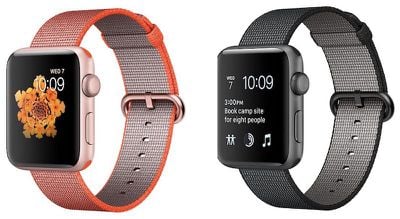
Though watchOS 6 is now available, the update has not been released for Series 1 and Series 2 models, so Apple today made a watchOS 5.3.2 update available for these devices.
watchOS 5.3.2 can be downloaded through the dedicated Apple Watch app on the iPhone by going to General -> Software Update. To install the new software, the Apple Watch needs to have over 50 percent battery, it needs to be placed on a charger, and it needs to be in range of the iPhone.
According to Apple's release notes, the watchOS 5.3.2 update provides important security updates and is recommended for all users. A security support document says the watchOS 5.3.2 update includes a fix for a vulnerability that could allow a remote hacker to cause unexpected application termination or arbitrary code execution.
Apple has not released watchOS 6 for the Series 1 and Series 2 Apple Watch models, despite the fact that these devices will be getting the update.
Series 1 and Series 2 Apple Watch owners may need to wait for the release of watchOS 6.1 to get watchOS 6, as that beta is available for older devices as well as newer ones.
While waiting for the watchOS 6 update, Series 1 and Series 2 Apple Watch owners should download the software released today.
Sunday November 1, 2026 3:34 am PST by Tim Hardwick
Apple has published a support document describing what to do if your Apple Watch continues to show time that's off by one hour after daylight savings time changes. "This incorrect time appears only on the Always On display when your wrist is down," says Apple. "When you activate the display by tapping it or raising your wrist, the time changes to the correct hour."
To fix the issue, Apple says ...
Monday November 9, 2026 1:55 pm PST by Juli Clover
Meta today updated the Muse app for iOS to add Apple Watch support, which means Muse users can access the proactive AI agent from the watch.
The app adds the Muse character to the watch with an option to text it, dictate text to it, or call it. There's also a Muse complication for quick access.
Muse is Meta's personal AI agent that can complete tasks for users. It is available as a...
Tuesday November 3, 2026 10:35 am PST by Juli Clover
With the first beta of watchOS 27.3, Apple is introducing new Audio Intelligence features it previewed for the Apple Watch Series 12 and Ultra 4 earlier this year. Powered by the S11 chip, Audio Intelligence includes Live Rewind, Siri Recap, Sound Recognition, and Shazam Music Recognition.
Sound Recognition and Shazam are already on the watch, but Live Rewind and Siri Recap are now available ...
I was getting excited as well, but alas... My S0 does me just fine - I only use it once in a while, and as long as I can get time, pay using the wallet, read emails and messages, check my calendar, and get directions, I'll stick with my original Apple Watch... Just wish they would at least update the OS to ver. 5.
It would be nice for Apple to do a little software polish every now and again for the first generation, even if only to close security vulnerabilities like they do on the Mac with older versions of macOS.
I can’t get the update for some reason. Just says up-to-date.
My model number says NJ3U2LL/A and not a normal one like A1554 (S1 SS 42). I’m wondering if that’s what’s keeping me from updating.
Thinking of unpairing and repairing but not sure if that will fix it. I really don’t want that hassle.
Strangely, the About screen on my watch actually lists the model number conventionally. so j doubt this is the glitch.
Lil’ help?
That’s because your watch is up to date, with 4.3.2 being the latest version for the original Apple Watch. Note that A1554 is the original Apple Watch (aka Series 0) not the series 1 (Apple naming 2nd gen hardware Series 1 has caused a lot of confusion).